
팀 프로젝트에서의 CI/CD와 트러블슈팅 기록: GitHub Actions + Discord + H2 테스트 환경 구축기
1. CI/CD의 중요성과 초기 세팅 목표
팀 프로젝트를 진행하면서 코드 품질 관리와 협업 효율성을 높이기 위해 CI/CD는 필수적인 요소라고 판단했다. 배포 자동화까지는 아직 아니더라도, 지속적인 통합(CI) 을 먼저 적용해 팀원들의 커밋마다 자동으로 빌드와 테스트가 수행되도록 하자는 목표를 세웠다.
이 프로젝트에서는 GitHub Actions를 활용해 CI 자동화를 구현하고, 나아가 PR과 커밋에 대해 팀원들이 적극적으로 피드백을 주고받을 수 있도록 Discord 알림까지 연동하기로 했다.
2. GitHub Actions + Discord 알림 세팅
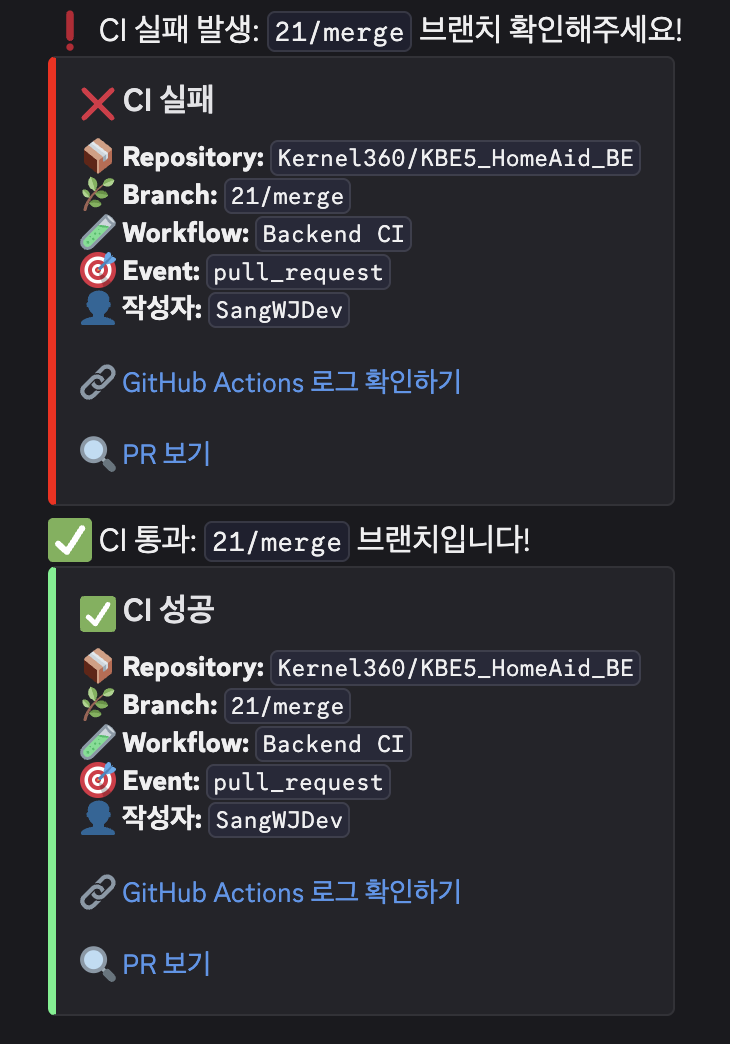
- GitHub Actions 워크플로우에서 성공/실패 여부에 따라 Discord Webhook으로 알림이 전송되도록 설정했다.
- 이를 통해 누가 어떤 브랜치에서 CI를 통과시켰는지, 혹은 실패했는지를 팀 채널에서 바로 확인할 수 있게 되었다.
✅ CI 성공/실패 시 알림 예시:
3. CI 설정 구성 파일들에 대한 이해
이번 프로젝트에서 .env 파일을 사용하여 민감 정보 및 환경변수는 개인 파일로 관리를 하였다. 이때문에 성공적인 CI 자동화를 위해 workflow 파일에 env 파일에 들어가는 값들을 설정하고 이를 github secrets key 로 설정하여 사용해야 했다. 다소 복잡한 부분이 있어 배포를 위해 사용해야 할 파일과 프로젝트에서 사용되는 파일, github actions 설정을 위한 파일들의 역할과 구분을 확실히 알고 넘어가고 싶었다.
| 파일 | 목적 및 역할 |
|---|---|
.github/workflows/backend-ci.yml | GitHub Actions 워크플로우 정의. push/pull_request 시 자동 빌드 및 테스트 수행 |
docker-compose.yml | MySQL과 같은 외부 서비스 컨테이너 실행. 로컬 개발/테스트에 사용 |
application.yml | Spring Boot의 공통 설정 파일. DB 연결 정보 등 포함 |
.env | 민감 정보 및 환경변수 저장용. compose 및 yml 파일에서 참조됨 |
아래는 Github Actions로 CI를 구축하면서 정리한 나의 글이다. CI 자동화 구축에 필요한 정보들을 정리해 놨다.
Github Actions로 CI 자동화 구축1
# workflows.yml
name: Backend CI

on:
  push:
    branches: [ dev ]
  pull_request:
    branches: [ dev ]

jobs:
  build-and-test:
    runs-on: ubuntu-latest

    services:
      mysql:
        image: mysql:latest
        env:
          MYSQL_DATABASE: ${{ secrets.DB_NAME }}
          MYSQL_ROOT_PASSWORD: root
          MYSQL_USER: homeaid_user
          MYSQL_PASSWORD: ${{ secrets.DB_PASSWORD }}
        ports:
          - 3306:3306
        options: >-
          --health-cmd="mysqladmin ping -h localhost --silent"
          --health-interval=10s
          --health-timeout=5s
          --health-retries=3

    steps:
      - name: Checkout source code
        uses: actions/checkout@v3

      - name: Set up JDK 17 (corretto)
        uses: actions/setup-java@v3
        with:
          java-version: '17'
          distribution: 'corretto'
          cache: gradle  # 👉 캐시 추가: 빌드 속도 향상

      - name: Grant execute permission for gradlew
        run: chmod +x gradlew

      - name: Build and Test
        env:
          DB_DRIVER: ${{ secrets.DB_DRIVER }}
          DB_HOST: ${{ secrets.DB_HOST }}
          DB_PORT: ${{ secrets.DB_PORT }}
          DB_NAME: ${{ secrets.DB_NAME }}
          DB_USERNAME: ${{ secrets.DB_USERNAME }}
          DB_PASSWORD: ${{ secrets.DB_PASSWORD }}
        run: ./gradlew clean build

      - name: Notify success on Discord
        if: success()
        run: |
          curl -H "Content-Type: application/json" \
               -X POST \
               -d '{
                 "embeds": [{
                   "title": "✅ CI 성공",
                   "description": "**📦 Repository:** `${{ github.repository }}`\n**🌿 Branch:** `${{ github.ref_name }}`\n**🧪 Workflow:** `${{ github.workflow }}`\n**🎯 Event:** `${{ github.event_name }}`\n**👤 작성자:** `${{ github.actor }}`\n\n[🔗 GitHub Actions 로그 확인하기](${{ github.server_url }}/${{ github.repository }}/actions/runs/${{ github.run_id }})\n\n${{ github.event_name == 'pull_request' && format('[🔍 PR 보기](https://github.com/{0}/pull/{1})', github.repository, github.event.pull_request.number) || '' }}",
                   "color": 5763719
                 }],
                 "content": "✅ CI 통과: `${{ github.ref_name }}` 브랜치입니다!"
               }' \
               ${{ secrets.DISCORD_WEBHOOK }}

      - name: Notify failure on Discord
        if: failure()
        run: |
          curl -H "Content-Type: application/json" \
               -X POST \
               -d '{
                 "embeds": [{
                   "title": "❌ CI 실패",
                   "description": "**📦 Repository:** `${{ github.repository }}`\n**🌿 Branch:** `${{ github.ref_name }}`\n**🧪 Workflow:** `${{ github.workflow }}`\n**🎯 Event:** `${{ github.event_name }}`\n**👤 작성자:** `${{ github.actor }}`\n\n[🔗 GitHub Actions 로그 확인하기](${{ github.server_url }}/${{ github.repository }}/actions/runs/${{ github.run_id }})\n\n${{ github.event_name == 'pull_request' && format('[🔍 PR 보기](https://github.com/{0}/pull/{1})', github.repository, github.event.pull_request.number) || '' }}",
                   "color": 16711680
                 }],
                 "content": "❗ CI 실패 발생: `${{ github.ref_name }}` 브랜치 확인해주세요!"
               }' \
               ${{ secrets.DISCORD_WEBHOOK }}
4. Test Build 실패와 해결 과정: H2 Database 도입
CI 환경에서 contextLoads() 테스트가 계속 실패했으며, 주된 에러 메시지는 아래와 같았다.
*** test completed, *** failed
HomeAidApplicationTests > contextLoads() FAILED
    java.lang.IllegalStateException at DefaultCacheAwareContextLoaderDelegate.java:***80
원인 분석
해당 오류에 대한 gpt의 처음 답변은 아래와 같았다.
- 테스트 실행 시
application.yml에서 사용하는${DB_*}값이 CI의 테스트 환경에서는 제대로 주입되지 않음. - Spring Boot는 해당 환경변수가 없으면 예외를 발생시키며 context 로딩에 실패함.
하지만 내가 설정한 값들에는 문제가 없었고 결국 이를 해결하기 위해선 test 환경과 개발 환경의 차이점을 알아야 했다.
처음에는 GitHub Actions에서 환경변수가 주입되지 않아서 발생하는 문제라고 생각했지만, 실제로는 application.yml이 아닌 application-test.yml을 따로 설정하지 않았기 때문에, 테스트 실행 시에도 application.yml을 참조하면서 DB 접속에 실패했던 것이었다.
Spring Boot에서 @SpringBootTest는 기본적으로 전체 ApplicationContext를 로딩하려고 하고, 이때 application.yml에 명시된 MySQL 환경을 그대로 사용하려다 보니, CI 환경에선 DB가 제대로 연결되지 않아 테스트가 실패하게 된 것이다.
해결 방법
src/test/resources/application-test.yml을 따로 생성해 H2 메모리 DB를 사용하는 테스트 전용 설정을 만들었고,- 테스트 클래스에
@ActiveProfiles("test")를 추가해 해당 설정이 적용되도록 했습니다.
# application-test.yml
spring:
  datasource:
    url: jdbc:h2:mem:testdb
    driver-class-name: org.h2.Driver
    username: sa
    password:
  jpa:
    hibernate:
      ddl-auto: create-drop
    properties:
      hibernate:
        dialect: org.hibernate.dialect.H2Dialect
@SpringBootTest
@ActiveProfiles("test")
class HomeAidApplicationTests {
@Test
void contextLoads() {}
}마무리
이 과정을 통해 GitHub Actions 기반의 CI 자동화를 안정적으로 구축할 수 있었고, 테스트 환경의 중요성을 체감했다. 초기에는 단순히 Actions만 설정하면 끝날 줄 알았지만, 테스트 환경 분리, 환경변수 전달, DB 설정 등 여러 고려사항이 있었다는 점에서 좋은 경험이 되었다.
앞으로는 CD(배포 자동화)까지 확장할 수 있도록 Dockerfile 작성과 배포 스크립트 구성도 계획 중이다.