1. 문제 발생
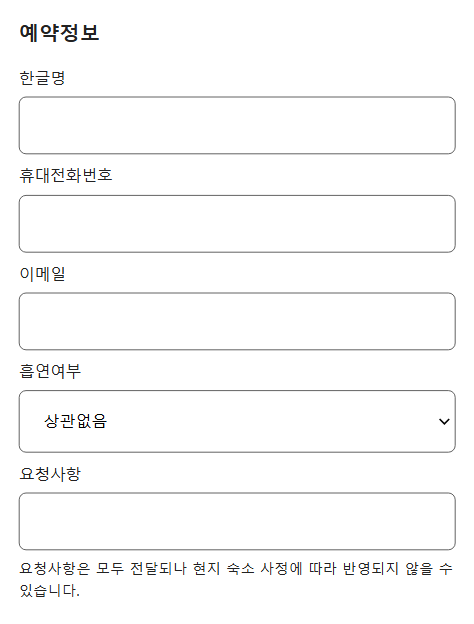
해당 Form 을 가지고 있는 프로젝트를 만들었고, 이 Form 을 전달하는 과정에서 문제가 발생했다.
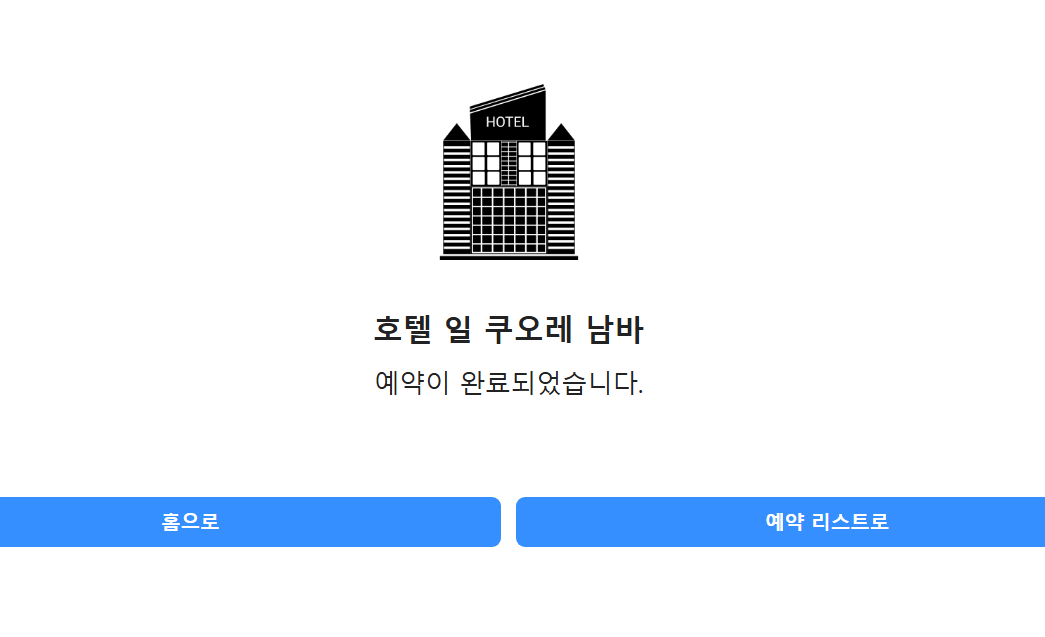
분명 Form을 제출하고 위와 같은 페이지(예약완료 페이지인 /reservation/done)가 나와야 하는데, 아래와 같은 오류가 발생하며 페이지 이동이 발생하지 않았다.

// useReservation.ts
...

const { data, isLoading } = useQuery({
    queryKey : ['hotelWithRoom', hotelId, roomId],
    queryFn : () => getHotelWithRoom({ hotelId, roomId }),
    refetchOnWindowFocus : false
})

useEffect((
	if(data){
  		const { room } = data;
		if (room.avaliableCount === 0) {
          open({
            title: '객실이 매진되었습니다.',
            onButtonClick: () => {
              window.history.back()
            },
          })
        }
    }
),[data])

...
위의 코드는 에러가 난 useReservation의 일부이고, 저기서 getHotelWithRoom을 호출한다.
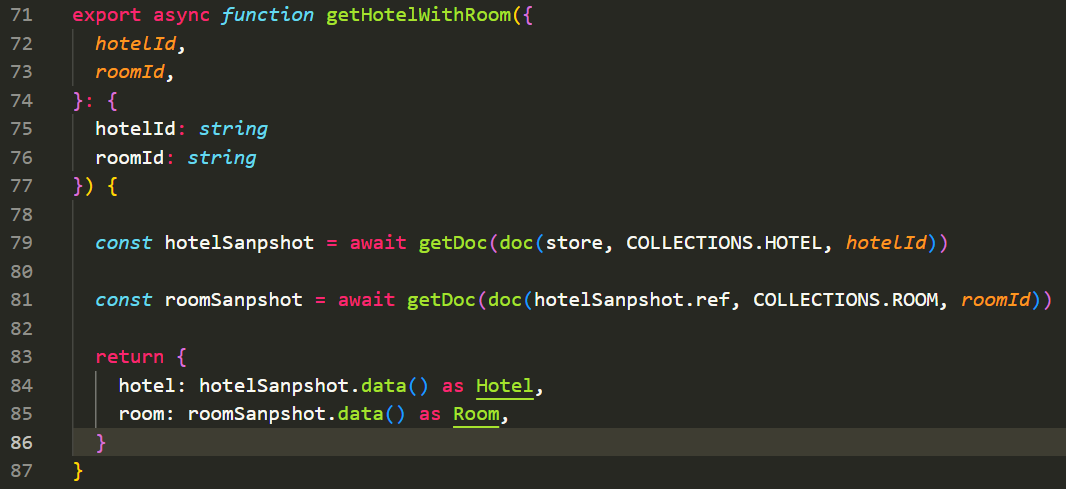
위가 getHotelWithRoom 함수이다. 여기서 에러가 났다고 하는데...
에러 메시지에서
room을 읽지 못했다고 했는데, 결국getDoc으로hotelSnapshot을 제대로 받아오지 못했다는 것이고,Props로 받아온hotelId가 문제가 있었을 것이다.
store나COLLECTIONS에서 문제가 있었다면 애초에roomSnapshot으로 가기도 전에hotelSnapshot을 구하는 도중에 에러가 발생했을 것이다.
store나COLLECTIONS는 나의 데이터베이스와 데이터가 들어있는 테이블 자체를 찾는 중요한 역할인데 반해,hotelId는 데이터 테이블에서 데이터(여기서는 호텔)를 찾는 키 역할이기에 정확하지 않은hotelId가 넘어와도 데이터베이스에서는 그냥 이hotelId를 가진 호텔이 없습니다~ 라고 전달해주면 되기 때문
결국 props로 전달받는 hotelId 와 roomId에서 에러가 발생했다는 것이다.
다시 getHotelWIthRoom을 호출하는 useReservation 을 확인해봤다.
그런데 useReservation도 hotelId와 roomId를 useReservation을 호출하는 컴포넌트에서 받아서 전달해주는 역할이었다.
당연하다... 그러라고 만든 훅(Hook)이었으니까.
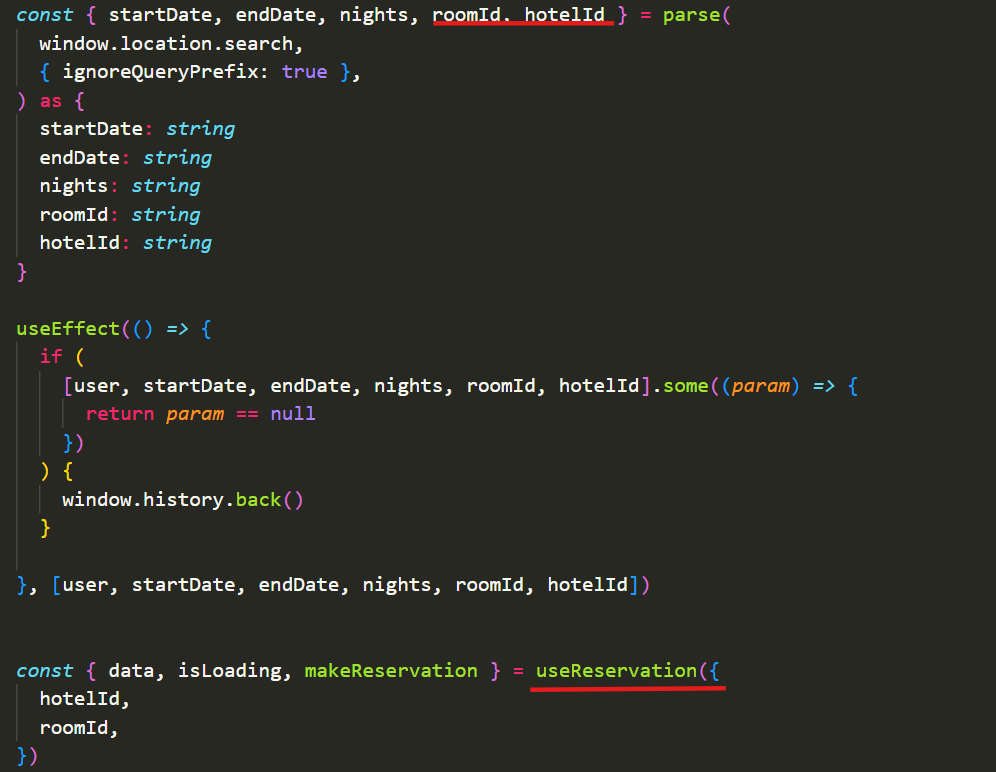
위는 useReservation을 호출하는 예약 페이지 컴포넌트이다.
해당 페이지의 url의 쿼리를 분리해서 roomId와 hotelId를 받아온다.
이것을 useReservation에 전달한다.
그래서 나는 이러한 생각밖에 할 수 없었다.
그렇다면 이 URL이 잘못돼서 문제가 발생한 것 아닐까?
2. 문제 원인
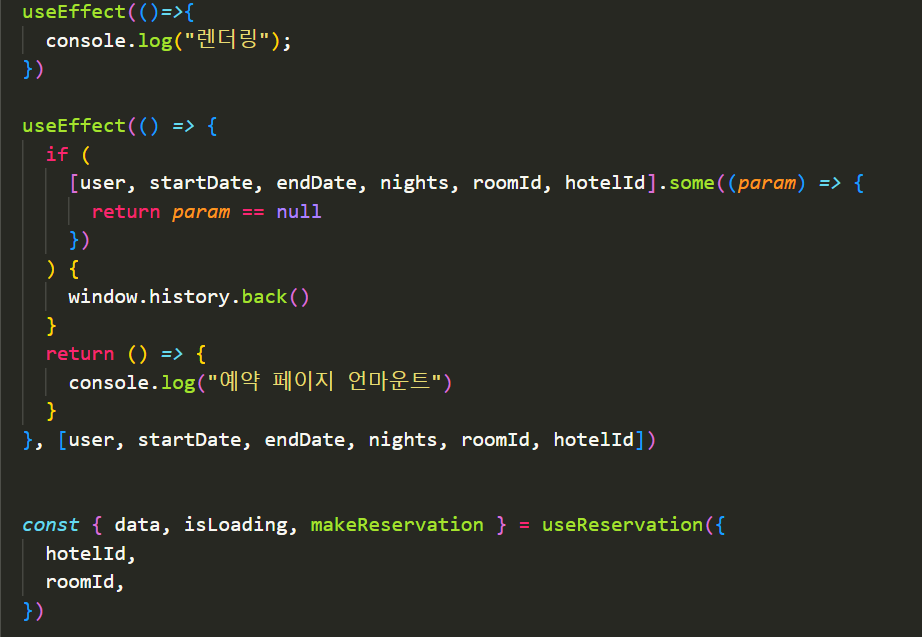
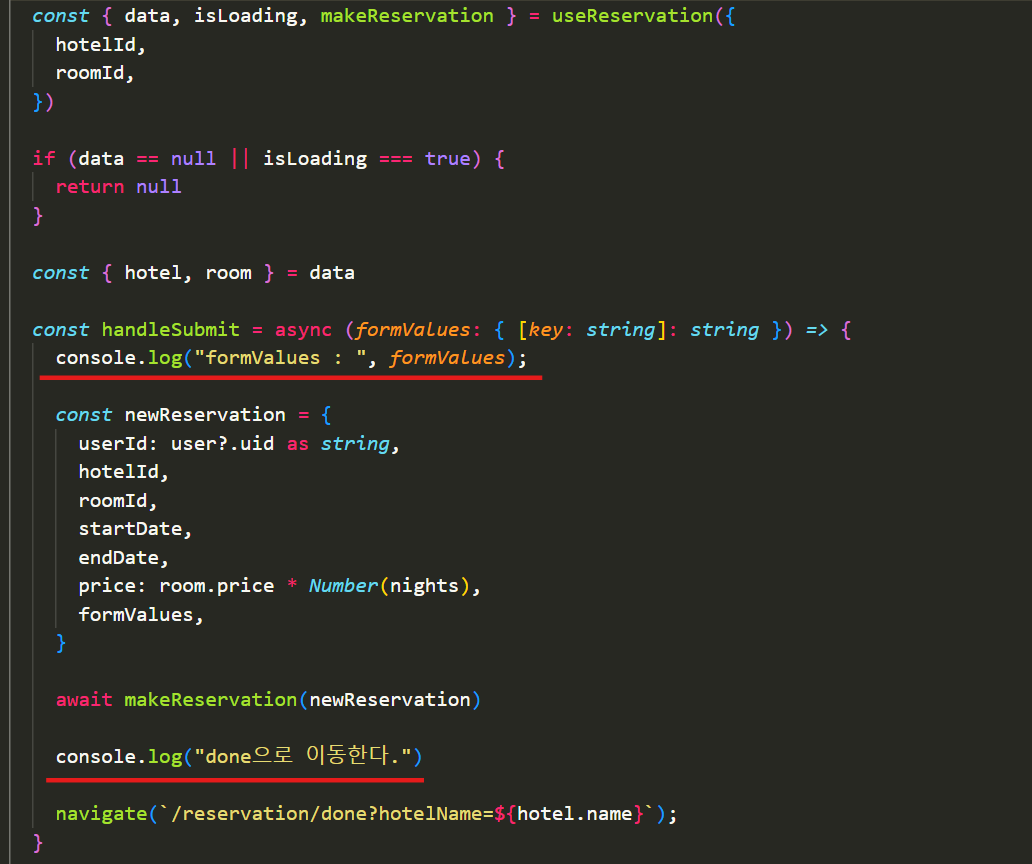
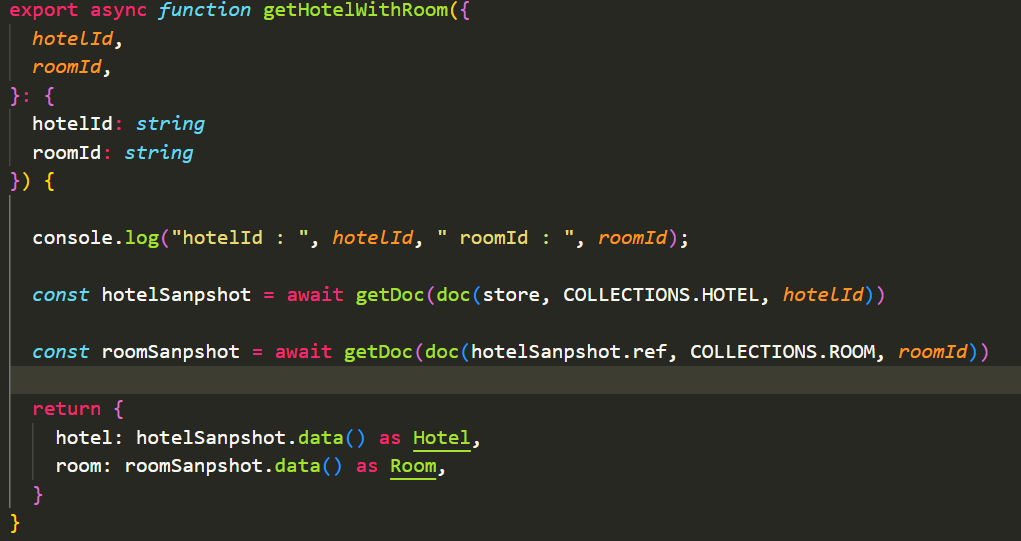
제대로 url의 쿼리가 전달되는지 확인하기 위해 우선 위처럼 console.log를 작성했다.
위에서 1, 2번째 사진들은 서로 연결되는 코드이다.
getHotelWIthRoom은 맨 위에서 말한대로useReservation 훅에서 react-query를 이용하여 호출하는 함수이다.
여기서 hotelId와 roomId 를 출력해본다.
Form을 제출하면 makeReservation으로 예약 데이터를 서버에 생성 후 navigate를 통해 done으로 이동한다. (navigate는 react-router-dom의 useNavigate 훅을 통해 만들었다.)

위 사진이 처음 페이지를 렌더링 했을 때의 콘솔이다.
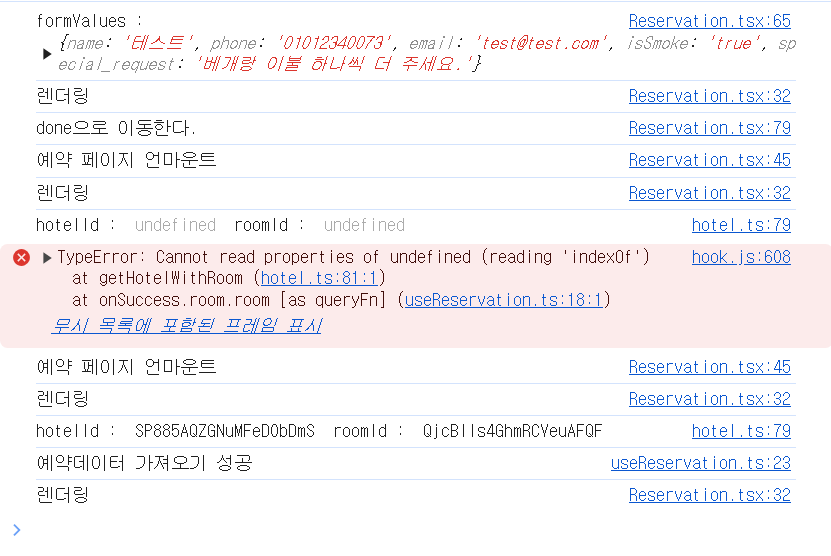
위의 사진을 보면 formValue를 제출한 후 form의 정보를 출력하고 done 페이지로 이동한다.
하지만 done 페이지로 이동하지 않고 갑자기 리렌더링이 발생하며
hotelId와roomId가 다시useReservation에 전달된다.
이때 done페이지로 이동한 URL에는hotelId와romeId가 없기 때문에 쿼리를 뽑을 수 없어undefined가 전달되었다.
2. React.memo ?
리렌더링을 막는다고 하면 가장 먼저 떠오르는 memo이다.
하지만 React.memo 를 사용해도 당연히 해결할 수 없다.
React.memo는memo로 감싼 컴포넌트의props의 변경 유무만 확인하여 부모 컴포넌트의 리렌더링이 자식 컴포넌트도 리렌더링 시키는 것을 막는 것이기 때문에
props가 변경되지 않았다고 해도 함수 내부에서useState나useContext같은 훅을 사용했을 때context나state의 변경으로도 리렌더링이 발생하기때문이다.
현재 예상가는 원인이 useNavigate 이므로 이 훅에 의해 리렌더링이 발생한다면 React.memo로 막을 수 없다.
3. useEffect dependencies
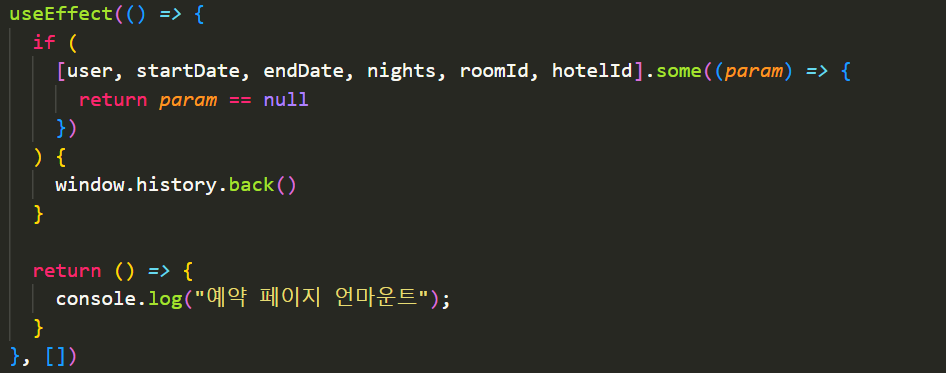
기존의 useEffect의 dependency에는 roomId와 hotelId가 포함되었다.
useNavigate에 의해 url이 변경되면서 이 의존성을 건들여 리렌더링 되는 것이 아닌가싶어 의존성을 제거했다.
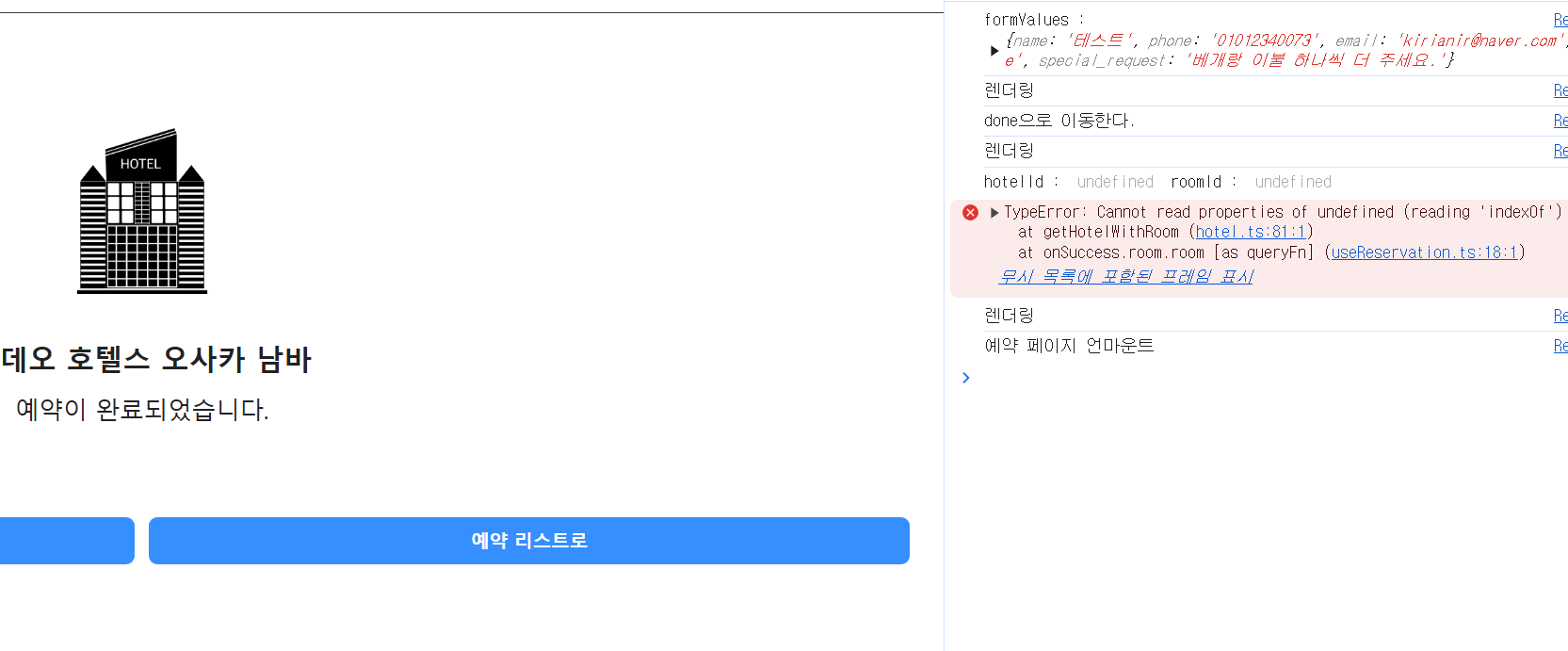
놀랍게도 다음 페이지로 잘 이동했지만 여전히 indexOf 에러가 발생했다.
그리고 아래와 같은 경고도 당연하게도 발생했다. 그래서 의존성을 다시 채울 수 밖에 없었다.
Line 41:6: React Hook useEffect has missing dependencies: 'endDate', 'hotelId', 'nights', 'roomId', 'startDate', and 'user'. Either include them or remove the dependency array react-hooks/exhaustive-deps4. useNavigate, useLocation
위에서 React.memo 에서 말했던 내용이 있다.
props가 변경되지 않았다고 해도 함수 내부에서useState나useContext같은 훅을 사용했을 때context나state의 변경으로도 리렌더링이 발생하기때문이다.
우리가 사용하는 훅에 또 다른 useState나 useContext가 숨어 있다고 생각했다.
현재 페이지에서 사용하는 훅은 내 커스텀훅과 useNavigate 뿐이다.
커스텀 훅에는 state나 Context를 사용하지 않았으니, 답은 useNavigate 였다.
export function useNavigate(): NavigateFunction {
  let { isDataRoute } = React.useContext(RouteContext);
  // Conditional usage is OK here because the usage of a data router is static
  // eslint-disable-next-line react-hooks/rules-of-hooks
  return isDataRoute ? useNavigateStable() : useNavigateUnstable();
}

function useNavigateUnstable(): NavigateFunction {
  invariant(
    useInRouterContext(),
    // TODO: This error is probably because they somehow have 2 versions of the
    // router loaded. We can help them understand how to avoid that.
    `useNavigate() may be used only in the context of a <Router> component.`
  );

  let dataRouterContext = React.useContext(DataRouterContext);
  let { basename, navigator } = React.useContext(NavigationContext);
  let { matches } = React.useContext(RouteContext);

  @@@@@@@@@@@@@@@@@@@@@@@@@@@@@@ 여기 @@@@@@@@@@@@@@@@@@@@@@@@@@@@@@@
  let { pathname: locationPathname } = useLocation();
  @@@@@@@@@@@@@@@@@@@@@@@@@@@@@@ 여기 @@@@@@@@@@@@@@@@@@@@@@@@@@@@@@@

  let routePathnamesJson = JSON.stringify(getResolveToMatches(matches));

  let activeRef = React.useRef(false);
  useIsomorphicLayoutEffect(() => {
    activeRef.current = true;
  });

  let navigate: NavigateFunction = React.useCallback(
    (to: To | number, options: NavigateOptions = {}) => {
      warning(activeRef.current, navigateEffectWarning);

      // Short circuit here since if this happens on first render the navigate
      // is useless because we haven't wired up our history listener yet
      if (!activeRef.current) return;

      if (typeof to === "number") {
        navigator.go(to);
        return;
      }

      let path = resolveTo(
        to,
        JSON.parse(routePathnamesJson),
        locationPathname,
        options.relative === "path"
      );

      // If we're operating within a basename, prepend it to the pathname prior
      // to handing off to history (but only if we're not in a data router,
      // otherwise it'll prepend the basename inside of the router).
      // If this is a root navigation, then we navigate to the raw basename
      // which allows the basename to have full control over the presence of a
      // trailing slash on root links
      if (dataRouterContext == null && basename !== "/") {
        path.pathname =
          path.pathname === "/"
            ? basename
            : joinPaths([basename, path.pathname]);
      }

      (!!options.replace ? navigator.replace : navigator.push)(
        path,
        options.state,
        options
      );
    },
    [
      basename,
      navigator,
      routePathnamesJson,
      locationPathname,
      dataRouterContext,
    ]
  );

  return navigate;
}
위가 실제 useNavigate 훅의 코드이다.
코드에 요란하게 표시했지만 useLocation 훅을 통해서 현재 경로를 받아온다.
이 useLocation 의 코드는 아래와 같다.
export function useLocation(): Location {
  invariant(
    useInRouterContext(),
    // TODO: This error is probably because they somehow have 2 versions of the
    // router loaded. We can help them understand how to avoid that.
    `useLocation() may be used only in the context of a <Router> component.`
  );

  return React.useContext(LocationContext).location;
}
useLocation 역시 useContext를 사용한다.
아마 우리가 페이지를 이동하며 변경된 url로 LocationContext의 값이 변경되며, 리렌더링이 발생한 것이라고 생각한다.
그렇다면 LocationContext의 값인 Location 객체가 전역 상태일까?
4.1 Router(BrowserRouter)
BrowserRouter는HTML5의History API(pushState, replaceState, popstate event)를 사용하여 URL과 UI를 동기해주는<Router>이다.
위의 useNavigate 코드에서는 이 훅을 사용하기 위해서는 <Router> 컨텍스트를 사용해야 한다 고 되어있다.
나는 프로젝트에 <BrowserRouter> 를 사용 중이다.
export function Router({
  basename: basenameProp = "/",
  children = null,
  location: locationProp,
  navigationType = NavigationType.Pop,
  navigator,
  static: staticProp = false,
}: RouterProps): React.ReactElement | null {
  invariant(
    !useInRouterContext(),
    `You cannot render a <Router> inside another <Router>.` +
      ` You should never have more than one in your app.`
  );
// pathname을 적절히 가공한다.
  let basename = normalizePathname(basenameProp);
  // navigationContext의 value를 만든다.
  let navigationContext = React.useMemo(
    () => ({ basename, navigator, static: staticProp }),
    [basename, navigator, staticProp]
  );

  if (typeof locationProp === "string") {
    locationProp = parsePath(locationProp);
  }

  let {
    pathname = "/",
    search = "",
    hash = "",
    state = null,
    key = "default",
  } = locationProp;
// LocationContext의 value인 location을 만든다.
  let location = React.useMemo(() => {
    let trailingPathname = stripBasename(pathname, basename);

    if (trailingPathname == null) {
      return null;
    }

    return {
      pathname: trailingPathname,
      search,
      hash,
      state,
      key,
    };
  }, [basename, pathname, search, hash, state, key]);

  warning(
    location != null,
    `<Router basename="${basename}"> is not able to match the URL ` +
      `"${pathname}${search}${hash}" because it does not start with the ` +
      `basename, so the <Router> won't render anything.`
  );

  if (location == null) {
    return null;
  }
// 컨텍스트를 제공한다.
  return (
    <NavigationContext.Provider value={navigationContext}>
      <LocationContext.Provider
        children={children}
        value={{ location, navigationType }}
      />
    </NavigationContext.Provider>
  );
}
https://velog.io/@warmwhiten/react-router-%EA%B9%8C%EB%B3%B4%EA%B8%B0-gmse7vsk
위의 링크에서 가져온 Router 코드이다.
보다시피 우리가 이미 프로젝트에 사용하는 Router 에서 LocationContext를 제공하였고, 이 컨텍스트의 값인 Location 객체가 전역 상태이므로, 이 값이 변경됨으로 인해 useNavigate로 리렌더링이 발생했던 것이라고 생각한다.
(내 답이 정확하다고 할 수는 없었다. 실제로 많은 질문들을 검색으로 봤지만 단순한 해결법만 제시했을 뿐 왜? 에 대한 답변은 없었다.)
5. 문제 해결 완료 : Navigate 컴포넌트
그래서 해결했나?
useNavigate 훅에 의한 문제였다면 또 다른 경로 이동 방식인 Navigate 컴포넌트를 사용하면 된다.
애초에 Navigate는 훅이 아닐 뿐 아니라 렌더링 시점에 경로를 이동시켜준다.
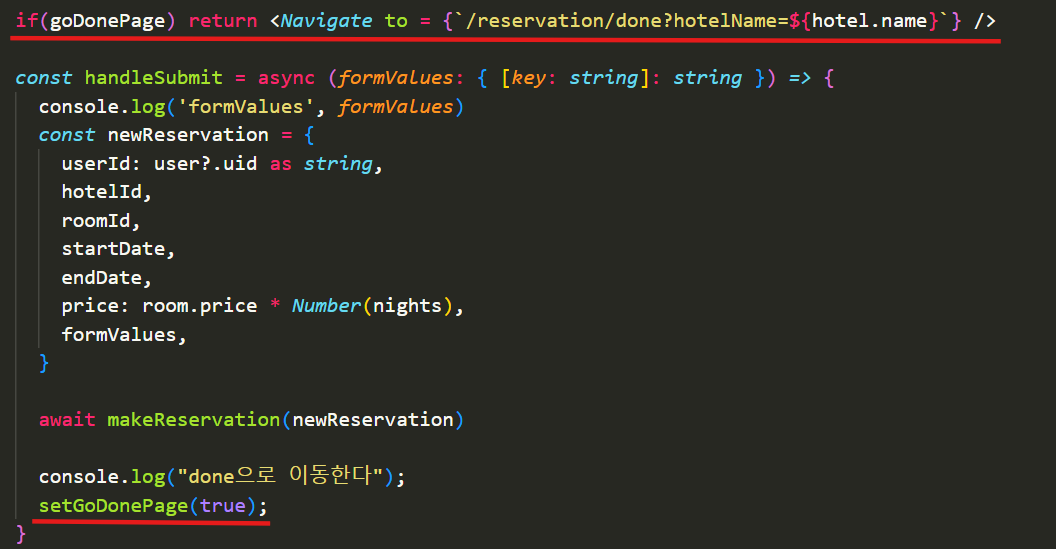
navigate() 를 삭제하고 그 자리에 setGoDonePage라는 상태변경 함수로 교체했다.
디폴트값이 false인 goDonePage라는 상태를 하나 추가해서 done으로 이동할 때 Navigate로 경로 이동을 실행한다.
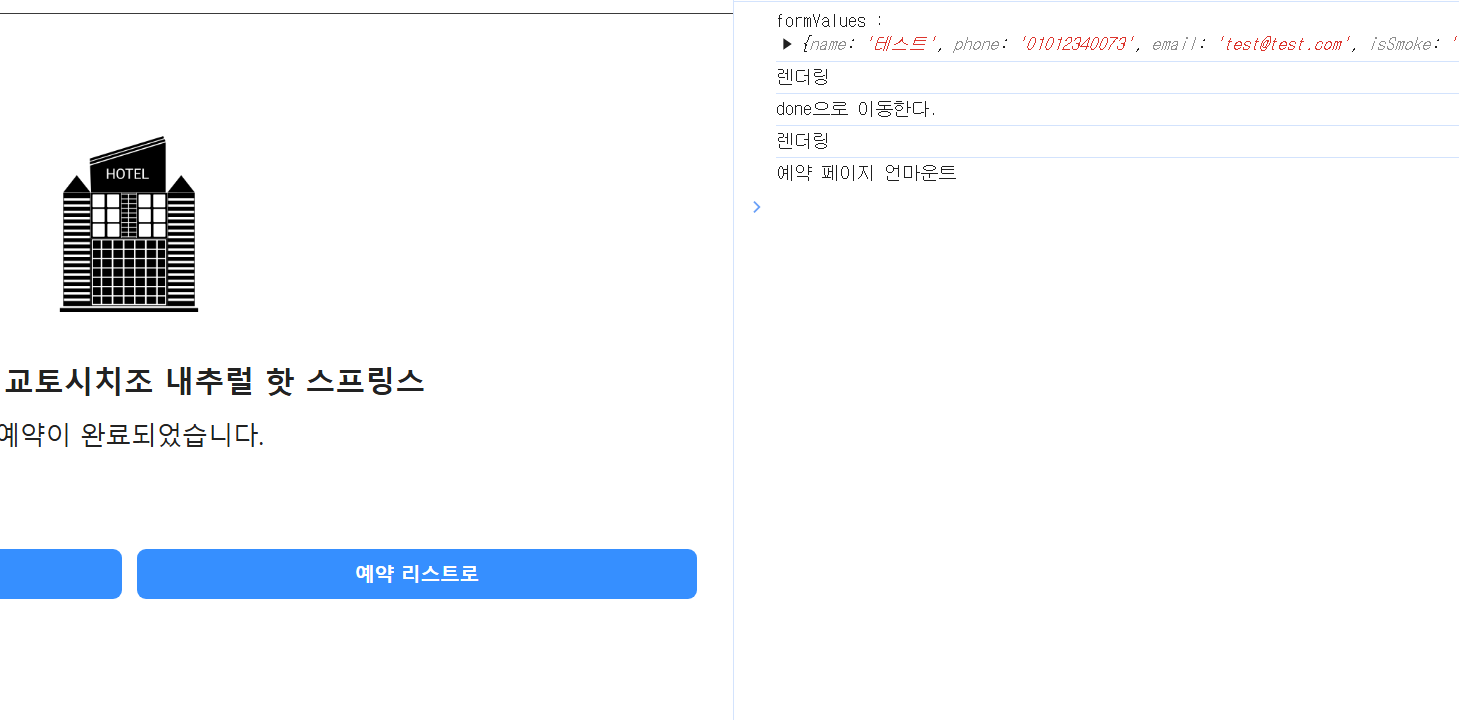
다행히 문제가 해결됐다.