@Async 오해와 진실
흔히 Async를 특정 메소드를 비동기적으로 처리하고 싶을때 사용한다. 하지만 Async를 사용함에 있어 흔히 저지를 수 있는 실수들이 존재하는데, 이러한 실수 줄이기 위해 몇몇가지 팁을 알려주려 한다.
@Async를 사용하는 방법
@Async는 AOP를 통해 비동기를 제공해주기 때문에 다음 두 가지 조건을 만족시켜야 한다.
- public method
- 내부 메소드 호출하지 않기
그 다음으로는 @Async를 사용하기 위해서는 Spring에서 제공하는 @EnableAsync를 Configuration 클래스에 위치시켜야 한다.
@Configuration
@EnableAsync
public class AsyncConfig{
}
그렇다면 비동기적으로 동작을 할때 스레드는 어떻게 관리가 되는지 궁금할 수 있다.
By default, Spring will be searching for an associated thread pool definition: either a unique TaskExecutor bean in the context, or an Executor bean named "taskExecutor" otherwise. If neither of the two is resolvable, a SimpleAsyncTaskExecutor will be used to process async method invocations.
Spring 공식 문서에 의하면 단일 TaskExecutor 타입의 빈이 등록되거나, Executor 인터페이스 타입에 “taskExecutor” 이름을 가지는 빈이 등록이되면 해당 빈들을 사용한다. 만약 두 종류의 빈이 등록되지 않았다면 SimpleAsyncTaskExecutor를 통해 비동기 메소드를 처리한다.
위 방법 중 TaskExecutor를 이용해서 빈을 등록해보겠다.
@Configuration
@EnableAsync
public class AsyncConfig{

	@Bean
	public TaskExecutor taskExecutor(){
		var threadPoolTaskExecutor = new ThreadPoolTaskExecutor();
		threadPoolTaskExecutor.setThreadNamePrefix("Async-");
		threadPoolTaskExecutor.setCorePoolSize(2);
		threadPoolTaskExecutor.setMaxPoolSize(6);
		threadPoolTaskExecutor.setQeueuCapacity(5);
		return threadPoolTaskExecutor;
}
@Configuration
@EnableAsync
class AsyncConfig {
@Bean
fun taskExecutor(): TaskExecutor = ThreadPoolTaskExecutor().apply {
setThreadNamePrefix("Async-")
corePoolSize = 2
maxPoolSize = 6
queueCapacity = 5
}
}ThreadPoolTaskExecutor의 동작 방법에 대한 오해
일반적으로 위 TaskExecutor를 설정을 통해 스레드의 생성 방식에 대해서 다음과 같이 생각할 수 있다.
스프링이 MaxPoolSize 만큼의 스레드를 새로 생성하고, MaxPoolSize 이상의 요청이 들어오면 QueueCapacity에 명시한 크기만큼 대기하겠지? 그리고 그 이상으로 요청이 들어오면 에러를 반환하며 요청을 무시하겠지?
하지만 TaskExecutor는 위 예측과는 다른게 동작한다.
ThreadPoolTaskExecutor의 스레드 관리 방식은 다음과 같다.
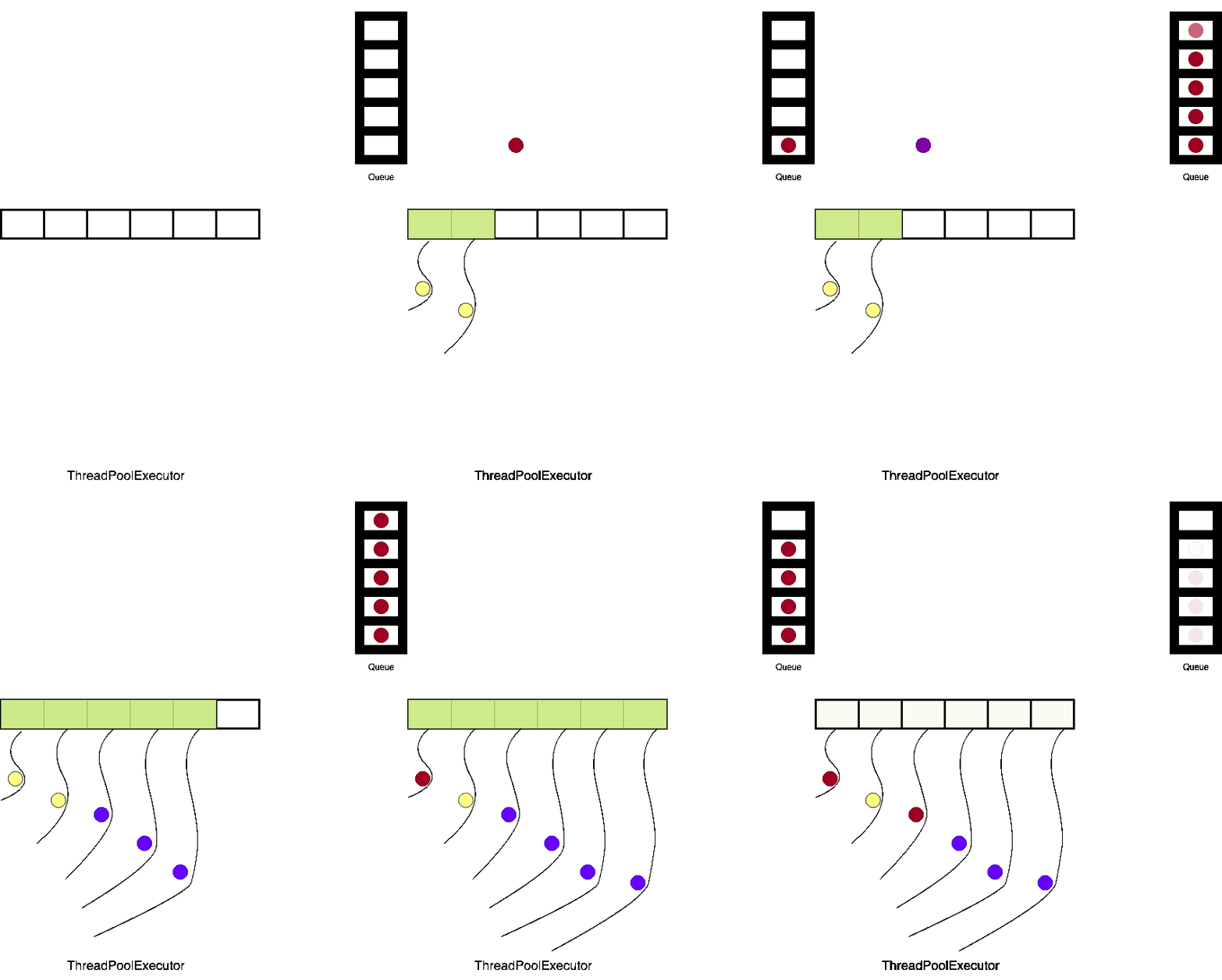
새로운 스레드는 CorePoolSize에 명시된 크기만큼 생성이 진행됩니다. 그 후 CorePoolSize 크기 이상의 요청이 들어오면 QueueCapacity에 명시된 크기만큼 요청이 대기하게 됩니다.
만약 CorePoolSize + QueueCapacity 이상의 요청이 들어오면 새로운 스레드를 생성하게 되는데, 추가로 생성되는 스레드의 수는 MaxPoolSize - CorePoolSize 입니다. 즉, 스레드 풀의 크기는 MaxPoolSize 크기만큼 되는 것입니다.
마지막으로 MaxPoolSize + QueueCapacity 이상으로 요청이 들어오면 해당 요청을은 무시됩니다.
글로만 설명하기에는 이해하기 힘들 수 있다. 코드와 이미지로 이해해보자
ThreadPoolTaskExecutor 실행해보기
@RestController
class TestController(
    private val threadService: ThreadService,

) {
    private val atomicInteger = AtomicInteger(0)

    @GetMapping("/async")
    fun async(){
        val number = atomicInteger.incrementAndGet()
        try{
            threadService.startThread(number)
        } catch (ex: RejectedExecutionException){
            logger.info { "Rejecting task since queue is full and no threads are free for task number: $number" }
        }
    }

    @PostConstruct
    fun setUp(){
        for(i in 1..11){
            threadService.startThread(atomicInteger.incrementAndGet())
            Thread.sleep(100)
        }
    }
}
@Service
class ThreadService(
@Qualifier("taskExecutor") private val taskExecutor: TaskExecutor
) {
@Async
fun startThread(number: Int){
if(taskExecutor is ThreadPoolTaskExecutor){
logger.info { "current thread count : ${taskExecutor.activeCount}, current queue size : ${taskExecutor.queueSize}" }
}
logger.info {
"current number : $number"
}
try{
Thread.sleep(60000)
} catch (ex: InterruptedException){
logger.info { "Error while executing sleep in Thread for task: $number" }
}
}
}위 코드를 통해서 스프링을 실행하면 다음과 같은 로그를 확인할 수 있다.
[        Async-1] com.sim.springasync.ThreadService        : current thread count : 1, current queue size : 0
[        Async-1] com.sim.springasync.ThreadService        : current number : 1
[        Async-2] com.sim.springasync.ThreadService        : current thread count : 2, current queue size : 0
[        Async-2] com.sim.springasync.ThreadService        : current number : 2
[        Async-3] com.sim.springasync.ThreadService        : current thread count : 3, current queue size : 5
[        Async-3] com.sim.springasync.ThreadService        : current number : 8
[        Async-4] com.sim.springasync.ThreadService        : current thread count : 4, current queue size : 5
[        Async-4] com.sim.springasync.ThreadService        : current number : 9
[        Async-5] com.sim.springasync.ThreadService        : current thread count : 5, current queue size : 5
[        Async-5] com.sim.springasync.ThreadService        : current number : 10
[        Async-6] com.sim.springasync.ThreadService        : current thread count : 6, current queue size : 5
[        Async-6] com.sim.springasync.ThreadService        : current number : 11

[        Async-1] com.sim.springasync.ThreadService        : current thread count : 6, current queue size : 4
[        Async-1] com.sim.springasync.ThreadService        : current number : 3
[        Async-2] com.sim.springasync.ThreadService        : current thread count : 6, current queue size : 3
[        Async-2] com.sim.springasync.ThreadService        : current number : 4
[        Async-3] com.sim.springasync.ThreadService        : current thread count : 6, current queue size : 2
[        Async-3] com.sim.springasync.ThreadService        : current number : 5
[        Async-4] com.sim.springasync.ThreadService        : current thread count : 6, current queue size : 1
[        Async-4] com.sim.springasync.ThreadService        : current number : 6
[        Async-5] com.sim.springasync.ThreadService        : current thread count : 6, current queue size : 0
[        Async-5] com.sim.springasync.ThreadService        : current number : 7
로그에서 확인할 수 있는 것은 CorePoolSize 크기만큼 스레드가 생성 되며 이후 스레드가 생성되면 QueueSize가 QueueCapacity에 설정된 크기만큼 되어 있는 것을 확인할 수 있다.
이 후 앞선 생성된 스레드 중 작업이 종료된게 있다면 큐에 담긴 작업이 하나씩 실행되는 것을 확인할 수 있다.
ThreadPoolExecutorService를 그림으로 이해하기
출처 : https://medium.com/@kswastik29/common-mistakes-to-avoid-when-using-async-in-spring-1eef0e8d15fb