Aesop
- 사이트명 : Aesop
- 사용언어 : HTML, CSS, JS
- 사용플러그인 : Swiper, GSAP, Lenis
- 분류 : 반응형, 클론코딩
🍀 : 프로젝트에서 사용
1. 마우스 움직임에 따라 이미지가 이동
- 마우스의 위치를 감지하여 이미지를 부드럽게 움직이게 만드는 기능이다.
- GSAP를 활용하여 마우스 위치에 따라 X, Y 좌표를 변화시켰다.

// sc-product .group-product .img-area
$(document).mousemove(function(e){
  xVal = e.clientX - window.innerWidth/2;
  yVal = e.clientY - window.innerHeight/2;

  gsap.to('.sc-product .group-product .prod', {
    x:xVal/100,
    y:yVal/100,
  })
});- 사용자가 마우스를 움직이면 mousemove 이벤트가 발생한다.
- 현재 마우스 위치에서 화면 중앙을 기준으로 상대적인 X, Y 좌표(xVal, yVal)를 /2로 설정했다.
.sc-product .group-product .prod 요소를 gsap.to()로 이동. - xVal / 100, yVal / 100 → 마우스 위치에 따라 부드럽게 움직이도록 작은 값으로 변환했다.
🌟 / 100 는?
마우스 좌표 값이 너무 크기 때문에 움직임을 부드럽게 만들기 위해 값의 크기를 조정했다. - 결과적으로 마우스를 움직이면 .prod 요소가 마우스 방향을 따라 미세하게 이동하는 효과를 볼 수 있다.
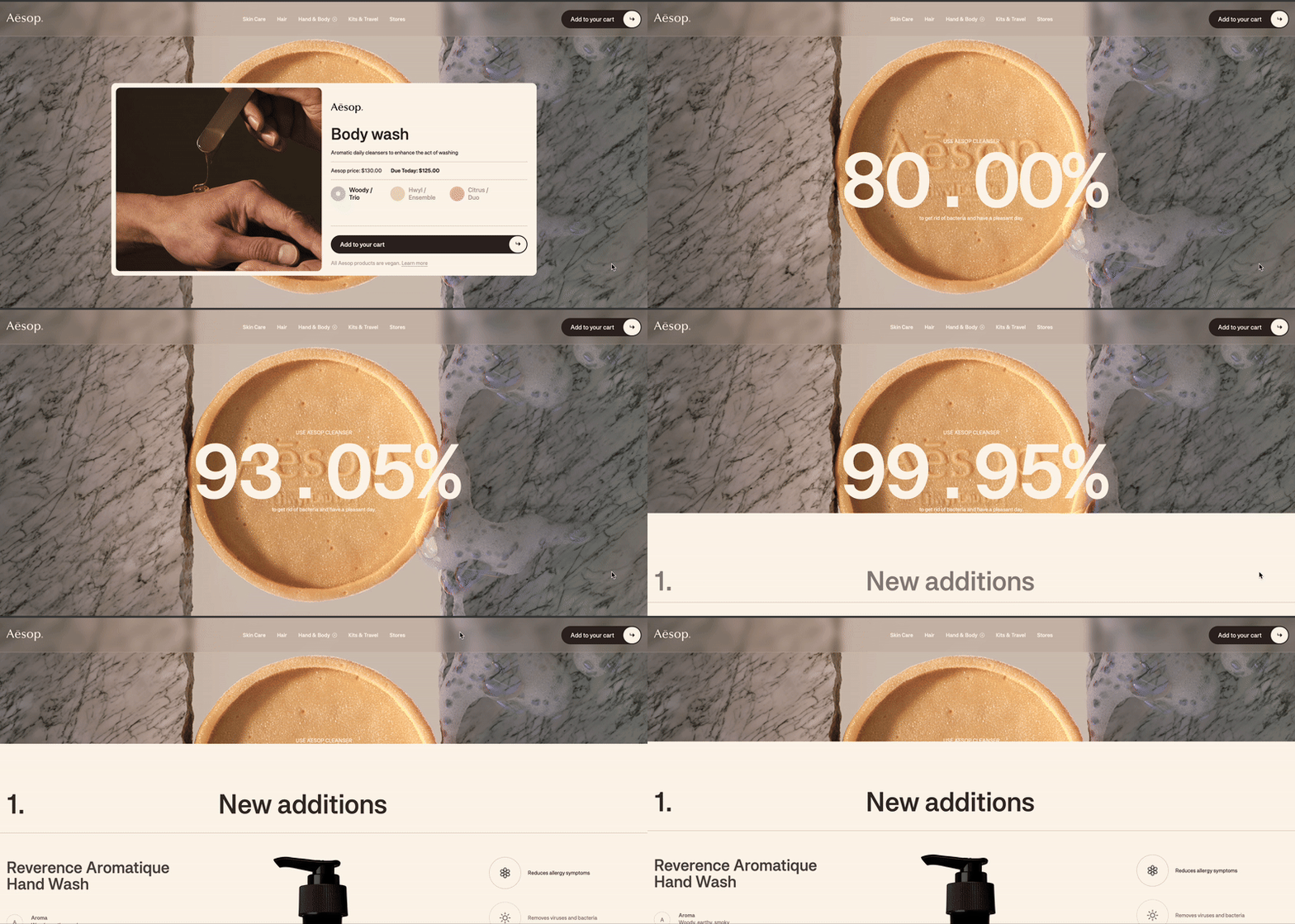
2. 스크롤에 따라 숫자가 변하는 애니메이션
- value 자체는 HTML 요소의 속성이 아니라 일반 숫자 데이터일 뿐이지만, onUpdate()를 통해 텍스트로 화면에 반영되도록 했다.
gsap.set('.sc-order1 .group-mask',{ 'mask-size': '200px', })

const order1 = gsap.timeline({
  scrollTrigger:{
    trigger: '.sc-order1',
    start: '0% 50%',
    end: '100% 100%',
    // markers: true,
    scrub: 0,
  }
})
order1
  .to({ value: 80 },1, {
    value: 99.95,
    duration: 0.5,
    ease: "linear",
    onUpdate: function () {
      document.querySelector(".font-mono").textContent =
        this.targets()[0].value.toFixed(2) + "%";
    }
},'circle');onUpdate(): 애니메이션이 진행될 때마다 실행된다.this.targets()[0].value: 현재 value 값을 가져온다..toFixed(2): 소수점 2자리까지 표시된다.document.querySelector(".font-mono").textContent = ...
.font-mono 요소의 텍스트를 현재 value 값으로 업데이트한다.- 숫자가 서서히 변하면서 화면에도 실시간으로 반영된다.
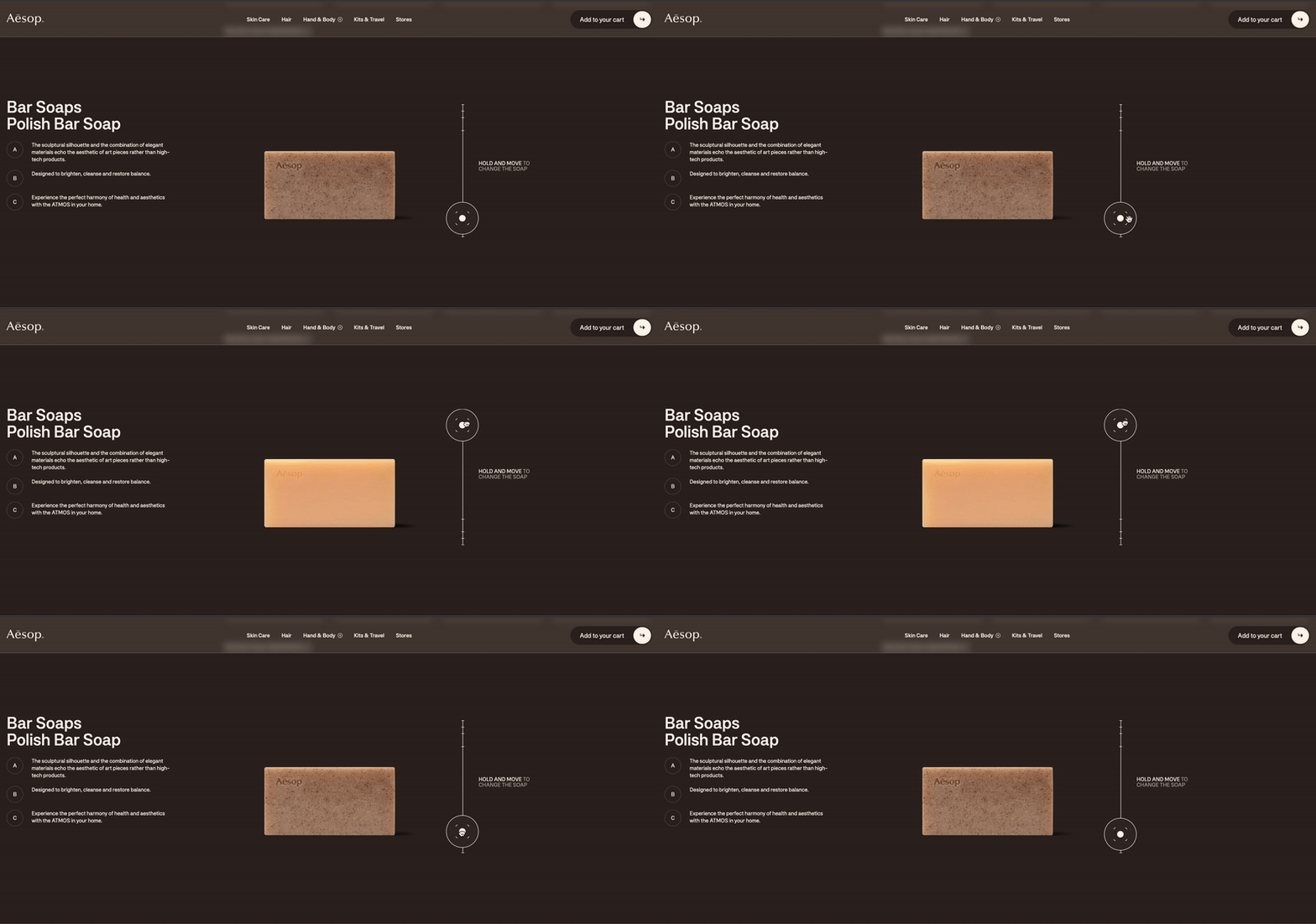
3. GSAP DRAGGLE
Draggable.create('.cursor-grab', {
  type: 'y', // Y축으로만 드래그 가능
  bounds: '.sc-info2 .group-design .drag-svg', // 드래그 범위 제한
  onDrag: function () {
    const boundsElement = document.querySelector('.sc-info2 .group-design .drag-svg'); // 실제 DOM 요소 가져오기
    const handle = this.target.getBoundingClientRect(); // 드래그 요소 위치 가져오기

    if (!boundsElement) return; // bounds 요소가 없으면 실행하지 않음

    const bounds = boundsElement.getBoundingClientRect(); // 드래그 가능 범위 좌표 가져오기

    const minY = bounds.top; // 최소 Y값
    const maxY = bounds.bottom - handle.height; // 최대 Y값
    const currentY = handle.top; // 현재 Y값

    const progress = (currentY - minY) / (maxY - minY); // 진행도 (0 ~ 1)

    gsap.to('.sc-info2 .group-design .lightOff', {
      opacity: 1 - progress, // progress에 따라 1에서 0으로
      duration: 0, // 즉시 반영 (실시간 업데이트)
    });
  }
});
.cursor-grab 요소가 Y축 방향으로만 드래그 가능하도록 한다..drag-svg 영역 내에서만 드래그 가능 (bounds로 제한)하도록 한다.- 사용자가 드래그할 때마다 현재 위치
currentY를 계산. - 이동 가능 범위에서
progress계산한다. (0,1로 볼 수 있음) - progress 값에 따라
.lightOff요소의 투명도를 조절한다. - 드래그를 위에서 아래로 하면
.lightOff가 점점 투명해지고,
반대로 위로 드래그하면 점점 불투명해진다.