1. Spring Security
- 인증 , 인가 , 일반적 공격에 대해 보호 기능을 제공하는 프레임워크
- service의 비즈니스 로직과 인증 , 인가의 보안 로직을 분리 할 수 있다는 장점을 가지고 있다.
2. Authentication과 Authorization 절차
- Request username(principal) , password(credential) 보낼 시
1) 서블릿 Filter Chain 과정 중 DelegatingFilterProxy에 접근
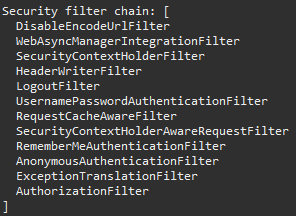
2) DelegatingFilterProxy 내부 설정한 각종 필터 적용 과정을 거친다.
2-1) 중요 필터 (UsernamePasswordAuthenticationFilter)
역할 :ID/password 인증을 담당하는 필터
1) Authentication을 생성 ( Authentication{principal , credential} )
2) AuthentiacationManager에 전달 및 처리에 알맞는 AuthenticationProvider 반환
2-1) AuthenticationProvider 종류
1) DaoAuthenticationProvider
2) JwtAuthenticationProviderAuthentiacationManager : 인증을 담당하는 객체
기본 구현체는 ProviderManager이다. (인증 방식에 따라 하위 구현체 구현)
과정
1) AuthentiacationManager에 구현체 중 별도의 등록이 없으면 default인 ProviderManager를 사용
2) providerManager에서 인증을 실행할 수 있는 AuthenticationProvider를 찾는다.3) AuthenticationProvider를 통해 인증 된 Authentication 반환( 성공 시 )
AuthenticationProvider : 인증을 처리하는 객체
public class DaoAuthenticationProvider implements AuthenticationProvider {
    private UserDetailsService userDetailsService;
    private PasswordEncoder passwordEncoder;
    @Override
    public Authentication authenticate(Authentication authentication) throws AuthenticationException {
        // 1. 요청 정보 추출
        String username = authentication.getName();
        String password = authentication.getCredentials().toString();
        // 2. 사용자 정보 조회
        UserDetails user = userDetailsService.loadUserByUsername(username);
        // 3. 비밀번호 비교
        if (!passwordEncoder.matches(rawPassword, user.getPassword())) {
            throw new BadCredentialsException("비밀번호 틀림");
        }
        // 4. 인증된 토큰 반환 (isAuthenticated = true)
        return new UsernamePasswordAuthenticationToken(user, null, user.getAuthorities());
    }
    @Override
    public boolean supports(Class<?> authentication) {
        return UsernamePasswordAuthenticationToken.class.isAssignableFrom(authentication);
    }
}
1) 2. 사용자 정보 조회
1-1) userDetailsService를 통해 DB 또는 메모리에서 사용자 정보를 로딩(원하는 걸로 설정 가능하다.)
1-2) username을 통해 DB 또는 메모리에서 조회한다.
1-3) 반환된 UserDetails에는 비밀번호(getPassword()), 권한(getAuthorities()), 계정 상태 등이 포함됨
2) 3. 비밀번호 비교
2-1) rawPassword(사용자가 입력한 비밀번호) == userDetails.getPassword() 비교
3) 인증된 Authentication 반환
3-1) Authentication이 반환 될떄는 기존의 Principal , credential이 아닌, P:UserDetails , C:Authorities(권한 정보)가 담겨서 반환된다.2-2) 중요 필터 (AuthorizationFilter)
역할 : 역할(role)에 따른 제한 구역 접근에 대한 제어 담당
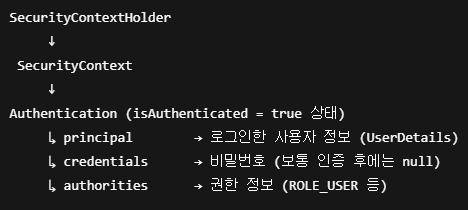
1) 인증(Authentication)을 완료한 Authentication 객체(SecurityContextHolder에서 가져온다)를 바탕으로 AuthorizationManager로 요청한 리소스에 접근 가능한지를 판단합니다.SecurityContextHolder
구조
1) SecurityContextHolder
SecurityContext를 보관한다.
2) SecurityContext
Authentication 객체를 보관하는 인터페이스다. 기본 구현체는 SecurityContextImpl
3) Authentication
인증된 사용자에 대한 핵심 정보 포함
4) 인증 전 후
인증 전 : Principal(id) , Credentials(비밀번호)로 구성
인증 후 : Principal , Authorities(권한정보)로 구성2) 권한이 있다면 continue
3) 권한이 없다면 AccessDeniedException 에러가 발생합니다.
3. 중요 개념
1) Servlet Application에서 Spring Security
1. DelegatingFilterProxy를 통해 Servlet 컨테이너와 Spring WebApplicationContext 사이의 브릿지 역할을 수행한다. 즉, 서블릿 필터처럼 동작하지만, 실제 필터 로직은 Spring의 빈으로 등록된 필터에 위임합니다.
WebApplicationContext
1) 웹 환경에 특화된 빈 컨테이너를 의미합니다. Controller, ViewResolver, DispatcherServlet 등을 지원하며 서블릿 API (request, response), 웹 스코프와 같은 웹 기능도 포함되어 있습니다.
2) WebApplicationContext는 ApplicationContext를 상속합니다.2. ApplicationContext에서 선언된 Filter 목록을 Lazy 하게 가져와서 실행한다.
2-1) 왜 LAZY하게 가져올까?
=> Servlet 컨테이너의 라이프사이클과 Spring 컨텍스트의 초기화 시점이 다르기 때문이다. 그래서 DelegatingFilterProxy는 필터 빈을 미리 가져오지 않고, 요청이 들어올 때(컨텍스트가 완전히 준비된 이후)에 lazy하게 getBean으로 호출한다.
3.
그림과 같이 프록시 빈을 만들어 뒀다가 연관 호출 시 getBean으로 가져온다.
SecurityFilterChain을 반환하는 빈 등록
4. 구현
1) 의존성 추가
        <dependency>
            <groupId>org.springframework.boot</groupId>
            <artifactId>spring-boot-starter-security</artifactId>
        </dependency>
        <dependency>
            <groupId>org.springframework.security</groupId>
            <artifactId>spring-security-test</artifactId>
            <scope>test</scope>
        </dependency>
2) 빈 등록