🐧박스모델 배치 관련 스타일 속성-1
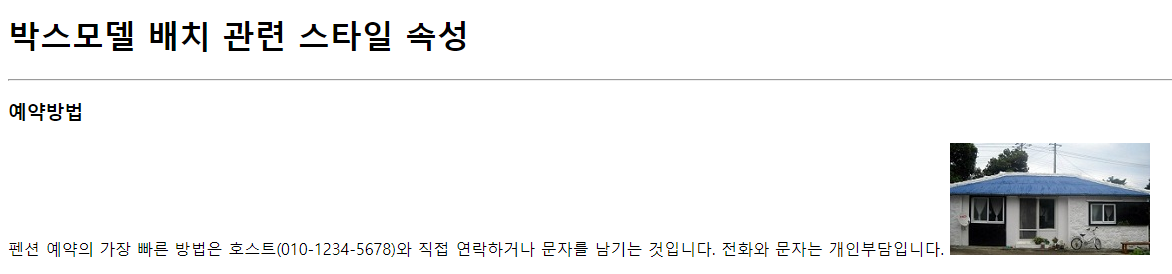
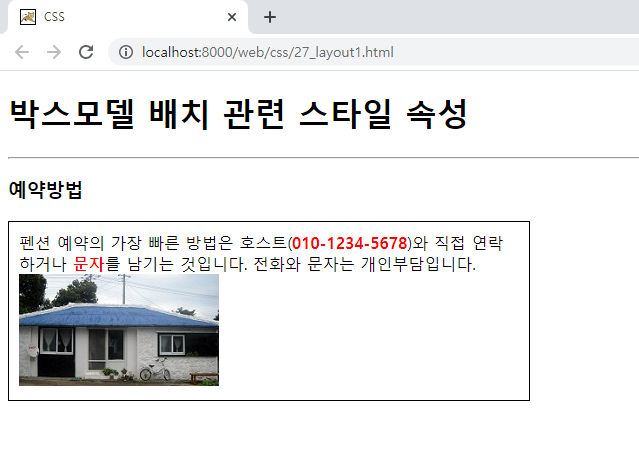
◈ 블럭 레벨의 박스모델과 인라인 레벨의 박스모델을 구분하여 브라우저에 자동 배치
◈ 블럭 레벨의 박스모델 : 하나의 라인을 모두 사용하는 박스모델
→ div, h1~h6, ul, ol, li, p, table, tr, form 등
◈ 인라인 레벨의 박스모델 : 하나의 라인을 같이 사용하는 박스모델
→ span, img, a, input, select, textarea, label, button 등
◈ 블럭 레벨의 박스모델에 후손으로 모든 박스모델 배치 가능
→ 인라인 레벨의 박스모델의 후손으로 블럭 레벨의 박스모델 배치 불가능초기값
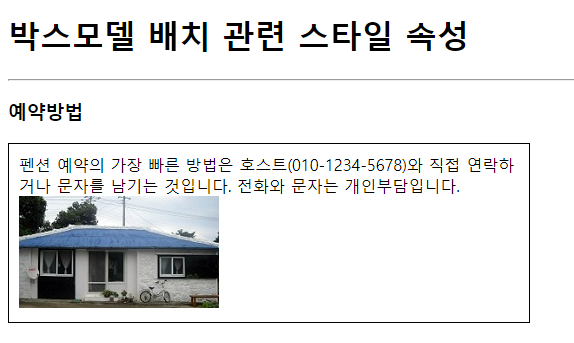
─────────────────────────────────────p { width: 500px; padding: 10px; border: 1px solid black; }
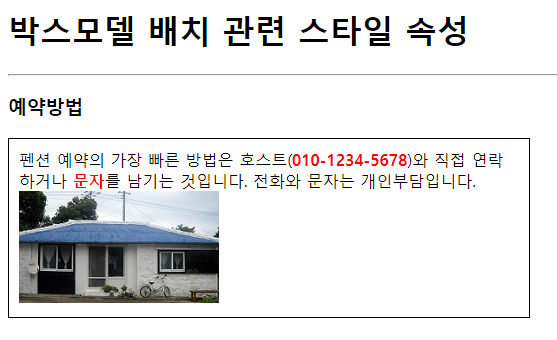
─────────────────────────────────────.acc { color: red; font-weight: bold; }
📃27_layout1.html
<!DOCTYPE html>
<html>
<head>
<meta charset="UTF-8">
<title>CSS</title>
<style type="text/css">
/* 블럭 레벨의 박스모델과 인라인 레벨의 박스모델을 구분하여 브라우저에 자동 배치 */
/* 블럭 레벨의 박스모델 : 하나의 라인을 모두 사용하는 박스모델 */
/* → div, h1~h6, ul, ol, li, p, table, tr, form 등 */
/* 인라인 레벨의 박스모델 : 하나의 라인을 같이 사용하는 박스모델 */
/* → span, img, a, input, select, textarea, label, button 등 */
/* 블럭 레벨의 박스모델에 후손으로 모든 박스모델 배치 가능 */
/* → 인라인 레벨의 박스모델의 후손으로 블럭 레벨의 박스모델 배치 불가능 */
p {
	width: 500px;
	padding: 10px;
	border: 1px solid black;
}
.acc {
	color: red;
	font-weight: bold;
}
</style>
</head>
<body>
	<h1>박스모델 배치 관련 스타일 속성</h1>
	<hr>
	<h3>예약방법</h3>
	<p>펜션 예약의 가장 빠른 방법은 호스트(<span class="acc">010-1234-5678</span>)와 직접
	연락하거나 <span class="acc">문자</span>를 남기는 것입니다. 전화와 문자는 개인부담입니다.
	<img alt="펜션이미지" src="images/1.jpg"></p>
</body>
</html>
🐧박스모델 배치 관련 스타일 속성-2
🎨display : 박스모델 배치 관련 스타일 속성
📌display : 박스모델 배치 관련 스타일 속성
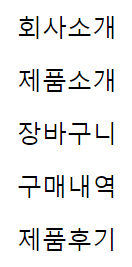
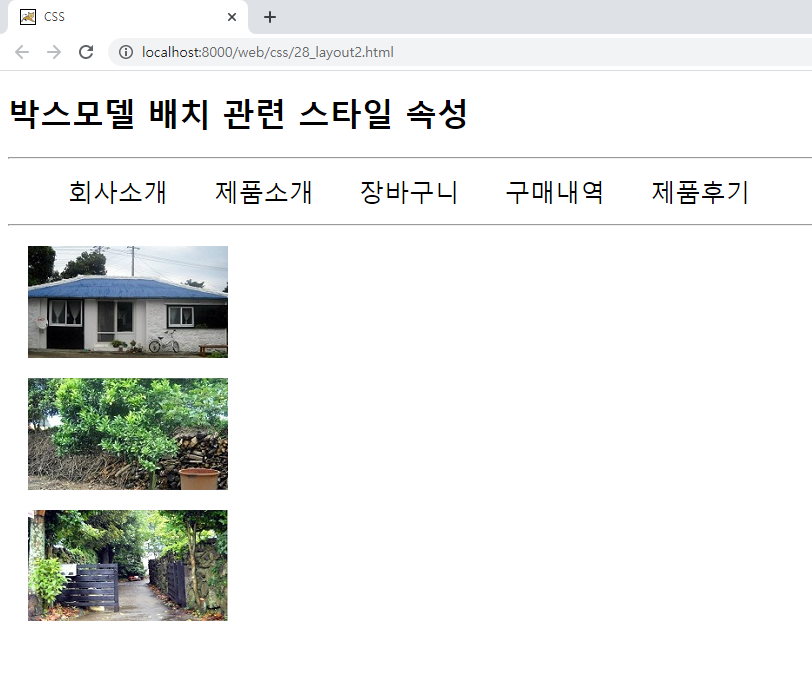
◈ 속성값 : none(미배치), block(블럭 레벨 배치), inline(인라인 레벨 배치), table, table-row, table-cell 등
초기값
─────────────────────────────────────display: inline;
─────────────────────────────────────초기값
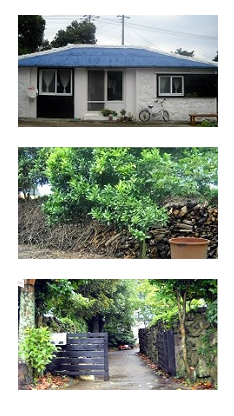
─────────────────────────────────────display: block;


📃28_layout2.html
<!DOCTYPE html>
<html>
<head>
<meta charset="UTF-8">
<title>CSS</title>
<style type="text/css">
ul li {
	list-style-type: none;
	font-size: 25px;
	margin: 20px;
	/* display : 박스모델 배치 관련 스타일 속성 */
	/* 속성값 : none(미배치), block(블럭 레벨 배치), inline(인라인 레벨 배치), table, table-row, table-cell 등 */
	display: inline;
}
img {
	margin: 20px;
	display: block;
}
</style>
</head>
<body>
	<h1>박스모델 배치 관련 스타일 속성</h1>
	<hr>
	<ul>
		<li>회사소개</li>
		<li>제품소개</li>
		<li>장바구니</li>
		<li>구매내역</li>
		<li>제품후기</li>
	</ul>
	<hr>
	<!-- 인라인 레벨의 박스모델은 하나의 라인에 박스모델이 여러개 출력 -->
	<img alt="펜션 이미지1" src="images/1.jpg">
	<img alt="펜션 이미지2" src="images/2.jpg">
	<img alt="펜션 이미지3" src="images/3.jpg">
</body>
</html>
🐧박스모델 배치 관련 스타일 속성-3
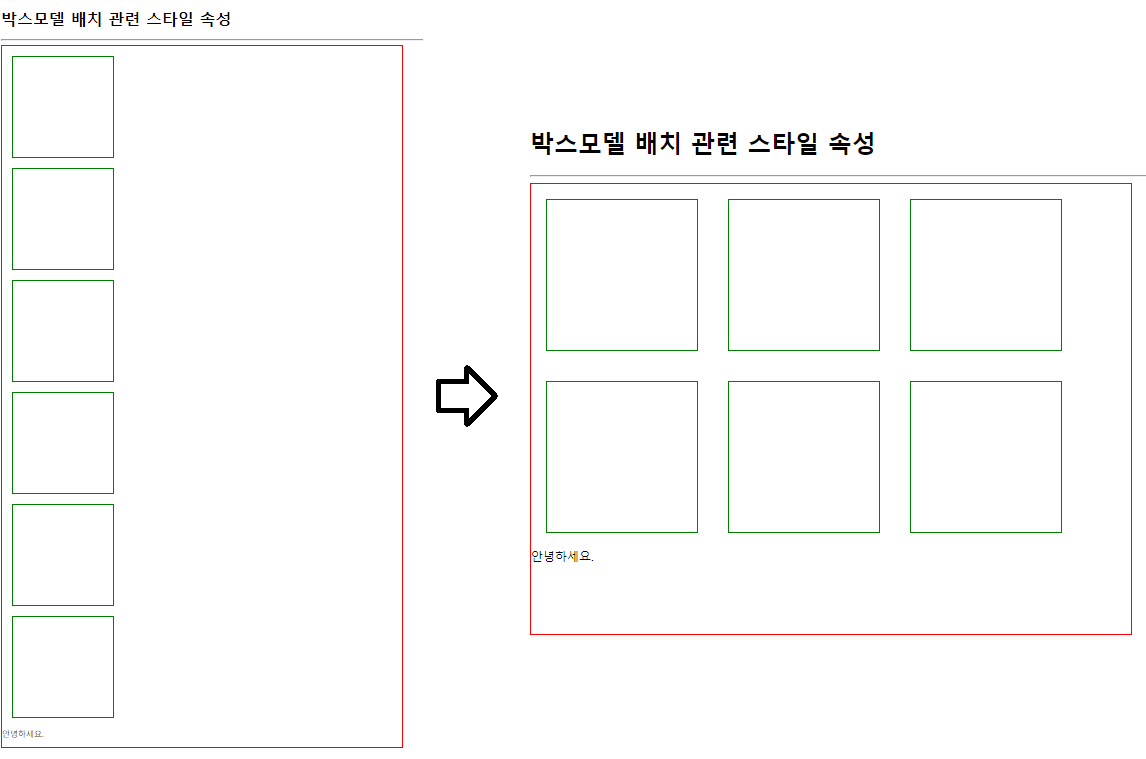
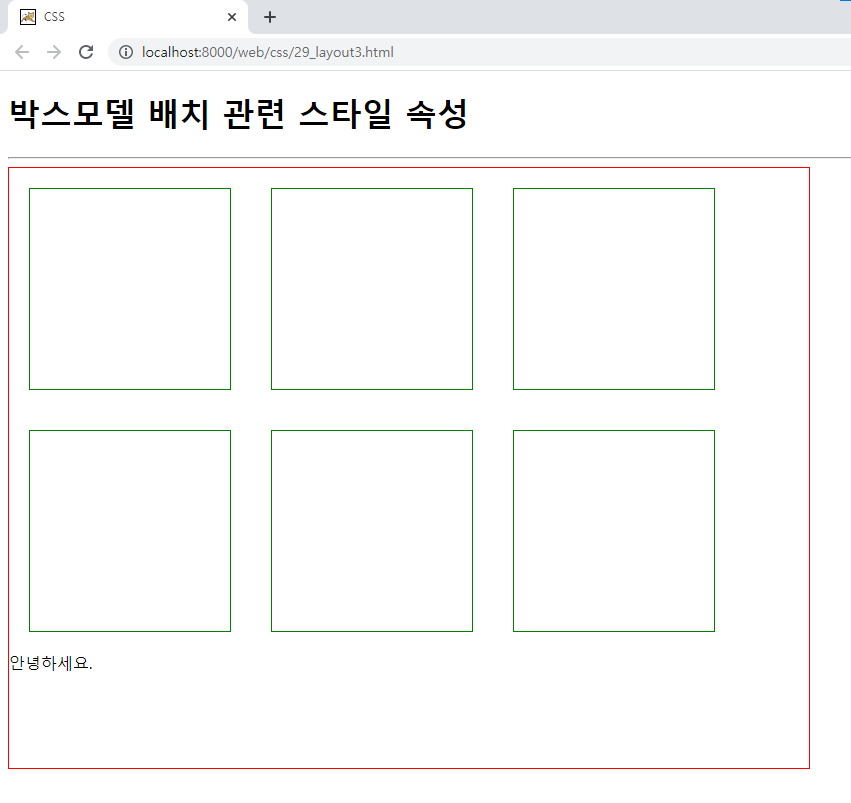
🎨float : 박스모델 배치 방향 관련 스타일 속성
📌float : 박스모델 배치 방향 관련 스타일 속성
→ 박스모델의 폭을 변경한 경우에만 사용 가능
◈ 속성값 : none(기본) ,left(박스모델을 띄워 왼쪽에서 오른쪽 방향으로 차례대로 배치), right(박스모델을 띄워 오른쪽에서 왼쪽 방향으로 차례대로 배치)
→ 부모 박스모델의 폭을 벗어난 박스모델은 자동 줄바꿈 처리되어 출력
→ 다음에 배치될 박스모델에 float 스타일 속성의 영향 발생float: left;
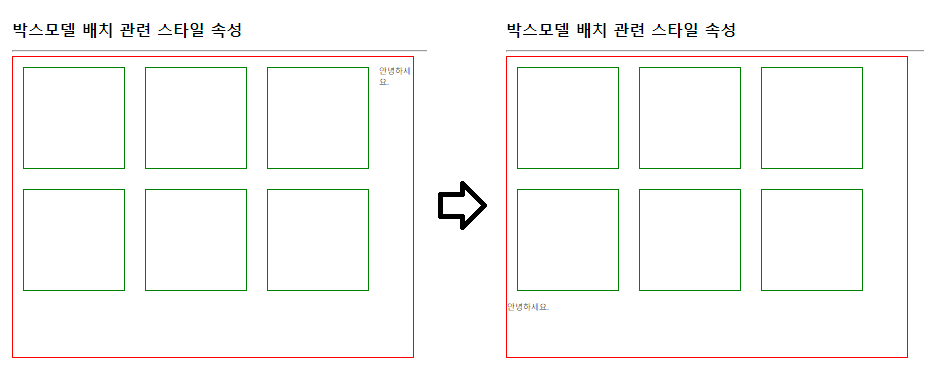
📌clear : float 스타일 속성의 초기화 관련 스타일 속성
◈ 속성값 : left, right, both(모두 초기화)
clear: both;
◈ min-height : 박스모델의 최소 높이 관련 스타일 속성
📃29_layout3.html
<!DOCTYPE html>
<html>
<head>
<meta charset="UTF-8">
<title>CSS</title>
<style type="text/css">
#container {
	width: 800px;
	/* min-height : 박스모델의 최소 높이 관련 스타일 속성 */
	min-height: 600px;
	border: 1px solid red;
}
.box {
	width: 200px;
	height: 200px;
	margin: 20px;
	border: 1px solid green;
	/* float : 박스모델 배치 방향 관련 스타일 속성 */
	/* → 박스모델의 폭을 변경한 경우에만 사용 가능 */
	/* 속성값 : none(기본) ,left(박스모델을 띄워 왼쪽에서 오른쪽 방향으로 차례대로 배치), right(박스모델을 띄워 오른쪽에서 왼쪽 방향으로 차례대로 배치) */
	/* → 부모 박스모델의 폭을 벗어난 박스모델은 자동 줄바꿈 처리되어 출력 */
	/* → 다음에 배치될 박스모델에 float 스타일 속성의 영향 발생 */
	float: left;
}
p {
	/* clear : float 스타일 속성의 초기화 관련 스타일 속성 */
	/* 속성값 : left, right, both(모두 초기화) */
	clear: both;
}
</style>
</head>
<body>
	<h1>박스모델 배치 관련 스타일 속성</h1>
	<hr>
	<div id="container">
		<div class="box"></div>
		<div class="box"></div>
		<div class="box"></div>
		<div class="box"></div>
		<div class="box"></div>
		<div class="box"></div>
		<p>안녕하세요.</p>
	</div>
</body>
</html>
🐧박스모델 배치 관련 스타일 속성-4
🎨position: 박스모델 배치 관련 스타일 속성
📌position: 박스모델 배치 관련 스타일 속성
◈ 속성값 : static(기본) - 박스모델 자동 배치(박스모델 중첩 미발생)
position: static;
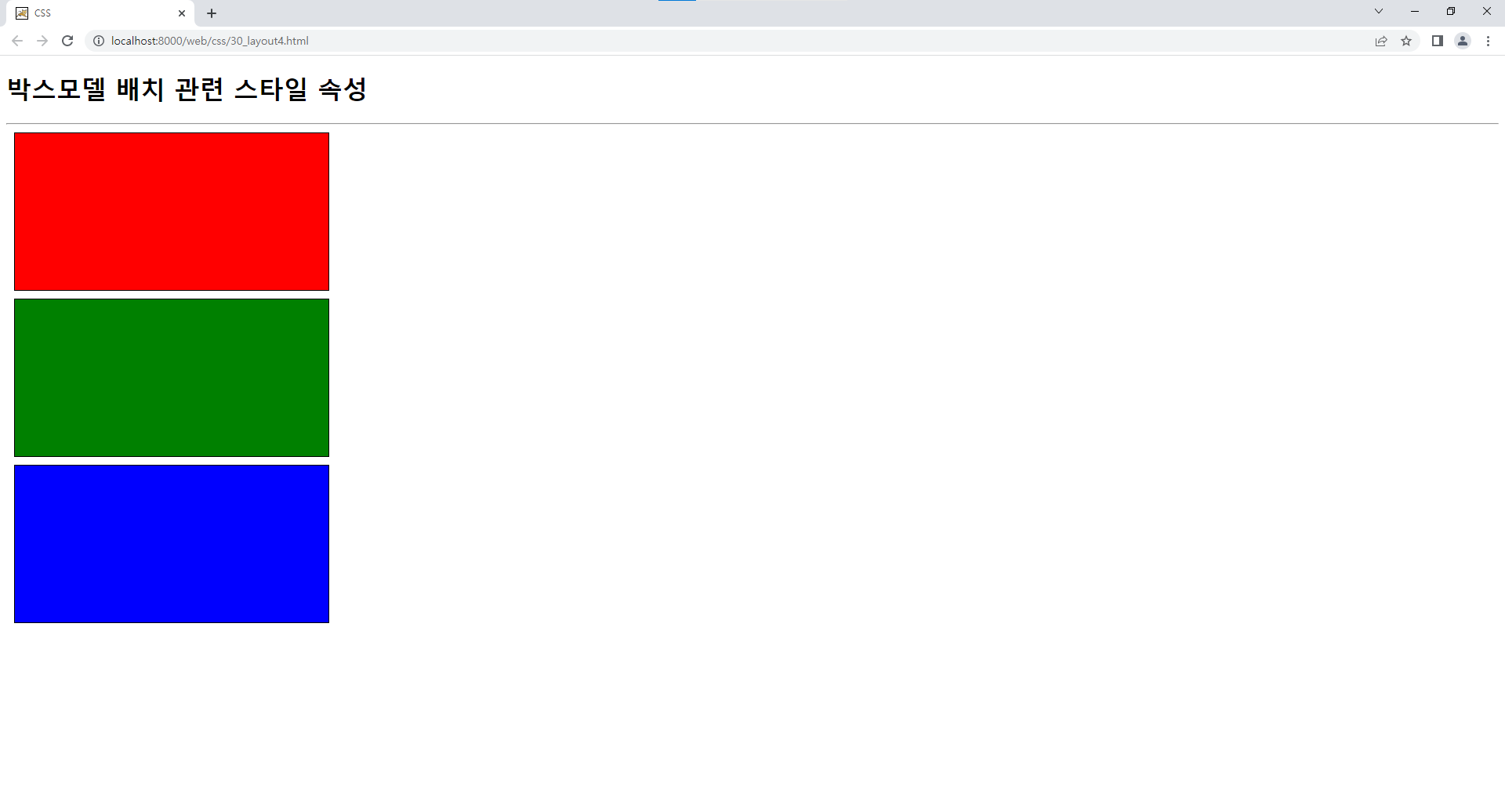
◈ 속성값 : relative - 박스모델 자동 배치 후 top 속성과 left 속성으로 박스모델 이동하여 배치(박스모델 중첩 발생)
◈ top 속성 : 세로 방향(Y)의 이동 관련 스타일 속성 - 속성값 단위 : px, %
◈ left 속성 : 가로 방향(X)의 이동 관련 스타일 속성 - 속성값 단위 : px, %position: relative; top: 50px; left: 30px;
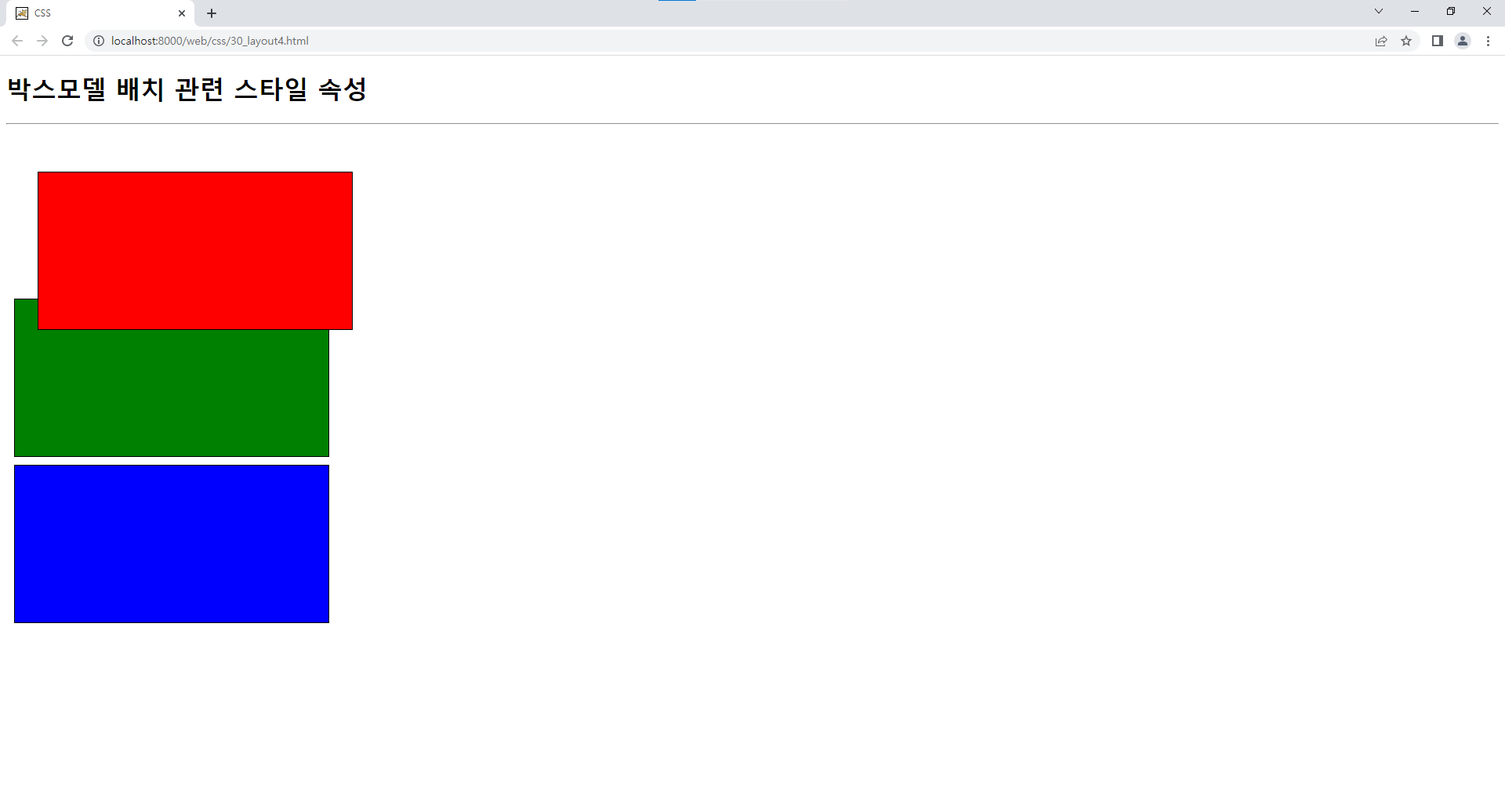
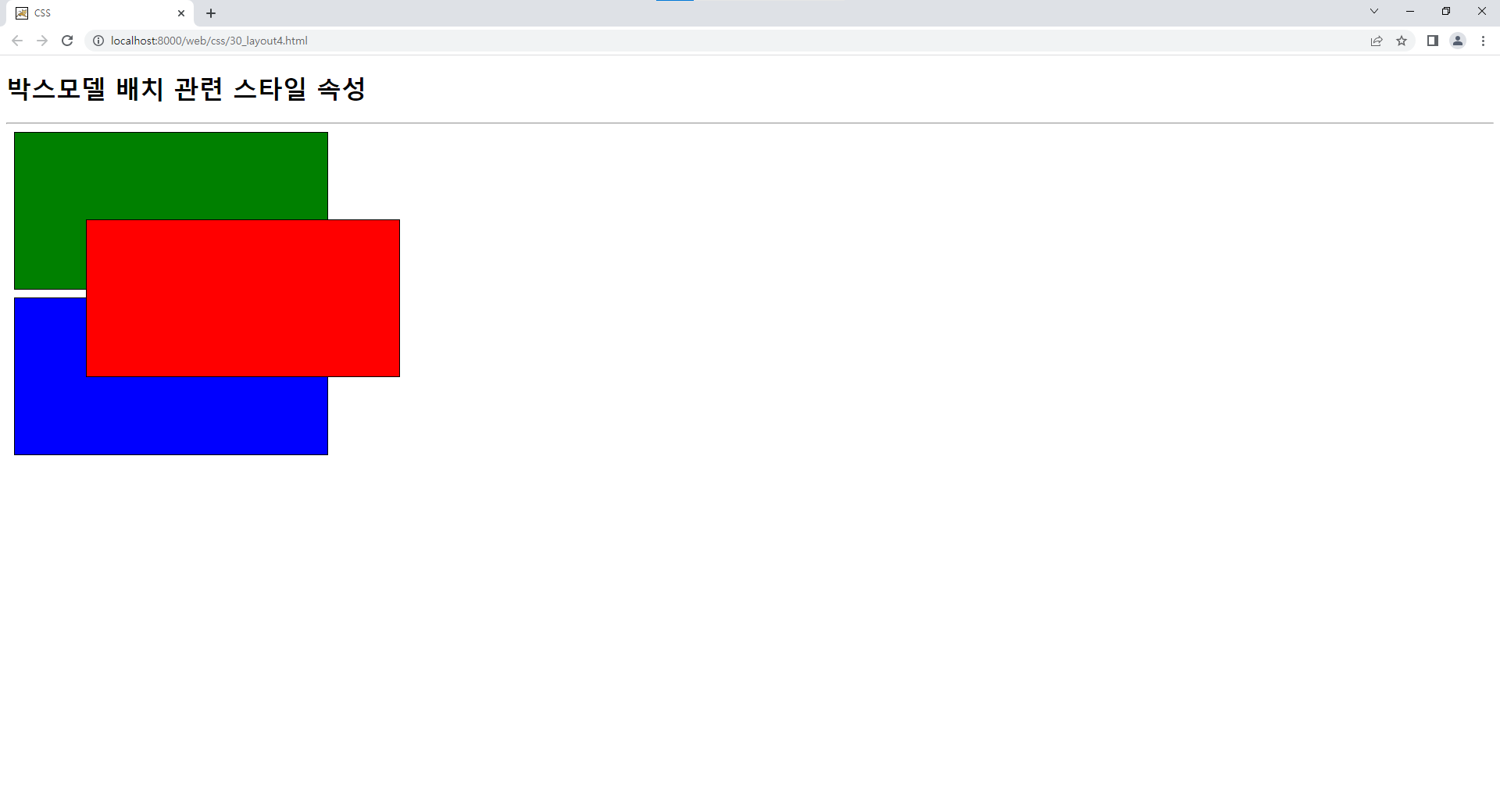
◈ 속성값 : absolute - 박스모델 배치 전 top 속성과 left 속성으로 박스모델 이용하여 배치(박스모델 중첩 발생)
position: absolute;
top: 200px;
left: 100px;
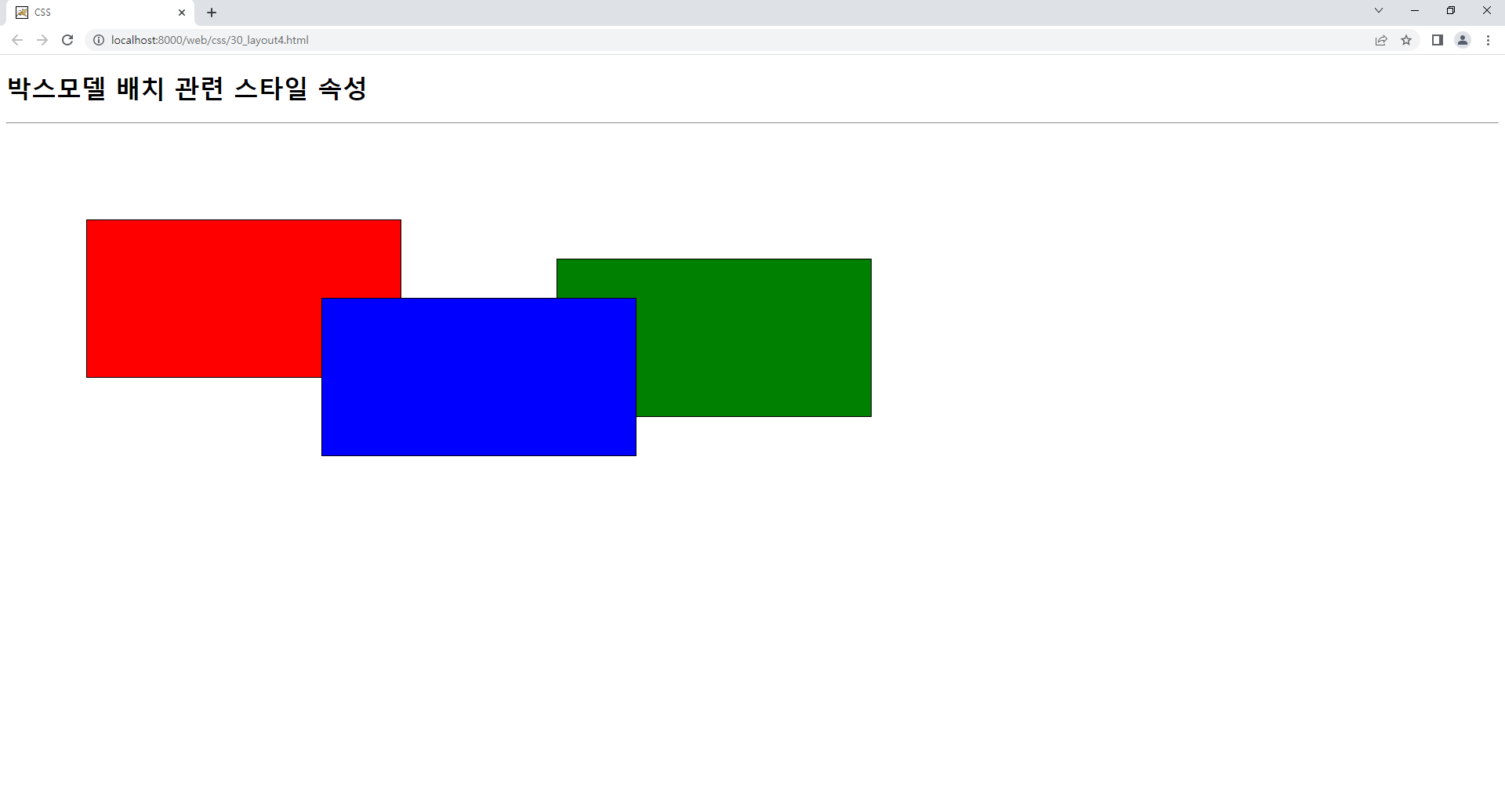
◈ 속성값 : fixed - 박스모델 배치 전 top 속성과 left 속성으로 박스모델 이용하여 배치(박스모델 중첩 발생)
→ 브라우저의 크기를 벗어난 박스모델에 대한 스크롤 미발생position: fixed; top: 200px; left: 100px;
📃30_layout4.html
<!DOCTYPE html>
<html>
<head>
<meta charset="UTF-8">
<title>CSS</title>
<style type="text/css">
div {
	width: 400px;
	height: 200px;
	margin: 10px;
	border: 1px solid black;
}
#red {
	background: red;
	/* position: 박스모델 배치 관련 스타일 속성 */
	/* 속성값 : static(기본) - 박스모델 자동 배치(박스모델 중첩 미발생) */
	/*position: static;*/
	/* 속성값 : relative - 박스모델 자동 배치 후 top 속성과 left 속성으로 박스모델 이동하여 배치(박스모델 중첩 발생) */
	/* top 속성 : 세로 방향(Y)의 이동 관련 스타일 속성 - 속성값 단위 : px, % */
	/* left 속성 : 가로 방향(X)의 이동 관련 스타일 속성 - 속성값 단위 : px, % */
	/*
	position: relative;
	top: 50px;
	left: 30px;
	*/
	/* 속성값 : absolute - 박스모델 배치 전 top 속성과 left 속성으로 박스모델 이용하여 배치(박스모델 중첩 발생) */
	/*
	position: absolute;
	top: 200px;
	left: 100px;
	*/
	/* 속성값 : fixed - 박스모델 배치 전 top 속성과 left 속성으로 박스모델 이용하여 배치(박스모델 중첩 발생) */
	/* → 브라우저의 크기를 벗어난 박스모델에 대한 스크롤 미발생 */
	position: fixed;
	top: 200px;
	left: 100px;
}
#green {
	background: green;
	position: static;
	/*
	position: relative;
	top: -20px;
	left: -10px;
	*/
	/*
	position: absolute;
	top: 250px;
	left: 700px;
	*/
	position: fixed;
	top: 250px;
	left: 700px;
}
#blue {
	background: blue;
	position: static;
	/*
	position: relative;
	top: -200px;
	left: 100px;
	*/
	/*
	position: absolute;
	top: 300px;
	left: 400px;
	*/
	position: fixed;
	top: 300px;
	left: 400px;
}
</style>
</head>
<body>
	<h1>박스모델 배치 관련 스타일 속성</h1>
	<hr>
	<div id="red"></div>
	<div id="green"></div>
	<div id="blue"></div>
</body>
</html>
🐧박스모델 배치 관련 스타일 속성-5
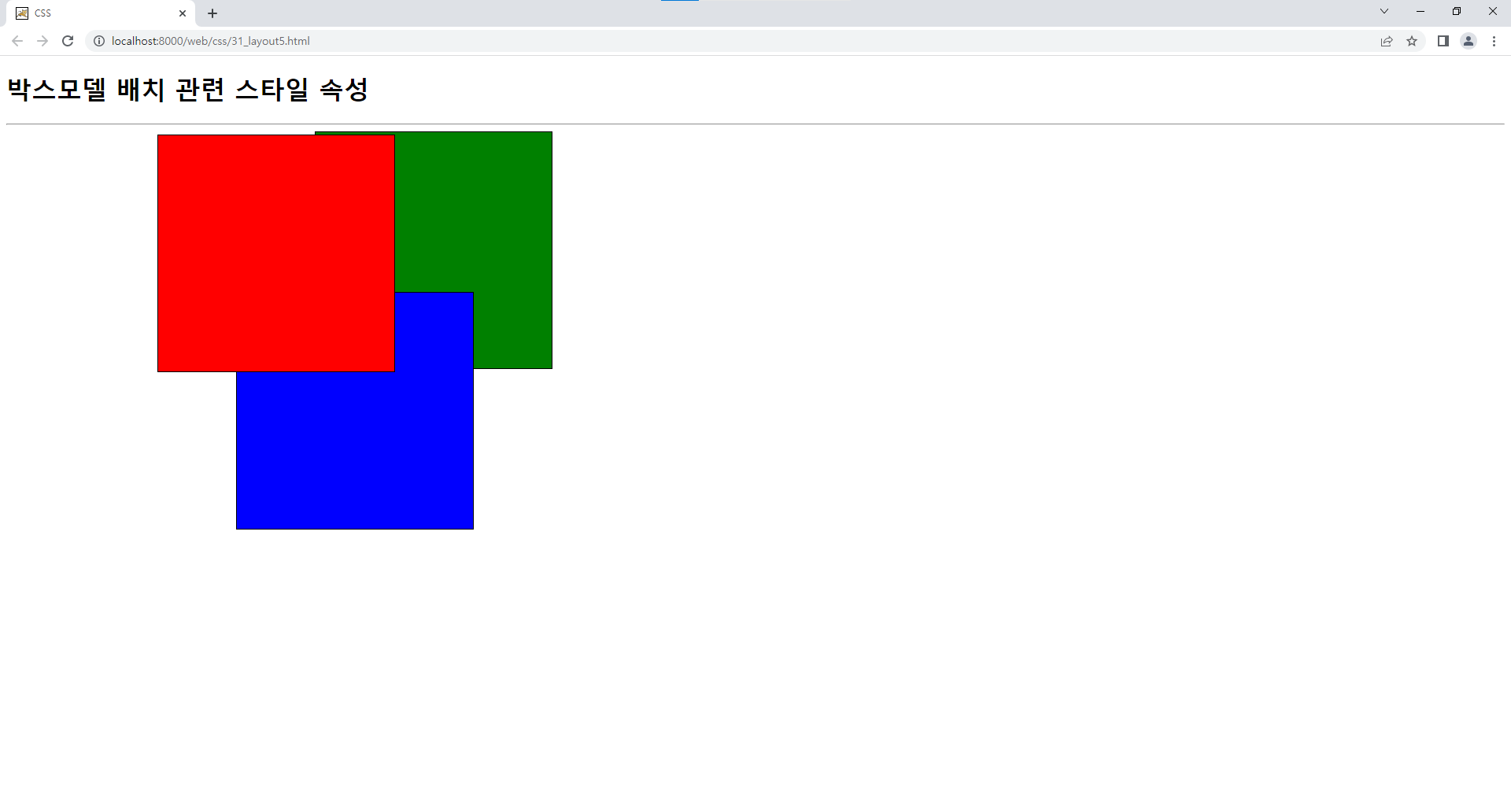
🎨z-index : 중첩된 박스모델의 배치순서 관련 스타일 속성
📌z-index : 중첩된 박스모델의 배치순서 관련 스타일 속성
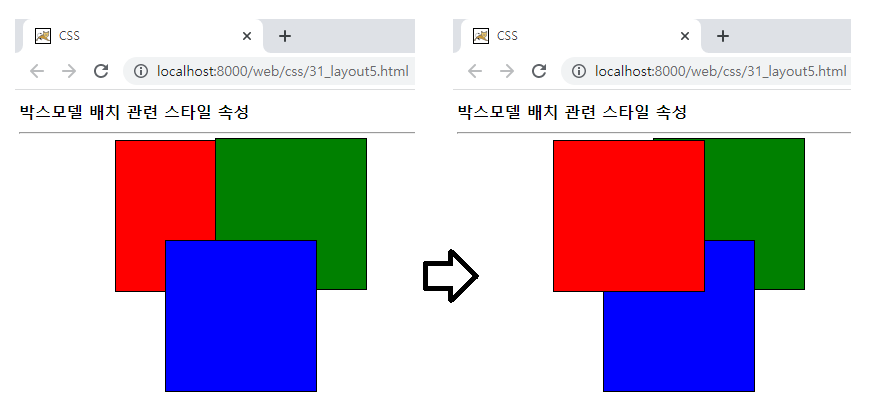
◈속성값 : 정수값 - 정수값이 큰 박스모델을 위쪽에 배치
◈박스모델이 중첩될 경우 박스모델 선언순서에 의해 중첩 배치
#red {
	background: red;
	position: absolute;
	top: 100px;
	left: 200px;
	z-index: 3
}
#green {
	background: green;
	position: absolute;
	top: 200x;
	left: 400px;
	z-index: 1
}
#blue {
	background: blue;
	position: absolute;
	top: 300px;
	left: 300px;
	z-index: 2
}
📃31_layout5.html
<!DOCTYPE html>
<html>
<head>
<meta charset="UTF-8">
<title>CSS</title>
<style type="text/css">
div {
	width: 300px;
	height: 300px;
	border: 1px solid black;
}
#red {
	background: red;
	position: absolute;
	top: 100px;
	left: 200px;
	/* z-index : 중첩된 박스모델의 배치순서 관련 스타일 속성 */
	/* 속성값 : 정수값 - 정수값이 큰 박스모델을 위쪽에 배치 */
	z-index: 3
}
#green {
	background: green;
	position: absolute;
	top: 200x;
	left: 400px;
	z-index: 1
}
#blue {
	background: blue;
	position: absolute;
	top: 300px;
	left: 300px;
	z-index: 2
}
</style>
</head>
<body>
	<h1>박스모델 배치 관련 스타일 속성</h1>
	<hr>
	<!-- 박스모델이 중첩될 경우 박스모델 선언순서에 의해 중첩 배치 -->
	<div id="red"></div>
	<div id="green"></div>
	<div id="blue"></div>
</body>
</html>
🐧박스모델 배치 관련 스타일 속성-6
🎨display : 박스모델 배치 관련 스타일 속성
🎨visibility : 박스모델 출력 관련 스타일 속성
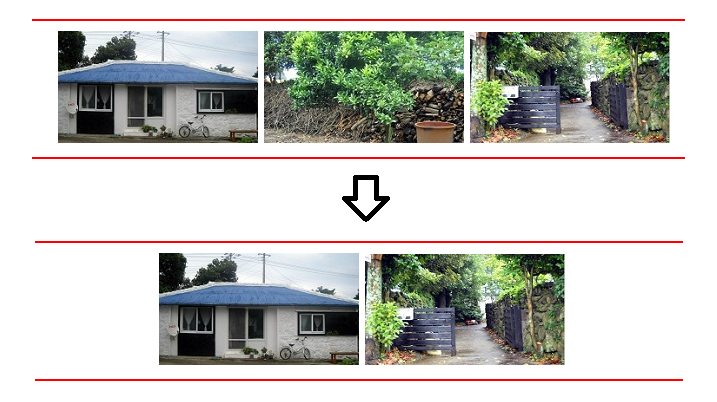
📌display : 박스모델 배치 관련 스타일 속성
속성값 : none, block, inline 등
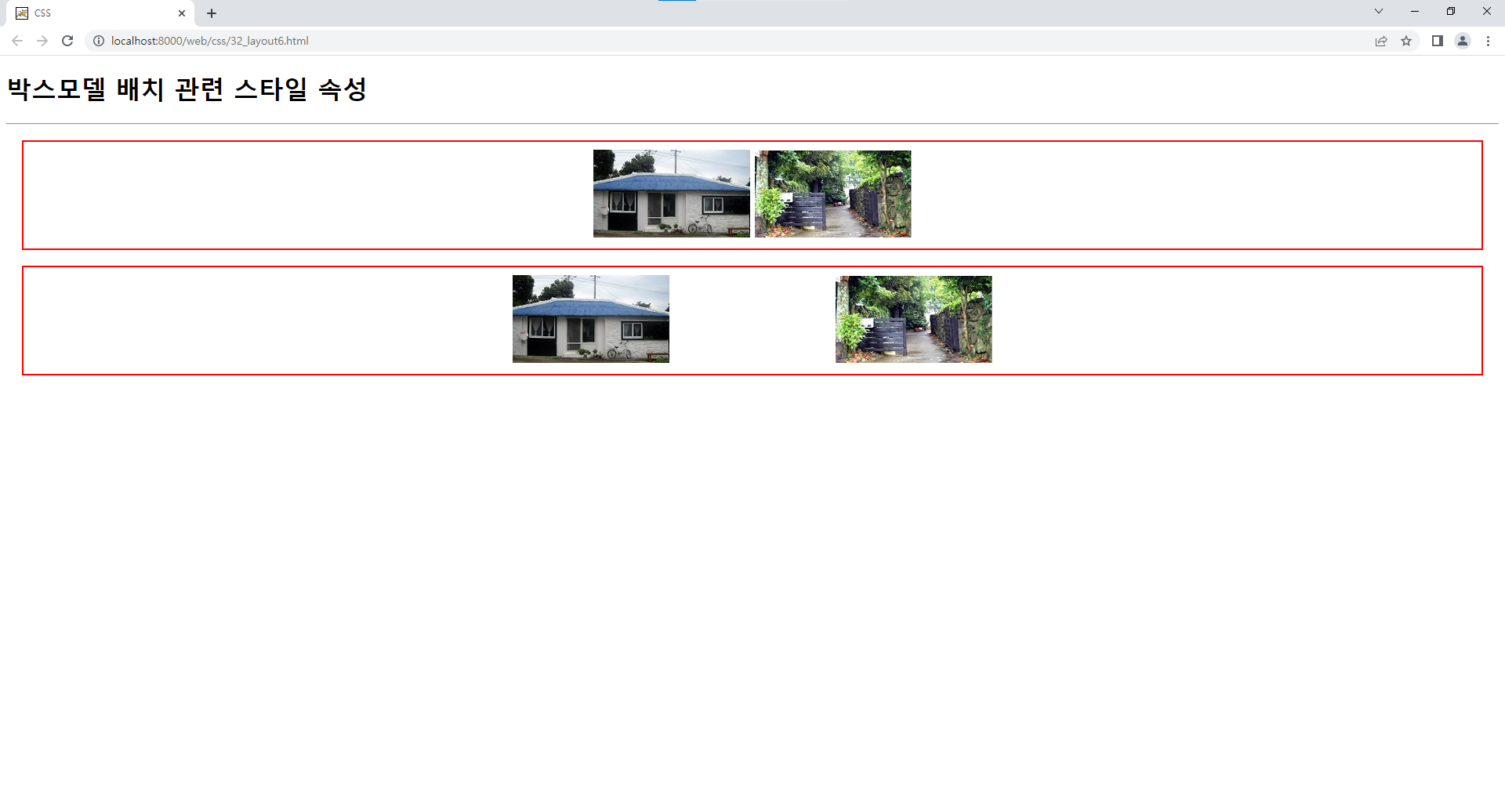
→ none 속성값 : 박스모델을 브라우저에 배치하지 않도록 설정 - 박스모델 미존재.on { display: inline; } .off { display: none; }
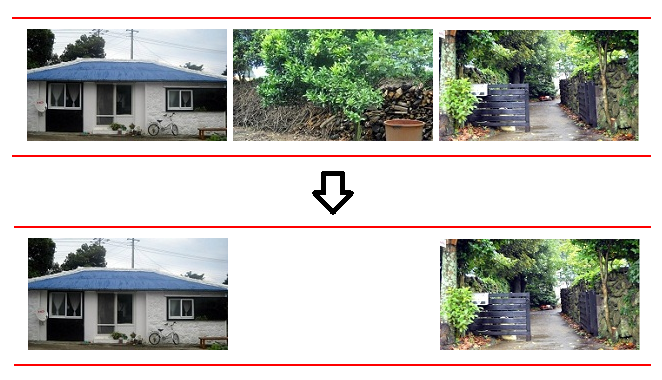
📌visibility : 박스모델 출력 관련 스타일 속성
→ 속성값 : visible(보임)-기본값, hidden(숨김)
.show { visibility: visible; }
.hide { visibility: hidden; }
📃32_layout6.html
<!DOCTYPE html>
<html>
<head>
<meta charset="UTF-8">
<title>CSS</title>
<style type="text/css">
div {
	margin: 20px;
	padding: 10px;
	border: 2px solid red;
	text-align: center;
}
/* display : 박스모델 배치 관련 스타일 속성 */
/* 속성값 : none, block, inline 등 */
/* → none 속성값 : 박스모델을 브라우저에 배치하지 않도록 설정 - 박스모델 미존재 */
.on { display: inline; }
.off { display: none; }
/* visibility : 박스모델 출력 관련 스타일 속성 */
/* → 속성값 : visible(보임)-기본값, hidden(숨김) */
/*.show { visibility: visible; }
.hide { visibility: hidden; }*/
</style>
</head>
<body>
	<h1>박스모델 배치 관련 스타일 속성</h1>
	<hr>
	<div>
		<img alt="펜션 이미지1" src="images/1.jpg" class="on">
		<img alt="펜션 이미지2" src="images/2.jpg" class="off">
		<img alt="펜션 이미지3" src="images/3.jpg" class="on">
	</div>
	<div>
		<img alt="펜션 이미지1" src="images/1.jpg" class="show">
		<img alt="펜션 이미지2" src="images/2.jpg" class="hide">
		<img alt="펜션 이미지3" src="images/3.jpg" class="show">
	</div>
</body>
</html>