❗️ 웹 결제와 중복되는 부분은 제외하고 작성하겠다 ❗️
📕 paymentStore.ts 파일에서의 Zustand를 이용한 상태 관리
- 모바일 환경 확인
const isMobile = window.innerWidth <= 768 || /Mobi|Android|iPhone|iPad|iPod/i.test(navigator.userAgent);isMobile 변수 : 사용자의 환경이 모바일인지 확인한다. window.innerWidth <= 768 조건은 화면 너비가 768px 이하인 경우를 모바일로 간주한다 정규 표현식 /Mobi|Android|iPhone|iPad|iPod/i.test(navigator.userAgent)는 사용자 에이전트를 기반으로 모바일 기기를 감지한다.
- 모바일 환경에서의 결제 옵션 설정
if (isMobile) {
  paymentOptions.bypass = {
    inicis_v2: {
      P_CARD_OPTION: 'selcode=14',
      P_MNAME: '포트원',
      P_RESERVED: ['below1000=Y', 'noeasypay=Y', 'global_visa3d=Y', 'apprun_check=Y']
    }
  };
  if (redirectUrl) {
    paymentOptions.redirectUrl = redirectUrl;
  }
}
사용자가 모바일 환경일 경우, paymentOptions.bypass에 모바일 결제를 위한 설정을 추가한다. inicis_v2는 이니시스 결제 모듈을 위한 설정이다. redirectUrl이 전달되었을 경우, 이 URL로 결제 후 리디렉션이 이루어지도록 paymentOptions.redirectUrl에 설정한다.
- 결제 요청 실행
const response = await PortOne.requestPayment(paymentOptions);PortOne.requestPayment 함수를 호출하여 결제를 요청한다. 이때 앞서 설정된 paymentOptions를 사용한다.(웹 결제 참고)
📕 redirect URL 설정
// baseRedirectUrl에 post_id와 total_amount를 쿼리 파라미터로 추가
const baseRedirectUrl = `${process.env.NEXT_PUBLIC_BASE_URL}/payment/payment?postId=${postId}&totalAmount=${totalAmountFormatted}`;
이 URL은 모바일 결제와 웹 결제 모두에서 사용될 수 있으며, 결제 후 사용자가 특정 페이지로 이동할 수 있도록 설정된다.
📕 결제 정보 저장 및 조회
- 결제 정보 저장
const savePaymentData = async () => {
  try {
    if (isDataSaved) return;
    const paymentData = {
      id: txId,
      user_id: user?.id,
      post_id: postIdFromParams,
      pay_state: paymentId,
      total_price: parseFloat(totalAmountFromParams || '0'),
    };
    const response = await axios.post('/api/detail/payment', paymentData);
    setPaymentData(response.data);
    setIsDataSaved(true);
  } catch (error) {
    console.error('Error saving payment data:', error);
    await handleCancel(paymentId, router);
    router.push(`/${user?.id}/mypage`);
  } finally {
    setPending(false);
  }
};
결제 데이터 저장 : savePaymentData 함수는 결제 정보를 서버에 저장한다. 이미 저장된 경우 중복 저장을 방지한다. 오류가 발생하면 결제를 취소하고 마이페이지로 리디렉션한다.
- 결제 데이터 조회
useEffect(() => {
  const fetchPaymentData = async () => {
    try {
      if (!isDataSaved) {
        await new Promise((resolve) => setTimeout(resolve, 500)); // 0.5초 대기
      }
      const response = await axios.get(`/api/detail/payment/${txId || id}`);
      setPaymentData(response.data);
      if (response.data && response.data.post_id) {
        fetchPost(response.data.post_id);
      }
    } catch (error) {
      console.error('Error fetching payment data:', error);
    } finally {
      setPending(false);
    }
  };
  if (txId || id) {
    fetchPaymentData();
  }
}, [txId, id, fetchPost, isDataSaved]);
결제 데이터 조회 : 결제 완료 후 서버에서 결제 관련 정보를 조회하여 상태로 저장한다. 조회된 데이터를 바탕으로 포스트 정보를 가져온다.
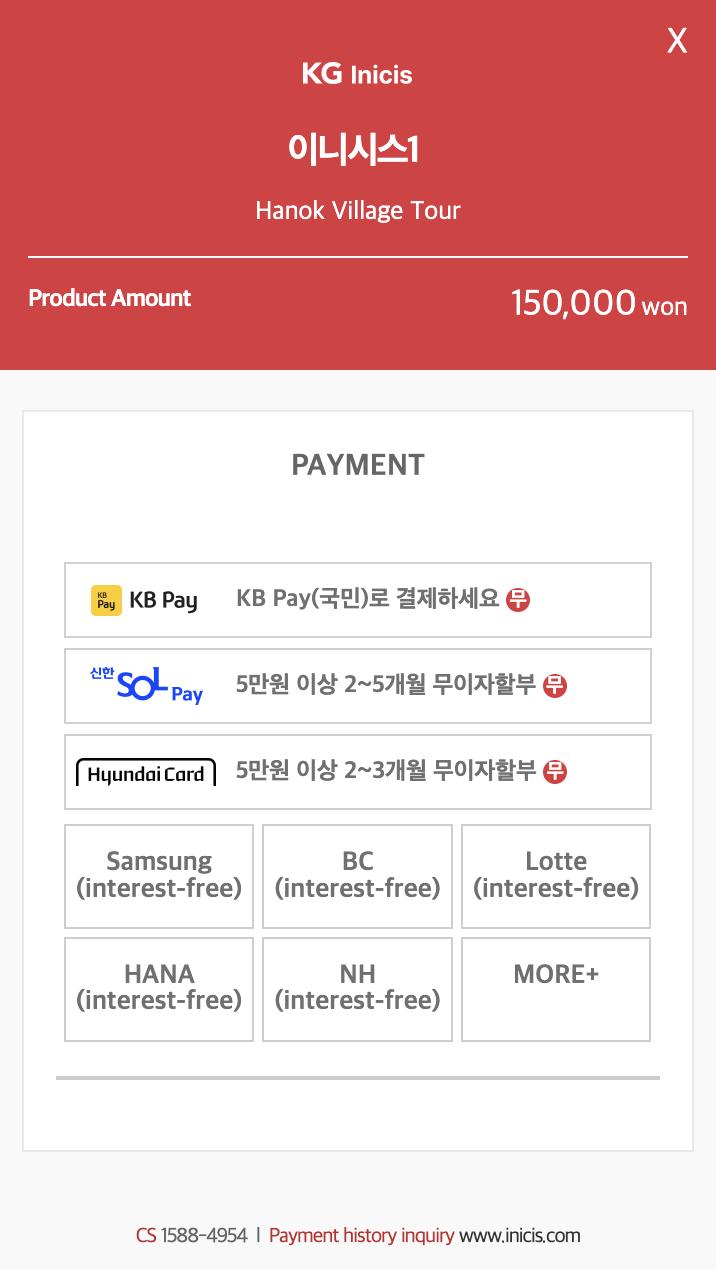
🖥️ 결과물

프론트 개발자 꿈꾸는 중