1. BeautifulSoup for web data
BeautifulSoup
- 텍스트형태의 html인 데이터를 request.text를 이용해 가져오고, 데이터에 원하는 html 태그를 추출할 수 있도록 도와준다.
=> 사이트 정보 추출
BeautifulSoup install
- conda install -c anaconda beautifulsoup4
- pip install beautifulsoup4
requests install
!pip install requestshtml 읽기
- prettify() : 들여쓰기가 포함되어 읽어드리기
1)
from bs4 import BeautifulSoup
page = open("파일명", "r").read()
print(page)

2)
page = open("파일명", "r").read()
soup = BeautifulSoup(page, "html.parser")
print(soup.prettify())
태그 확인하기
- 변수.head / 변수.body / 변수.p ...
- 찾는 태그 실행시 원하는 부분의 데이터를 확인할 수 있다.
- p 태그는 처음 발견한 태그만 반환한다.
find()
- find() : 찾고 싶은 태그의 속성값 찾기
- 파이썬의 예약어 피해서 작성하기
- text : text만 출력하기
- strip() : 공백 지우기
1)
soup.find("p")
2)
soup.find("p", class_="inner-text second-item")
3) dict
soup.find("p", {"class":"outer-text first-item"}).text.strip()
4) 다중 조건
soup.find("p", {"class" : "inner-text first-item", "id" : "first"})- find_all() : 여러개의 태그를 반환, list의 형태로 반환
1) 특정 태그 확인
soup.find_all(class_="outer-text")
2) 리스트 형태의 text 반환시 인덱스 설정
soup.find_all(id="pw-link")[0].text
select()
- find_all와 같은 속성
- select로 태그시 id -> #, class -> .으로 표현
- 단일 선택 : find(), select_one()
- 다중 선택 : find_all(), select()
text
- text를 보는 매서드
- text
- string
- get_text()
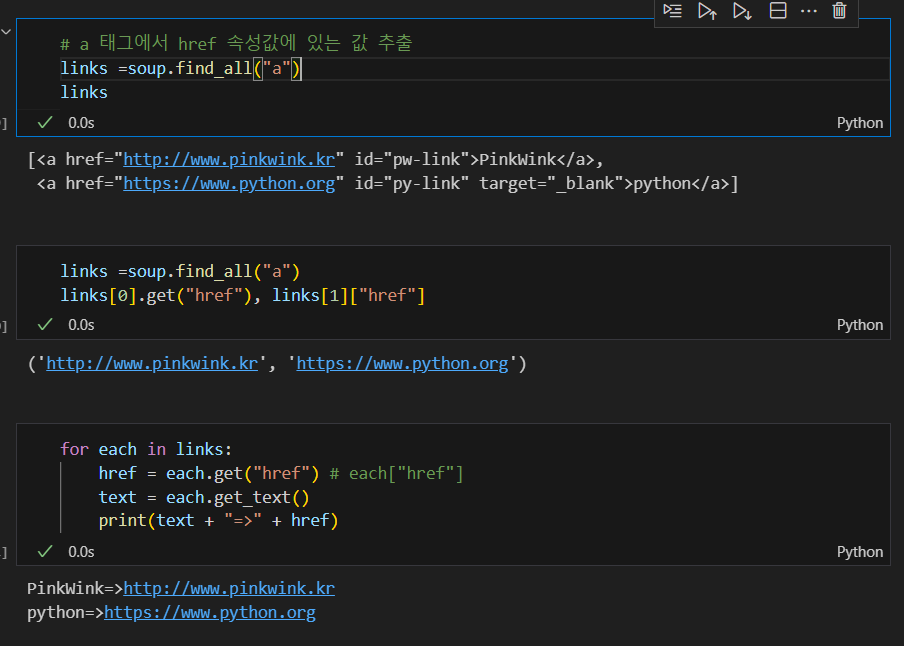
< a > 태그의 href 속성값에 있는 값 추출하기
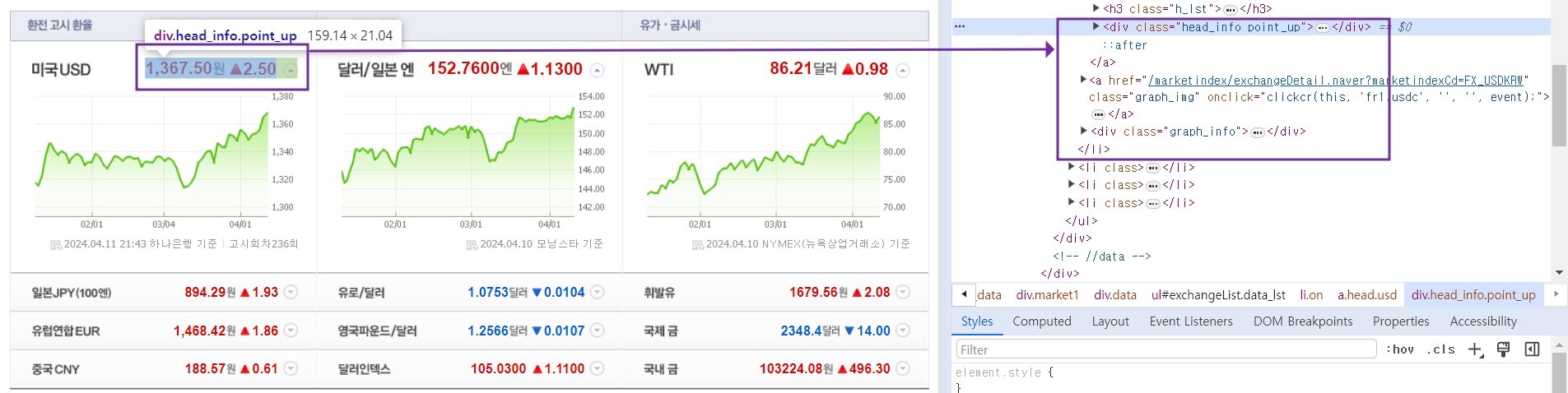
예제 1. 네이버 금융
환율 지표 확인하기
- 개발자 도구(f12)를 통해 html 데이터 확인하기
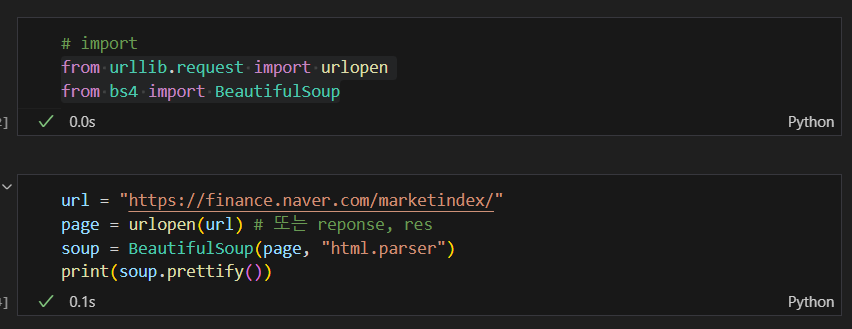
html 가져오기
+ import requests (from urllib.requests.Request)
- response = requests.get()
- requests.post()
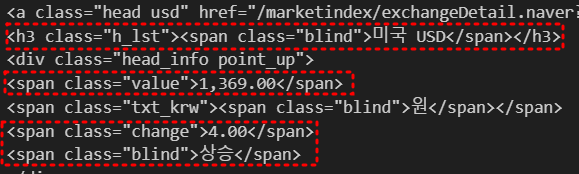
원하는 데이터 추출하기
* 모두 같은 반환을 하는 코드
soup.find_all("span", "value")
soup.find_all("span", class_="value")
soup.find_all("span", {"class":"value"})
text만 추출하기
* 모두 같은 반환을 하는 코드
soup.find_all("span", "value")[0].text,
soup.find_all("span", {"class":"value"})[0].string,
soup.find_all("span", {"class":"value"})[0].get_text()
추출한 데이터의 원하는 값 확인하기
- '>' : 해당 태그의 하위를 반환
exchangeList = soup.select("#exchangeList > li")
각 데이터의 해당하는 태그 반환하기
- head_info point_dn 띄어쓰기는 none 반환 : 띄어쓰기는 "." 으로 이어주기
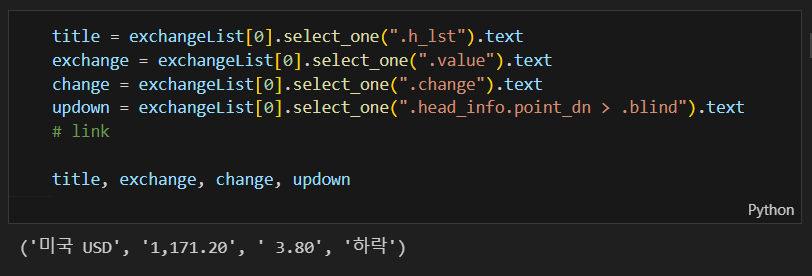
수동으로 link 만들기
baseUrl = "https://finance.naver.com"
baseUrl + exchangeList[0].select_one("a").get("href")
4개의 데이터 수집 후 excel로 저장하기
exchange_datas = []
baseUrl = "https://finance.naver.com"

for item in exchangeList:
    data = {
        "title": item.select_one(".h_lst").text,
        "exchnage": item.select_one(".value").text,
        "change": item.select_one(".change").text,
        "updown": item.select_one(".head_info.point_dn > .blind").text,
        "link": baseUrl + item.select_one("a").get("href")
    }
    exchange_datas.append(data)
df = pd.DataFrame(exchange_datas)
df.to_excel("./naverfinance.xlsx", encoding="utf-8")
예제 2. 위키백과 문서 정보 가져오기
- decode tool에서 url 변경가능
import urllib
from urllib.request import urlopen, Request

html = "https://ko.wikipedia.org/wiki/{search_words}"
# 글자를 URL로 인코딩
req = Request(html.format(search_words=urllib.parse.quote("여명의_눈동자")))
response = urlopen(req)
soup = BeautifulSoup(response, "html.parser")
print(soup.prettify())
“이 글은 제로베이스 데이터 취업 스쿨의 강의 자료 일부를 발췌하여 작성되었습니다.”

데이터 공부 기록