문제상황
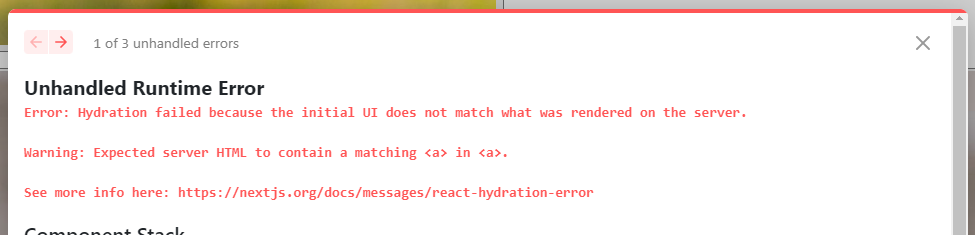
개발 중에 다음과 같은 오류가 났다. 오류를 읽어보니 초기 UI가 서버에서 렌더된 UI와 match가 되지 않아서 hydration에 실패했다고 한다.

Hydrate가 무엇인가?
간단하게 말하면 서버사이드에서 렌더링된 정적 페이지 위에 클라이언트사이드에서 번들링된 js코드를 re-rendering 하면서 서로 매칭되는 과정을 얘기한다.
내가 이해한 바로는 nextjs의 동작방식이 다음과 같다.
(= Next.JS에서 내부적으로 사용하는 ReactDOM.hydrate 함수 동작방식)
- 서버사이드에서 정적인 HTML을 렌더링한다. <- pre-rendering, initial UI
- 서버에서 받아온 DOM tree와 클라이언트사이드에서 렌더링한 tree를 비교한다.
(HTML요소, 순서 비교) - 두 tree 사이의 diff를 얻어서 어떤 DOM이 어떻게 매칭되는지 이해한다.
- 이해한 내용에 따라서 적절한 DOM 요소에 이벤트와 같은 동적인 것들을 채우면서 re-rendering한다.
따라서 이 오류는 pre-rendering된 DOM에서 클라이언트 사이드의 js파일에서 요구하는 DOM이 매칭되지 않아서 생기는 오류라는 결론을 내렸다.
공식문서를 보니 styled-components와 같은 css-in-js 라이브러리를 사용할 때도 hydrate과정에서 문제가 발생한다고 되어있다.
When css-in-js libraries are not set up for pre-rendering (SSR/SSG) it will often lead to a hydration mismatch
css-in-js 라이브러리가 CSR 처럼 동작하기 때문이다. 따라서 SSR방식을 사용하는 프레임워크에서 styled-components를 사용할 경우 styled-components가 서버사이드에서 렌더링 되도록 설정을 해줘야 한다.
해결방안1 - 실패
https://taenami.tistory.com/69
이 링크를 참고해서 styled-components가 SSR로 동작하게 설정하면 오류가 사라질거라고 생각했는데, 해결이 되지 않았다.
_document.tsx
import Document, { Html, Head, Main, NextScript } from 'next/document';
import { ServerStyleSheet } from 'styled-components';

export default class MyDocument extends Document {
  static async getInitialProps(ctx: any) {
    const { renderPage } = ctx;
    const initialProps = await Document.getInitialProps(ctx);

    // Step 1: Create an instance of ServerStyleSheet
    const sheet = new ServerStyleSheet();

    // Step 2: Retrieve styles from components in the page
    const page = renderPage(
      (App: any) => (props: any) => sheet.collectStyles(<App {...props} />)
    );

    // Step 3: Extract the styles as <style> tags
    const styleTags = sheet.getStyleElement();

    // Step 4: Pass styleTags as a prop
    return { ...initialProps, ...page, styleTags };
  }

  render() {
    const { styleTags } = this.props as any;

    return (
      <>
        <Html lang='ko-KR'>
          <Head>{styleTags}</Head>
          <body>
            <Main />
            <NextScript />
          </body>
        </Html>
      </>
    );
  }
}
해결방안2 - 성공
https://stackoverflow.com/questions/71706064/react-18-hydration-failed-because-the-initial-ui-does-not-match-what-was-render
구글링을 통해 stackoverflow의 여러 사례를 확인해보니 적절하지 않은 태그를 사용했을 때 next.js가 hydration에러를 낸다고 한다.
예를 들어서 다음과 같이 p태그 같은 inline 태그 안에 div와 같이 block 태그를 사용하는 것은 적절하지 않다.
 <p>
   inline태그
	<div>block태그</div>
 </p>
따라서 main 코드에서 태그가 적절하지 않은 부분을 찾았다. 가장 의심이 가는 코드는 다음과 같았다.
export function UserList() {
  const user_id = profile.email.split('@')[0];
  return (
    <ListBox>
      ...
      <LinkStyle href='/main' passHref fontSize={fontSize}>
        <IdLink>{user_id}</IdLink>
      </LinkStyle>
    </ListBox>
  );
}

const LinkStyle = styled(Link)<{ fontSize: string }>`
  display: inline;
  text-decoration: none;
  color: black;
  font-size: ${(props) => props.fontSize};
  font-weight: 600;
`;

const IdLink = styled.a`
`;
Link 태그 안에 styled-component를 이용해 custom한 a태그를 넣어 페이지 이동을 하게 만들어 놓았었다. Link의 href를 a태그에 연결해주기 위해서 passHref를 사용했다. 그런데 여기에 더 추가할 속성이 있었다.
현재 next.js 공식문서에는 다음과 같이 안내되어있다.
An
<a>element is no longer required as a child of<Link>. Add the legacyBehavior prop to use the legacy behavior or remove the<a>to upgrade.
따라서 legacyBehavior 속성을 추가해주면 hydration 관련 런타임 에러가 사라진다.
<LinkStyle href='/main' passHref legacyBehavior>
  <IdLink fontSize={fontSize}>{user_id}</IdLink>
</LinkStyle>

const LinkStyle = styled(Link)`
  display: inline;
`;

const IdLink = styled.a<{ fontSize: string }>`
  text-decoration: none;
  color: black;
  font-size: ${(props) => props.fontSize};
  font-weight: 600;
`;
참고링크
[nextJS 공식문서] https://nextjs.org/docs/messages/react-hydration-error
[nextJS 공식문서] https://nextjs.org/docs/pages/api-reference/components/link#legacybehavior
[nextJS 공식문서] https://nextjs.org/docs/pages/api-reference/components/link#if-the-child-is-a-custom-component-that-wraps-an-a-tag
[hydrate 개념 참고] https://helloinyong.tistory.com/315
[Next js + Styled-Components 셋팅] https://taenami.tistory.com/69