JavaScript
JavaScript - HTML DOM
HTML DOM은 브라우저가 HTML을 파싱해 노드(부모–자식) 트리로 만든 모델이며, 자바스크립트로 (element)요소를 선택/읽기/변경/추가/삭제할 수 있게 해주는 표준이다.
HTML DOM
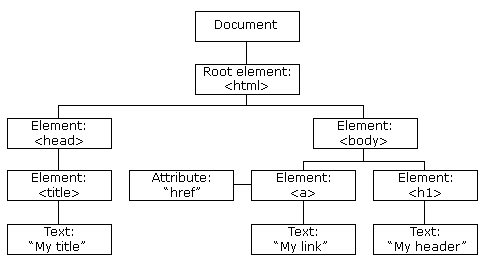 https://www.w3schools.com/js/js_htmldom.asp
- Document: 한 페이지 전체를 대표하는 루트 객체. (
window.document) - Node: DOM 트리의 모든 점(요소, 텍스트, 주석 등).
- Element: HTML 태그 노드(예:
<div>,<p>). 대부분 우리가 조작하는 대상.
요소 접근하기
// 1) ID로 1개 선택 (가장 빠르고 많이 씀)
const ex = document.getElementById('example');

// 2) 태그/클래스으로 "라이브 컬렉션" 얻기
const pList = document.getElementsByTagName('p');     // HTMLCollection
const items = document.getElementsByClassName('item'); // HTMLCollection

// 3) CSS 선택자
const one  = document.querySelector('.card');          // 첫 번째 요소 1개
const many = document.querySelectorAll('.card');       // 모든 card class ,NodeList(정적)
const secondH3 = document.querySelector('h3:nth-of-type(2)'); // 2번째 h3
컬렉션
HTMLCollection (라이브 실시간반영)
getElementsByTagName,getElementsByClassName등에서 반환- DOM이 바뀌면 즉시 반영됨(길이/내용 자동 업데이트)
- 태그로 이루어진 요소 노드만을 다룬다.
NodeList (대체로 정적)
-
querySelectorAll의 NodeList는 정적(DOM 변경 자동 미반영) -
childNodes가 반환하는 NodeList는 텍스트/주석/요소 모두 담고 라이브이다.
부모/자식 노드접근
const html = document.documentElement;
// 부모
html.parentNode;    // #document (문서 노드)
html.parentElement; // null (문서의 부모는 태그 요소가 아님 부모가 요소일대만 반환한다.)

// 자식
html.childNodes; // (NodeList) 텍스트/주석/요소 모두 포함
html.children;   // (HTMLCollection) "요소"만

// 형제/자식 편의 접근
element.firstElementChild;
element.lastElementChild;
element.previousElementSibling;
element.nextElementSibling;
노드 생성/추가/삭제
* 태그 요소/텍스트 생성 및 추가
// <li>green</li> 만들기
const newLi = document.createElement('li');
newLi.textContent = 'green';

const ul = document.getElementById('color');
ul.appendChild(newLi);                   // 마지막 자식으로 추가
* innerHTML로 추가 (HTML 포함 문자열을 넣을 때)
ul.innerHTML += '<li><strong>pink</strong></li>';
* textContent vs innerHTML
textContent: 문자 그대로 넣음(HTML 해석 X) → 빠르고 안전(XSS 위험 적음)innerHTML: 문자열을 HTML로 파싱한다. 즉 태그를 포함한다. 파싱하기에 속도가 느림→ 편하지만 성능/보안 주의 사용자 입력을 그대로innerHTML에 넣으면 태그를 입력받을수 있기에 보안상 위험하다
교체
// <li>green</li> --> <li>yellow</li>
const another = document.createElement('li');
another.textContent = 'yellow';
newLi.replaceWith(another);           // 교체
삭제
newLi.remove(); // 자기자신 제거
스타일 변경
const box = document.getElementById('box');

box.style.backgroundColor = 'red';
box.style.width = '100px';
box.style['margin-left'] = '30px';
위와 같이 box 라는 id 태그를 가진 요소에 접근하여 style을 바꿔줄수있다.
이벤트 핸들링
event는 마우스를 클릭하거나, 키보드를 누르는것 과 같이 일어나는 이벤트를 의미한다.
event가 발생할 때 특정함수를 호출해서 쓸 수있는데 이를 eventHandler 라고한다.
<button onclick="alert('click1')">클릭1 </button>
<button onclick="sayHello(2)">클릭2 </button>
<input id="txt1" type="text" />
<input id="txt2" type="text" />
function sayHello(num){
  alert('click' + num);
}

const input = document.getElementById('txt1');

input.addEventListener('click', () => sayHello(3));


const input2 = document.getElementById('txt2');
input2.addEventListener('keydown', (event) => {
  // text 창에 enter 키가 눌리면 enter! 경고창 출력된다.
  if (event.key === 'Enter') alert('enter!');
});

toddcanwell