알토르 8
1. Assistant API -> Response API
Response가 기존의 어이스턴스의 핵심기능( 파일검색 및 코드실행 등)을 포함하고 , API를 단순화하기위해 종료수순으로 돌린다고 하여 Resposnse API로 변경하였다.
기존의 복잡한 스레드/런관리가 사라짐. 요청에 tools 배열만 주면 파일검색(File search), 웹검색, 컴퓨터 사용 같은 내장 툴이 자동 호출한다.
- “Assistant 만들기/Thread 생성/Run 실행” 코드 → Responses 한 호출로 교체
- Vector store와 File Search 툴 이용
- 대화 이어가기 필요시 conversation Id 사용
openAI Storage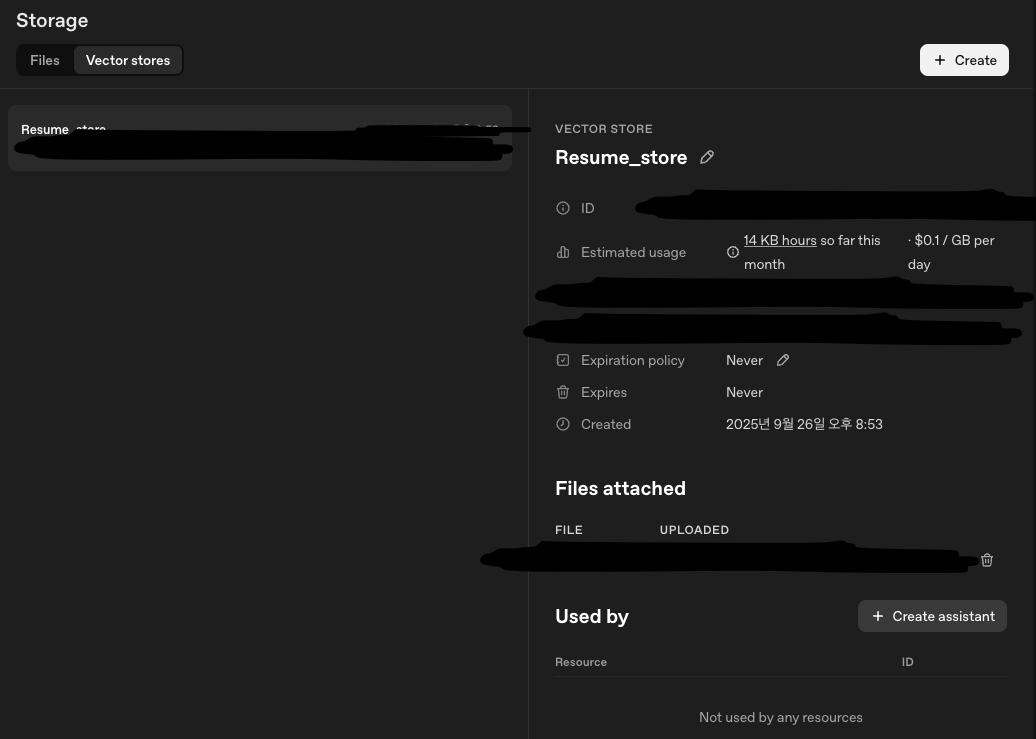
테스트 및 코드 변경사항
response API로 답변생성 해올때
list index out of range 에러와
파일조회를 못해오는 에러가 빈번했다.
#질문이 올려놓은 파일과 관련이 없을때 output 개수 1개
output=[ResponseOutputMessage(..., type='message')]

#질문이 파일과 관련일때 output 개수 2개
output=[ResponseFileSearchToolCall(..., type='file_search_call'), ResponseOutputMessage(..., type='message')]
코드변경사항
.env
VECTOR_STORE_ID=my_vector_store_idapp.py
def save_chat_to_mongodb(user_message, ai_response):
    """채팅 데이터를 MongoDB에 저장하는 함수"""
    if collection is None:
        return False

    try:
        chat_data = {
            "user_message": user_message,
            "ai_response": ai_response,
            "timestamp": datetime.now(),
            "created_at": datetime.now().isoformat()
        }

        result = collection.insert_one(chat_data)
        print(f"채팅 데이터 저장 성공! ID: {result.inserted_id}")
        return True

    except Exception as e:
        print(f"채팅 데이터 저장 실패: {e}")
        return False


@app.route("/sendMessage", methods=["POST"])
def send_message():
    """
    사용자 메시지를 받아서 OpenAI Response API + Vector Store로 응답을 반환하는 API 엔드포인트
    """
    try:
        # 클라이언트가 보낸 JSON 데이터를 파싱
        data = request.get_json()
        message = data.get('message', '')

        if not message:
            return jsonify({"error": "메시지가 없습니다."}), 400

        print(f"받은 메시지: {message}")

        # OpenAI Responses API 호출 (Vector Store와 함께)
        response = client.responses.create(
            model="gpt-4o",
            input=[
                {"role": "system", "content": "기본적인 gpt 모델처럼 행동해주시고, 이력서 관련 질문이 나오면 당신은 박건준에 대해 친근하고 자세하게 설명하는 AI 어시스턴트입니다. 업로드된 이력서 파일을 참고하여 정확한 정보를 제공해주세요. 한국어로 대답해주세요."},
                {"role": "user", "content": message}
            ],
            tools=[{
                "type": "file_search",
                "vector_store_ids": [VECTOR_STORE_ID]
            }] if VECTOR_STORE_ID else []
        )

        # 전체 응답 구조 확인
        # print(f"전체 응답 구조: {response}")

        # 응답 처리 - 메시지 타입에서 텍스트 추출
        # 이력서 관련있을시 output배열에 2개의 답변이 실린다. 툴호출과 메세지생성
        ai_response = ""
        for output in response.output:
            if hasattr(output, 'type') and output.type == 'message':
                ai_response = output.content[0].text
                break

        # 메시지 타입이 없으면 기본 처리
        if not ai_response:
            ai_response = "응답을 처리할 수 없습니다."


        print(f"AI 응답: {ai_response}")

        # MongoDB에 채팅 데이터 저장
        save_success = save_chat_to_mongodb(message, ai_response)

        # 클라이언트에게 성공 응답을 JSON 형태로 반환
        return jsonify({
            "success": True,
            "message": ai_response,
            "original_message": message,
            "saved_to_db": save_success
        })

    except Exception as e:
        print(f"에러 발생: {str(e)}")
        return jsonify({"error": f"서버 에러: {str(e)}"}), 500
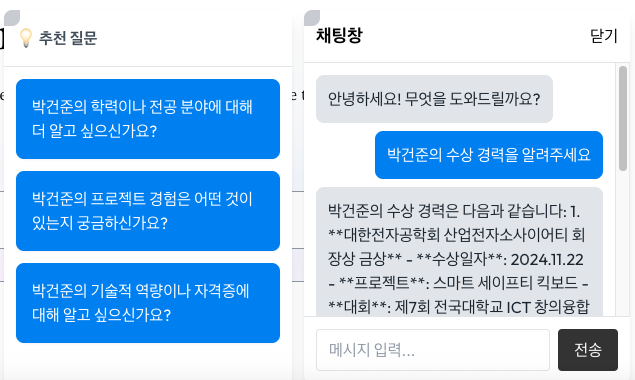
2. 채팅봇에 추천질문 리스트 추가
app.py 코드 수정
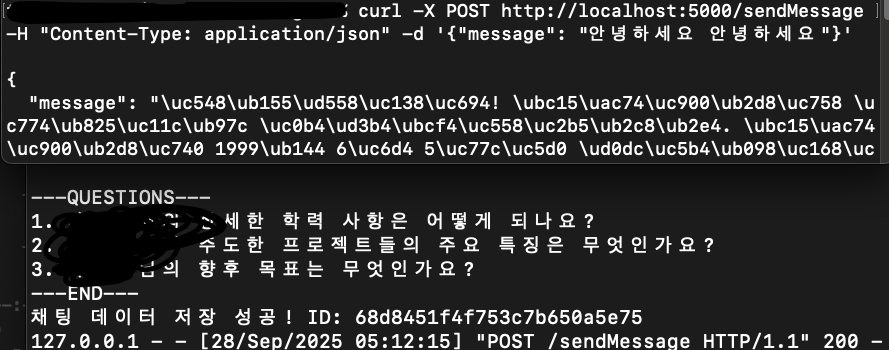
- 초기추천질문리스트 4개 생성 응답 API 추가
- openAI가 답변과 함께 추천질문 3개 생성
- 메세지와 추천질문을 분리하여 JSON 응답에 포함
/sendMessage 엔드포인트 처리함수 수정
#  ---QUESTIONS---,---END---사이로 추천질문생성요구
system_content = """ 나의 요구내용 ...
**중요: 답변 후에는 반드시 다음 형식으로 관련 추천질문 3개를 제공해주세요:**
---QUESTIONS---
1. 추천질문1
2. 추천질문2
3. 추천질문3
---END---"""

        response = client.responses.create(
            model="gpt-4o",
            input=[
                {"role": "system", "content": system_content},
                {"role": "user", "content": message}
            ],
            tools=[{
                "type": "file_search",
                "vector_store_ids": [VECTOR_STORE_ID]
            }] if VECTOR_STORE_ID else []
        )


        ai_response = ""
        for output in response.output:
            if hasattr(output, 'type') and output.type == 'message':
                ai_response = output.content[0].text
                break


        if not ai_response:
            ai_response = "응답을 처리할 수 없습니다."


        print(f"AI 응답: {ai_response}")

        # AI 응답에서 메시지와 추천질문 분리
        parsed_message, recommend_questions = parse_ai_response(ai_response)


        save_success = save_chat_to_mongodb(message, parsed_message)

        # 클라이언트에게 성공 응답을 JSON 형태로 반환
        return jsonify({
            "success": True,
            "message": parsed_message,
            "recommend_questions": recommend_questions,
            "original_message": message,
            "saved_to_db": save_success
        })
Ai 응답 메세지/추천질문 분리 함수 추가
def parse_ai_response(ai_response):

    try:
        if "---QUESTIONS---" in ai_response and "---END---" in ai_response:
            # 메시지와 추천질문 분리
            parts = ai_response.split("---QUESTIONS---")
            message = parts[0].strip()

            questions_part = parts[1].split("---END---")[0].strip()
            questions = []
            for line in questions_part.split('\n'):
                line = line.strip()
                if line and any(line.startswith(f'{i}.') for i in range(1, 4)):
                    question = line[2:].strip()  # "1. " 제거
                    if question:
                        questions.append(question)

            return message, questions[:3]  # 최대 3개만
        else:
            # 추천질문이 없으면 기본값
            return ai_response, []
    except Exception as e:
        print(f"AI 응답 파싱 실패: {e}")
        return ai_response, []
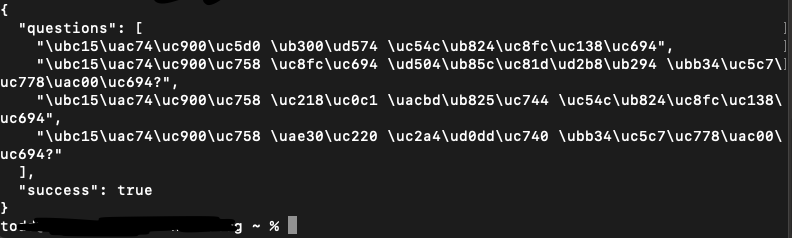
초기추천질문리스트 엔드포인트 생성
  @app.route("/getInitialQuestions", methods=["GET"])
def get_initial_questions():
    """처음 접속시 보여줄 추천질문"""
    initial_questions = [
        "이 사람에 대해 알려주세요",
        "이사람의 주요 프로젝트는 무엇인가요?",
        "이사람의 수상 경력을 알려주세요",
        "이사람의 기술 스택은 무엇인가요?"
    ]

    return jsonify({
        "success": True,
        "questions": initial_questions
    })
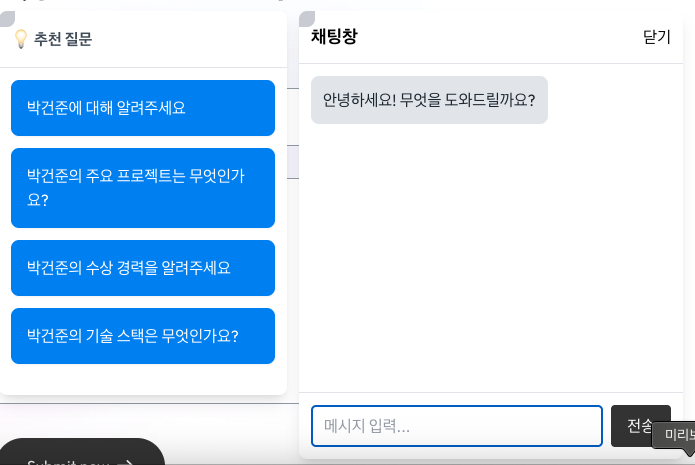
채팅창 코드 수정
- 첫접속 -> 초기추천질문가져오는 API 호출
- 질문 버튼 클릭 -> sendMessage()호출
- AI 답변과 새로운 추천질문리스트 응답
- 추천질문리스트 업데이트 및 버튼표시
const ChatWidget = ({ isDarkMode }) => {
  // 기존 state들...
  const [recommendQuestions, setRecommendQuestions] = useState([]);
  const [isFirstLoad, setIsFirstLoad] = useState(true);


  // 초기 추천질문 로드
  // useEffect로 초기 추천질문 가져오기
useEffect(() => {
  if (isFirstLoad) {
    fetchInitialQuestions();
    setIsFirstLoad(false);
  }
}, []);

const fetchInitialQuestions = async () => {
  try {
    const response = await fetch('https://api.toddcanwell.info/getInitialQuestions');
    const data = await response.json();
    if (data.success) {
      setRecommendQuestions(data.questions);
    }
  } catch (error) {
    console.error('초기 질문 로드 실패:', error);
  }
};

// sendMessage 함수 수정
const sendMessage = async (messageText = inputMessage) => {
  if (!messageText.trim()) return;

  const userMessage = { type: 'user', content: messageText };
  setMessages(prev => [...prev, userMessage]);
  setInputMessage('');
  setIsLoading(true);

  try {
    const response = await fetch('https://api.toddcanwell.info/sendMessage', {
      method: 'POST',
      headers: { 'Content-Type': 'application/json' },
      body: JSON.stringify({ message: messageText })
    });

    const data = await response.json();

    if (data.success) {
      setMessages(prev => [...prev, { type: 'bot', content: data.message }]);

      // 새로운 추천질문 업데이트
      if (data.recommend_questions && data.recommend_questions.length > 0) {
        setRecommendQuestions(data.recommend_questions);
      }
    } else {
      setMessages(prev => [...prev, { type: 'bot', content: '오류가 발생했습니다.' }]);
    }
  } catch (error) {
    console.error('API 호출 에러:', error);
    setMessages(prev => [...prev, { type: 'bot', content: '서버 연결에 실패했습니다.' }]);
  } finally {
    setIsLoading(false);
  }
};


//추천질문 버튼 컴포넌트
const handleRecommendClick = (question) => {
  sendMessage(question);
};


// 추천질문 버튼들 렌더링
 <div className="p-3 border-b">
                <span className="font-bold text-base text-gray-600">💡 추천 질문</span>
              </div>
              <div className="p-3 overflow-y-auto h-full">
                <div className="flex flex-col gap-3">
                  {recommendQuestions.map((question, index) => (
                    <button
                      key={index}
                      onClick={() => handleRecommendClick(question)}
                      className="text-left text-base p-4 bg-blue-500 hover:bg-blue-600 text-white rounded-lg transition-colors disabled:opacity-50 shadow-sm"
                      disabled={isLoading}
                    >
                      {question}
                    </button>
                  ))}
                </div>
              </div>
채팅창과 추천질문

toddcanwell