https://github.com/Ksr-ccb/Sparta-Chapter2
먼저 깃허브!!! 진짜 열심히 써서 제일 위에 올려본다 ^-^
Lv 1. 클래스 없이 기본적인 연산을 수행할 수 있는 계산기 만들기
목표
✅ 양의 정수(0 포함)를 입력받기
✅ 사칙연산 기호(➕,➖,✖️,➗)를 입력받기
✅ 위에서 입력받은 양의 정수 2개와 사칙연산 기호를 사용하여 연산을 진행한 후 결과값을 출력하기
✅ 반복문을 사용하되, 반복의 종료를 알려주는 “exit” 문자열을 입력하기 전까지 무한으로 계산을 진행할 수 있도록 소스 코드를 수정하기
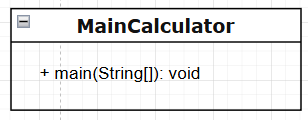
1단계는 따로 함수나 클래스 생성없이 메인함수에서 진행되도록 했다.
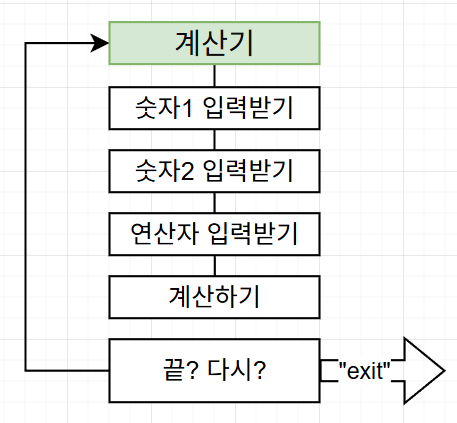
코드의 흐름은 이렇다
제일 먼저 숫자입력받는 것 부터 시작한다!!
코드 리뷰
전체 코드
package level1;

import java.util.InputMismatchException;
import java.util.Scanner;

public class MainCalculator {
    public static void main(String[] args){
        Scanner sc = new Scanner(System.in);
        int[] values = new int[2];
        boolean exitFlag = true;
        String str;

        while(exitFlag){
            for(int i = 0; i < 2; i++){
                System.out.println("연산을 진행할 "+ (i+1) +"번째 정수를 입력해주세요 : ");
                try{
                    values[i] = sc.nextInt();
                    if(values[i] < 0){
                        System.out.println("0 이상의 값만 입력이 가능해요.");
                        sc.nextLine();
                        i--;
                    }
                }catch (InputMismatchException e) {
                    System.out.println("정수 값을 입력해주세요!");
                    sc.nextLine();
                    i--;
                }
            }
            System.out.println(values[0] + "와" + values[1] + " 사이 계산할 사칙연산 기호를 정해주세요: ");
            char operator = sc.next().charAt(0);
            sc.nextLine();
            switch (operator){
                case '+':
                    System.out.println(values[0] + values[1]);
                    break;
                case '-':
                    System.out.println(values[0] - values[1]);
                    break;
                case '*':
                    System.out.println(values[0] * values[1]);
                    break;
                case '/':
                    if(values[1] != 0){
                        System.out.println(values[0] / values[1]);
                    }else {
                        System.out.println("나눗셈 연산에서 분모(두번째 정수)에 0이 입력될 수 없어요");
                    }
                    break;
                default:
                    System.out.println("사칙 연산 기호는 +,-,*,/만 사용가능해요.");
            }
            System.out.print("계산을 종료하시려면 'exit'를 입력해주세요 : ");
            str = sc.nextLine();
            if(str.equals("exit")){
                exitFlag = false;
                System.out.println("계산기를 종료합니다.");
            }
            else{
                System.out.println("입력된 값 : " + str);
                System.out.println("계산을 다시 시작합니다.");
            }
        }
        sc.close();
    }
}
사용 번수
        Scanner sc = new Scanner(System.in); //스캐너를 통해 입력
        int[] values = new int[2]; //입력받는 값은 정수니깐 int 배열로 설정
        boolean exitFlag = true; // 계산기 반복을 제어하는 플래그 설정
        String str; // 계산기 반복 여부를 물을 때 받아오는 스트링
입력받기
            for(int i = 0; i < 2; i++){
                System.out.println("연산을 진행할 "+ (i+1) +"번째 정수를 입력해주세요 : ");
                try{
                    values[i] = sc.nextInt();
                    if(values[i] < 0){
                        System.out.println("0 이상의 값만 입력이 가능해요.");
                        sc.nextLine();
                        i--;
                    }
                }catch (InputMismatchException e) {
                    System.out.println("정수 값을 입력해주세요!");
                    sc.nextLine();
                    i--;
                }
            }
반복문 제어하기
        boolean exitFlag = true;
        String str;
		while(exitFlag){
        ...
			System.out.print("계산을 종료하시려면 'exit'를 입력해주세요 : ");
            str = sc.nextLine();
            if(str.equals("exit")){
                exitFlag = false;
                System.out.println("계산기를 종료합니다.");
            }
            else{
                System.out.println("입력된 값 : " + str);
                System.out.println("계산을 다시 시작합니다.");
            }
        }
        sc.close();
트러블 슈팅
📌정수를 받는 타이밍에 스트링이나 연산자를 입력받으면 안됨.
Lv 2. 클래스를 적용해 기본적인 연산을 수행할 수 있는 계산기 만들기
목표
✅ 사칙연산을 수행 후, 결과값 반환 메서드 구현 & 연산 결과를 저장하는 컬렉션 타입 필드를 가진 Calculator 클래스를 생성
✅ Lv 1에서 구현한 App 클래스의 main 메서드에 Calculator 클래스가 활용될 수 있도록 수정
✅ App 클래스의 main 메서드에서 Calculator 클래스의 연산 결과를 저장하고 있는 컬렉션 필드에 직접 접근하지 못하도록 수정 (캡슐화)
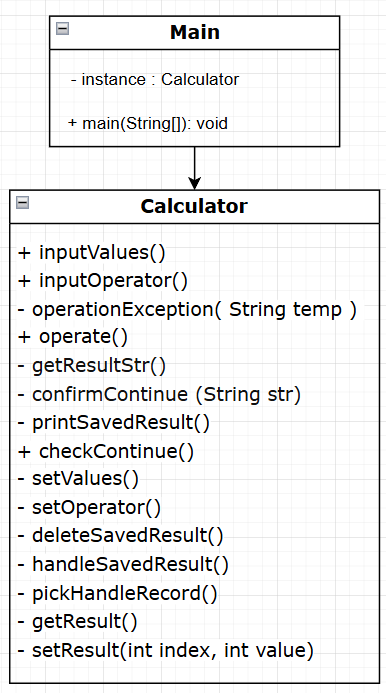
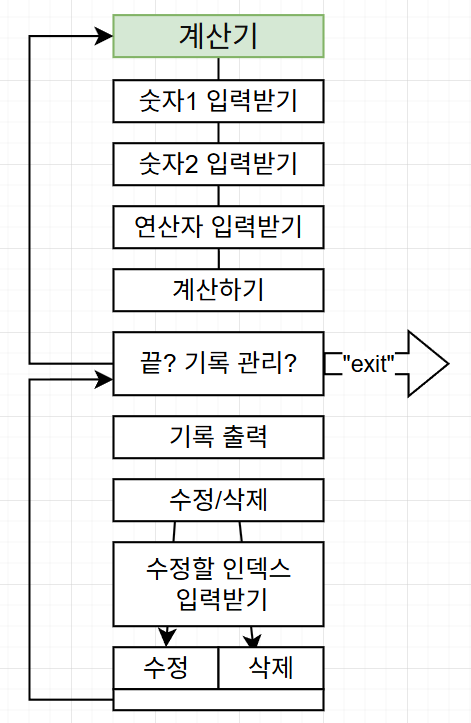
코드 리뷰
전체 코드
public class Main
package level2;
public class Main {
    public static void main(String[] args) {
        Calculator calculator = new Calculator();
        boolean exitFlag = true;
        while(exitFlag){
            calculator.inputValues(); // 계산할 정수 입력 받기
            calculator.inputOperator(); // 계산할 연산자 입력 받기

            //calculator.getResultStr();
            calculator.operate();//결과 출력

            exitFlag = calculator.checkContinue(); // 계산기 종료여부 + 누적 계산 결과 리스트 접근 여부
        }
    }
}
static으로 존재하는 메인함수내부에서 역할을 제어하는 정도만 남겨두고 많은 기능을 주고싶지 않았다. 😩
public class Calculator
이 클래스에서는 크게 연산자 입력과 계산 결과 관리 부분에 많이 관심ㅋㅋ을 주었다.
package level2;

import java.util.ArrayList;
import java.util.InputMismatchException;
import java.util.List;

public class Calculator {
    private String resultStr;
    private final List<Integer> savedResults= new ArrayList<>();
새로생긴 변수는 결과를 출력하기 위한 부분과 결과값들을 누적해주는 리스트 사용정도다.
🍰연산 받는 부분
메인함수에서는 inputOperator가 호출이된다.
1차적으로 입력받은 사칙연산 기호를 operationException 함수에서 유효성 검사를 실시한다.
연산 기호 입력 함수를
- 연산 기호 입력
- 입력된 연산 기호의 유효성 검사
두가지 함수로 쪼가른 것이다. (여기서 정해진 사칙연산이 아니면 else문과 함께 넘기도록 했다.)
    void inputOperator(){
        System.out.print(values[0] + "와" + values[1] + " 사이 계산할 사칙연산 기호를 정해주세요: ");
        String temp = sc.nextLine();

        if( operationException(temp)) {
            setOperator(temp.charAt(0));
            //operationException(temp);
        }else{
            System.out.println(operator + "은 유효한 연산 기호가 아니에요 ");
        }
    }

    boolean operationException(String temp) {
        if(temp.length() != 1){
            return false;
        }else{
            char operator = temp.charAt(0);
            return (operator == '+') || (operator == '-') || (operator == '*') || (operator == '/');
        }
    }
🍩계산기 재가동?여부?
마찬가지로 checkContinue()으로 입력을 받고 confirmContinue()에서 유효성 검사를 하는 것으로 역할을 나눴다.
     boolean confirmContinue(String str) {
        if(str.equalsIgnoreCase("exit")){
            System.out.println("계산기를 종료합니다.");
            sc.close();
            return false;
        }
        else{
            System.out.println("입력된 값 : " + str);
            System.out.println("계산을 다시 시작합니다.");
            return true;
        }
    }

    boolean checkContinue() {
        System.out.println("//////////////////////////////////////");
        System.out.println("계산기를 계속 진행하시겠습니까?");
        System.out.print("계산을 종료하시려면 'exit' , 누적 계산 결과를 출력하시려면 'total' 을 입력하세요 : ");
        String finishStr = sc.nextLine();

        if(finishStr.equalsIgnoreCase("total")){
            pickHandleRecord();
            return checkContinue();
        }else{
            System.out.println("//////////////////////////////////////");
            return confirmContinue(finishStr);
        }
    }
🍫계산 결과 관리
pickHandleRecord()->handleSavedResult()->deleteSavedResult()
ㄴ(printSavedResult())
이런식의 순차적 호출이 진행된다.
    void printSavedResult() {
        for (int i=0; i<savedResults.toArray().length; i++) {
            System.out.print("[" + i + "] :" + getResult(i) + ", ");
        }
    }


    void deleteSavedResult(int index){
        String totalStr;
        totalStr = sc.nextLine();
        if(totalStr.equalsIgnoreCase("delete")){ //int값이면
            try{
                System.out.println("처음 누적 결과값 " + getResult(index));
                savedResults.remove(index);
                System.out.println(" 을 삭제했어요");
            }catch (Exception e){
                System.out.println("누적 결과값을 삭제할 수 없어요.");
            }
        }
    }

    void handleSavedResult(int index) {
        System.out.print("수정할 값 혹은 'delete'를 입력하여 값을 변경할 수 있어요. 돌아가시려면 'back' 를 입력하세요 : ");

        String totalStr;
        totalStr = sc.nextLine();

        if(totalStr.matches("\\d+")){ //int값이면
            try{
                int value = Integer.parseInt(totalStr);
                setResult(index, value);
                System.out.println("수정을 완료했어요. 처음으로 돌아가겠습니다.");

            }catch (Exception e){
                System.out.println("누적 결과값을 불러올 수 없어요");
                System.out.println("에러 메시지 : " + e);
            }
        } else if (totalStr.equalsIgnoreCase("delete")){
            deleteSavedResult(index);
        } else if (totalStr.equalsIgnoreCase("back")){
        }else {
            System.out.println("유효하지 않은 입력이에요.");
            System.out.println("/////////////////////////////////////");
        }
    }

    void pickHandleRecord(){
        printSavedResult();
        System.out.print("수정/삭제 할 결과 값의 순서를 입력하시거나 (0부터시작), 돌아가시려면 'back' 를 입력하세요 : ");

        String totalStr;
        totalStr = sc.nextLine();

        if(totalStr.matches("\\d+")){ //int값이면
            try{
                int index = Integer.parseInt(totalStr);
                System.out.println( index + "번 째 결과값 " + getResult(index));
                handleSavedResult(index);
            }catch (Exception e){
                System.out.println("누적 결과값을 불러올 수 없어요");
                System.out.println("에러 메시지 : " + e);
            }
        } else if (totalStr.equalsIgnoreCase("back")){
        }else {
            System.out.println("유효하지 않은 입력이에요.");
            System.out.println("/////////////////////////////////////");
        }
    }
🍫계산 결과 관리 와 🍩계산기 재가동?여부? 구문은 서로서로 왔다갔다 하면서 호출이 가능하다.
트러블 슈팅
📌 함수입력이 들어가기전에 유효성 검사하기
-> 계산 진행이 안되는 상황을 함수 입력안에 들어가기전, 검사를 통해서 제거해주자
📌Exception (try -catch문) 이용해서 계산 오류로 나오는 예외 처리를 해주자
-> try문에는 정상적으로 계산값이 리턴됨
-> catch는 계산이 안되는 상황에서 뱉는 오류를 적어놓고 예외상황을 정리해줌
3. Enum, 제네릭, 람다 & 스트림을 이해한 계산기 만들기
목표
✅ 현재 사칙연산 계산기는 (➕,➖,✖️,➗) 이렇게 총 4가지 연산 타입으로 구성되어 있습니다.
✅ 실수, 즉 double 타입의 값을 전달 받아도 연산이 수행하도록 만들기
✅ 저장된 연산 결과들 중 Scanner로 입력받은 값보다 큰 결과값 들을 출력
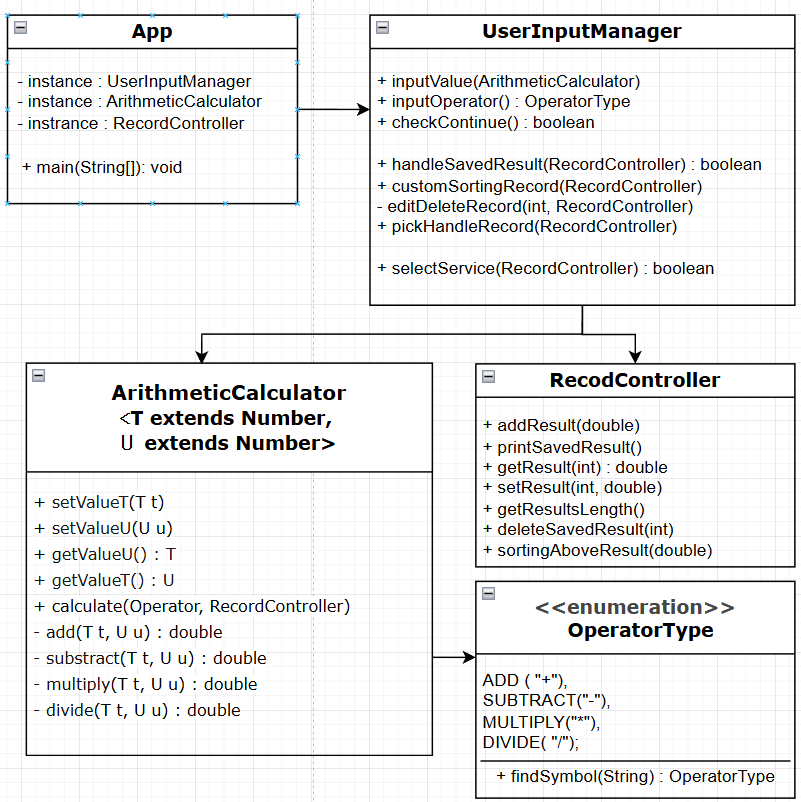
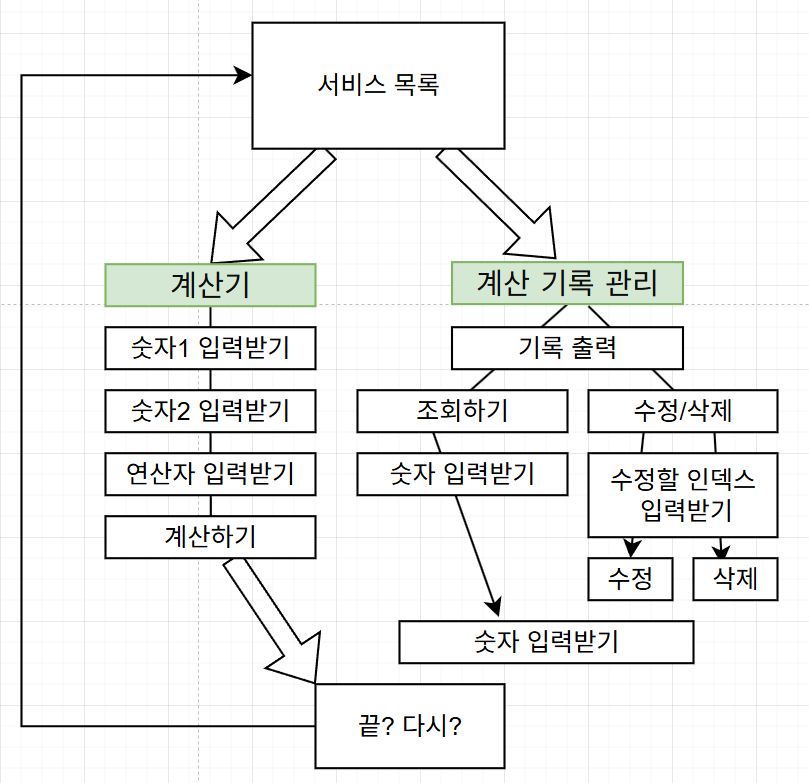
코드 리뷰
전체 코드
이부분은............... 코드를 다 올리기에는 양이 좀 많은 것 같아서 트러블 슈팅하면서 기재햇던 부분은 제외하고 엄....
마지막 트러블 슈팅 이후로 다듬은 부분 위주로 짚어보자
🍪 public class RecordController
    public void sortingAboveValue(double value){ //특정값 받으면 그 값 이상의 값들 삭제하기
        savedResults.stream() //읽기 전용으로 연다
                .filter(listValue -> listValue >= value).sorted() //파라미터 이상 값만 남기고, 그대로 오름차순 정렬
                        .forEach(listValue->{ //정렬된것들 for문돌려서
                            int index = savedResults.indexOf(listValue); //각각 인덱스 어딘지 알아내고
                            System.out.println("["+ index+ "]" + "번 째 : "+ listValue + ", "); //출력
                        });
    }
먼저 이 함수는 람다랑 스트림을 이용해보라는 요구사항을 충족하기 위해........................ 머리를 반나절 싸매서 만든 함수다...
.stream(), .filter(람다함수) << 이부분가뒤에 정렬, 람다형식의 foreach활용까지 해봤었다 .
아직까지는 이해가 잘 되지않아서 사용하려면 여러번 계속 써 봐야할 것같다.
그외에 🍪RecordController 은 많은 함수들이 throws/throw 학습에 희생이 되었다. 덕분에 사용법에 대해서 많이 익힐 수 있었음..
.
.
🍮 public class ArithmeticCalculator<T extends Number, U extends Number>
private static <T extends Number, U extends Number> double add(T a, U b) { ...
private static <T extends Number, U extends Number> double subtract(T a, U b) { ...
private static <T extends Number, U extends Number> double multiply(T a, U b) { ...
private static <T extends Number, U extends Number> double divide(T a, U b) { ...
여기서는 Integer + Double 형태를 유효하게 만들기 위해서 제네릭 클래스를 두개 받아줬다
하면서 제네릭 클래스에 대해 많은 고민을 할 수 이썽ㅆ음......................ArithmeticCalculator 클래스 자체는 역할이 크게없음.
안의 코드들은 크게 바뀌;ㄴ건없고 서로 클래스들이 주고받고 하는거랑 클래스의 역할을 확실하게 구분지으려고 하다보니 클래스가 3개(+enum) 가 되었따.
트러블 슈팅
📌 enum 상수에 특정 값을 연결 시킬 수 있음!
📌 제네릭 클래스 사용해보기
📌throw와 throws에 대해서
마치며
개인 과제 첫번쨰를 마무리하면서 느꼈던 점은
한 가지 기능에 너무 오래 붙잡으면서 질ㅈ리끌었던 적이 좀 있어서 아쉬웠다.
그렇다고 대충 다 만들고 넘어가자니 학습이 제대로되는건지 잘 모르겠고..,
그래도 조원들이랑 서로서로 봐주고 알려주고하면서 고등학교때로 돌아간 기분이다 (16조짱~)
내일 새로운 과제 키오스크였나.... 가 나올텐데
이부분에서는 어떻게 풀어나갈지 사실 아직 못정했다
똑같이 할 것 같은데 다음부분에는 오류처리 뭘 해야할지 감을 잡았으니 GUI부분에 꼭 손대보고싶다
굿