
MinIO 설정
MinIO 다운로드
wget https://dl.min.io/server/minio/release/linux-amd64/minio실행 권한 부여
chmod +x minio디렉터리 이동
sudo mv minio /usr/local/bin/데이터 저장 디렉터리 생성
sudo mkdir -p /mnt/data/minio소유권 부여
sudo chown -R $USER:$USER /mnt/data/minio서비스 파일 생성 및 작성
sudo vi /etc/systemd/system/minio.service[Unit]
Description=MinIO Object Storage Server
Documentation=https://docs.min.io
Wants=network-online.target
After=network-online.target
[Service]
User=dongik
Group=dongik
Environment="MINIO_ROOT_USER=dongik"
Environment="MINIO_ROOT_PASSWORD=P@ssw0rd"
ExecStart=/usr/local/bin/minio server /mnt/data/minio --console-address ":9001"
Restart=always
LimitNOFILE=65536
[Install]
WantedBy=multi-user.target- execStart의 /mnt/data/minio 는 데이터 저장 디렉터리 경로입니다.
- 기본 API 접근 포트는 9000입니다.
- 관리 UI는 9001 포트 입니다.
따라서 9000, 9001 방화벽 포트를 열어줍니다.
서비스 시작 및 활성화
sudo systemctl daemon-reload
sudo systemctl start minio
sudo systemctl enable minio
9001 포트로 접속
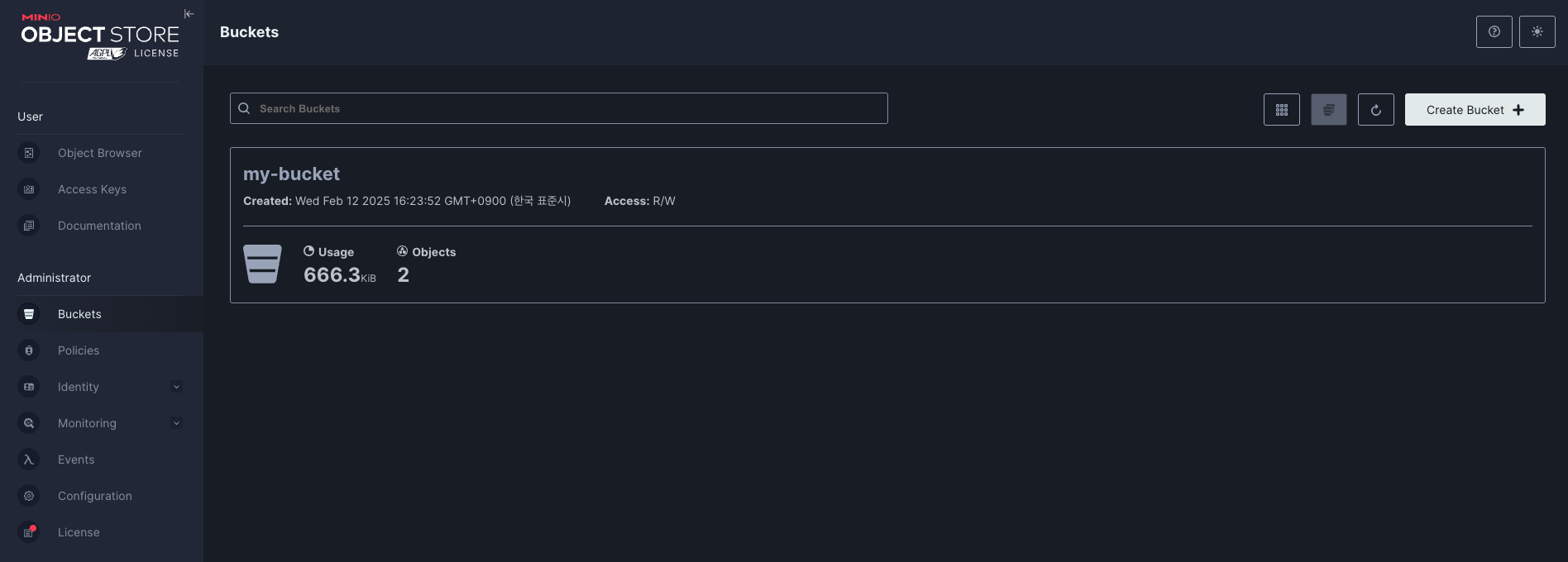
9001 포트로 접속하면 버킷을 생성하고 관리할 수 있는 UI가 보입니다.
SpringBoot와의 연동
해당 스프링부트는 연동 테스트를 위한 간단한 코드입니다.
MinioConfig
package com.example.demo.config;

import io.minio.MinioClient;
import org.springframework.beans.factory.annotation.Value;
import org.springframework.context.annotation.Bean;
import org.springframework.context.annotation.Configuration;

@Configuration
public class MinioConfig {

    @Value("${minio.url}")
    private String minioUrl;

    @Value("${minio.access-key}")
    private String accessKey;

    @Value("${minio.secret-key}")
    private String secretKey;

    @Bean
    public MinioClient minioClient() {
        return MinioClient.builder()
                .endpoint(minioUrl)
                .credentials(accessKey, secretKey)
                .build();
    }
}
FileController
import com.example.demo.service.MinioService;
import org.springframework.beans.factory.annotation.Autowired;
import org.springframework.http.HttpStatus;
import org.springframework.http.ResponseEntity;
import org.springframework.web.bind.annotation.*;
import org.springframework.web.multipart.MultipartFile;

@RestController
public class FileController {

    @Autowired
    private MinioService minioService;  // 반드시 MinioService 타입으로 주입되어야 합니다.

    @PostMapping("/upload")
    public ResponseEntity<?> uploadFile(@RequestParam("file") MultipartFile file) {
        try {
            String fileName = file.getOriginalFilename();
            // 파일 업로드
            minioService.uploadFile(
                    fileName,
                    file.getInputStream(),
                    file.getSize(),
                    file.getContentType()
            );
            // 업로드 후 pre-signed URL 생성
            String fileUrl = minioService.getPresignedUrl(fileName);
            return ResponseEntity.ok("파일 업로드 성공! 파일 접근 URL: " + fileUrl);
        } catch (Exception e) {
            e.printStackTrace();
            return ResponseEntity.status(HttpStatus.INTERNAL_SERVER_ERROR)
                    .body("업로드 실패: " + e.getMessage());
        }
    }
}
import io.minio.GetPresignedObjectUrlArgs;
import io.minio.MinioClient;
import io.minio.PutObjectArgs;
import io.minio.BucketExistsArgs;
import io.minio.MakeBucketArgs;
import io.minio.http.Method;
import org.springframework.beans.factory.annotation.Value;
import org.springframework.stereotype.Service;
import java.io.InputStream;
@Service
public class MinioService {
private final MinioClient minioClient;
@Value("${minio.bucket-name}")
private String bucketName;
public MinioService(MinioClient minioClient) {
this.minioClient = minioClient;
}
/**
* 파일 업로드 메서드
*
* @param objectName 업로드할 파일 이름
* @param stream 파일의 InputStream
* @param size 파일 크기
* @param contentType 파일의 MIME 타입
* @throws Exception 예외 발생 시
*/
public void uploadFile(String objectName, InputStream stream, long size, String contentType) throws Exception {
// Bucket 존재 여부 확인
boolean found = minioClient.bucketExists(
BucketExistsArgs.builder().bucket(bucketName).build()
);
// Bucket이 없으면 생성
if (!found) {
minioClient.makeBucket(
MakeBucketArgs.builder().bucket(bucketName).build()
);
}
// 파일 업로드
minioClient.putObject(
PutObjectArgs.builder()
.bucket(bucketName)
.object(objectName)
.stream(stream, size, -1)
.contentType(contentType)
.build()
);
}
/**
* 업로드된 파일의 pre-signed URL 생성
*
* @param objectName 파일의 이름
* @return pre-signed URL (예: 24시간 유효)
* @throws Exception 예외 발생 시
*/
public String getPresignedUrl(String objectName) throws Exception {
return minioClient.getPresignedObjectUrl(
GetPresignedObjectUrlArgs.builder()
.method(Method.GET)
.bucket(bucketName)
.object(objectName)
.expiry(24 * 60 * 60) // 24시간 (초 단위)
.build()
);
}
}application.properties
minio.url=http://localhost:9000

minio.access-key=dongik
minio.secret-key=P@ssw0rd

minio.bucket-name=my-bucket
Gradle
plugins {
	id 'java'
	id 'org.springframework.boot' version '3.4.2'
	id 'io.spring.dependency-management' version '1.1.7'
}

group = 'com.example'
version = '0.0.1-SNAPSHOT'

java {
	toolchain {
		languageVersion = JavaLanguageVersion.of(21)
	}
}

configurations {
	compileOnly {
		extendsFrom annotationProcessor
	}
}

repositories {
	mavenCentral()
}

dependencies {
	implementation 'io.minio:minio:8.5.17'
	implementation 'org.springframework.boot:spring-boot-starter-web'
	compileOnly 'org.projectlombok:lombok'
	annotationProcessor 'org.projectlombok:lombok'
	testImplementation 'org.springframework.boot:spring-boot-starter-test'
	testRuntimeOnly 'org.junit.platform:junit-platform-launcher'
}

tasks.named('test') {
	useJUnitPlatform()
}
to mist