01. MVC
1. 모델
1) 모델1
- 비즈니스로직에서는 안쓴다.
- 이미지같이 정적 처리할때만 쓴다.
- jsp에 html 다 있는것
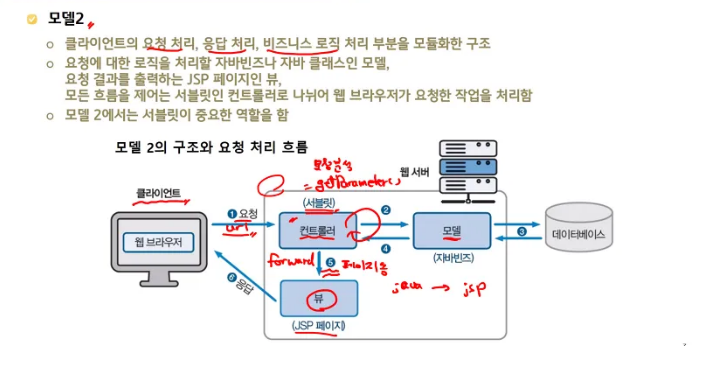
2) 모델2
- 컨트롤러
- 서블릿 에서 비즈니스 로직을 돌린다.
- 모델
- 결과가 모델객체에 나온다.
- write 써서, 출력하는 단계
- 근데 이것도 서블릿에서 하기 힘드니까 뷰로 페이지 이동시킨다.
- 뷰
- 응답을 한다.
- jsp페이지가 응답 한다.
- 컨트롤러에서 뷰로 가는 단계를 포워드라고 한다.
2. 모델2에서 컨틀로러 → 뷰 : 포워드
3. 포워딩
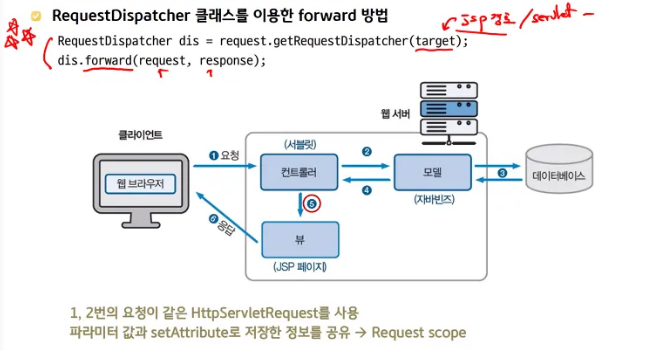
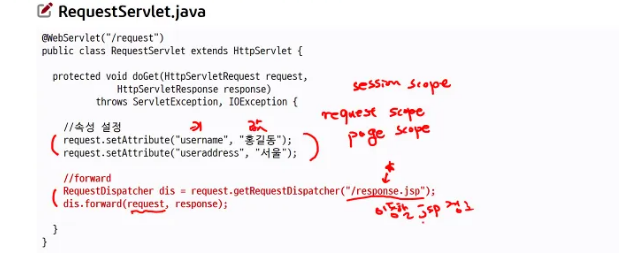
1) get요청 → forword 처리
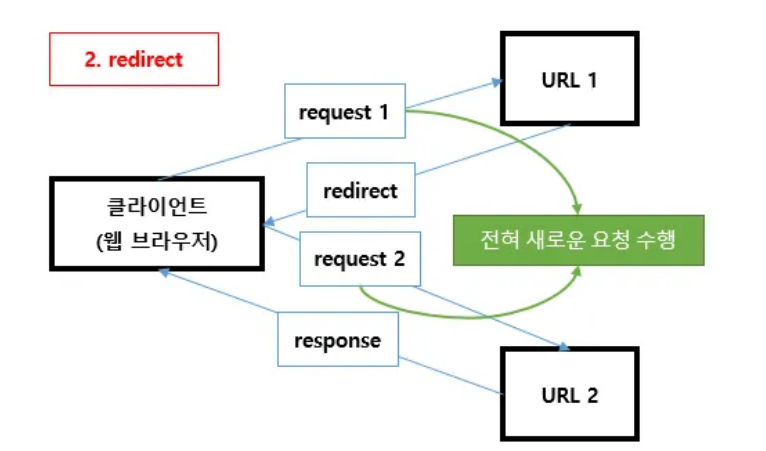
2) post요청 : redirect 처리
- 새로고침 때문이다.
- 삭제했는데, 새로고침하면 또 새로고침 해달라고 한다.
- 등록 요청시, post로 인서트 되었다 → 등록성공 메시지 받음 → 새로고침 → 똑같은 데이터 DB에 또 등록 된다.
- 근데 리다이렉트하면 → 거기로 이동하라
- 이동한곳에서 등록성공
- 첫번째 요청은 리다이렉트 post
- 리다이렉트로 간곳에서는 get요청
02. 스코프
1. 어플리케이션 스코프 : 서버레벨
- 모든 브라우저와 상관없이 항상 유지
- 서버가 기동되고, 종료될때까지 유지
- 브라우저가 껏다 켜져도 남아있다
- 새로 기동해도 남아있다.
- 전역변수
2. 세션 스코프
- 리퀘스트가 바뀌어도 쓸 수 있다.
3. 리퀘스트 스코프
- 서버와 jsp
4. 페이지 스코프
- 지역변수
- 제일 범위가 좁다
03. 오후수업
1. 스토리지
로컬 스토리지
- 영속성이 있다
- 다른 탭에 가도 있다.
- 브라우저 닫았다가 다시 켜도 있다
세션 스토리지
- 다른 탭 가면 사라짐
- 브라우저 닫으면 다 없어짐
쿠키
- 세션과 같음
브라우저에 상태 저장 가능하다.
- 로컬 스토리지에서 수정 가능
- 하지만 수정이 가능해서 보안에 좋지 않다.
- 클라이언트는 보안이 취약
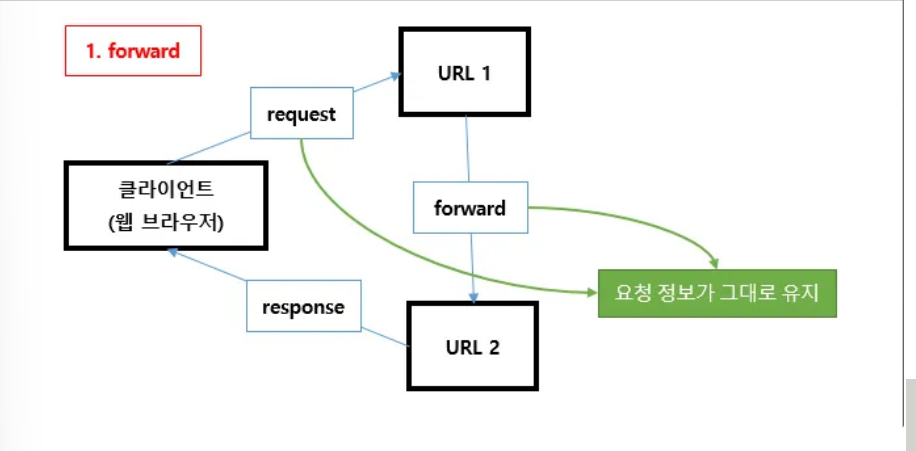
2. 포워드
- 포워드의 주체는 서버이기때문에,
- 서버는 응답을 브라우저에게 보내는게 아니라, 서버한테 보낸다.
-
그래서 상태가 유지가 된다.
예시) 내선 전화 옆자리로 돌려주는 그런 로직
-
3. 리다이렉트
- 예시, 구청에 전화 거세요
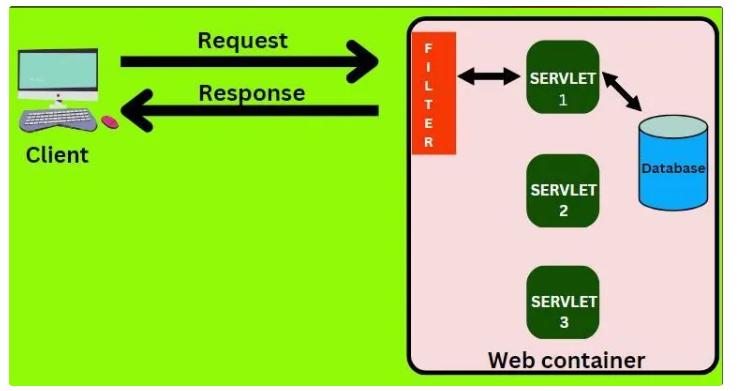
4. 필터
5. 문제풀이
- 쿠키로 리다이렉션 바로 보이게 하는 방법
package org.scoula.ex04;

import javax.servlet.*;
import javax.servlet.http.*;
import javax.servlet.annotation.*;
import java.io.IOException;
import java.io.PrintWriter;

    @WebServlet("/response_redirect")
public class ResponseRedirectServlet extends HttpServlet {
//    @Override
    protected void doGet(HttpServletRequest request, HttpServletResponse response) throws ServletException, IOException {

//        // 세션 가져오기
//        HttpSession session = request.getSession(false); // 기존 세션이 없으면 null 반환
//
//        String username = null;
//        String useraddress = null;
//
//        if (session != null) {
//            // 세션에서 데이터 읽기
//            username = (String) session.getAttribute("username");
//            useraddress = (String) session.getAttribute("useraddress");
//        }
        // 쿠키 배열 가져오기
        Cookie[] cookies = request.getCookies();
        String username = null;
        String useraddress = null;

        if (cookies != null) {
            for (Cookie cookie : cookies) {
                if ("username".equals(cookie.getName())) {
                    username = cookie.getValue();
                } else if ("useraddress".equals(cookie.getName())) {
                    useraddress = cookie.getValue();
                }
            }
        }
//        String username = (String) request.getAttribute("username");
//        String useraddress = (String) request.getAttribute("useraddress");

        // 속성 설정
        request.setAttribute("username",username );
        request.setAttribute("useraddress",useraddress );

        //forward
        RequestDispatcher rd = request.getRequestDispatcher("/redirect_response.jsp");
        rd.forward(request, response);
    }
}
package org.scoula.ex04;
import javax.servlet.*;
import javax.servlet.http.*;
import javax.servlet.annotation.*;
import java.io.IOException;
import java.io.PrintWriter;
@WebServlet("/request_redirect")
public class RequestRedirectServlet extends HttpServlet {
@Override
protected void doGet(HttpServletRequest request, HttpServletResponse response) throws ServletException, IOException {
// 세션 생성
// HttpSession session = request.getSession();
//
// // 세션에 데이터 저장
// session.setAttribute("username", "Dayae");
// session.setAttribute("useraddress", "YoungIn");
// 쿠키 생성
Cookie usernameCookie = new Cookie("username", "Dayae");
Cookie useraddressCookie = new Cookie("useraddress", "YoungIn");
// 쿠키의 유효 기간 설정 (초 단위)
usernameCookie.setMaxAge(60 * 60); // 1시간
useraddressCookie.setMaxAge(60 * 60); // 1시간
// 쿠키를 응답에 추가
response.addCookie(usernameCookie);
response.addCookie(useraddressCookie);
// // 속성 설정
// request.setAttribute("username","Dayae" );
// request.setAttribute("useraddress","YoungIn" );
// redirect
response.sendRedirect("response_redirect");
}
// @Override
// protected void doPost(HttpServletRequest request, HttpServletResponse response) throws ServletException, IOException {
// doGet(request, response);
//
// }
}톰캣의 관리자 버전으로 들어가는 방법
C:\apache-tomcat-9.0.91\conf 에서 tomcat-users.xml 들어가서 아이디랑 비번 설정
http://localhost:8080/manager/html 브라우저에서 들어감
- 활성화된 세션 수 알 수 있다.
- 세션안에 있는 내용도 볼 수 있다.

혼자 보려고 만든 기록장 | 또또는 귀여워 🐈⬛