pub.dev 사이트 에서 http 검색 후 사용
main.dart
import 'package:flutter/material.dart';
import 'package:flutter_http/model/test_model.dart';
import 'package:http/http.dart';

void main() {
  runApp(const MyApp());
}

class MyApp extends StatelessWidget {
  const MyApp({super.key});

  // This widget is the root of your application.
  @override
  Widget build(BuildContext context) {
    return MaterialApp(
      home: ExParsing(),
    );
  }
}

List<Test> list1 = [];

class ExParsing extends StatelessWidget {
  const ExParsing({super.key});

  //통신 하는 코드
  Future<List<Test>> getInfo() async {
    //1. 통신 할 url 작성
    String url = "https://jsonplaceholder.typicode.com/users";
    //2. get/ post 방식으로 통신
    //2.1 매개변수 Uri.parse(주소)

    //Future<Response>
    //Response로 받아주는 이유 : 궁극적으로 get 결과 값은 Response
    //임시적으로는 Future -> Response로 바뀔 때 까지 '기다려라' ->await
    // await를 사용하기 위해서는 해당 메소드가 async 메소드
    // ㄴ 메소드 명 옆에 async 작성하면 끝!
    Response res = await get(Uri.parse(url));

    //200 , 400, 500
    print(res.statusCode);
    //body - json 내용을 가지고 올 수 있다!
    print(res.body); // 특이점! - String

    list1 = testFromJson(res.body);
    print(list1[0].name);
    print(list1[0].email);
    //city
    print(list1[0].address.city);

    return list1;
  }

  @override
  Widget build(BuildContext context) {
    getInfo();
    return Scaffold(
      body: SafeArea(
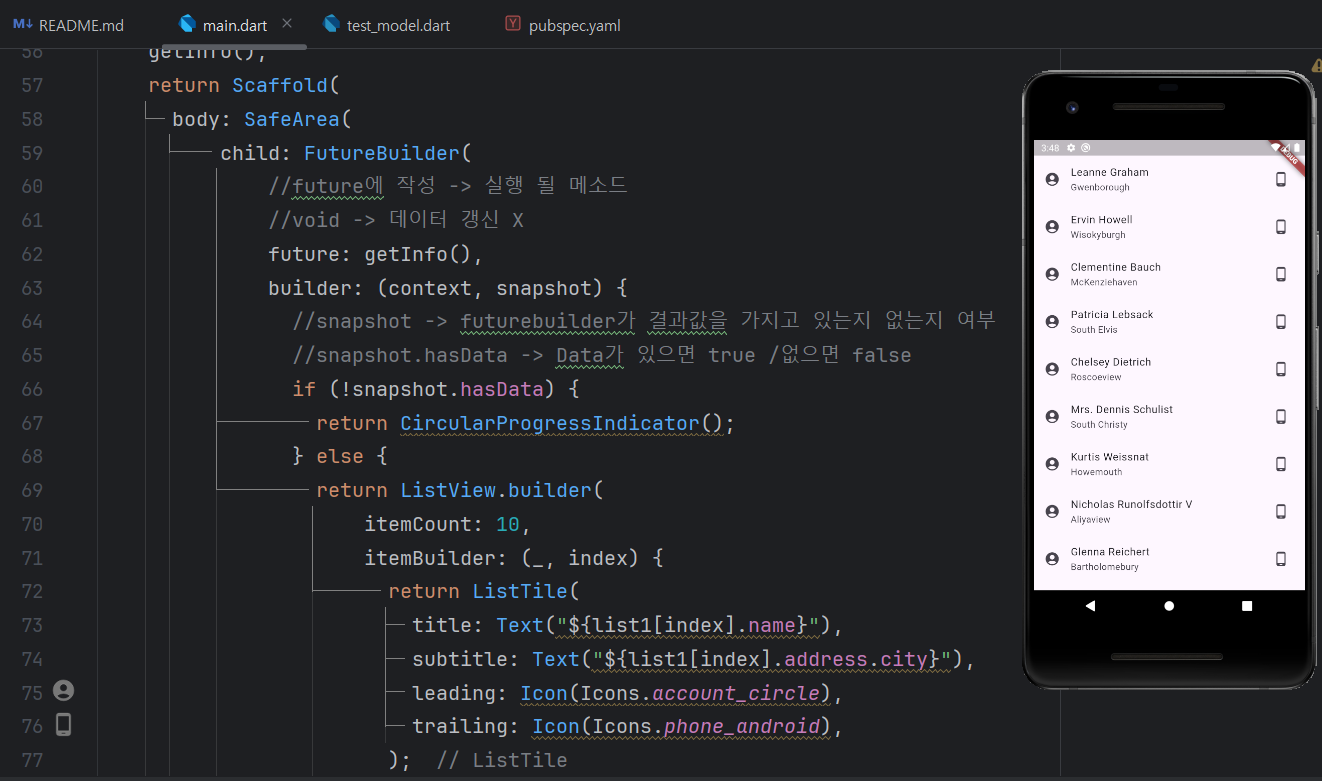
          child: FutureBuilder(
              //future에 작성 -> 실행 될 메소드
              //void -> 데이터 갱신 X
              future: getInfo(),
              builder: (context, snapshot) {
                //snapshot -> futurebuilder가 결과값을 가지고 있는지 없는지 여부
                //snapshot.hasData -> Data가 있으면 true /없으면 false
                if (!snapshot.hasData) {
                  return CircularProgressIndicator();
                } else {
                  return ListView.builder(
                      itemCount: 10,
                      itemBuilder: (_, index) {
                        return ListTile(
                          title: Text("${list1[index].name}"),
                          subtitle: Text("${list1[index].address.city}"),
                          leading: Icon(Icons.account_circle),
                          trailing: Icon(Icons.phone_android),
                        );
                      });
                }
              })),
    );
  }
}
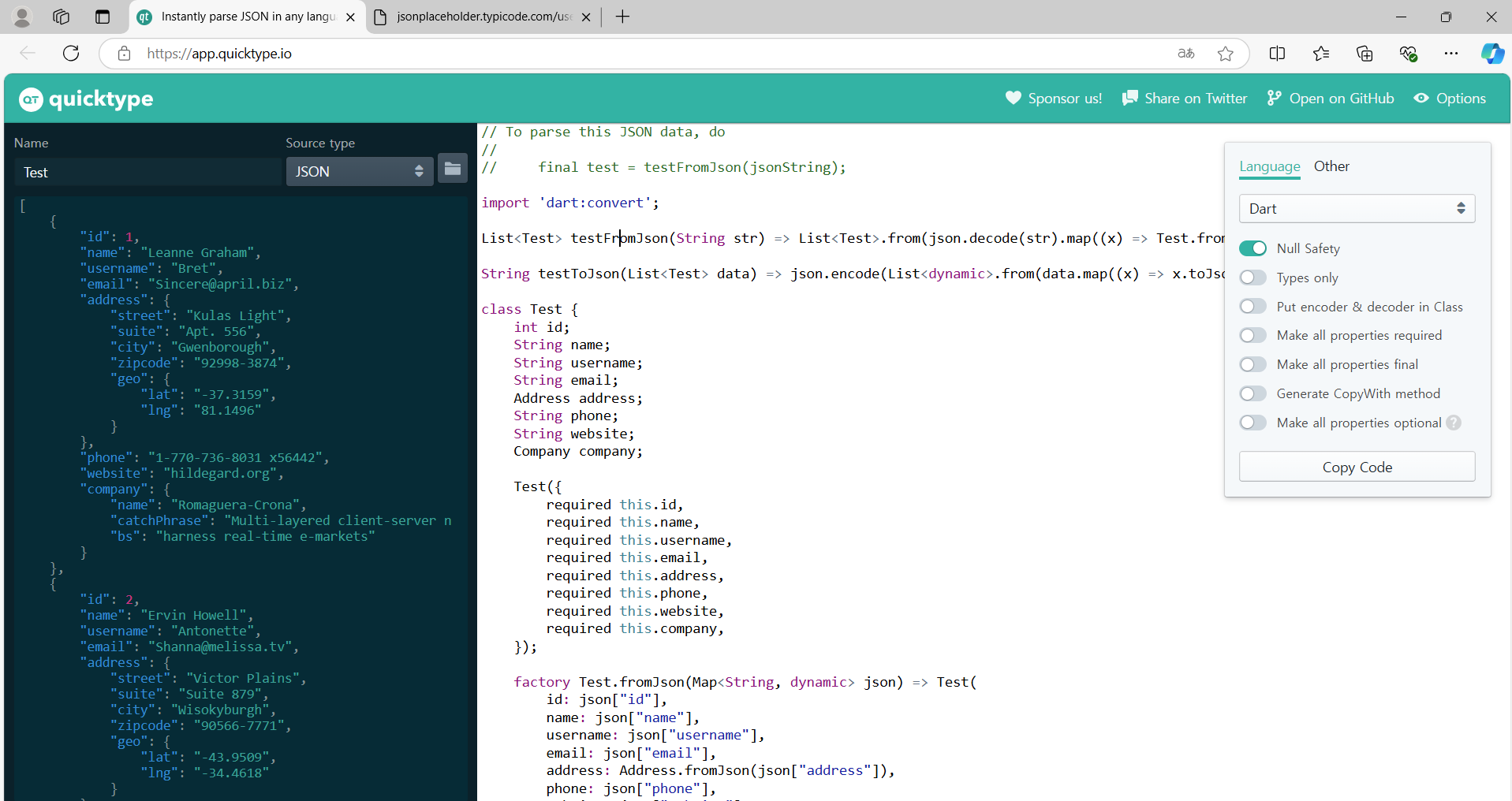
https://app.quicktype.io/
Json 형식을 모델링 해주는 사이트
test_model.dart
// To parse this JSON data, do
//
//     final test = testFromJson(jsonString);

import 'dart:convert';

List<Test> testFromJson(String str) =>
    List<Test>.from(json.decode(str).map((x) => Test.fromJson(x)));

String testToJson(List<Test> data) =>
    json.encode(List<dynamic>.from(data.map((x) => x.toJson())));

class Test {
  int id;
  String name;
  String username;
  String email;
  Address address;
  String phone;
  String website;
  Company company;

  Test({
    required this.id,
    required this.name,
    required this.username,
    required this.email,
    required this.address,
    required this.phone,
    required this.website,
    required this.company,
  });

  factory Test.fromJson(Map<String, dynamic> json) => Test(
        id: json["id"],
        name: json["name"],
        username: json["username"],
        email: json["email"],
        address: Address.fromJson(json["address"]),
        phone: json["phone"],
        website: json["website"],
        company: Company.fromJson(json["company"]),
      );

  Map<String, dynamic> toJson() => {
        "id": id,
        "name": name,
        "username": username,
        "email": email,
        "address": address.toJson(),
        "phone": phone,
        "website": website,
        "company": company.toJson(),
      };
}

class Address {
  String street;
  String suite;
  String city;
  String zipcode;
  Geo geo;

  Address({
    required this.street,
    required this.suite,
    required this.city,
    required this.zipcode,
    required this.geo,
  });

  factory Address.fromJson(Map<String, dynamic> json) => Address(
        street: json["street"],
        suite: json["suite"],
        city: json["city"],
        zipcode: json["zipcode"],
        geo: Geo.fromJson(json["geo"]),
      );

  Map<String, dynamic> toJson() => {
        "street": street,
        "suite": suite,
        "city": city,
        "zipcode": zipcode,
        "geo": geo.toJson(),
      };
}

class Geo {
  String lat;
  String lng;

  Geo({
    required this.lat,
    required this.lng,
  });

  factory Geo.fromJson(Map<String, dynamic> json) => Geo(
        lat: json["lat"],
        lng: json["lng"],
      );

  Map<String, dynamic> toJson() => {
        "lat": lat,
        "lng": lng,
      };
}

class Company {
  String name;
  String catchPhrase;
  String bs;

  Company({
    required this.name,
    required this.catchPhrase,
    required this.bs,
  });

  factory Company.fromJson(Map<String, dynamic> json) => Company(
        name: json["name"],
        catchPhrase: json["catchPhrase"],
        bs: json["bs"],
      );

  Map<String, dynamic> toJson() => {
        "name": name,
        "catchPhrase": catchPhrase,
        "bs": bs,
      };
}
quicktype

개발자