
들어가며: 왜 Kotlin Monorepo인가?
흔하게 아는 것처럼 React Native, Flutter와 같은 크로스플랫폼으로 Android, iOS를 구현하는데 AI 덕분에 러닝 커브가 완화되었다고 생각한다. 하지만 Android 개발 위주로 해온 사람 입장에서는 Kotlin으로 구현할 수 있다는 사실만큼 귀가 솔깃해지는 것은 없다.
더군다나 서버 프레임워크 중 하나인 Ktor를 이용해서 클라이언트와 서버를 하나의 모노 레포에서 관리할 수 있으면 공유할 수 있는 부분들이 많아지면서 빠르게 여러 개의 앱을 찍어내야하는 상황에서는 유리할 수도 있겠다라는 가정에서 출발했다.
그래서 Kotlin으로 비즈니스 로직, UI, DTO까지 공유한다면 절대적인 코드의 양이 줄어들면서 해당 기술이 안정된다면 AI로 레버리지할 수 있는 영역이 더 많아질 것이라는 생각을 갖고 있다.

근데 Java 시절 그 슬로건이랑은 좀 다르다.
1995년도에 Java가 출시되면서 내세운 밈이 되어버린 마케팅 슬로건이다. 그 당시에는 한 번 Java로 코드를 작성하면 JVM이 설치된 어떤 플랫폼에서도 재컴파일 없이 동일하게 실행된다는 뜻이다.
하지만 밈이 되어버린 이유는 Windows, Linux 운영체제에서 파일 경로 구분자, 줄 바꿈 등등 플랫폼별 디버깅이 필수였기 때문이다.
Java는 이상주의적 철학을 내세웠고 KMP는 그런 행보를 가진 않았다. 원래 프로그래밍에서는 절대라는 것은 없다고 누가 말해주셨는데 그 말이 맞는 것 같다. 필요한 것은 필요할 때, 개발자의 시간이 곧 리소스이다.
Kotlin Multiplatform의 철학은 100% 코드 공유가 아니라, 공유할 수 있는 것만 공유하자는 것이다. 굉장히 실용적인 접근이라고 생각한다. 이 템플릿이 목표로 하는 구조는 이렇다:
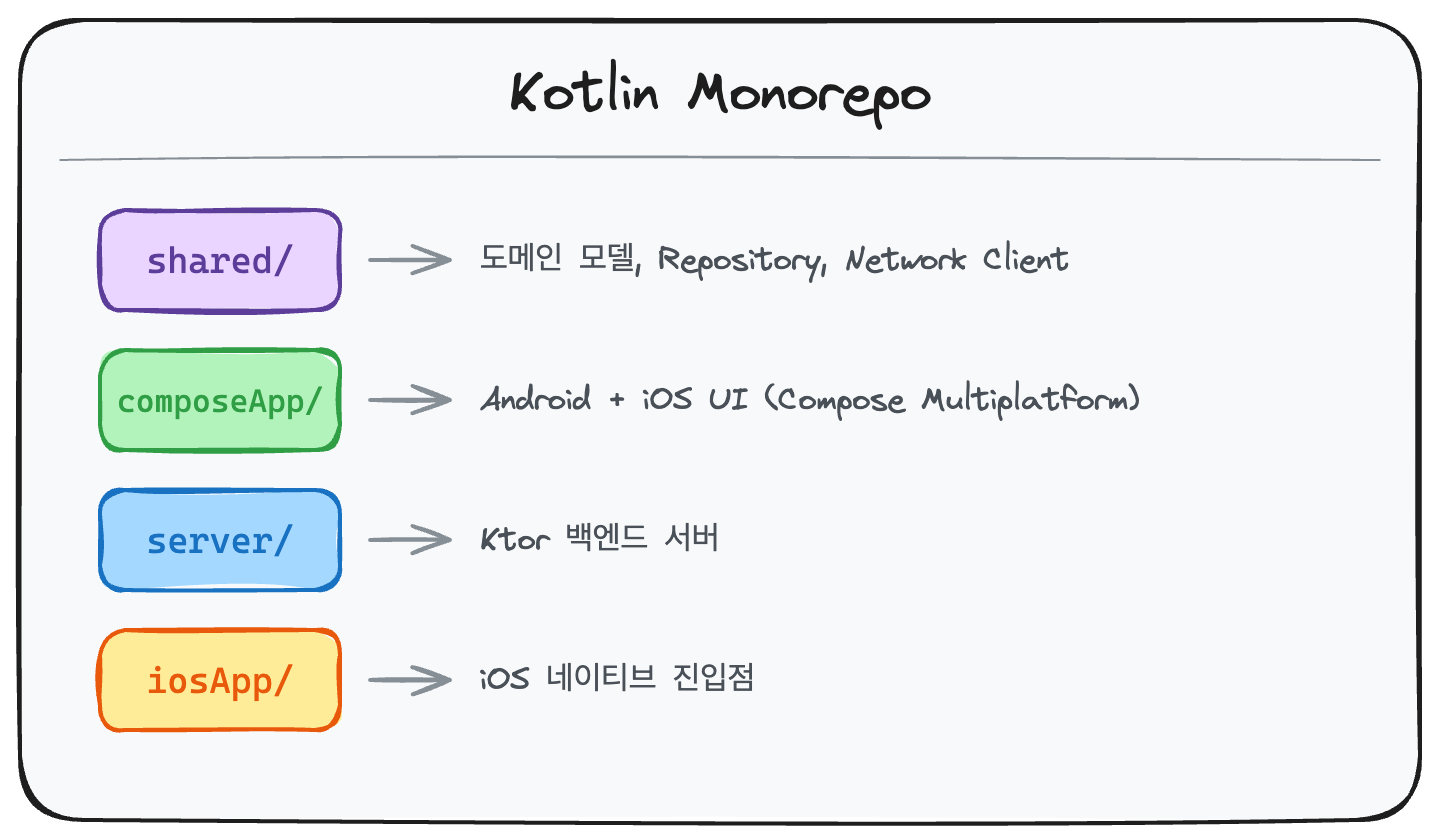
2. 기술 스택 선정과 그 이유
2.1 기술 스택 비교
Ktor vs Spring Boot
Spring Boot를 안 쓴 이유가 있다.
// Spring Boot - JVM 전용이고, 리플렉션 기반이라 무겁다
@RestController
class UserController(@Autowired val service: UserService) {
    @GetMapping("/users")
    fun getUsers() = service.getAllUsers()
}

// Ktor - 순수 Kotlin이고, 코루틴 네이티브라 가볍다
fun Route.userRoutes(userService: UserService) {
    get("/api/users") {
        val users = userService.getAllUsers()  // suspend 함수
        call.respond(users)
    }
}
Ktor의 장점을 정리하자면:
shared모듈에서 만든 DTO를 그대로 가져다 쓸 수 있다- 코루틴 기반이라 서버랑 클라이언트가 같은 비동기 패턴을 쓴다
- Cold Start가 빨라서 서버리스 환경에서 특히 좋다
Koin vs Hilt/Dagger
사실 선택의 여지가 별로 없었다. 현재 기준으로 아직은 Hilt가 Android 전용이기 떄문에 멀티플랫폼에서는 Koin이 거의 유일한 실용적 선택지다:
// shared 모듈에서 정의해두면
val sharedModule = module {
    single { createHttpClient() }
    single { ApiClient(get(), getProperty("BASE_URL")) }
    singleOf(::UserRepositoryImpl) bind UserRepository::class
}

// Android, iOS, Server 어디서든 똑같이 쓸 수 있다
val repository: UserRepository by inject()
Exposed vs Room/SQLDelight
서버 사이드에서 Exposed를 선택한 건 Type-safe한 DSL 때문이다:
// Exposed - 타입 안전한 DSL
object UsersTable : LongIdTable("users") {
    val email = varchar("email", 255).uniqueIndex()
    val name = varchar("name", 100)
    val passwordHash = varchar("password_hash", 255)
    val createdAt = datetime("created_at").defaultExpression(CurrentDateTime)
}

// 쿼리도 타입 안전하게 작성할 수 있다
val users = UsersTable.selectAll()
    .where { UsersTable.email eq "test@example.com" }
    .map { it.toUser() }
3. 프로젝트 아키텍처 설계
3.1 모듈 구조
KotlinMonorepoStarter/
├── shared/                          # 코어 비즈니스 로직
│   ├── src/
│   │   ├── commonMain/kotlin/       # 공통 코드
│   │   │   ├── domain/
│   │   │   │   ├── model/           # 도메인 엔티티
│   │   │   │   └── repository/      # Repository 인터페이스
│   │   │   ├── data/repository/     # Repository 구현체
│   │   │   ├── network/             # API 클라이언트
│   │   │   └── di/                  # DI 모듈
│   │   ├── androidMain/kotlin/      # Android 전용 구현
│   │   ├── iosMain/kotlin/          # iOS 전용 구현
│   │   └── jvmMain/kotlin/          # Server 전용 구현
│   └── build.gradle.kts
│
├── composeApp/                      # 멀티플랫폼 UI
│   ├── src/
│   │   ├── commonMain/kotlin/       # 공통 UI 코드
│   │   │   ├── App.kt               # 메인 Composable
│   │   │   └── ui/screen/           # 화면별 컴포넌트
│   │   ├── androidMain/kotlin/      # Android Activity
│   │   └── iosMain/kotlin/          # iOS ViewController
│   └── build.gradle.kts
│
├── server/                          # Ktor 백엔드
│   ├── src/main/kotlin/
│   │   ├── Application.kt           # 진입점
│   │   ├── plugins/                 # Ktor 플러그인
│   │   ├── database/                # DB 레이어
│   │   ├── service/                 # 비즈니스 로직
│   │   └── routes/                  # HTTP 라우트
│   └── build.gradle.kts
│
└── iosApp/                          # iOS Xcode 프로젝트
    └── iosApp.xcodeproj
3.2 계층형 아키텍처
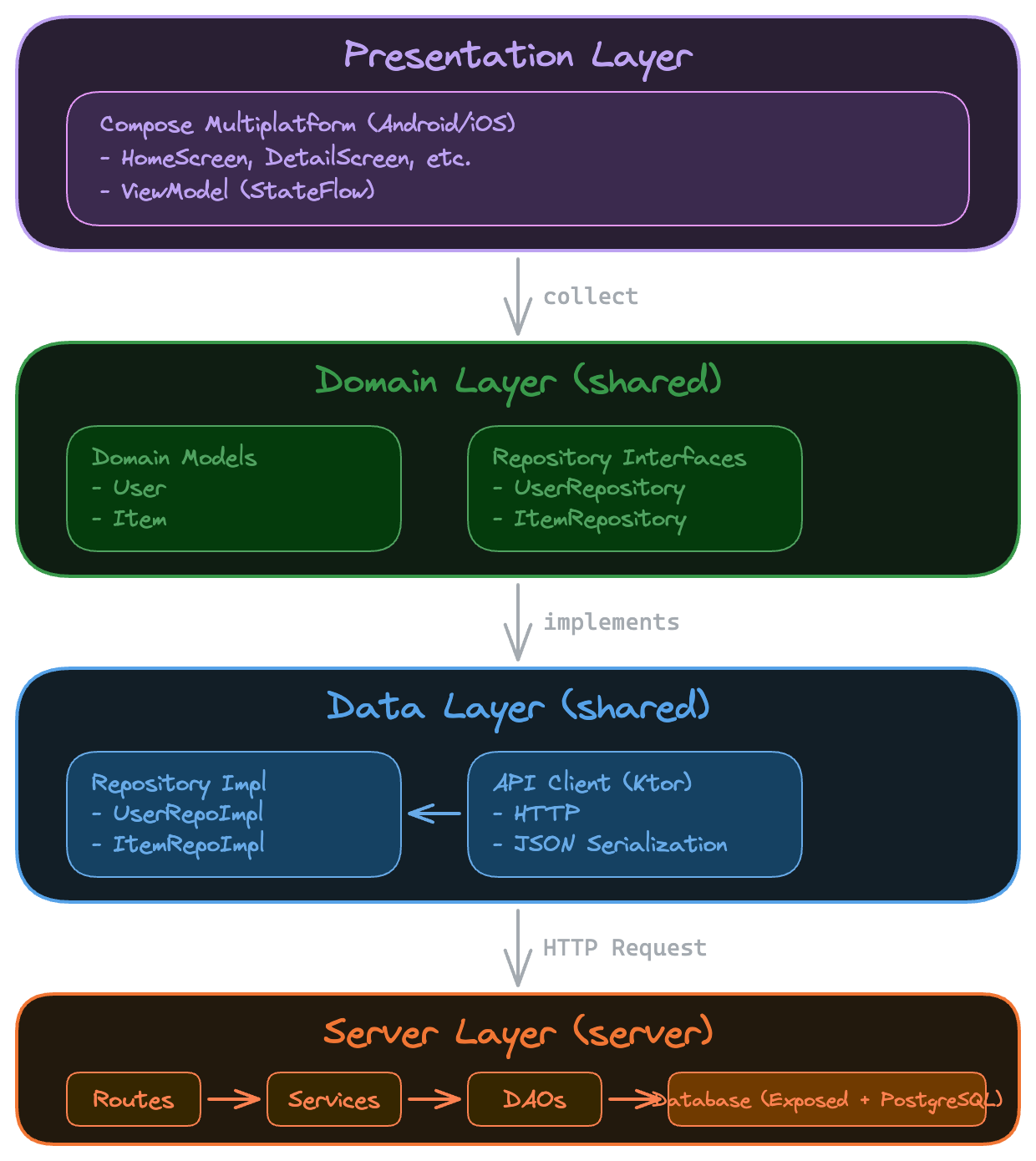
3.3 expect/actual 패턴으로 플랫폼 분기
KMP의 핵심 메커니즘이 바로 expect/actual이다. 어떻게 동작하는지 파헤쳐 보자:
// commonMain - 일단 "이런 게 있을 거야"라고 선언만 해둔다
expect fun createHttpClient(): HttpClient

// androidMain - Android에서는 OkHttp 엔진을 쓴다
actual fun createHttpClient(): HttpClient = HttpClient(OkHttp) {
    install(ContentNegotiation) {
        json(Json { ignoreUnknownKeys = true })
    }
    install(Logging) { level = LogLevel.INFO }
}

// iosMain - iOS에서는 Darwin(URLSession) 엔진을 쓴다
actual fun createHttpClient(): HttpClient = HttpClient(Darwin) {
    install(ContentNegotiation) {
        json(Json { ignoreUnknownKeys = true })
    }
    install(Logging) { level = LogLevel.INFO }
}

// jvmMain - 서버에서는 CIO 엔진을 쓴다
actual fun createHttpClient(): HttpClient = HttpClient(CIO) {
    install(ContentNegotiation) {
        json(Json { ignoreUnknownKeys = true })
    }
}
나머지 비즈니스 로직은 commonMain에서 공유하고 플랫폼마다 다른 구현이 필요한 부분만 이렇게 분기하면 된다.
4. 핵심 구현 상세
4.1 Version Catalog로 의존성 중앙 관리
gradle/libs.versions.toml 파일 하나로 모든 의존성 버전을 관리한다. 이거 진짜 편하다:
[versions]
kotlin = "2.1.21"
composeMultiplatform = "1.7.3"
ktor = "3.0.3"
koin = "4.0.0"
exposed = "0.57.0"

[libraries]
ktor-server-core = { module = "io.ktor:ktor-server-core", version.ref = "ktor" }
ktor-client-core = { module = "io.ktor:ktor-client-core", version.ref = "ktor" }

[bundles]
ktor-server = ["ktor-server-core", "ktor-server-netty", "ktor-server-content-negotiation"]
ktor-client-common = ["ktor-client-core", "ktor-client-content-negotiation", "ktor-client-logging"]

[plugins]
kotlinMultiplatform = { id = "org.jetbrains.kotlin.multiplatform", version.ref = "kotlin" }
이렇게 할 경우 장점:
- 당연하겠지만 버전 충돌을 미리 방지할 수 있다
- IDE에서
libs.versions.xxx,libs.bundles.xxx자동완성이 된다 - 멀티모듈 프로젝트에서 버전 일관성을 유지하기 쉽다
4.2 Shared 모듈: 공유 비즈니스 로직
도메인
// 클라이언트든 서버든 똑같은 모델을 쓰기 떄문에 매우 강력하다
data class User(
    val id: Long,
    val email: String,
    val name: String,
    val createdAt: LocalDateTime
)
Repository 패턴
// 인터페이스로 정의해서 구현과 분리한다
interface UserRepository {
    suspend fun getAllUsers(): List<User>
    suspend fun getUserById(id: Long): User?
    suspend fun createUser(request: CreateUserRequest): User
    suspend fun deleteUser(id: Long): Boolean
}

// 구현체는 API 클라이언트에 의존한다
class UserRepositoryImpl(private val apiClient: ApiClient) : UserRepository {
    override suspend fun getAllUsers(): List<User> {
        return apiClient.getUsers().map { it.toDomain() }
    }
    // ...
}
DI 설정
val sharedModule = module {
    // Network - 플랫폼별로 다른 HttpClient 팩토리를 사용한다
    single { createHttpClient() }
    single {
        ApiClient(
            httpClient = get(),
            baseUrl = getProperty("BASE_URL", "http://10.0.2.2:8080")
        )
    }

    // Repositories - 인터페이스에 바인딩한다
    singleOf(::UserRepositoryImpl) bind UserRepository::class
    singleOf(::ItemRepositoryImpl) bind ItemRepository::class
}
4.3 Server 모듈: Ktor 백엔드
플러그인 기반 모듈화
Ktor의 설계 철학이 재밌는데, 플러그인을 조합해서 쓴다는 거다:
// Application.kt - 진입점이 깔끔해진다
fun Application.module() {
    configureDI()           // Koin 설정
    configureDatabase()     // Exposed + HikariCP
    configureSerialization() // JSON 직렬화
    configureMonitoring()   // 로깅
    configureSecurity()     // CORS
    configureRouting()      // 라우트 등록
}
각 플러그인을 독립적으로 테스트할 수 있다는 게 장점이다.
Database Layer with Exposed
object DatabaseFactory {
    fun init(driverClassName: String, jdbcUrl: String, username: String, password: String) {
        val pool = createHikariDataSource(driverClassName, jdbcUrl, username, password)
        Database.connect(pool)

        transaction {
            SchemaUtils.create(UsersTable, ItemsTable)  // 테이블 자동 생성
        }
    }

    private fun createHikariDataSource(...) = HikariDataSource(HikariConfig().apply {
        this.driverClassName = driverClassName
        this.jdbcUrl = jdbcUrl
        maximumPoolSize = 10
        isAutoCommit = false
        transactionIsolation = "TRANSACTION_REPEATABLE_READ"
        validate()
    })

    // 코루틴 컨텍스트에서 DB 쿼리를 실행한다
    suspend fun <T> dbQuery(block: suspend () -> T): T =
        newSuspendedTransaction(Dispatchers.IO) { block() }
}
RESTful Routes
fun Route.userRoutes(userService: UserService) {
    route("/api/users") {
        get {
            val users = userService.getAllUsers()
            call.respond(HttpStatusCode.OK, UsersResponse(users.map { it.toDto() }))
        }

        get("/{id}") {
            val id = call.parameters["id"]?.toLongOrNull()
                ?: return@get call.respond(HttpStatusCode.BadRequest, "Invalid ID")

            val user = userService.getUserById(id)
                ?: return@get call.respond(HttpStatusCode.NotFound, "User not found")

            call.respond(HttpStatusCode.OK, user.toDto())
        }

        post {
            val request = call.receive<CreateUserRequest>()
            val user = userService.createUser(request.email, request.name, request.password)
            call.respond(HttpStatusCode.Created, user.toDto())
        }

        delete("/{id}") {
            val id = call.parameters["id"]?.toLongOrNull()
                ?: return@delete call.respond(HttpStatusCode.BadRequest, "Invalid ID")

            if (userService.deleteUser(id)) {
                call.respond(HttpStatusCode.NoContent)
            } else {
                call.respond(HttpStatusCode.NotFound, "User not found")
            }
        }
    }
}
4.4 ComposeApp 모듈: 멀티플랫폼 UI
ViewModel with StateFlow
class HomeViewModel(private val userRepository: UserRepository) : ViewModel() {
    private val _uiState = MutableStateFlow(HomeUiState())
    val uiState: StateFlow<HomeUiState> = _uiState.asStateFlow()

    fun loadUsers() {
        viewModelScope.launch {
            _uiState.update { it.copy(isLoading = true) }
            try {
                val users = userRepository.getAllUsers()
                _uiState.update { it.copy(users = users, isLoading = false) }
            } catch (e: Exception) {
                _uiState.update { it.copy(error = e.message, isLoading = false) }
            }
        }
    }
}

data class HomeUiState(
    val users: List<User> = emptyList(),
    val isLoading: Boolean = false,
    val error: String? = null
)
Compose UI
@Composable
fun App() {
    MaterialTheme {
        val viewModel: HomeViewModel = koinViewModel()
        val uiState by viewModel.uiState.collectAsState()

        LaunchedEffect(Unit) {
            viewModel.loadUsers()
        }

        when {
            uiState.isLoading -> LoadingIndicator()
            uiState.error != null -> ErrorMessage(uiState.error!!)
            else -> UserList(uiState.users)
        }
    }
}
5. 트러블슈팅: 실전에서 마주친 문제들
직접 삽질하면서 부딪혔던 부분들이다.
5.1 Gradle 메모리 부족 문제
증상: KMP 빌드하다가 OutOfMemoryError가 터진다...
원인: Kotlin 컴파일러가 여러 플랫폼을 동시에 빌드하면서 메모리를 엄청 잡아먹는다. 물론 노트북 사양에 따라서 케이스 바이 케이스이기는 하다.
해결:
# gradle.properties
org.gradle.jvmargs=-Xmx4096m -Dfile.encoding=UTF-8
kotlin.daemon.jvmargs=-Xmx3072m
org.gradle.caching=true
org.gradle.configuration-cache=true
팁을 하나 더 주자면, Configuration Cache를 켜면 빌드 시간이 최대 40%까지 줄어든다.
5.2 iOS에서 Ktor 네트워크 오류
증상: iOS 시뮬레이터에서 localhost 연결이 안 된다
원인: iOS는 10.0.2.2(Android 에뮬레이터에서 호스트를 가리키는 IP)를 모른다
해결: 플랫폼별로 BASE_URL을 다르게 설정한다
// iosMain
actual fun getBaseUrl(): String = "http://localhost:8080"

// androidMain
actual fun getBaseUrl(): String = "http://10.0.2.2:8080"
아니면 Koin의 getProperty를 활용해도 된다:
// Android MainApplication.kt
startKoin {
    properties(mapOf("BASE_URL" to "http://10.0.2.2:8080"))
    modules(sharedModule, appModule)
}

// iOS MainViewController.kt
startKoin {
    properties(mapOf("BASE_URL" to "http://localhost:8080"))
    modules(sharedModule, appModule)
}
5.3 Exposed에서 코루틴 트랜잭션 문제
증상: No transaction in context 오류가 뜬다
원인: Exposed의 transaction { } 블록은 blocking인데, suspend 함수와 바로 섞어 쓰면 문제가 생긴다
해결: newSuspendedTransaction을 써야 한다
// 잘못된 방식
suspend fun getAllUsers(): List<User> = transaction {
    UserEntity.all().map { it.toUser() }  // suspend 컨텍스트에서 blocking 호출
}

// 올바른 방식
suspend fun getAllUsers(): List<User> = newSuspendedTransaction(Dispatchers.IO) {
    UserEntity.all().map { it.toUser() }  // 코루틴 친화적
}

// 아니면 헬퍼 함수를 만들어서 쓰면 편하다
suspend fun <T> dbQuery(block: suspend () -> T): T =
    newSuspendedTransaction(Dispatchers.IO) { block() }

suspend fun getAllUsers(): List<User> = dbQuery {
    UserEntity.all().map { it.toUser() }
}
5.4 HikariCP 커넥션 풀 고갈
증상: 동시 요청이 몰리면 Connection is not available 타임아웃이 뜬다
원인: 기본 풀 사이즈가 작고, 트랜잭션이 제대로 반환 안 되는 경우가 있다
해결:
private fun createHikariDataSource(...) = HikariDataSource(HikariConfig().apply {
    maximumPoolSize = 10                              // 적절한 풀 사이즈
    minimumIdle = 2                                    // 최소 유휴 커넥션
    idleTimeout = 600000                               // 10분
    connectionTimeout = 30000                          // 30초
    maxLifetime = 1800000                              // 30분
    isAutoCommit = false                               // 명시적 트랜잭션 제어

    // 커넥션 누수 감지 - 이거 켜두면 디버깅할 때 도움이 된다
    leakDetectionThreshold = 60000                     // 1분 이상 사용하면 경고

    validate()
})
6. 성능 최적화와 주의사항
6.1 빌드 성능 최적화
# gradle.properties

# Gradle 데몬 메모리
org.gradle.jvmargs=-Xmx4096m -XX:+UseParallelGC

# Kotlin 컴파일러 메모리
kotlin.daemon.jvmargs=-Xmx3072m

# 병렬 빌드
org.gradle.parallel=true

# Configuration Cache (Gradle 8.1 이상)
org.gradle.configuration-cache=true

# Build Cache
org.gradle.caching=true
6.2 네트워크 최적화
actual fun createHttpClient(): HttpClient = HttpClient(OkHttp) {
    install(ContentNegotiation) {
        json(Json {
            ignoreUnknownKeys = true  // 서버에서 새 필드 추가해도 호환된다
            isLenient = true          // 좀 더 유연하게 파싱한다
            encodeDefaults = false    // 기본값은 직렬화 안 해서 페이로드가 줄어든다
        })
    }

    engine {
        config {
            retryOnConnectionFailure(true)
            connectTimeout(30, TimeUnit.SECONDS)
            readTimeout(30, TimeUnit.SECONDS)
        }
    }
}
6.3 주의사항
- expect/actual은 최소화한다: 정말 플랫폼 분기가 필요한 부분만 쓴다
- 인터페이스 기반으로 설계한다: Repository, Service는 인터페이스로 정의한다
- DTO와 도메인 모델은 분리한다: 네트워크 DTO랑 비즈니스 도메인 모델은 따로 유지한다
- 단방향 의존성을 지킨다: shared ← composeApp, shared ← server (shared는 다른 모듈을 참조 안 한다)
7. 마무리와 향후 계획
이 템플릿으로 할 수 있는 것
- 빠른 프로토타이핑: 모바일이랑 백엔드 풀스택 앱을 하나의 레포에서 개발할 수 있다
- 코드 재사용: 도메인 로직의 대부분을 공유할 수 있다
- 일관된 API: 클라이언트-서버 DTO가 달라서 생기는 버그를 없앨 수 있다
- 단일 언어: Kotlin 하나로 전체 스택을 커버한다
향후 추가 예정 기능
- 인증/인가: JWT + OAuth2 통합
- 테스트: shared 모듈 유닛 테스트, Ktor 통합 테스트
- CI/CD: GitHub Actions 워크플로우
- 모니터링: 서버 메트릭스, 로깅 인프라
마치며
Kotlin Multiplatform이 아직 완전히 성숙한 단계는 아니지만, 이미 실무에서 충분히 쓸 수 있는 수준이라고 생각하고 싶다.
구글 측에서 stable이라고 선언한다고 해서 회사를 운영하는 입장에서는 문제가 발생할 경우 참고할 만한 레퍼런스가 부족한 상황이기 때문에 충분히라는 단어는 충분하지 않는다는 것을 알고 있다.
특히 스타트업이나 소규모 팀에서 적은 인력으로 여러 플랫폼을 커버해야 할 때 강력한 선택지가 될 수 있다고 말하고 싶지만 그 유명한 듀오링고조차 부분 KMP를 도입하고 있다...
앞으로 이 템플릿이 프로젝트 시작점으로 도움이 됐으면 좋겠다.
이제 다른 일을 시작하게 되면서 당분간 Android 개발은 취미로만 지속할 것 같다.

GitHub Repository: KotlinMonorepoStarter