
Baseline Profile이란?
"좋은 UX" 를 위해서라면 속도, 자연스러움, 앱의 컨셉에 맞는 정제된 화려함은 필수인 것 같은데, 그 중에서 앱을 클릭해서 처음 실행할 때 걸리는 시간을 단축시켜서 사용자가 오래 기다리지 않게 할 수 있는 성능 개선이 있다.
Baseline Profile은 AOT 컴파일 최적화 기법인데, 앱이 처음 설치되거나 업데이트될 때 자주 사용되는 코드 경로를 미리 컴파일하여 앱 시작 성능과 런타임 성능을 크게 개선시킬 수 있다.
주요 특징
- 앱 시작 속도 향상: 첫 실행부터 최적화된 성능 제공
- 런타임 성능 개선: JIT 컴파일 오버헤드 감소
- 배터리 효율성: 불필요한 컴파일 작업 최소화
- 사용자 경험 개선: 빠른 반응성과 부드러운 UI 전환
Baseline Profile 배경
기존 ART 컴파일 방식의 한계
Android Runtime(ART)은 기본적으로 다음과 같은 컴파일 전략을 사용한다:
- 최초 설치: 대부분의 코드가 해석(interpreted) 모드로 실행
- JIT 컴파일: 런타임에 자주 실행되는 코드를 감지하여 컴파일
- 디바이스 유휴 시간: 축적된 프로파일 정보를 바탕으로 AOT 컴파일
이 방식의 문제점:
- 처음 몇 번의 실행은 느림
- 컴파일 최적화까지 시간이 걸림
- 사용자마다 다른 성능 경험
Baseline Profile의 해결책
Baseline Profile을 적용하면:
- 첫 실행부터 최적화된 성능 제공
- 개발자가 지정한 중요 코드 경로를 우선 컴파일
- 일관된 성능 경험 보장
1. Gradle 설정
app/build.gradle.kts
plugins {
    alias(libs.plugins.androidx.baselineprofile)
}

dependencies {
    implementation(libs.androidx.profileinstaller)
    "baselineProfile"(project(":baselineprofile"))
}
주요 구성 요소:
androidx.baselineprofile플러그인: Baseline Profile 생성 자동화androidx.profileinstaller: 런타임에 프로파일 설치baselineProfile의존성: 생성 모듈과 연결
baselineProfile/build.gradle.kts
plugins {
    alias(libs.plugins.android.test)
    alias(libs.plugins.kotlin.android)
    alias(libs.plugins.androidx.baselineprofile)
}

android {
    targetProjectPath = ":app"
}

baselineProfile {
    useConnectedDevices = true
}

dependencies {
    implementation(libs.androidx.junit)
    implementation(libs.androidx.espresso.core)
    implementation(libs.androidx.uiautomator)
    implementation(libs.androidx.benchmark.macro.junit4)
}
핵심 설정:
targetProjectPath = ":app": 프로파일을 생성할 대상 앱 지정useConnectedDevices = true: 에뮬레이터 없이 실제 기기로 테스트할 경우 USB, 무선 디버깅한다는 의미로 선언해줘야함- 테스트 및 벤치마크 라이브러리 포함
2. 버전 관리 (gradle/libs.versions.toml)
[versions]
benchmark = "1.4.1"
profileinstaller = "1.4.1"
uiautomator = "2.3.0"

[libraries]
androidx-benchmark-macro-junit4 = { group = "androidx.benchmark", name = "benchmark-macro-junit4", version.ref = "benchmark" }
androidx-profileinstaller = { group = "androidx.profileinstaller", name = "profileinstaller", version.ref = "profileinstaller" }
androidx-uiautomator = { group = "androidx.test.uiautomator", name = "uiautomator", version.ref = "uiautomator" }

[plugins]
androidx-baselineprofile = { id = "androidx.baselineprofile", version.ref = "benchmark" }
Baseline Profile 생성 프로세스
1. BaselineProfileGenerator 분석
BaselineProfileGenerator.kt는 앱의 주요 사용자 플로우를 시뮬레이션할 수 있기 때문에 홈 이외에도 다른 탭에 이동해서 스크롤하는 행동까지 시나리오처럼 미리 작성해둘 수 있다.
그래서 실제로 테스트할 때 baseline profile generator를 실행하면 자동으로 앱이 켜졌다 꺼졌다를 반복하는 모습을 볼 수 있다.
코드 구조
@RunWith(AndroidJUnit4::class)
@LargeTest
class BaselineProfileGenerator {

    @get:Rule
    val rule = BaselineProfileRule()

    @Test
    fun generate() {
        rule.collect(
            packageName = InstrumentationRegistry.getArguments().getString("targetAppId")
                ?: throw Exception("targetAppId not passed as instrumentation runner arg"),
            includeInStartupProfile = true
        ) {
            // Journey 1: App Startup - Basic MainActivity launch
            pressHome()
            startActivityAndWait()

            // Wait for initial content to load
            device.wait(Until.hasObject(By.pkg(packageName)), 3000)
            device.waitForIdle()
        }
    }
}
주요 구성 요소 설명
-
BaselineProfileRule
- Baseline Profile 생성을 위한 JUnit 규칙
- 앱 실행을 추적하고 프로파일 데이터를 수집
-
includeInStartupProfile = true
- 시작 최적화 포함
- 앱 초기 로딩 시간 개선에 중점
-
사용자 플로우 시뮬레이션
pressHome(): 홈 화면으로 이동startActivityAndWait(): 앱 시작 및 대기device.wait(): 초기 콘텐츠 로딩 대기device.waitForIdle(): UI 안정화 대기
2. 프로파일 생성 명령어
# Release 빌드용 Baseline Profile 생성
./gradlew :app:generateReleaseBaselineProfile
실행 과정:
1. 앱을 릴리스 모드로 빌드
2. 실제 디바이스에 설치
3. BaselineProfileGenerator 테스트 실행
4. 프로파일 데이터 수집
5. baseline-prof.txt 파일 생성
성능 측정 및 벤치마킹
1. StartupBenchmarks 분석
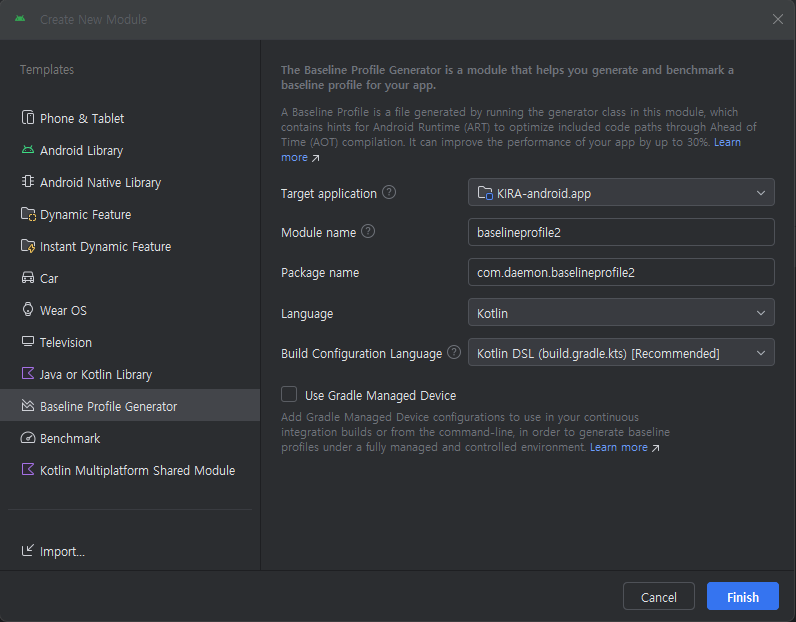
StartupBenchmarks.kt는 Baseline Profile의 효과를 측정한다.
Android Studio IDE에서 New Module을 생성하겠다고 하면 기본적인 포맷을 제공해주기 때문에 해당 파일을 자동으로 작성해서 편했다.
코드 구조
@RunWith(AndroidJUnit4::class)
@LargeTest
class StartupBenchmarks {

    @get:Rule
    val rule = MacrobenchmarkRule()

    @Test
    fun startupCompilationNone() =
        benchmark(CompilationMode.None())

    @Test
    fun startupCompilationBaselineProfiles() =
        benchmark(CompilationMode.Partial(BaselineProfileMode.Require))

    private fun benchmark(compilationMode: CompilationMode) {
        rule.measureRepeated(
            packageName = InstrumentationRegistry.getArguments().getString("targetAppId")
                ?: throw Exception("targetAppId not passed as instrumentation runner arg"),
            metrics = listOf(StartupTimingMetric()),
            compilationMode = compilationMode,
            startupMode = StartupMode.COLD,
            iterations = 10,
            setupBlock = {
                pressHome()
            },
            measureBlock = {
                startActivityAndWait()
            }
        )
    }
}
2. 벤치마크 비교 시나리오
Test 1: startupCompilationNone()
- 컴파일 모드:
CompilationMode.None() - 의미: Baseline Profile 없이 실행
- 목적: 최적화 전 성능 측정
Test 2: startupCompilationBaselineProfiles()
- 컴파일 모드:
CompilationMode.Partial(BaselineProfileMode.Require) - 의미: Baseline Profile 적용
- 목적: 최적화 후 성능 측정
3. 측정 지표
StartupTimingMetric()이 측정하는 항목:
- Time To Initial Display (TTID)
- 첫 프레임이 표시되기까지의 시간
- Time To Full Display (TTFD)
- 앱이 완전히 사용 가능해지기까지의 시간
- Cold Startup
- 앱 프로세스가 없는 상태에서 시작
4. 벤치마크 실행
# 모든 벤치마크 실행
./gradlew :baselineProfile:connectedBenchmarkReleaseAndroidTest

# 결과는 다음 위치에 저장됨
# app/build/outputs/connected_android_test_additional_output/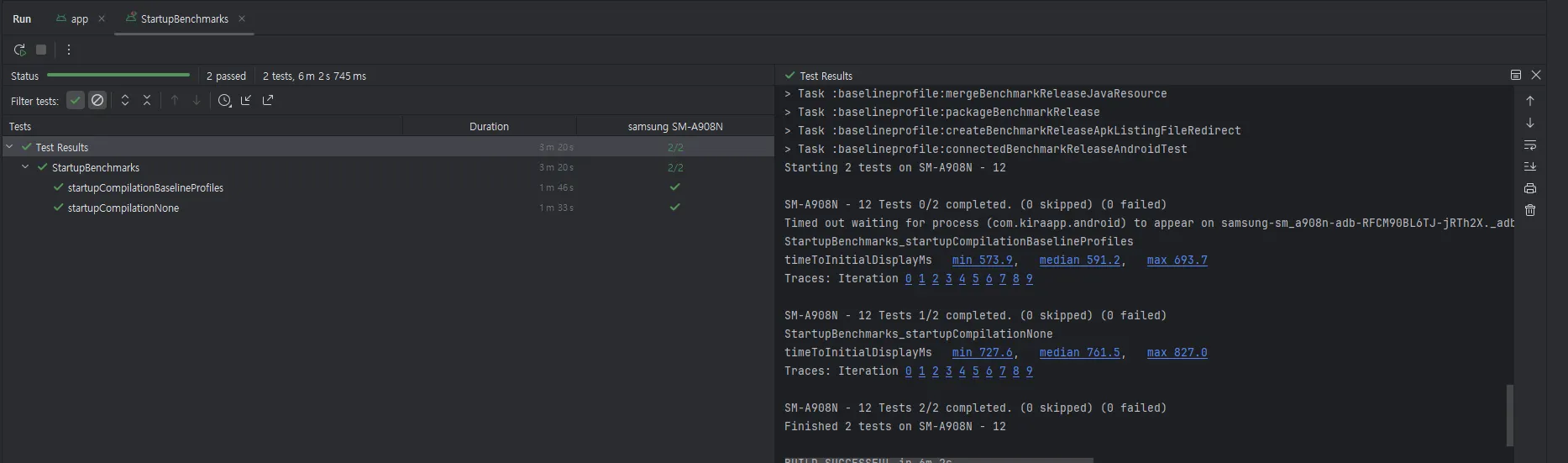
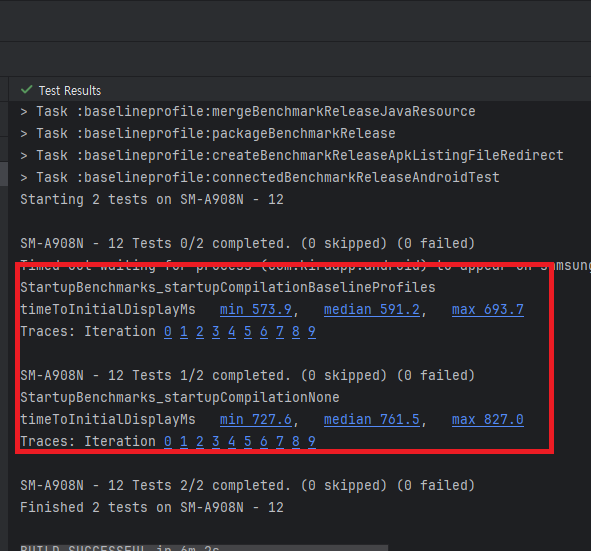
실제 결과:
- Baseline Profile 적용 시 22% 시작 시간 단축
- 첫 프레임 렌더링 속도 향상
- 일관된 성능 제공
variant를 baenchmark로 설정하다보니 release 모드에서는 즉 플레이스토어에 런칭할 때는 해당 내용이 적용이 안되지 않을까하고 생각했었는데 apk가 올라가는 것이 아니라 aab 번들이 올라가므로 괜찮았다.