Kakao OAuth 2.0 로그인 구현
1. 사용자가 로그인 버튼을 클릭한다.

2. 버튼을 누르면 -> 프론트엔드는 백엔드의 특정 URI 로 요청을 보낸다.

3. 백엔드는 이를 처리하여 client_id / redirect_uri 등을 포함해 카카오 인증 서버(Authorization Server) 의 AuthCode 발급 URL 로 리다이렉트 시킨다.
=> 이 과정에서 카카오 인증 서버에서 사용자에게 로그인 페이지를 제공함.

4. 사용자가 로그인을 진행하고, 정보 사용에 동의한다.

5. 해당 정보는 Authorization Server 에 전달되며, 이후 사전에 등록한 프론트의 리다이렉트 URI 로 AuthCode 와 함께 리다이렉트 된다.

6. 프론트는 해당 Redirect URI 로 요청이 들어오면, 파라미터로 코드를 추출해 백엔드의 회원가입 / 로그인 처리 API 로 요청을 보낸다 !

7. 백엔드는 Post(Get) 요청을 통해 해당 요청을 받아 회원가입 / 로그인 처리한다.
- 파라미터 요청의 코드를 통해 액세스 토큰을 받아온다.
- 해당 액세스 토큰으로 사용자 정보를 받아와 post 요청 처리 가능.
- 로그인 후 발급된 인증 정보(세션 또는 토큰)를 Header, Cookie, Body 등에 담아 프론트에 반환해준다.

⭐️ 프론트에서 진행 시 인증 정보인 Token, Session 을 여러 방법으로 전달할 수 있다 !
Kakao Developer 설정
https://developers.kakao.com/docs/latest/ko/kakaologin
내 애플리케이션 에서 설정하고 받은 key 값들 !
yml 작성 시 필요하다 !
📍 client_id
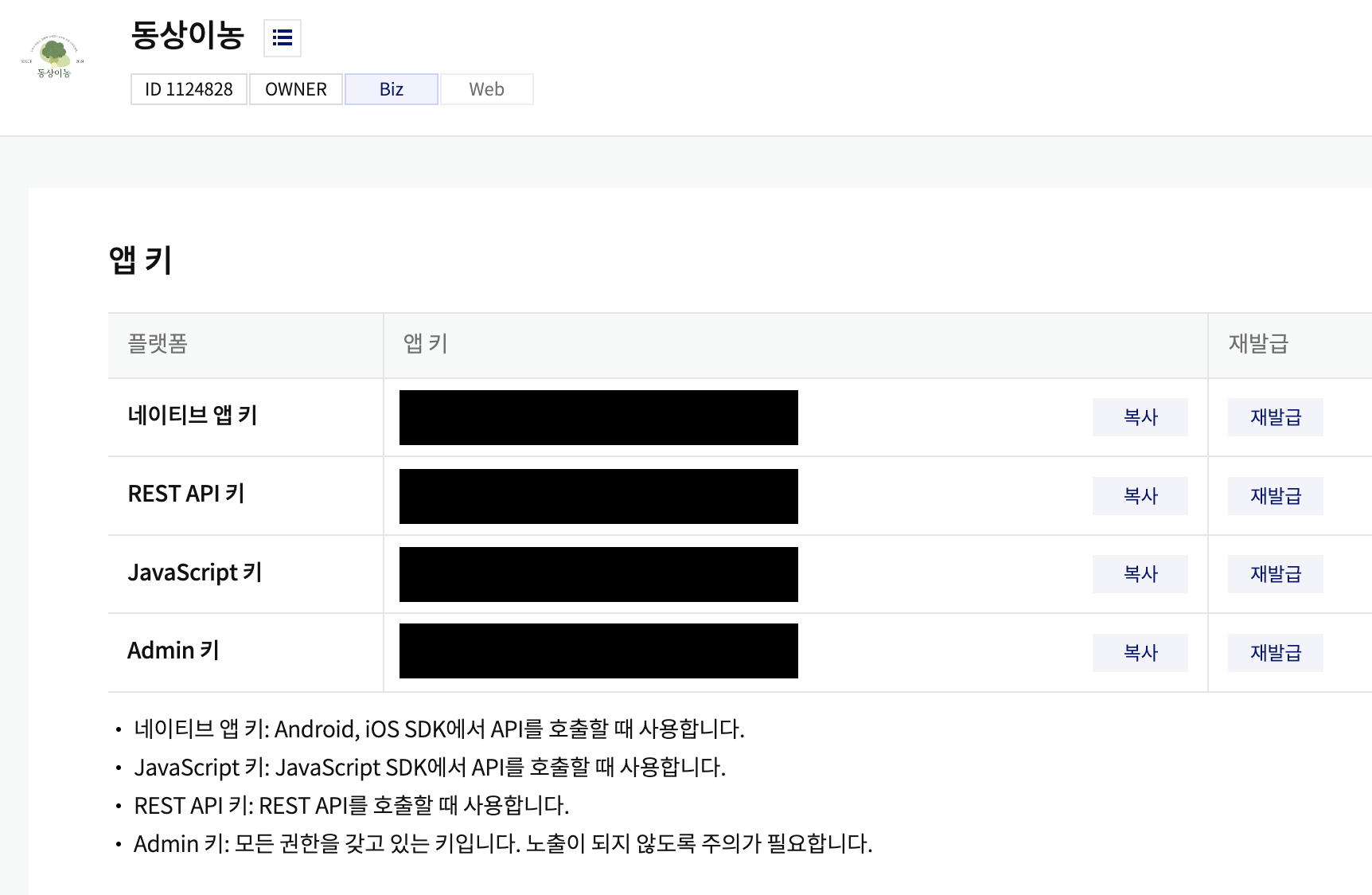
여기서 REST API 키 = client_id
📍 Redirect_URI
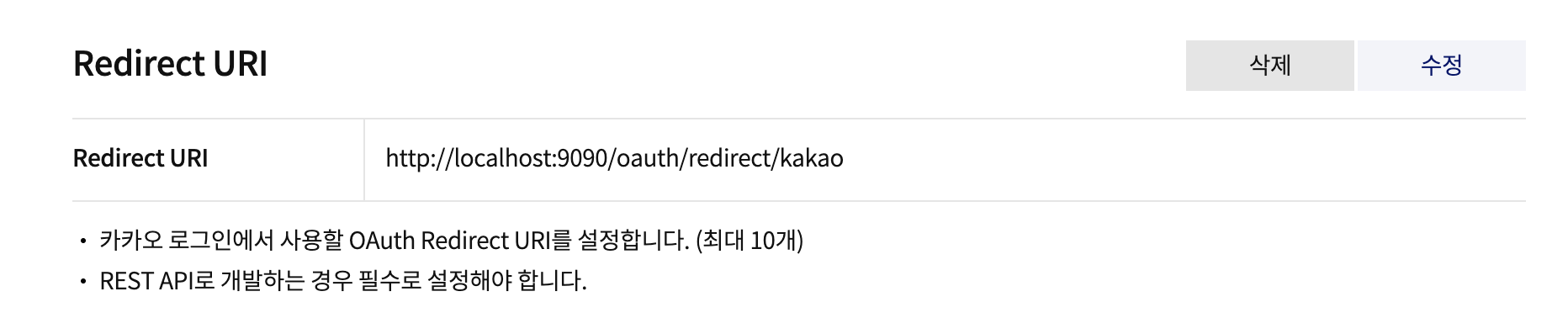
프론트엔드에서 -> 백엔드로 요청을 보낼 때 필요한 Redirect URI
📍 kakao_secret_key
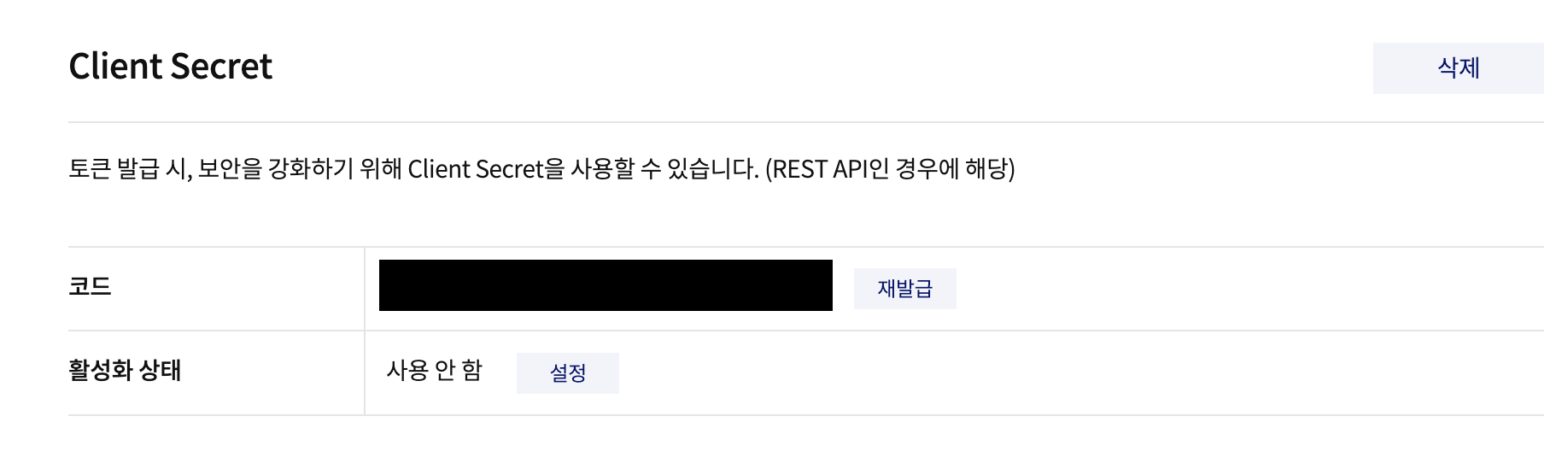
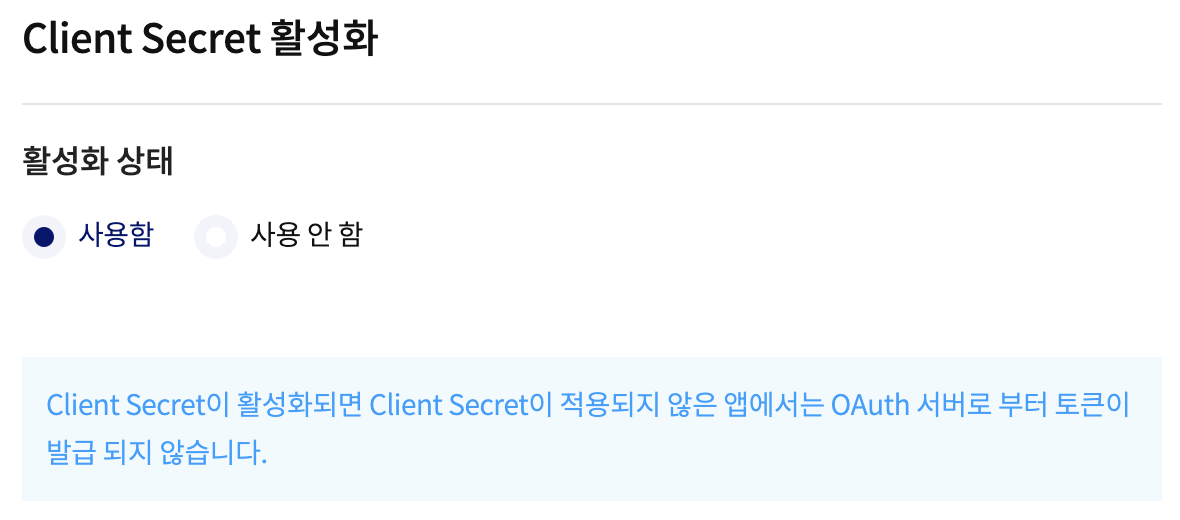
시크릿 키로 활용할 Client Secret 활성화 해주기 !
client secret 을 사용으로 설정 시 해당 시크릿 키 값이 없으면 OAuth 토큰 발급이 안된다.
REST API 키(client_id) : client_id
Client Secret : client_secret
Redirect URI : http://localhost:9090/oauth/redirect/kakao
동의 항목 : 닉네임(profile_nickname), 프로필 사진(profile_image), 이메일(account_email)
구현 순서
1. 사용자가 프론트엔드를 통해 http://localhost:9090/oauth/kakao 로 접속하면 카카오톡 로그인 화면으로 리다이렉트 시킨다.

=> 사용자가 카카오톡 로그인 후 정보 제공 동의 -> 카카오톡 인증 서버에서 프론트엔드로 AuthCode 를 포함해 리다이렉트 시킨다.
=> 프론트엔드는 리다이렉트 되는 순간 AuthCode 를 꺼내서
   http://localhost:9090/oauth/login/kakao?code={xxx} 로 POST 요청 보냄.

2. /oauth/login/kakao 에 auth code 가 담겨서 POST 요청이 도착하고,
	백엔드는 받은 auth code 와 함께 카카오 인증 서버에 AccessToken 을 요청, 발급.

3. 받아온 액세스 토큰으로 카카오에 등록된 회원 정보(닉네임, 사진, 이메일)를 조회

4. 해당 사용자 정보로 로그인 진행. 이 때 회원가입 되어있지 않다면 회원가입을 진행.
📍 KakaoLoginPageController
@Controller
@RequestMapping("/login")
public class KakaoLoginPageController {

    @Value("${kakao.client_id}")
    private String client_id;

    @Value("${kakao.redirect_uri}")
    private String redirect_uri;

    @GetMapping("/page")
    public String loginPage(Model model){
        String location = "https://kauth.kakao.com/oauth/authorize?response_type=code&client_id="+client_id+"&redirect_uri="+redirect_uri;
        model.addAttribute("location", location);

        return "login";
    }


}
📍 application.yml
server:
  port: 9090

kakao:
  client_id: kakao 애플리케이션에서 발급 받은 값 (rest API 키)
  redirect_uri: http://localhost:9090/oauth/redirect/kakao
📍 login.html
.vue 파일과 연결해주기 전 코드 테스트를 위해
resources > static 에 로그인 버튼 이미지를, resources > templates 에 login.html 파일을 작성해주었다.
<!DOCTYPE html>
<html lang="en">
<head>
    <meta charset="UTF-8">
    <title>KakaoLogin</title>
</head>
<body>
<div class="container" style="display: flex; justify-content: center; align-content: center; align-items: center; flex-direction: column; margin: 200px auto; ">
    <h1>카카오 로그인</h1>
    <a th:href="${location}">
        <img src="/kakao_login_medium_narrow.png" >
    </a>
</div>
</body>
</html>
요기까지 작성해주고 중간 점검 ⭐️

❗️ 카카오가 코드를 전송해줬다 !
이걸로 카카오 auth 서버로 POST 요청을 통해 토큰을 요청하자 !
https://developers.kakao.com/docs/latest/ko/kakaologin/rest-api#request-token-request-body
위에서 보안 > client secret 을 활성화 해주었으므로 요청에도 포함해야한다 !
요걸 포함하지 않아서 헤맸다 . . 갓팀장 갓세정님이 해결해주셨다 🧔🏻♀️💐
📍 access token 받기
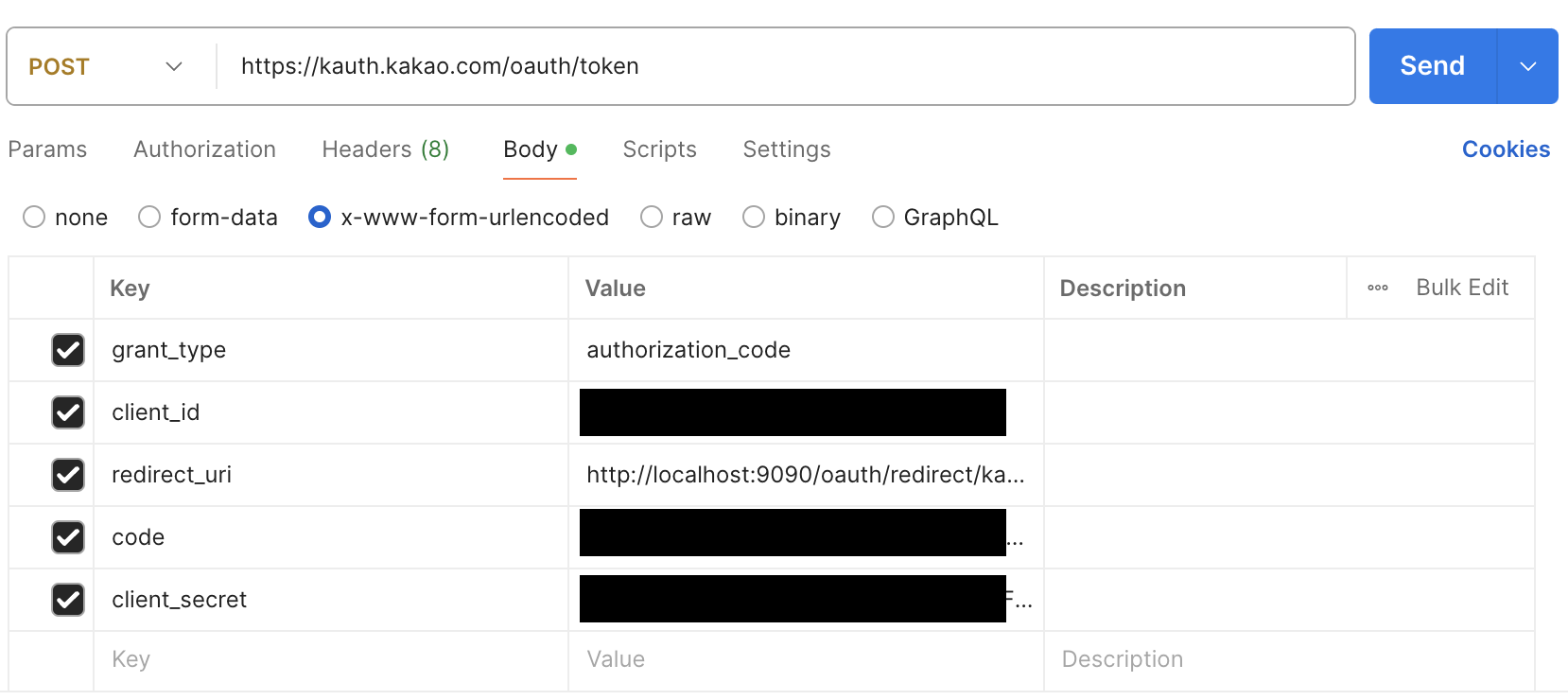
지겹게 보는데도 아직도 정확하게 못 외웠다 . .
client_id = REST API 키
redirect_uri = 애플리케이션 설정에서 지정했던 uri
code = 로그인 진행 후 받은 인가 코드 값 (auth code)
위 값들을 포함해서 POST 요청 날리기 !
public String getAccessTokenFromKakao(String code) {

        KakaoTokenResponseDto kakaoTokenResponseDto = WebClient.create(KAUTH_TOKEN_URL_HOST).post()
                .uri(uriBuilder -> uriBuilder
                        .scheme("https")
                        .path("/oauth/token")
                        .queryParam("grant_type", "authorization_code")
                        .queryParam("client_id", clientId)
                        .queryParam("code", code)
                        .queryParam("client_secret", clientSecret)
                        .build(true))
                .header(HttpHeaders.CONTENT_TYPE, HttpHeaderValues.APPLICATION_X_WWW_FORM_URLENCODED.toString())
                .retrieve()
                .onStatus(HttpStatusCode::is4xxClientError, clientResponse -> Mono.error(new RuntimeException("Invalid Parameter")))
                .onStatus(HttpStatusCode::is5xxServerError, clientResponse -> Mono.error(new RuntimeException("Internal Server Error")))
                .bodyToMono(KakaoTokenResponseDto.class)
                .block();

        return kakaoTokenResponseDto.getAccessToken();
    }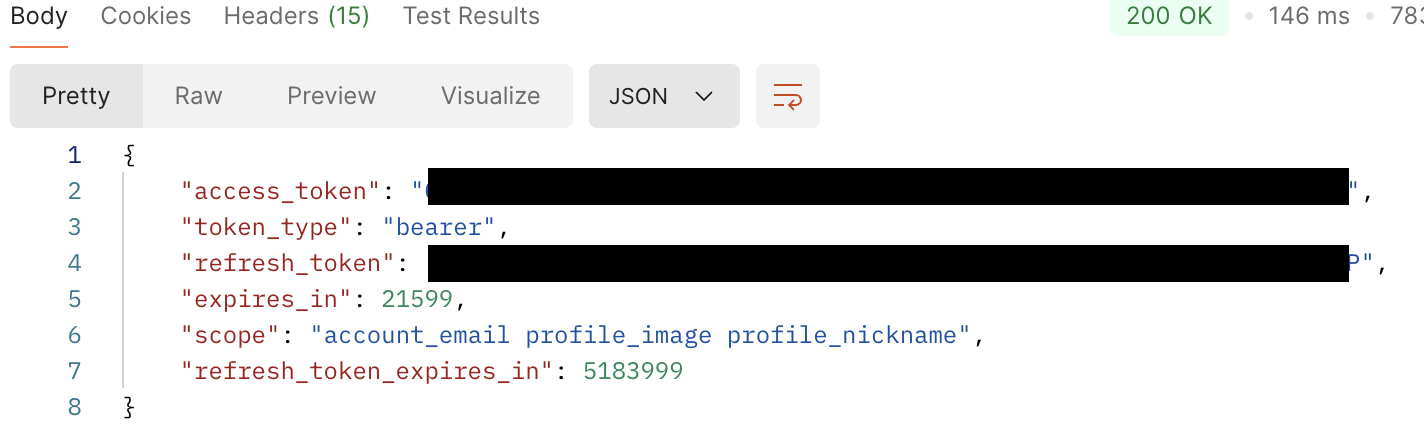
감격 . . 🤸🏻
여기서 받은 액세스 토큰으로 사용자 정보를 가져올 수 있다.
📍 access token 으로 사용자 정보 가져오기
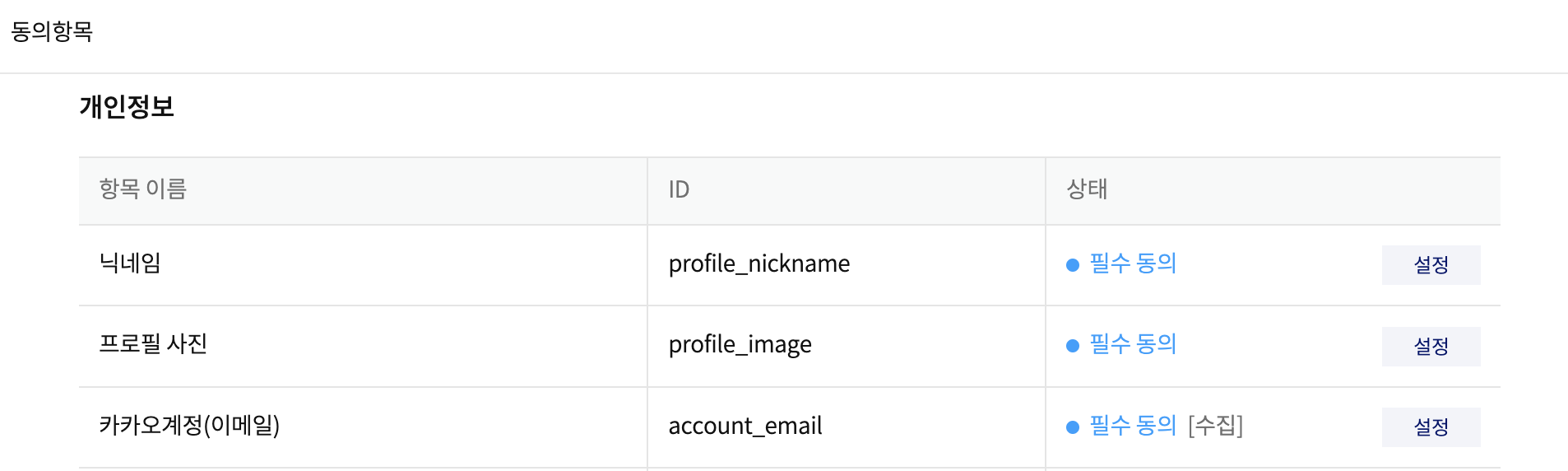
닉네임, 프로필 사진, 카카오 계정(이메일) 수집에만 동의 설정 해두었다.
public KakaoUserInfoResponseDto getUserInfo(String accessToken) {

        KakaoUserInfoResponseDto userInfo = WebClient.create(KAUTH_USER_URL_HOST)
                .get()
                .uri(uriBuilder -> uriBuilder
                        .scheme("https")
                        .path("/v2/user/me")
                        .build(true))
                .header(HttpHeaders.AUTHORIZATION, "Bearer " + accessToken) // access token 인가
                .header(HttpHeaders.CONTENT_TYPE, HttpHeaderValues.APPLICATION_X_WWW_FORM_URLENCODED.toString())
                .retrieve()
                .onStatus(HttpStatusCode::is4xxClientError, clientResponse -> Mono.error(new RuntimeException("Invalid Parameter")))
                .onStatus(HttpStatusCode::is5xxServerError, clientResponse -> Mono.error(new RuntimeException("Internal Server Error")))
                .bodyToMono(KakaoUserInfoResponseDto.class)
                .block();

        return userInfo;
    }
KakaoUserInfoResponseDto 에서 필요한 값만 받아오게끔 작성, 결과는 !
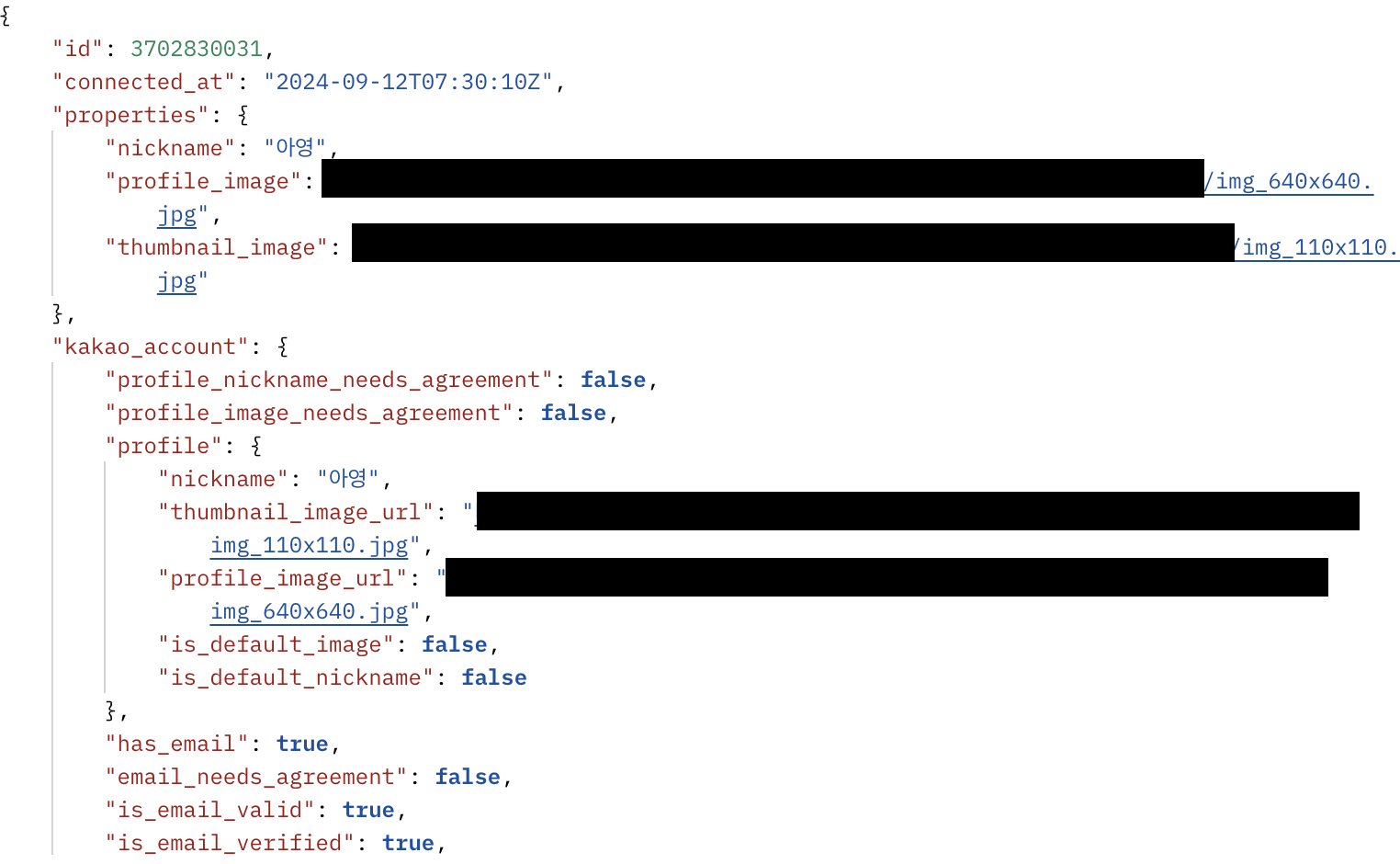
반가워 내 정보야 . . .
📍 RestClient 활용
- WebMVC :
spring-boot-starter-web의존성으로 기존부터 쭉 사용하고 있었던 멀티스레드 기반의 웹 프레임워크. - WebFlux :
spring-boot-starter-webflux의존성으로 추가해준 리액티브 기반 프레임워크.- RestTemplate 대신 사용해주려고 했던 값. 직관적이지 못하고, HTTP 기능이 다량 노출된다는 단점이 있다. WebFlux 로 대체가 가능하지만, 의존성이 필요하다는 단점 !
⭐️ 이들에 대한 대안이
RestClient!
- RestTemplate 대신 사용해주려고 했던 값. 직관적이지 못하고, HTTP 기능이 다량 노출된다는 단점이 있다. WebFlux 로 대체가 가능하지만, 의존성이 필요하다는 단점 !
public String getAccessTokenFromKakao(String code) {

        KakaoTokenResponseDto kakaoTokenResponseDto = RestClient.create(KAUTH_TOKEN_URL_HOST).post()
                .uri(uriBuilder -> uriBuilder
                        .scheme("https")
                        .path("/oauth/token")
                        .queryParam("grant_type", "authorization_code")
                        .queryParam("client_id", clientId)
                        .queryParam("code", code)
                        .queryParam("client_secret", clientSecret)
                        .build(true))
                .header(HttpHeaders.CONTENT_TYPE, MediaType.APPLICATION_FORM_URLENCODED_VALUE)
                .retrieve()
                .onStatus(HttpStatusCode::is4xxClientError, ((request, response) -> {throw new RuntimeException("Invalid Parameter");}))
                .onStatus(HttpStatusCode::is5xxServerError, (((request, response) -> {throw new RuntimeException("Internal Server Error");})))
                .body(KakaoTokenResponseDto.class);

        return kakaoTokenResponseDto.getAccessToken();
    }

웅니..멋있다..