실제 외부에 있는 DB를 사용하면 테스트를 병렬로 여러 개 돌리거나, 다른 환경에서 작업할 때 외부에서 DB를 또 설치해야 하는 불편함이 있습니다.
테스트를 내부에의 격리된 환경에서 실행할 수 있습니다. 메모리 DB를 사용하면 됩니다.
- test 디렉토리의 하위 resources 디렉토리에 application.yml 파일을 생성합니다.
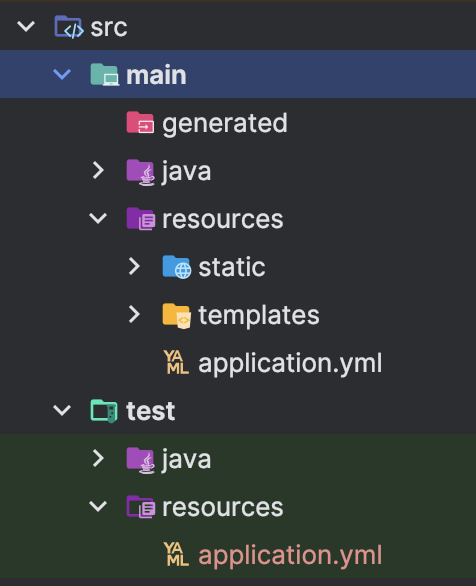
이렇게 하면 테스트 환경에서는 test > resources > application.yml 을 우선권으로 가지고 실행됩니다.
- application.yml 파일에서 url을 다음과 같이 수정합니다.
jdbc:h2:mem:test
수정한 application.yml 파일
spring:
  datasource:
    url: jdbc:h2:mem:test
    username: sa
    password:
    driver-class-name: org.h2.Driver

  jpa:
    hibernate:
      ddl-auto: create
    properties:
      hibernate:
        format_sql: true

logging:
  level:
    org.hibernate.SQL : debug
    org.hibernate.orm.jdbc.bind : trace
+ 스프링부트에서는 별도의 설정이 없다면 기본적으로 메모리 모드로 DB를 실행합니다.
spring:
#  datasource:
#    url: jdbc:h2:mem:test
#    username: sa
#    password:
#    driver-class-name: org.h2.Driver
#
#  jpa:
#    hibernate:
#      ddl-auto: create
#    properties:
#      hibernate:
#        format_sql: true

logging:
  level:
    org.hibernate.SQL : debug
    org.hibernate.orm.jdbc.bind : trace
Today I Learned