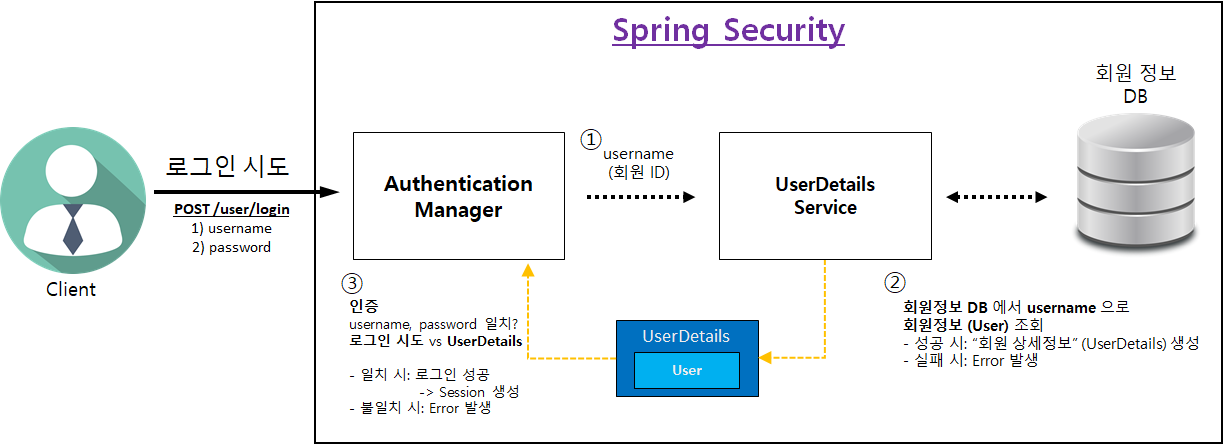
-
25) API 접근 권한 제어 이해
-
스프링 시큐리티에 "권한 (Authority)" 설정방법
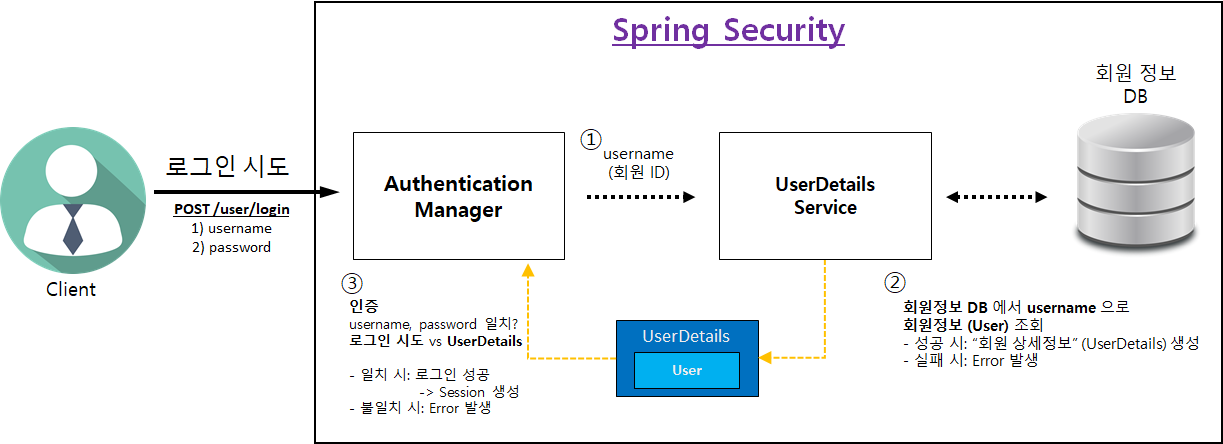
- 회원 상세정보 (UserServiceImpl) 를 통해 "권한 (Authority)" 설정 가능
- 권한을 1개 이상 설정 가능
- "권한 이름" 규칙
-
"ROLE_" 로 시작해야 함
예) "ADMIN" 권한 부여 → "ROLE_ADMIN"
"**USER**" 권한 부여 → "**ROLE_USER**"
-
public class UserDetailsImpl implements UserDetails { // ... @Override public Collection<? extends GrantedAuthority> getAuthorities() { SimpleGrantedAuthority adminAuthority = new SimpleGrantedAuthority("ROLE_ADMIN"); Collection<GrantedAuthority> authorities = new ArrayList<>(); authorities.add(adminAuthority); return authorities; } } -
스프링 시큐리티를 이용한 API 별 권한 제어 방법
- Controller 에 "@Secured" 어노테이션으로 권한 설정 가능
-
@Secured("권한 이름") 선언
- 권한 1개 이상 설정 가능// (관리자용) 등록된 모든 상품 목록 조회 @Secured("ROLE_ADMIN") @GetMapping("/api/admin/products") public List<Product> getAllProducts() { return productService.getAllProducts(); }
-
- "@Secured" 어노테이션 활성화 방법
@Configuration
@EnableWebSecurity // 스프링 Security 지원을 가능하게 함
**@EnableGlobalMethodSecurity(securedEnabled = true)** // @Secured 어노테이션 활성화
public class WebSecurityConfig extends WebSecurityConfigurerAdapter {
- Controller 에 "@Secured" 어노테이션으로 권한 설정 가능
-
-
26) 접근 불가 페이지 적용
-
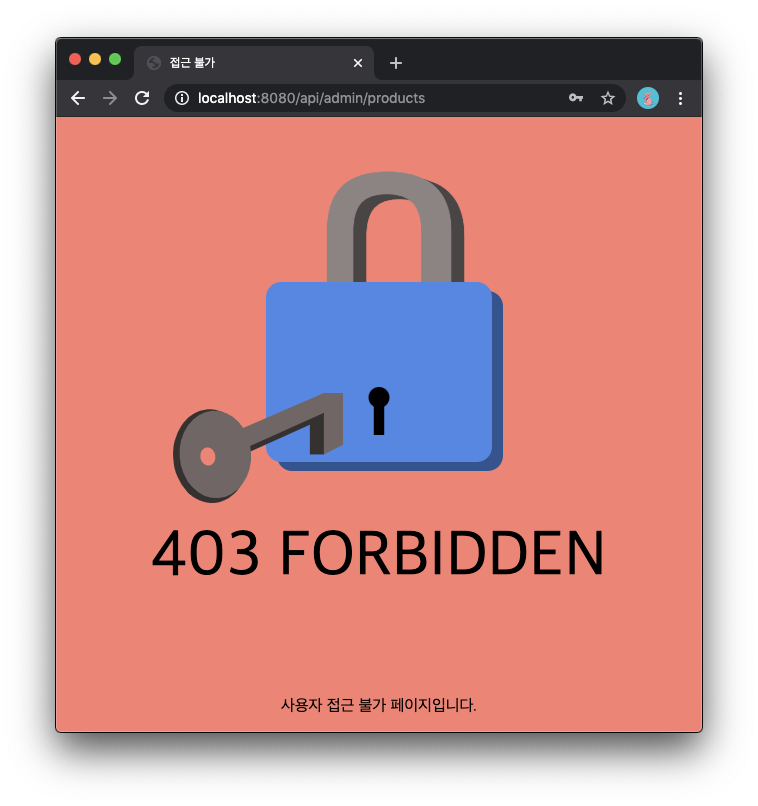
프론트엔드 개발자 작업 → Forbidden 페이지 적용
- [코드스니펫] resources > static > forbidden.html
<!DOCTYPE html>
<html lang="en">
    <head>
        <meta charset="UTF-8">
        <title>접근 불가</title>
        <style>
            html,body{
                margin:0;
                padding:0;
                display:flex;
                justify-content:center;
                align-items:center;
                background-color:salmon;
                font-family:"Quicksand", sans-serif;

            }

            #container_anim{
                position:relative;
                width:100%;
                height:70%;
            }

            #key{
                position:absolute;
                top:77%;
                left:-33%;
            }

            #text{
                font-size:4rem;
                position:absolute;
                top:55%;
                width:100%;
                text-align:center;
            }

            #credit{
                position:absolute;
                bottom:0;
                width:100%;
                text-align:center;
                bottom:
            }

            a{
                color: rgb(115,102,102);
            }
        </style>
        <script>
          var lock = document.querySelector('#lock');
          var key = document.querySelector('#key');

          function keyAnimate(){
            dynamics.animate(key, {
              translateX: 33
            }, {
              type:dynamics.easeInOut,
              duration:500,
              complete:lockAnimate
            })
          }

          function lockAnimate(){
            dynamics.animate(lock, {
              rotateZ:-5,
              scale:0.9
            }, {
              type:dynamics.bounce,
              duration:3000,
              complete:keyAnimate
            })
          }

          setInterval(keyAnimate, 3000);
        </script>
    </head>
    <body>
        <div id="container_anim">
            <div id="lock" class="key-container">
                <?xml version="1.0" standalone="no"?><!-- Generator: Gravit.io --><svg xmlns="http://www.w3.org/2000/svg" xmlns:xlink="http://www.w3.org/1999/xlink" style="isolation:isolate" viewBox="317.286 -217 248 354" width="248" height="354"><g><path d="M 354.586 -43 L 549.986 -43 C 558.43 -43 565.286 -36.144 565.286 -27.7 L 565.286 121.7 C 565.286 130.144 558.43 137 549.986 137 L 354.586 137 C 346.141 137 339.286 130.144 339.286 121.7 L 339.286 -27.7 C 339.286 -36.144 346.141 -43 354.586 -43 Z" style="stroke:none;fill:#2D5391;stroke-miterlimit:10;"/><g transform="matrix(-1,0,0,-1,543.786,70)"><text transform="matrix(1,0,0,1,0,234)" style="font-family:'Quicksand';font-weight:700;font-size:234px;font-style:normal;fill:#4a4444;stroke:none;">U</text></g><g transform="matrix(-1,0,0,-1,530.786,65)"><text transform="matrix(1,0,0,1,0,234)" style="font-family:'Quicksand';font-weight:700;font-size:234px;font-style:normal;fill:#8e8383;stroke:none;">U</text></g><path d="M 343.586 -52 L 538.986 -52 C 547.43 -52 554.286 -45.144 554.286 -36.7 L 554.286 112.7 C 554.286 121.144 547.43 128 538.986 128 L 343.586 128 C 335.141 128 328.286 121.144 328.286 112.7 L 328.286 -36.7 C 328.286 -45.144 335.141 -52 343.586 -52 Z" style="stroke:none;fill:#4A86E8;stroke-miterlimit:10;"/><g><circle vector-effect="non-scaling-stroke" cx="441.28571428571433" cy="63.46153846153848" r="10.461538461538453" fill="rgb(0,0,0)"/><rect x="436.055" y="66.538" width="10.462" height="34.462" transform="matrix(1,0,0,1,0,0)" fill="rgb(0,0,0)"/></g></g></svg>
            </div>

            <div id="key">
                <?xml version="1.0" standalone="no"?><!-- Generator: Gravit.io --><svg xmlns="http://www.w3.org/2000/svg" xmlns:xlink="http://www.w3.org/1999/xlink" style="isolation:isolate" viewBox="232.612 288.821 169.348 109.179" width="169.348" height="109.179"><g><path d=" M 382.96 349.821 L 368.96 349.821 L 368.96 314.821 L 382.96 307.821 L 382.96 349.821 Z " fill="rgb(55,49,49)"/><path d=" M 292.134 354.827 L 379.96 315.39 L 379.96 305.547 L 292.134 343.094 L 292.134 354.827 Z " fill="rgb(55,49,49)"/><path d=" M 280.96 340.109 L 401.96 288.821 L 401.96 340.109 L 382.96 349.972 L 382.96 308.547 L 265.96 360.821 L 259.96 349.972 L 280.96 340.109 Z " fill="rgb(115,102,102)"/><path d=" M 401.96 288.821 L 382.96 288.821 L 280.96 332.821 L 292.134 340.109 L 401.96 288.821 Z " fill="rgb(115,102,102)"/><g><path d=" M 232.755 354.125 C 230.958 328.501 246.297 306.519 266.988 305.068 C 287.679 303.617 305.937 323.243 307.734 348.867 C 309.531 374.492 294.191 396.473 273.5 397.924 C 252.809 399.375 234.552 379.75 232.755 354.125 Z " fill="rgb(55,49,49)"/><path d=" M 239.241 352.316 C 237.564 328.406 252.144 307.876 271.779 306.499 C 291.414 305.122 308.716 323.416 310.393 347.326 C 312.07 371.236 297.49 391.766 277.855 393.143 C 258.22 394.52 240.917 376.226 239.241 352.316 Z " fill="rgb(115,102,102)"/><path d=" M 260.038 353.084 C 259.196 348.171 261.788 343.621 265.822 342.929 C 269.856 342.238 273.816 345.665 274.658 350.578 C 275.5 355.49 272.909 360.041 268.874 360.732 C 264.84 361.424 260.88 357.997 260.038 353.084 Z " fill="salmon"/></g></g></svg>
            </div>
        </div>

        <p id="text">403 FORBIDDEN</p>
        <p id="credit">사용자 접근 불가 페이지입니다.</a></p>
    </body>
</html>
- [코드스니펫] resources > static > forbidden.html
-
WebSecurityConfig 파일 수정
- "@EnableGlobalMethodSecurity(securedEnabled = true)" 추가
- "접근 불가" 페이지 URL 설정 → "/forbidden.html"
- [코드스니펫] security > WebSecurityConfig
import org.springframework.context.annotation.Bean;
import org.springframework.context.annotation.Configuration;
import org.springframework.security.config.annotation.method.configuration.EnableGlobalMethodSecurity;
import org.springframework.security.config.annotation.web.builders.HttpSecurity;
import org.springframework.security.config.annotation.web.builders.WebSecurity;
import org.springframework.security.config.annotation.web.configuration.EnableWebSecurity;
import org.springframework.security.config.annotation.web.configuration.WebSecurityConfigurerAdapter;
import org.springframework.security.crypto.bcrypt.BCryptPasswordEncoder;

@Configuration
@EnableWebSecurity // 스프링 Security 지원을 가능하게 함
@EnableGlobalMethodSecurity(securedEnabled = true) // @Secured 어노테이션 활성화
public class WebSecurityConfig extends WebSecurityConfigurerAdapter {

    @Bean
    public BCryptPasswordEncoder encodePassword() {
        return new BCryptPasswordEncoder();
    }

    @Override
    public void configure(WebSecurity web) {
        // h2-console 사용에 대한 허용 (CSRF, FrameOptions 무시)
        web
                .ignoring()
                .antMatchers("/h2-console/**");
    }

    @Override
    protected void configure(HttpSecurity http) throws Exception {
        http.csrf().disable();

        http.authorizeRequests()
                // image 폴더를 login 없이 허용
                .antMatchers("/images/**").permitAll()
                // css 폴더를 login 없이 허용
                .antMatchers("/css/**").permitAll()
                // 회원 관리 처리 API 전부를 login 없이 허용
                .antMatchers("/user/**").permitAll()
                // 그 외 어떤 요청이든 '인증'
                .anyRequest().authenticated()
                .and()
                // [로그인 기능]
                .formLogin()
                // 로그인 View 제공 (GET /user/login)
                .loginPage("/user/login")
                // 로그인 처리 (POST /user/login)
                .loginProcessingUrl("/user/login")
                // 로그인 처리 후 성공 시 URL
                .defaultSuccessUrl("/")
                // 로그인 처리 후 실패 시 URL
                .failureUrl("/user/login?error")
                .permitAll()
                .and()
                // [로그아웃 기능]
                .logout()
                // 로그아웃 요청 처리 URL
                .logoutUrl("/user/logout")
                .permitAll()
                .and()
                .exceptionHandling()
                // "접근 불가" 페이지 URL 설정
                .accessDeniedPage("/forbidden.html");
    }
}
-
관리자용 상품조회 API 에 @Secured 어노테이션으로 권한 설정
- [코드스니펫] controller > ProductController
import com.sparta.springcore.dto.ProductMypriceRequestDto; import com.sparta.springcore.dto.ProductRequestDto; import com.sparta.springcore.model.Product; import com.sparta.springcore.model.UserRoleEnum; import com.sparta.springcore.security.UserDetailsImpl; import com.sparta.springcore.service.ProductService; import org.springframework.beans.factory.annotation.Autowired; import org.springframework.security.access.annotation.Secured; import org.springframework.security.core.annotation.AuthenticationPrincipal; import org.springframework.web.bind.annotation.*; import java.util.List; @RestController // JSON으로 데이터를 주고받음을 선언합니다. public class ProductController { private final ProductService productService; @Autowired public ProductController(ProductService productService) { this.productService = productService; } // 신규 상품 등록 @PostMapping("/api/products") public Product createProduct(@RequestBody ProductRequestDto requestDto, @AuthenticationPrincipal UserDetailsImpl userDetails) { // 로그인 되어 있는 회원 테이블의 ID Long userId = userDetails.getUser().getId(); Product product = productService.createProduct(requestDto, userId); // 응답 보내기 return product; } // 설정 가격 변경 @PutMapping("/api/products/{id}") public Long updateProduct(@PathVariable Long id, @RequestBody ProductMypriceRequestDto requestDto) { Product product = productService.updateProduct(id, requestDto); // 응답 보내기 (업데이트된 상품 id) return product.getId(); } // 로그인한 회원이 등록한 관심 상품 조회 @GetMapping("/api/products") public List<Product> getProducts(@AuthenticationPrincipal UserDetailsImpl userDetails) { // 로그인 되어 있는 회원 테이블의 ID Long userId = userDetails.getUser().getId(); return productService.getProducts(userId); } // (관리자용) 등록된 모든 상품 목록 조회 @Secured(value = UserRoleEnum.Authority.ADMIN) @GetMapping("/api/admin/products") public List<Product> getAllProducts() { return productService.getAllProducts(); } } - [코드스니펫] model > UserRoleEnum
public enum UserRoleEnum {
    USER(Authority.USER),  // 사용자 권한
    ADMIN(Authority.ADMIN);  // 관리자 권한

    private final String authority;

    UserRoleEnum(String authority) {
        this.authority = authority;
    }

    public String getAuthority() {
        return this.authority;
    }

    public static class Authority {
        public static final String USER = "ROLE_USER";
        public static final String ADMIN = "ROLE_ADMIN";
    }
}
- [코드스니펫] controller > ProductController
-
스프링 시큐리티가 로그인한 회원의 권한을 인식하도록 수정
- [코드스니펫] security > UserDetailsImpl```java import com.sparta.springcore.model.User; import com.sparta.springcore.model.UserRoleEnum; import org.springframework.security.core.GrantedAuthority; import org.springframework.security.core.authority.SimpleGrantedAuthority; import org.springframework.security.core.userdetails.UserDetails; import java.util.ArrayList; import java.util.Collection; public class UserDetailsImpl implements UserDetails { private final User user; public UserDetailsImpl(User user) { this.user = user; } public User getUser() { return user; } @Override public String getPassword() { return user.getPassword(); } @Override public String getUsername() { return user.getUsername(); } @Override public boolean isAccountNonExpired() { return true; } @Override public boolean isAccountNonLocked() { return true; } @Override public boolean isCredentialsNonExpired() { return true; } @Override public boolean isEnabled() { return true; } @Override public Collection<? extends GrantedAuthority> getAuthorities() { UserRoleEnum userRole = user.getRole(); String authority = userRole.getAuthority(); SimpleGrantedAuthority simpleAuthority = new SimpleGrantedAuthority(authority); Collection<GrantedAuthority> authorities = new ArrayList<>(); authorities.add(simpleAuthority); return authorities; } } ```👉 알아두면 유용한 HTTP Status Code
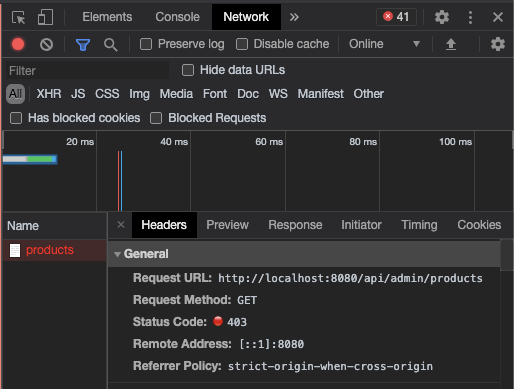
403 (Forbidden)
클라이언트 오류 상태. 서버에 요청이 전달되었지만, 권한 때문에 거절됨MDN Docs) https://developer.mozilla.org/ko/docs/Web/HTTP/Status/403
-