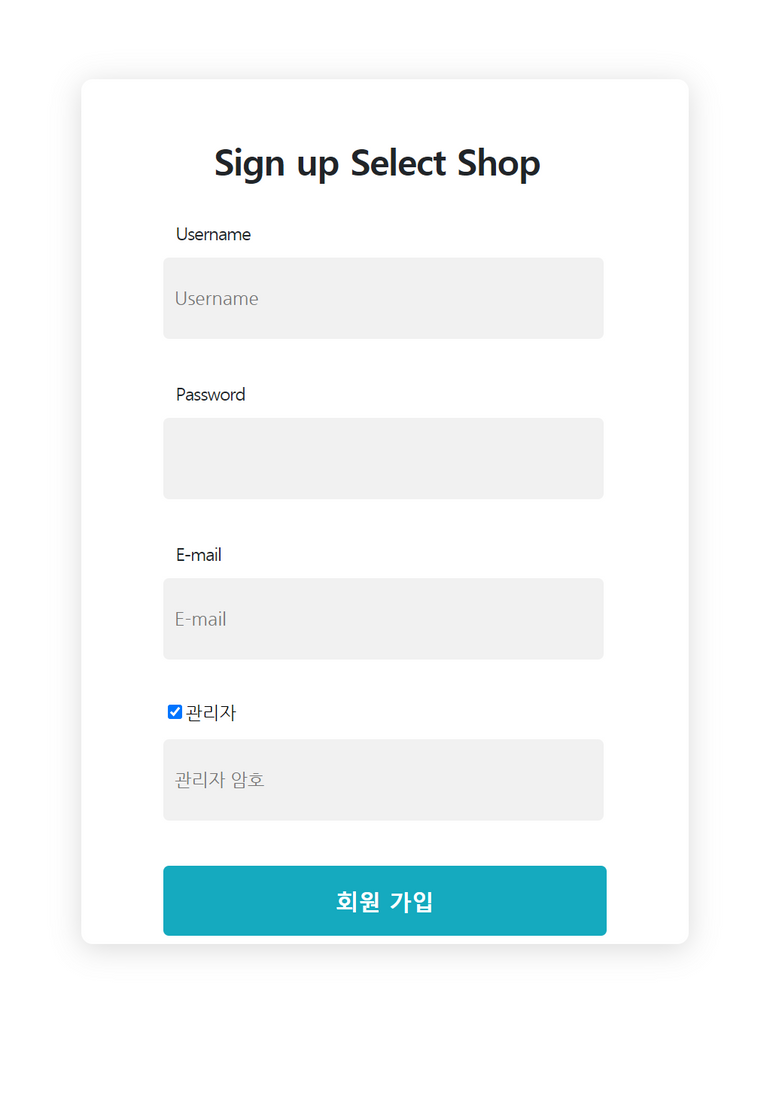
🔥 지금부터 '스프링 시큐리티' 프레임워크를 사용해서 회원 가입 기능을 구현해 보겠습니다.
- 13) 회원 테이블 설계
- 회원 DB 설계
- 요구사항과 디자인을 확인하며 어떤 정보가 저장되어야 할지 정리 필요
- 요구사항과 디자인을 확인하며 어떤 정보가 저장되어야 할지 정리 필요
- 회원 DB 설계
- 회원 DB 에 매핑되는 **@Entity 클래스** 구현
    - **[코드스니펫] model > User**

        ```java
        import lombok.Getter;
        import lombok.NoArgsConstructor;
        import lombok.Setter;

        import javax.persistence.*;

        @Setter
        @Getter // get 함수를 일괄적으로 만들어줍니다.
        @NoArgsConstructor // 기본 생성자를 만들어줍니다.
        @Entity // DB 테이블 역할을 합니다.
        public class User {

            // ID가 자동으로 생성 및 증가합니다.
            @GeneratedValue(strategy = GenerationType.AUTO)
            @Id
            private Long id;

            // nullable: null 허용 여부
            // unique: 중복 허용 여부 (false 일때 중복 허용)
            @Column(nullable = false, unique = true)
            private String username;

            @Column(nullable = false)
            private String password;

            @Column(nullable = false, unique = true)
            private String email;

            @Column(nullable = false)
            @Enumerated(value = EnumType.STRING)
            private UserRoleEnum role;

            public User(String username, String password, String email, UserRoleEnum role) {
                this.username = username;
                this.password = password;
                this.email = email;
                this.role = role;
            }
        }
        ```

    - **[코드스니펫] model > UserRoleEnum**

        ```java
        public enum UserRoleEnum {
            USER,  // 사용자 권한
            ADMIN  // 관리자 권한
        }
        ```
- 14) 관리자 회원 가입 인가 방법
-
'관리자 가입 토큰' 입력 필요
💡 잠깐! 실제로 '관리자' 권한을 이렇게 엉성하게 부여해 주는 경우는 드뭅니다. 해커가 해당 암호를 갈취하게 되면, 관리자 권한을 너무 쉽게 획득할 수 있게 되겠죠?: 랜덤하게 생성된 토큰 사용 ``` ***AAABnv/xRVklrnYxKZ0aHgTBcXukeZygoC*** ```보통 현업에서는
1) '관리자' 권한을 부여할 수 있는 관리자 페이지 구현
2) 승인자에 의한 결재 과정 구현 → 관리자 권한 부여
-
- 15) 회원가입 API 구현
- 회원가입 요청 DTO 구현
- [코드스니펫] dto> SignupRequestDto
import lombok.Getter;
import lombok.Setter;

@Setter
@Getter
public class SignupRequestDto {
    private String username;
    private String password;
    private String email;
    private boolean admin = false;
    private String adminToken = "";
}
- [코드스니펫] dto> SignupRequestDto
- 회원관리 Controller 구현
- [코드스니펫] controller > UserController
import com.sparta.springcore.dto.SignupRequestDto;
import com.sparta.springcore.service.UserService;
import org.springframework.beans.factory.annotation.Autowired;
import org.springframework.stereotype.Controller;
import org.springframework.web.bind.annotation.GetMapping;
import org.springframework.web.bind.annotation.PostMapping;

@Controller
public class UserController {

    private final UserService userService;

    @Autowired
    public UserController(UserService userService) {
        this.userService = userService;
    }

    // 회원 로그인 페이지
    @GetMapping("/user/login")
    public String login() {
        return "login";
    }

    // 회원 가입 페이지
    @GetMapping("/user/signup")
    public String signup() {
        return "signup";
    }

    // 회원 가입 요청 처리
    @PostMapping("/user/signup")
    public String registerUser(SignupRequestDto requestDto) {
        userService.registerUser(requestDto);
        return "redirect:/user/login";
    }
}
- [코드스니펫] controller > UserController
- 회원가입 API Service 구현
- [코드스니펫] service > UserService
import com.sparta.springcore.dto.SignupRequestDto; import com.sparta.springcore.model.User; import com.sparta.springcore.model.UserRoleEnum; import com.sparta.springcore.repository.UserRepository; import org.springframework.beans.factory.annotation.Autowired; import org.springframework.stereotype.Service; import java.util.Optional; @Service public class UserService { private final UserRepository userRepository; private static final String ADMIN_TOKEN = "AAABnv/xRVklrnYxKZ0aHgTBcXukeZygoC"; @Autowired public UserService(UserRepository userRepository) { this.userRepository = userRepository; } public void registerUser(SignupRequestDto requestDto) { String username = requestDto.getUsername(); String password = requestDto.getPassword(); // 회원 ID 중복 확인 Optional<User> found = userRepository.findByUsername(username); if (found.isPresent()) { throw new IllegalArgumentException("중복된 사용자 ID 가 존재합니다."); } String email = requestDto.getEmail(); // 사용자 ROLE 확인 UserRoleEnum role = UserRoleEnum.USER; if (requestDto.isAdmin()) { if (!requestDto.getAdminToken().equals(ADMIN_TOKEN)) { throw new IllegalArgumentException("관리자 암호가 틀려 등록이 불가능합니다."); } role = UserRoleEnum.ADMIN; } User user = new User(username, password, email, role); userRepository.save(user); } } - 회원 가입 요청 처리
- 회원 중복 Id 확인
- 관리자 가입 요청에 대해서는 '관리자 가입 토큰' 인가
- [코드스니펫] service > UserService
- 회원가입 API Repository 구현
- [코드스니펫] repository > UserRepository
import com.sparta.springcore.model.User;
import org.springframework.data.jpa.repository.JpaRepository;

import java.util.Optional;

public interface UserRepository extends JpaRepository<User, Long> {
    Optional<User> findByUsername(String username);
}
- [코드스니펫] repository > UserRepository
- UI 연동 테스트
- 회원 가입 페이지로 이동: GET /user/signup
- 회원 가입 시도: POST /user/signup
- DB 확인
- H2 console 통해 가입된 회원 정보 확인
- 스프링 시큐리티 허용 정책 변경 필요
- 회원 관리 API 허용 (CSRF 무시)
- h2-console 사용에 대한 허용 (CSRF, FrameOptions 무시)
- [코드스니펫] security > WebSecurityConfig
import org.springframework.context.annotation.Configuration;
import org.springframework.security.config.annotation.web.builders.HttpSecurity;
import org.springframework.security.config.annotation.web.builders.WebSecurity;
import org.springframework.security.config.annotation.web.configuration.EnableWebSecurity;
import org.springframework.security.config.annotation.web.configuration.WebSecurityConfigurerAdapter;

@Configuration
@EnableWebSecurity // 스프링 Security 지원을 가능하게 함
public class WebSecurityConfig extends WebSecurityConfigurerAdapter {

    @Override
    public void configure(WebSecurity web) {
        // h2-console 사용에 대한 허용 (CSRF, FrameOptions 무시)
        web
                .ignoring()
                .antMatchers("/h2-console/**");
    }

    @Override
    protected void configure(HttpSecurity http) throws Exception {
        // 회원 관리 처리 API (POST /user/**) 에 대해 CSRF 무시
        http.csrf()
                .ignoringAntMatchers("/user/**");

        http.authorizeRequests()
                // image 폴더를 login 없이 허용
                .antMatchers("/images/**").permitAll()
                // css 폴더를 login 없이 허용
                .antMatchers("/css/**").permitAll()
                // 회원 관리 처리 API 전부를 login 없이 허용
                .antMatchers("/user/**").permitAll()
                // 그 외 어떤 요청이든 '인증'
                .anyRequest().authenticated()
                .and()
                    // 로그인 기능
                    .formLogin()
                    .loginPage("/user/login")
                    .defaultSuccessUrl("/")
                    .failureUrl("/user/login?error")
                    .permitAll()
                .and()
                    // 로그아웃 기능
                    .logout()
                    .permitAll();
    }
}
- 회원가입 요청 DTO 구현