참고자료
velog
학습한 내용을 정리한 포스팅입니다.
방법1. 스크롤 이벤트 감지 코드
먼저 scroll 이벤트를 이용해 이벤트 감지 코드를 작성해보자
useEffect(() => {
    const handleScroll = () => {
        const {scrollTop, offsetHeight} = document.documentElement;
        console.log(`top : ${scrollTop}`)
        console.log(`offsetHeight : ${offsetHeight}`)
        console.log(`innerHeight : ${window.innerHeight}`)
        if (window.innerHeight + scrollTop >= offsetHeight) {
            console.log('scroll event detected!')
            fetchImages();
        }
    }
    fetchImages()
    window.addEventListener('scroll', handleScroll)
    return () => window.removeEventListener('scroll', handleScroll)
}, []);- scrollTop : 화면에 보이는 가장 위 scroll 지점을 말한다.
- offsetHeight : 현재 페이지의 높이를 말한다.
- window.innerHeight : 현재 화면의 높이를 말한다.
- useEffect : 해당 컴포넌트가 렌더링 될때 실행되는 함수를 인자로 받는다. return 시 컴포넌트가 파괴될때 실행되는 함수이다.
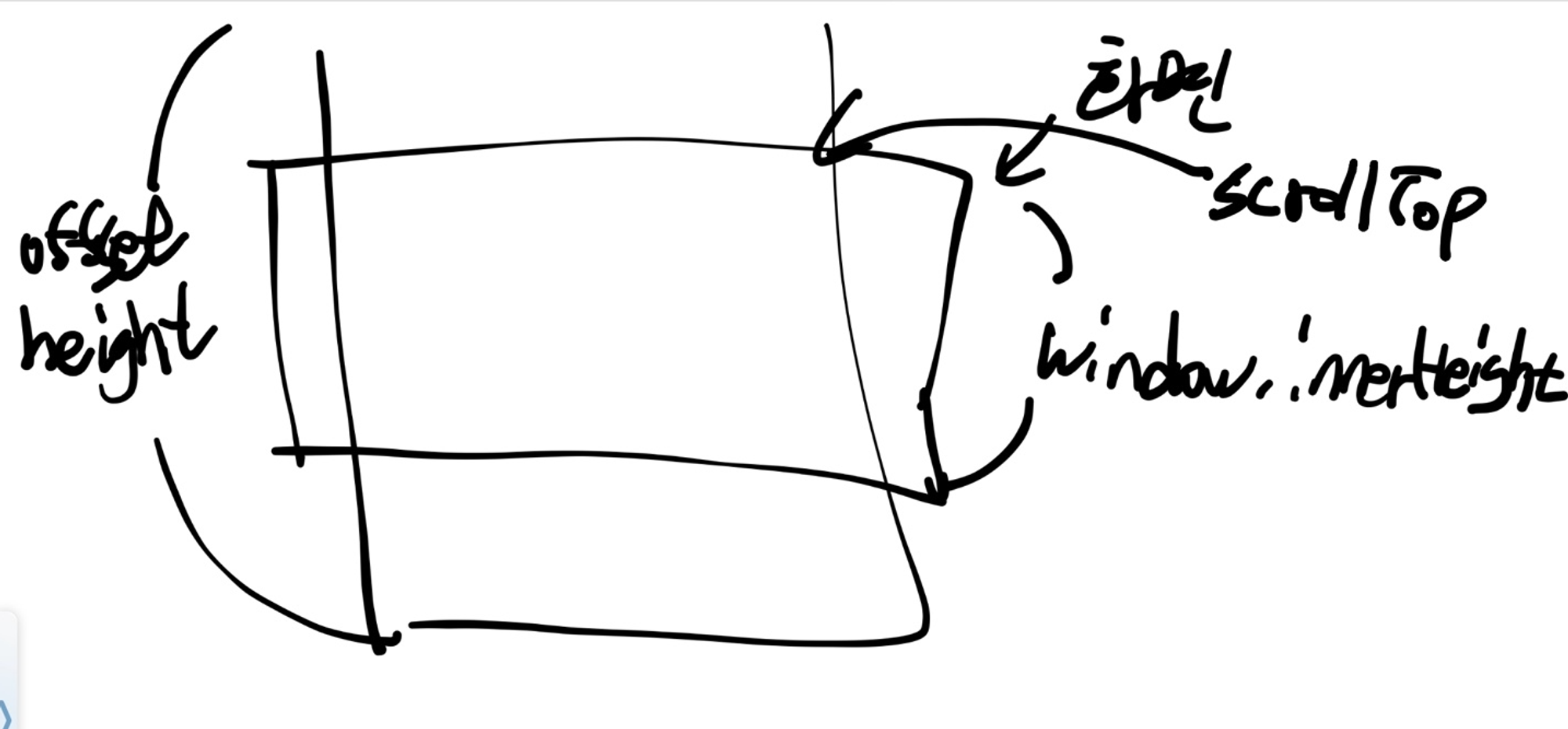
설명하자면 사용자가 scroll을 할때마다 위 handleScroll 함수가 실행되게끔 설정해 놓았다.
만약 전체 높이 offsetHeight보다 scrollTop + window.innerHeight 가 같거나 커진다면
데이터를 가져오는 fetchImage() 함수를 실행시키게 하였다.
하지만 이렇게 하면 사용자의 scroll 이벤트 마다 실행되기 때문에 최적화 되어있지 않다…
방법2 IntersectionObserver API 를 이용
-
가져오는 중인
boolean상태isFetch, 보이면 새로운 데이터를 가져오는 target RefloadingComp, 배열 데이터를 관리할images, page를 관리할page- isFetch
- loadingComp
- images
- page
const [images, setImages] = useState([])

const isFetching = useRef(false);
const page = useRef(1);
const loadingComp = useRef();
위에서 isFetching, page는 렌더링을 해도 계속 최신값을 유지 해야 하기 때문에
useRef로 선언한다. -
데이터를 가져오는 코드 작성
const fetchImages = async () => {
    isFetching.current = true;
    let ret = await AlbumController.findAll({page: page.current, page_size: 9});
    setImages(images => [...images, ...ret.collection.items])
    isFetching.current = false;

    if (ret.length === 0) {
        setIsLast(true);
    }
}
만약 가져올게 없다면 페이징의 마지막을 알리는
setIsLast를true로 한다. -
핸들러함수를
IntersectionObserver에 등록useEffect(() => { const handleObserver = (entries) => { const target = entries[0]; if (target.isIntersecting && !isFetching.current) { fetchImages(); page.current += 1 } } const observer = new IntersectionObserver(handleObserver, { threshold: 0, }) const observerTarget = loadingComp.current; if (observerTarget) { observer.observe(observerTarget); } return () => observer.disconnect(); }, [imagesState]);- useEffect 를 이용해 컴포넌트가 렌더링 될때 옵저버 핸들러 함수를 달아준다.
const observer = new IntersectionObserver(handleObserver, option)여기서 handleObserver 는 내가 걸어둔 ref가 화면에 걸치면 실행될 함수!!IntersectionObserver의 optioninterface IntersectionObserverInit { root?: Element | Document | null; rootMargin?: string; threshold?: number | number[]; }root: 내가 걸어둔 ref(target)이 감지할 뷰포트를 설정한다. null이라면 브라우저 화면이 자동으로 설정된다 (사용자가 보는 화면)rootMargin: 위에서root를 설정한뒤margin을 주면 뷰포트를 확장 가능하다threshold: handle 옵저버 함수가 실행되기 위해 target이 얼마나 보여야지 실행할지 정하는 옵션값이다. 백분율이며 0(0%)이면 1px만 보여도 함수가 실행되고, 1 (100%) 이라면 전체가 보여야 실행된다.
-
로딩 컴포넌트를 ref로 걸어준다.
//App.js
return (
    <div className="App">
        <TopBackGround modal={modal}/>
        {<AlbumList images={images}/>}
        <Loading
            isLast={isLast}
            isFetching={isFetching.current}
            **loadingComp={loadingComp} />**
    </div>
);

// Loading.js
function Loading({isLast, isFetching, loadingComp}) {
    if (isLast) {
        return null;
    }
    return (
        <div ref={loadingComp}>잠시만 기다려 주세요</div>
    );
}

소통과 기록이 무기(Weapon)인 개발자