언리얼 엔진의 게임플레이 어빌리티 시스템 | 언리얼 엔진 5.5 문서 | Epic Developer Community
GameplayTag
라이라 어빌리티 문서에 자주 등장하는 GameplayTag
어디서 설정하고 어떻게 동작하는지 알아보자.
Gameplay Tag Manager
편집>프로젝트 세팅>GameplayTags>게임플레이 태그 관리
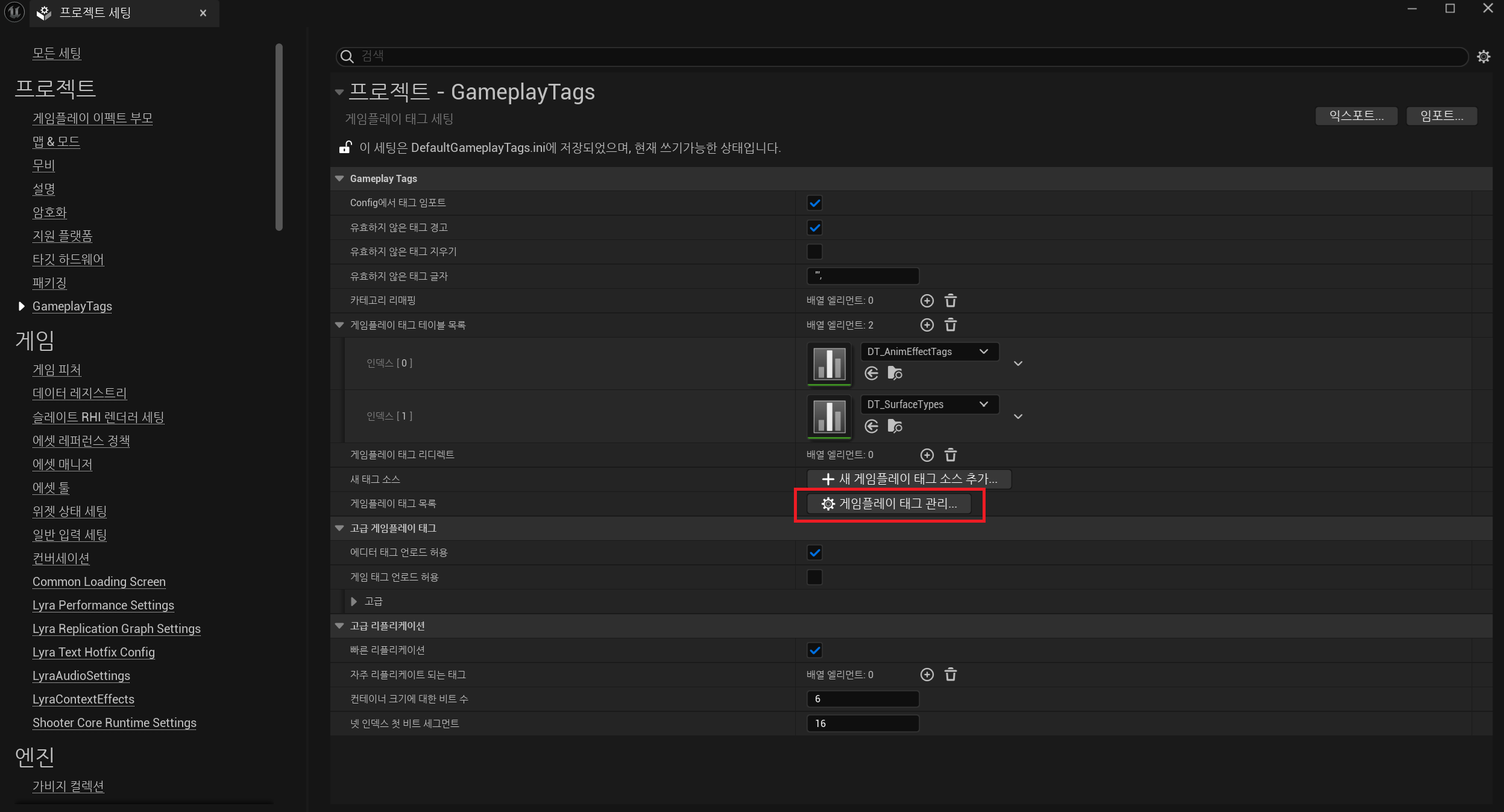
게임플래이 태그 매니저로 다양한 태그들을 관리할 수 있다.
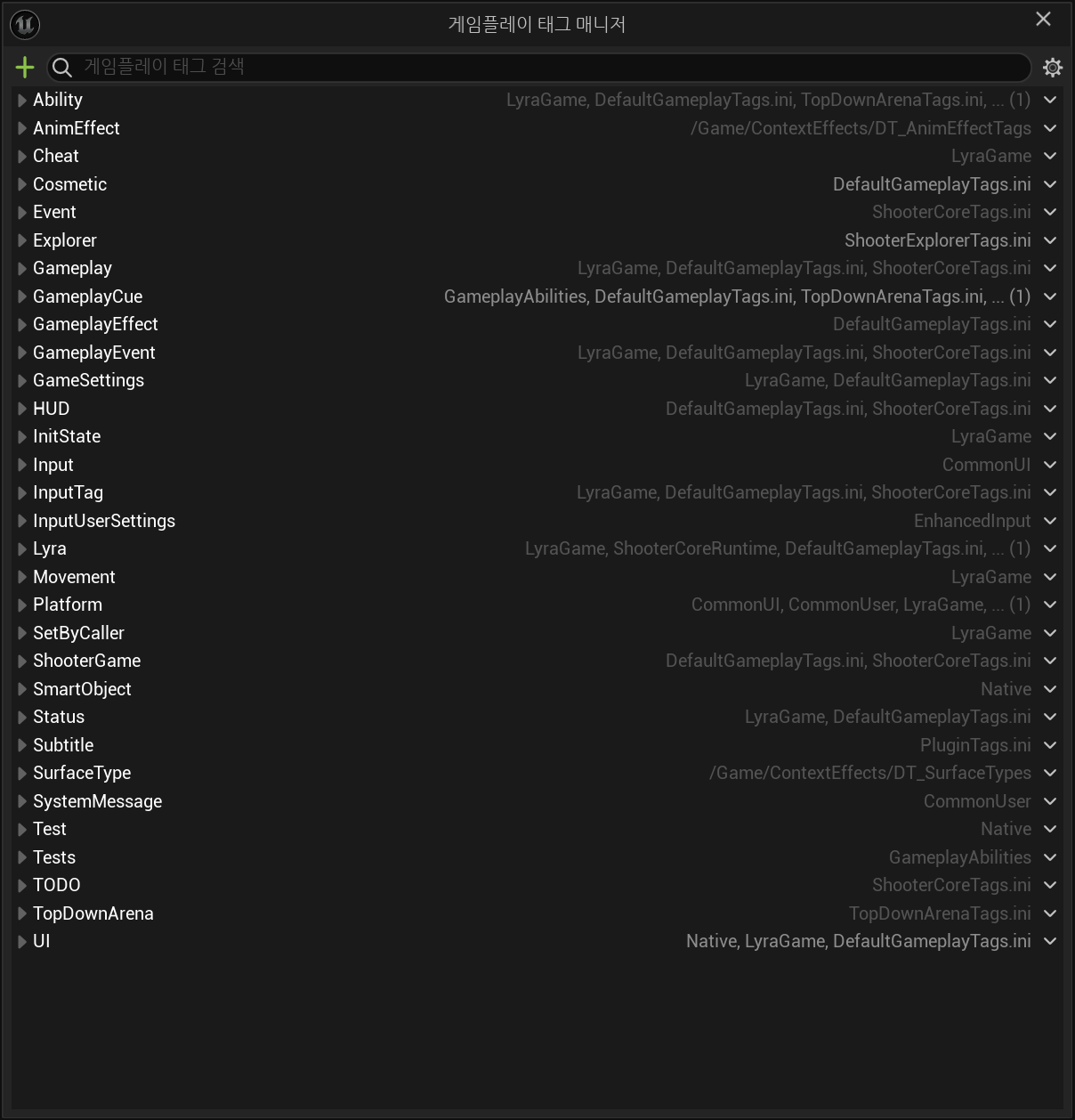
Ability Tag
라이라 문서에 등장하는 GameplayTag 유형으로는 AbilityTag, InputTag 정도가 있는데, 먼저 AbilityTag부터 탐구해보자.
(InputTag는 다음에 정리해보겠음..)
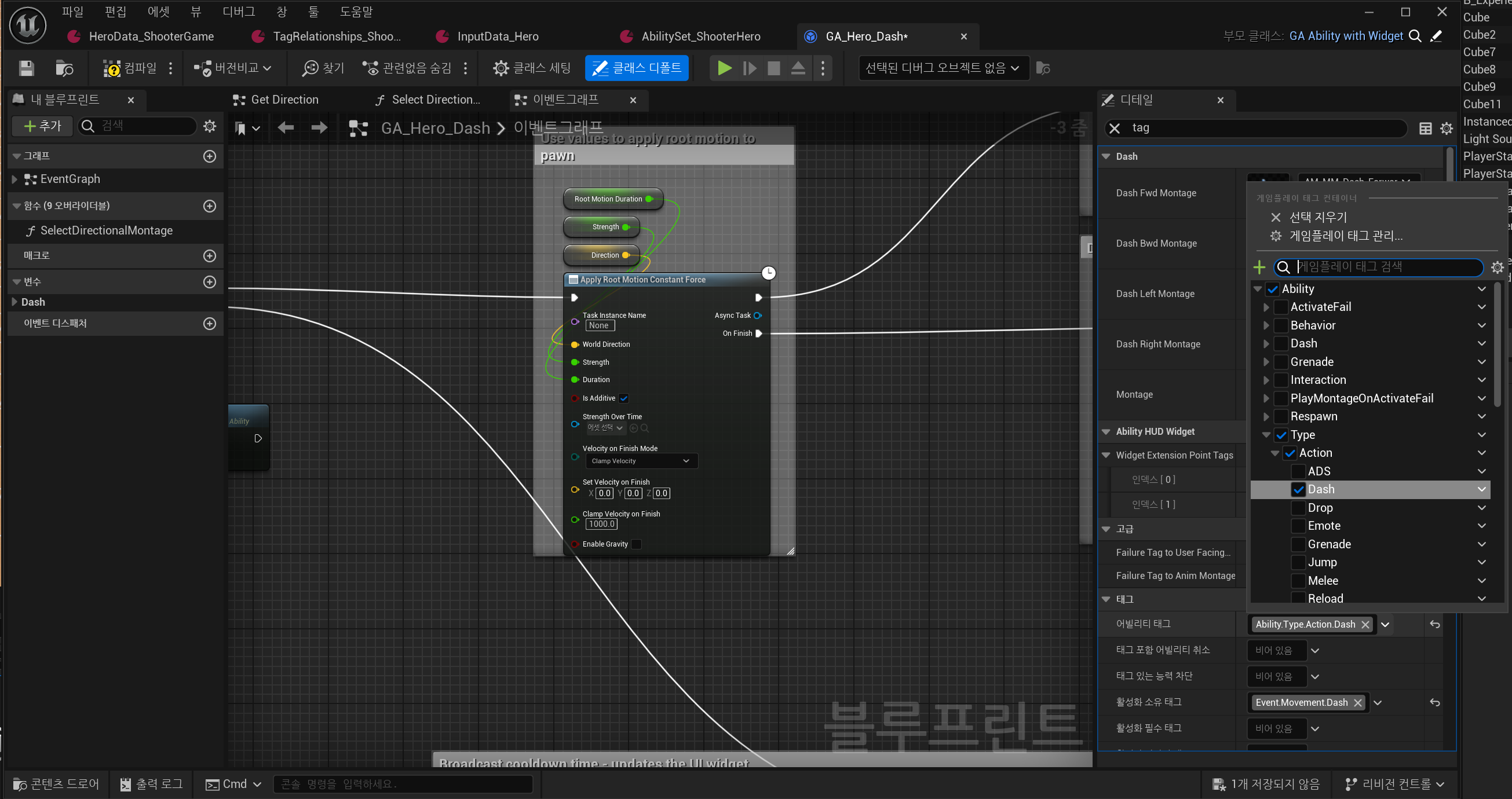
아무 Gameplay Ability를 열어보면 해당 어빌리티의 어빌리티 태그를 확인할 수 있다.
참고로 여러 개의 어빌리티 태그를 설정할 수 있다. (왠지 당연히 하나만 설정 가능할거라 생각했었다.)
AbilityTag간의 관계는 PawnData의 TagRelationshipMapping에서 확인할 수 있다.
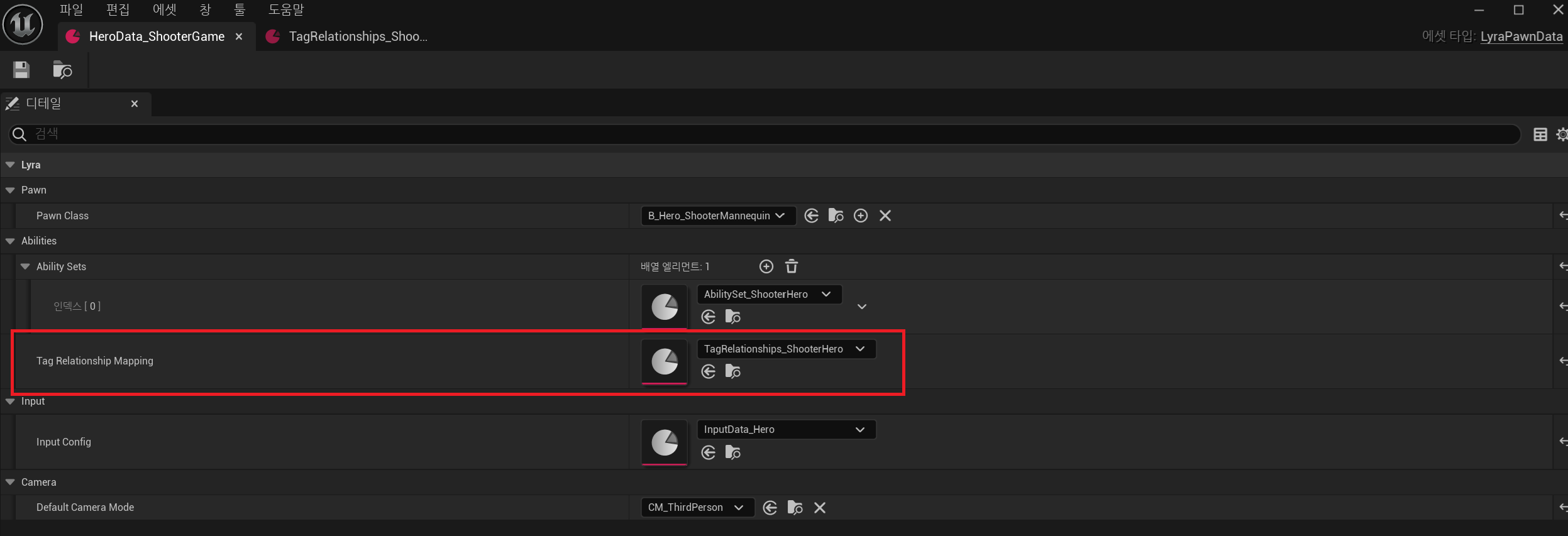
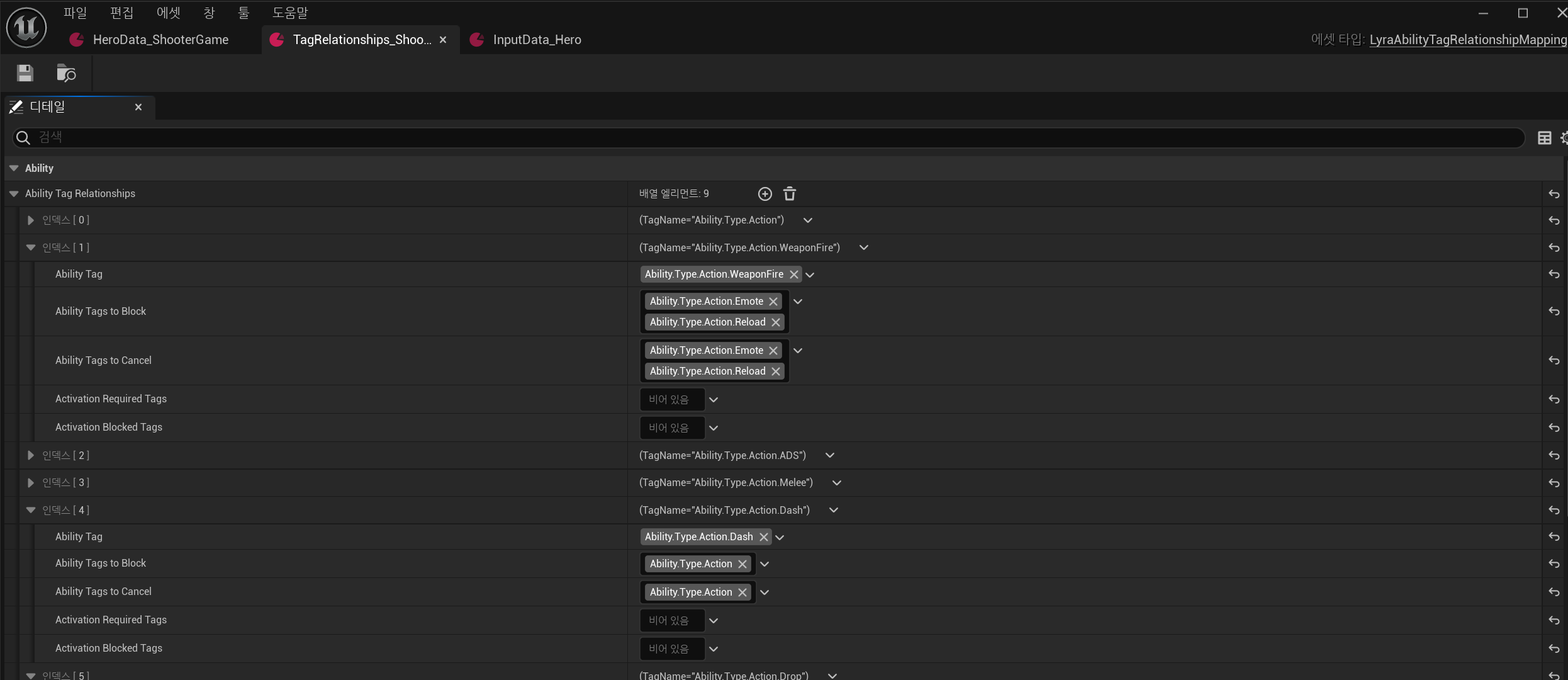
Ability Tag Releationships로 AbilityTag 간의 우선순위 등을 관리하고 있다.
각 프로퍼티의 의미는 아래 주석 참고
/** Struct that defines the relationship between different ability tags */
USTRUCT()
struct FLyraAbilityTagRelationship
{
	GENERATED_BODY()

	/** The tag that this container relationship is about. Single tag, but abilities can have multiple of these */
	UPROPERTY(EditAnywhere, Category = Ability, meta = (Categories = "Gameplay.Action"))
	FGameplayTag AbilityTag;

	/** The other ability tags that will be blocked by any ability using this tag */
	UPROPERTY(EditAnywhere, Category = Ability)
	FGameplayTagContainer AbilityTagsToBlock;

	/** The other ability tags that will be canceled by any ability using this tag */
	UPROPERTY(EditAnywhere, Category = Ability)
	FGameplayTagContainer AbilityTagsToCancel;

	/** If an ability has the tag, this is implicitly added to the activation required tags of the ability */
	UPROPERTY(EditAnywhere, Category = Ability)
	FGameplayTagContainer ActivationRequiredTags;

	/** If an ability has the tag, this is implicitly added to the activation blocked tags of the ability */
	UPROPERTY(EditAnywhere, Category = Ability)
	FGameplayTagContainer ActivationBlockedTags;
};
AbilityTagsToBlock, AbilityTagsToCancel
어빌리티 태그 적용 및 해제
어떤 어빌리티를 실행하기 전에 UAbilitySystemComponent에 해당 어빌리티의 AbilityTag의 AbilityTagsToBlock, AbilityTagsToCancel을 적용한다.
// GameplayAbility.h
void UGameplayAbility::CallActivateAbility(const FGameplayAbilitySpecHandle Handle, const FGameplayAbilityActorInfo* ActorInfo, const FGameplayAbilityActivationInfo ActivationInfo, FOnGameplayAbilityEnded::FDelegate* OnGameplayAbilityEndedDelegate, const FGameplayEventData* TriggerEventData)
{
	PreActivate(Handle, ActorInfo, ActivationInfo, OnGameplayAbilityEndedDelegate, TriggerEventData);
	ActivateAbility(Handle, ActorInfo, ActivationInfo, TriggerEventData);
}

void UGameplayAbility::PreActivate(const FGameplayAbilitySpecHandle Handle, const FGameplayAbilityActorInfo* ActorInfo, const FGameplayAbilityActivationInfo ActivationInfo, FOnGameplayAbilityEnded::FDelegate* OnGameplayAbilityEndedDelegate, const FGameplayEventData* TriggerEventData)
{
	UAbilitySystemComponent* Comp = ActorInfo->AbilitySystemComponent.Get();

	// ...

	Comp->ApplyAbilityBlockAndCancelTags(AbilityTags, this, true, BlockAbilitiesWithTag, true, CancelAbilitiesWithTag);

    // ...
}


// LyraAbilitySystemComponent.h
void ULyraAbilitySystemComponent::ApplyAbilityBlockAndCancelTags(const FGameplayTagContainer& AbilityTags, UGameplayAbility* RequestingAbility, bool bEnableBlockTags, const FGameplayTagContainer& BlockTags, bool bExecuteCancelTags, const FGameplayTagContainer& CancelTags)
{
	FGameplayTagContainer ModifiedBlockTags = BlockTags;
	FGameplayTagContainer ModifiedCancelTags = CancelTags;

	if (TagRelationshipMapping)
	{
		// Use the mapping to expand the ability tags into block and cancel tag
		TagRelationshipMapping->GetAbilityTagsToBlockAndCancel(AbilityTags, &ModifiedBlockTags, &ModifiedCancelTags);
	}

	Super::ApplyAbilityBlockAndCancelTags(AbilityTags, RequestingAbility, bEnableBlockTags, ModifiedBlockTags, bExecuteCancelTags, ModifiedCancelTags);

	//@TODO: Apply any special logic like blocking input or movement
}

void UAbilitySystemComponent::ApplyAbilityBlockAndCancelTags(const FGameplayTagContainer& AbilityTags, UGameplayAbility* RequestingAbility, bool bEnableBlockTags, const FGameplayTagContainer& BlockTags, bool bExecuteCancelTags, const FGameplayTagContainer& CancelTags)
{
	if (bEnableBlockTags)
	{
		BlockAbilitiesWithTags(BlockTags);
	}
	else
	{
		UnBlockAbilitiesWithTags(BlockTags);
	}

	if (bExecuteCancelTags)
	{
		CancelAbilities(&CancelTags, nullptr, RequestingAbility);
	}
}
반대로 어빌리티가 종료되면 다시 태그를 해제
void UGameplayAbility::EndAbility(const FGameplayAbilitySpecHandle Handle, const FGameplayAbilityActorInfo* ActorInfo, const FGameplayAbilityActivationInfo ActivationInfo, bool bReplicateEndAbility, bool bWasCancelled)
{
	if (IsEndAbilityValid(Handle, ActorInfo))
	{
		// ...

		if (UAbilitySystemComponent* const AbilitySystemComponent = ActorInfo->AbilitySystemComponent.Get())
		{
			// ...

			if (IsBlockingOtherAbilities())
			{
				// If we're still blocking other abilities, cancel now
				AbilitySystemComponent->ApplyAbilityBlockAndCancelTags(AbilityTags, this, false, BlockAbilitiesWithTag, false, CancelAbilitiesWithTag);
			}

			// ...
		}

		// ...
	}
}
어빌리티의 블락 및 실행 취소
그렇다면 실제 해당 태그를 가진 어빌리티가 어떻게 block/cancel되는지도 알아보자
Block: 어빌리티 실행 전에 CanActivateAbility에서 현재 BlockTag에 해당 어빌리티의 AbilityTag가 포함되어있으면 실행하지 않는다.
bool UGameplayAbility::CanActivateAbility(const FGameplayAbilitySpecHandle Handle, const FGameplayAbilityActorInfo* ActorInfo, const FGameplayTagContainer* SourceTags, const FGameplayTagContainer* TargetTags, OUT FGameplayTagContainer* OptionalRelevantTags) const
{
	// ...

	if (!DoesAbilitySatisfyTagRequirements(*AbilitySystemComponent, SourceTags, TargetTags, OptionalRelevantTags))
	{	// If the ability's tags are blocked, or if it has a "Blocking" tag or is missing a "Required" tag, then it can't activate.
		if (FScopedCanActivateAbilityLogEnabler::IsLoggingEnabled())
		{
			UE_LOG(LogAbilitySystem, Verbose, TEXT("%s: %s could not be activated due to Blocking Tags or Missing Required Tags"), *GetNameSafe(ActorInfo->OwnerActor.Get()), *GetNameSafe(Spec->Ability));
			UE_VLOG(ActorInfo->OwnerActor.Get(), VLogAbilitySystem, Verbose, TEXT("%s could not be activated due to Blocking Tags or Missing Required Tags"), *GetNameSafe(Spec->Ability));
		}
		return false;
	}

	// ...

	return true;
}

bool ULyraGameplayAbility::DoesAbilitySatisfyTagRequirements(const UAbilitySystemComponent& AbilitySystemComponent, const FGameplayTagContainer* SourceTags, const FGameplayTagContainer* TargetTags, OUT FGameplayTagContainer* OptionalRelevantTags) const
{
	// Specialized version to handle death exclusion and AbilityTags expansion via ASC

	bool bBlocked = false;
	bool bMissing = false;

	UAbilitySystemGlobals& AbilitySystemGlobals = UAbilitySystemGlobals::Get();
	const FGameplayTag& BlockedTag = AbilitySystemGlobals.ActivateFailTagsBlockedTag;
	const FGameplayTag& MissingTag = AbilitySystemGlobals.ActivateFailTagsMissingTag;

	// Check if any of this ability's tags are currently blocked
	if (AbilitySystemComponent.AreAbilityTagsBlocked(AbilityTags))
	{
		bBlocked = true;
	}

	// ...

	if (bBlocked)
	{
		if (OptionalRelevantTags && BlockedTag.IsValid())
		{
			OptionalRelevantTags->AddTag(BlockedTag);
		}
		return false;
	}
	// ...

	return true;
}
Cancel: 앞서 설명한 UAbilitySystemComponent::ApplyAbilityBlockAndCancelTags에서 호출되는 CancelAbilities
현재 실행중인 어빌리티들을 모두 확인해서 어빌리티의 AbilityTag 중에 CancelTag 중 하나라도 포함한다면 해당 어빌리티는 캔슬된다.
void UAbilitySystemComponent::CancelAbilities(const FGameplayTagContainer* WithTags, const FGameplayTagContainer* WithoutTags, UGameplayAbility* Ignore)
{
	ABILITYLIST_SCOPE_LOCK();
	for (FGameplayAbilitySpec& Spec : ActivatableAbilities.Items)
	{
		if (!Spec.IsActive() || Spec.Ability == nullptr)
		{
			continue;
		}

		bool WithTagPass = (!WithTags || Spec.Ability->AbilityTags.HasAny(*WithTags));
		bool WithoutTagPass = (!WithoutTags || !Spec.Ability->AbilityTags.HasAny(*WithoutTags));

		if (WithTagPass && WithoutTagPass)
		{
			CancelAbilitySpec(Spec, Ignore);
		}
	}
}
ActivationRequiredTags, ActivationBlockedTags
AbilityTagsToBlock, AbilityTagsToCancel과 마찬가지로 어빌리티 실행 전에 DoesAbilitySatisfyTagRequirements에서 ActivationRequiredTags, ActivationBlockedTags를 체크한다.
bool ULyraGameplayAbility::DoesAbilitySatisfyTagRequirements(const UAbilitySystemComponent& AbilitySystemComponent, const FGameplayTagContainer* SourceTags, const FGameplayTagContainer* TargetTags, OUT FGameplayTagContainer* OptionalRelevantTags) const
{
	// ...

	const ULyraAbilitySystemComponent* LyraASC = Cast<ULyraAbilitySystemComponent>(&AbilitySystemComponent);
	static FGameplayTagContainer AllRequiredTags;
	static FGameplayTagContainer AllBlockedTags;

	AllRequiredTags = ActivationRequiredTags;
	AllBlockedTags = ActivationBlockedTags;

	// Expand our ability tags to add additional required/blocked tags
	if (LyraASC)
	{
		LyraASC->GetAdditionalActivationTagRequirements(AbilityTags, AllRequiredTags, AllBlockedTags);
	}

	// Check to see the required/blocked tags for this ability
	if (AllBlockedTags.Num() || AllRequiredTags.Num())
	{
		static FGameplayTagContainer AbilitySystemComponentTags;

		AbilitySystemComponentTags.Reset();
		AbilitySystemComponent.GetOwnedGameplayTags(AbilitySystemComponentTags);	// 아마 현재 실행중인 어빌리티들의 AbilityTag를 가져올 듯

		// 현재 AbilitySystemComponentTags에 ActivationBlockedTags가 포함되어있는지 체크
        if (AbilitySystemComponentTags.HasAny(AllBlockedTags))
		{
			if (OptionalRelevantTags && AbilitySystemComponentTags.HasTag(LyraGameplayTags::Status_Death))
			{
				// If player is dead and was rejected due to blocking tags, give that feedback
				OptionalRelevantTags->AddTag(LyraGameplayTags::Ability_ActivateFail_IsDead);
			}

			bBlocked = true;
		}

		// 현재 AbilitySystemComponentTags에 ActivationRequiredTags가 포함되어있는지 체크
        if (!AbilitySystemComponentTags.HasAll(AllRequiredTags))
		{
			bMissing = true;
		}
	}

	// ...

	if (bBlocked)
	{
		if (OptionalRelevantTags && BlockedTag.IsValid())
		{
			OptionalRelevantTags->AddTag(BlockedTag);
		}
		return false;
	}
	if (bMissing)
	{
		if (OptionalRelevantTags && MissingTag.IsValid())
		{
			OptionalRelevantTags->AddTag(MissingTag);
		}
		return false;
	}

	return true;
}
의문점..
ActivationBlockedTags가 꼭 필요한지? 'A 태그의 ActivationBlockedTags에 B 태그를 설정'과 'B태그의 AbilityTagsToBlock에 A 태그를 설정'하는 것이 동일하지 않나 라는 생각