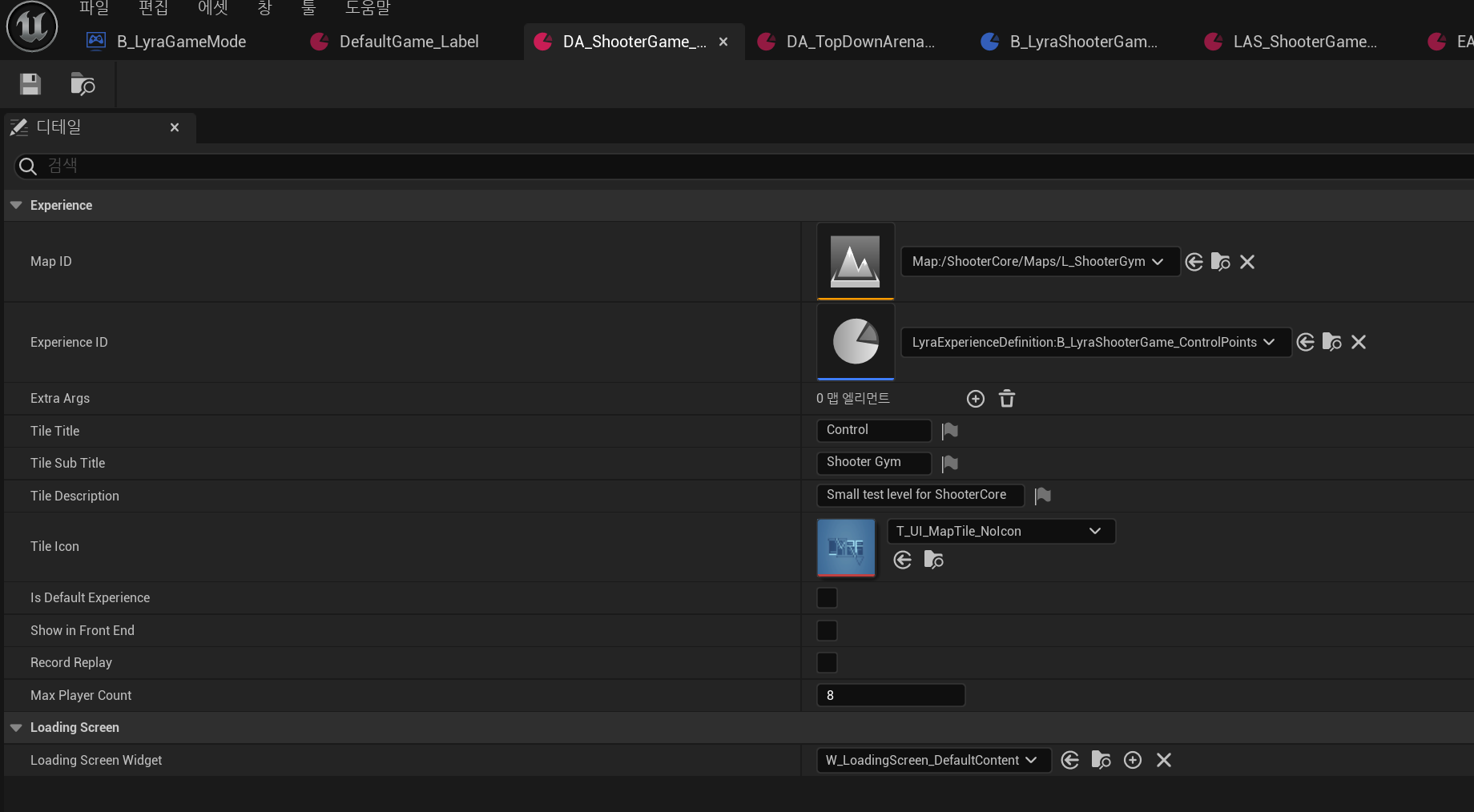
Experience
기존의 GameMode를 대체하는 개념
이전에는 게임의 모드(ex. 로비, 소환사의 협곡, 칼바람 등)가 바뀔 때마다 GameMode를 바꿨다.
근데 이 과정이 비용이 크기 때문에 GameMode는 하나로 고정하고 대신 Experience를 변경해서 개선한 것이다.
ULyraUserFacingExperienceDefinition
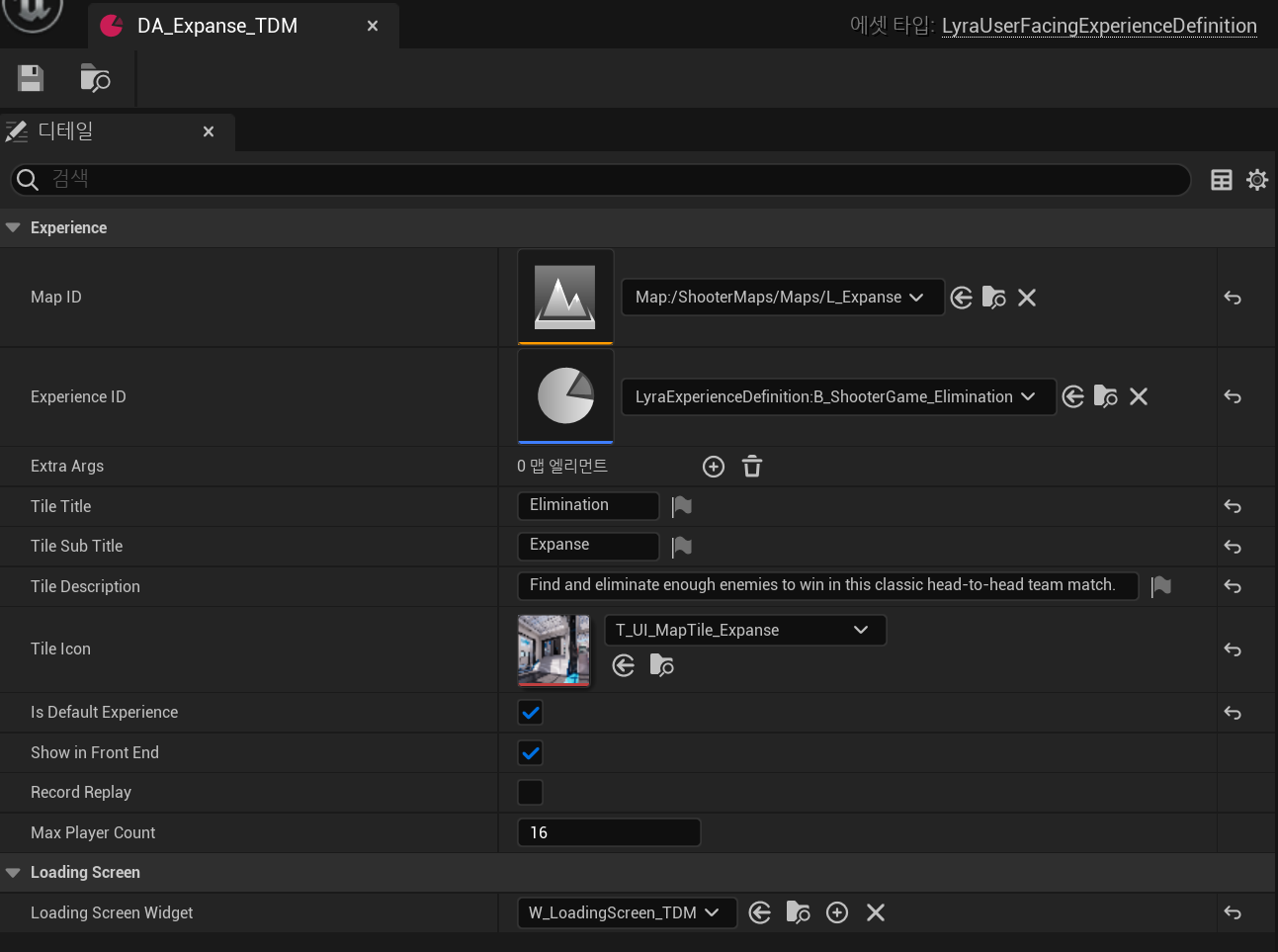
UPrimaryDataAsset를 상속받는다.
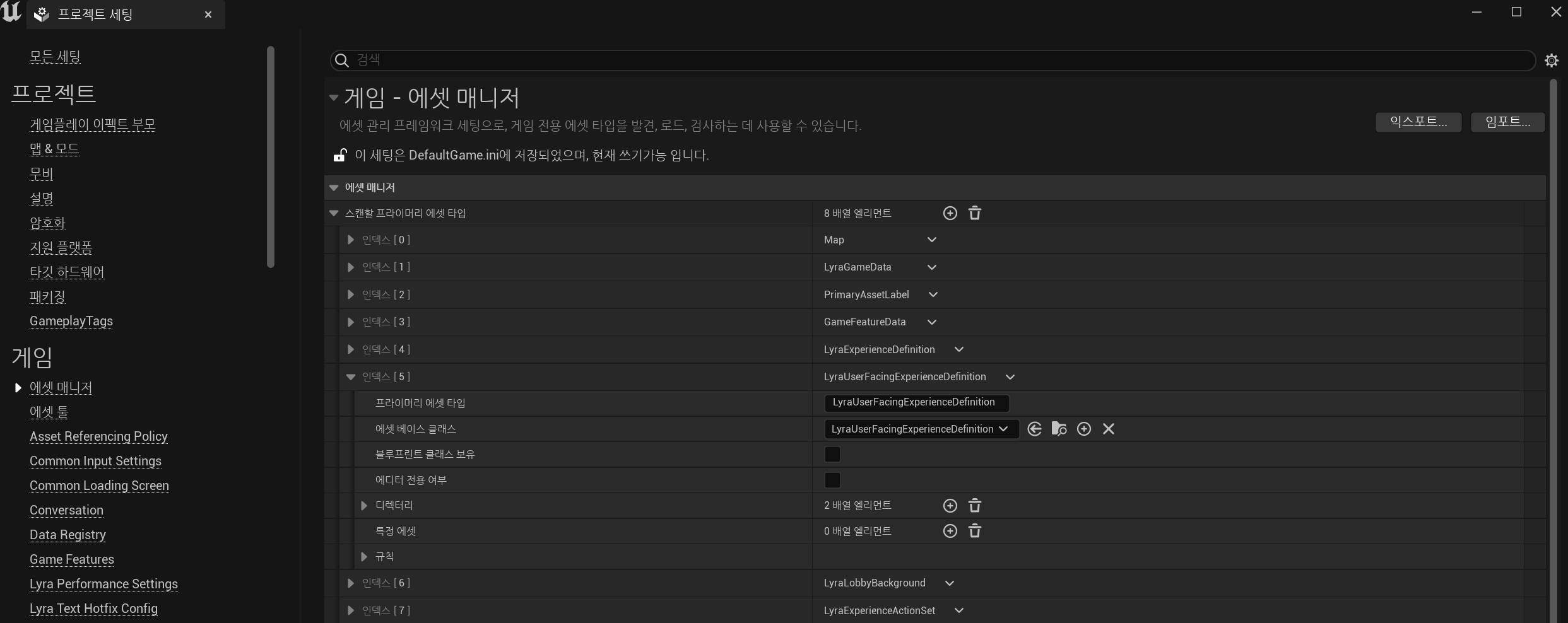
PrimaryDataAsset을 로드하려면 프로젝트 세팅 > 에셋매니저에서 추가해야 한다.
PrimaryDataAsset에 대한 설명은 누군가 잘 정리해뒀으니 참고
ULyraExperienceDefinition
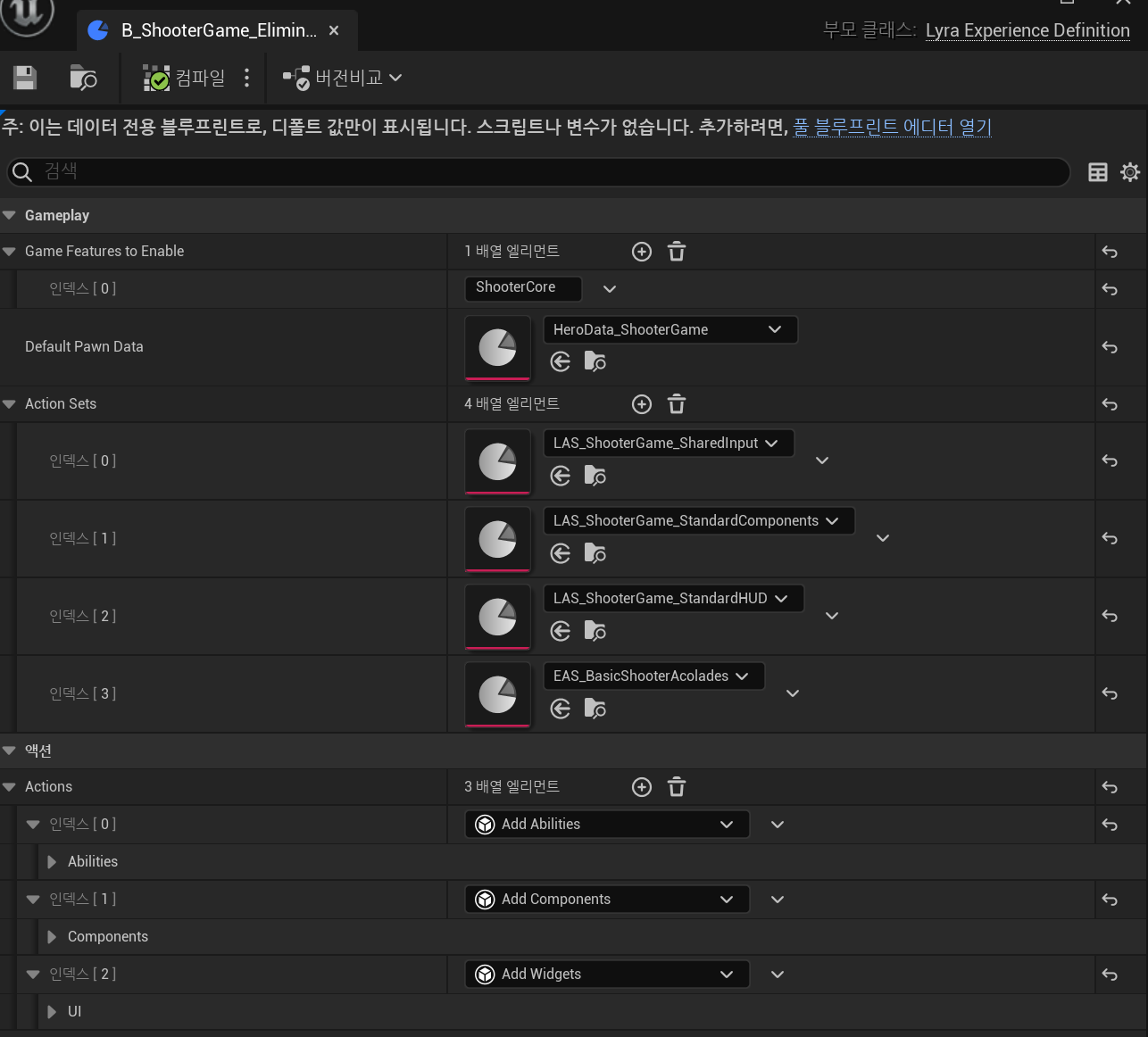
마찬가지로 UPrimaryDataAsset를 상속받는다.
GameFeaturesToEnable: 해당 Experience가 적용됐을 때 활성화할 Feature 리스트
DefaultPawnData: Experience가 로드되면 PlayerState에 적용할 폰데이터
ActionSets: ULyraExperienceActionSet 리스트. 아래에서 설명
Actions: UGameFeatureAction 리스트
ULyraExperienceActionSet
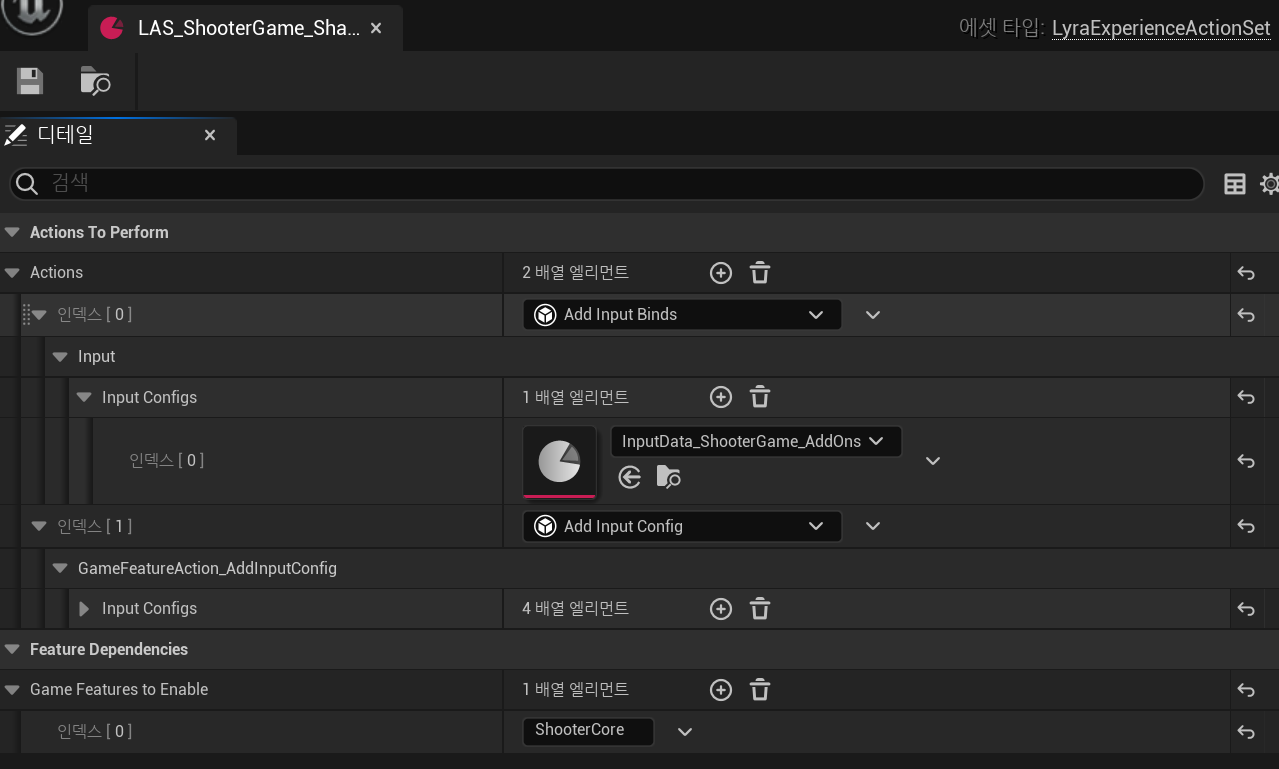
Actions: UGameFeatureAction 리스트. Experience가 적용될 때 ULyraExperienceDefinition::Actions와 같이 실행된다. ExperienceDefinition>Actions에 한 번에 안 넣고, 굳이 ActionSet로 Actions을 실행하는 이유는 비슷한 Actions끼리 모아서 여러 Experience에 추가하고 싶어서 아닐까 싶음.
GameFeaturesToEnable: ULyraExperienceDefinition::GameFeaturesToEnable와 마찬가지로 활성화할 Feature 리스트. 맨 마지막에 설명
Experience 교체 과정
실제로 Lyra 샘플 프로젝트에서는 어떻게 Experience가 교체되고 있는지를 알아보았다.
void ALyraGameMode::HandleMatchAssignmentIfNotExpectingOne()
{
	// ...

	// Final fallback to the default experience
	if (!ExperienceId.IsValid())
	{
		//@TODO: Pull this from a config setting or something
		ExperienceId = FPrimaryAssetId(FPrimaryAssetType("LyraExperienceDefinition"), FName("B_LyraDefaultExperience"));
		ExperienceIdSource = TEXT("Default");
	}
	// ...
}
일단은 실행하면 디폴트로 B_LyraDefaultExperience을 experience로 로드한다.
주석에서도 말하듯이.. 냅다 하드코딩하지 말고 프로젝트 세팅에서 설정하면 좋을 듯
B_ExperienceList3D
에디터 시작 레벨인 L_DefaultEditorOverview에 배치된 액터
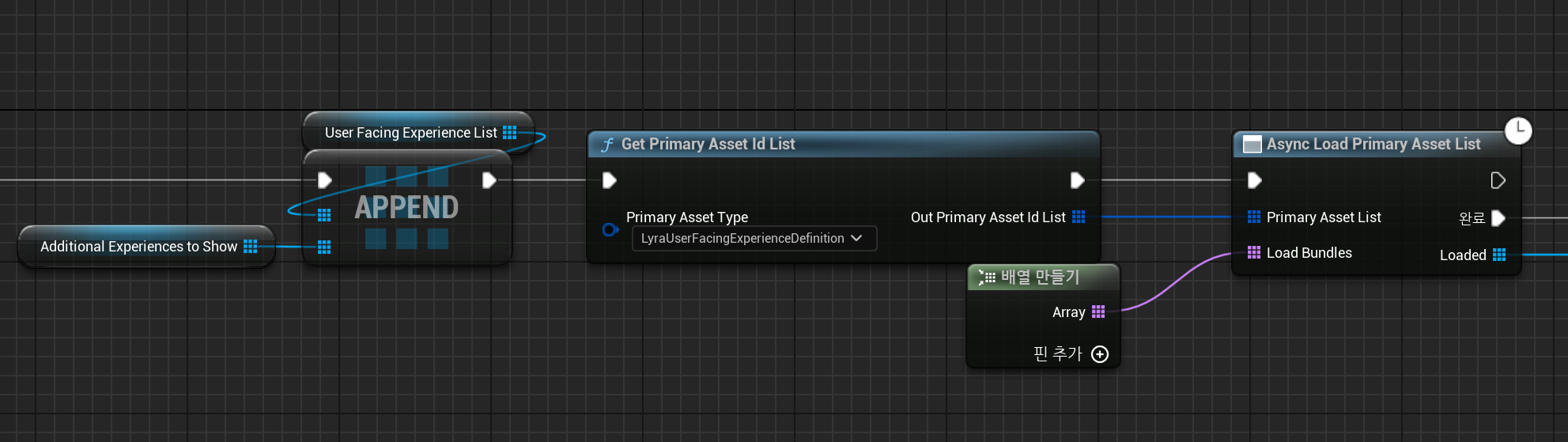
B_ExperienceList3D의 BeginPlay 이벤트에서 LyraUserFacingExperienceDefinition 타입인 PrimaryAssetId를 가져와 비동기로드한다.
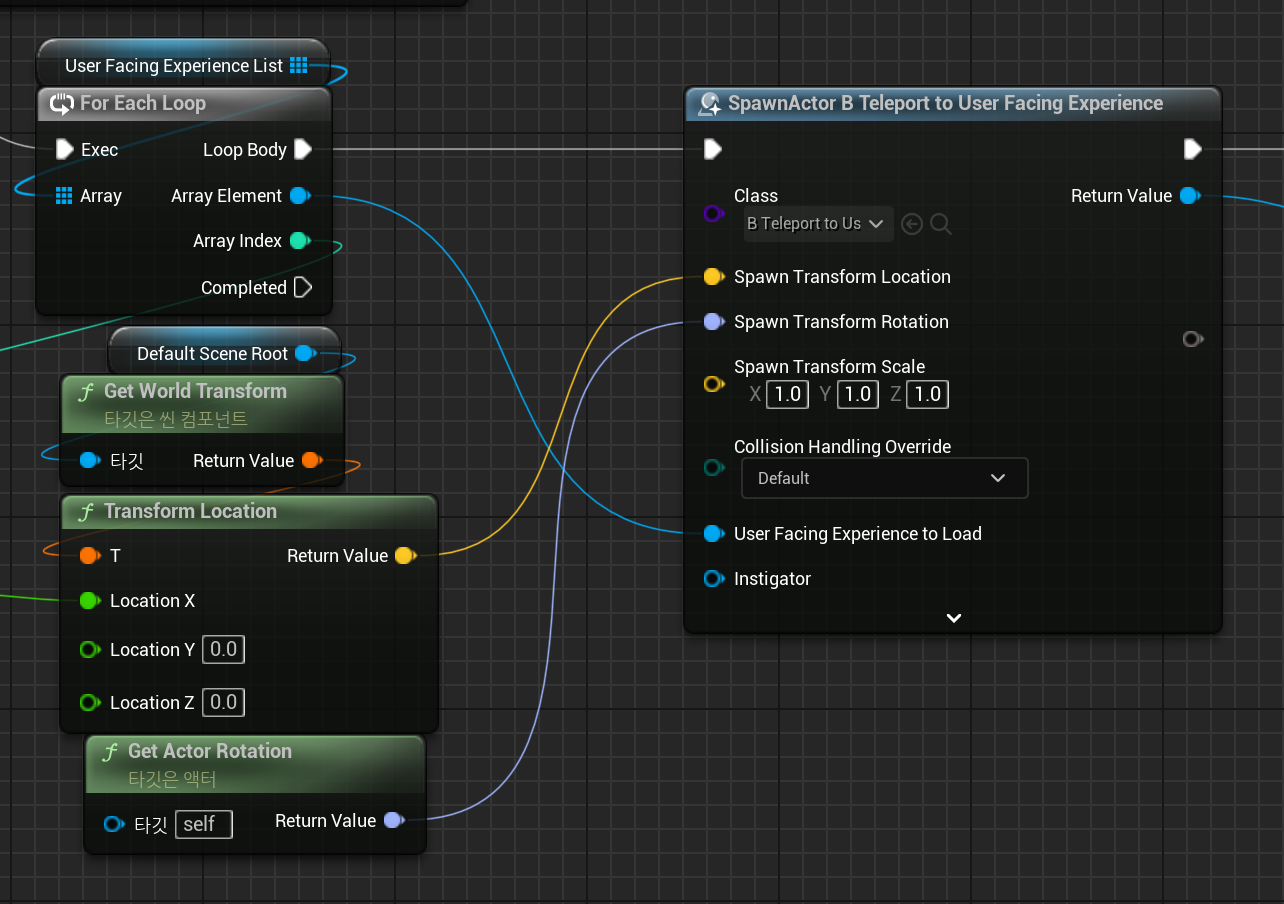
그리고 FacingExperience마다 텔레포트 액터 B_TeleportToUserFacingExperience를 스폰한다..
B_TeleportToUserFacingExperience
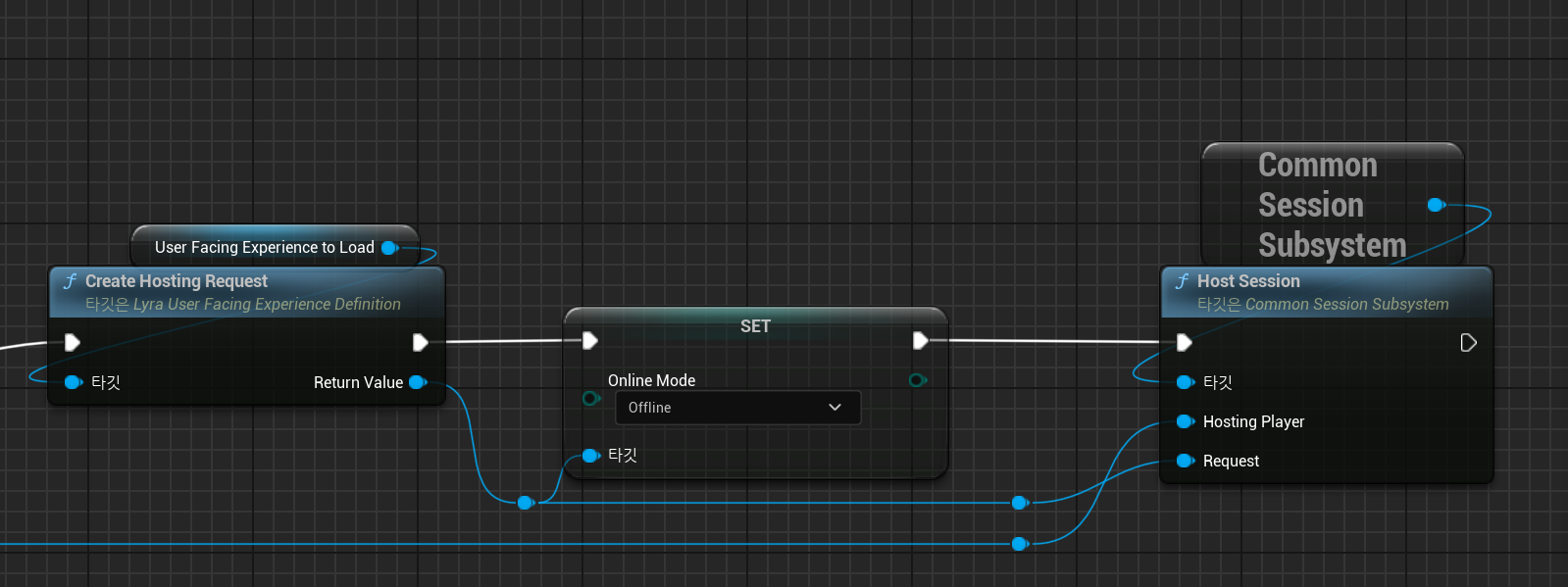
플레이어 컨트롤러 액터와 겹치게 되면 게임 시작~
여기서 OptionsString은 UCommonSession_HostSessionRequest::ConstructTravelURL로 만들어 넘긴 url이다
참고: CommonUser Plugin in Lyra
void ALyraGameMode::HandleMatchAssignmentIfNotExpectingOne()
{
	FPrimaryAssetId ExperienceId;
	FString ExperienceIdSource;

	UWorld* World = GetWorld();

	if (!ExperienceId.IsValid() && UGameplayStatics::HasOption(OptionsString, TEXT("Experience")))
	{
		const FString ExperienceFromOptions = UGameplayStatics::ParseOption(OptionsString, TEXT("Experience"));
		ExperienceId = FPrimaryAssetId(FPrimaryAssetType(ULyraExperienceDefinition::StaticClass()->GetFName()), FName(*ExperienceFromOptions));
		ExperienceIdSource = TEXT("OptionsString");
	}

	// ...

	OnMatchAssignmentGiven(ExperienceId, ExperienceIdSource);
}
게임 매칭되거나 게임에서 나갈 경우 해당 GameMode의 OptionsString에서 설정한 Experience로 세팅한다.
(이 OptionsString은 한틱 전에AGameModeBase::InitGame에서 이미 변경했다.)
void ULyraExperienceManagerComponent::ServerSetCurrentExperience(FPrimaryAssetId ExperienceId)
{
	ULyraAssetManager& AssetManager = ULyraAssetManager::Get();
	FSoftObjectPath AssetPath = AssetManager.GetPrimaryAssetPath(ExperienceId);
	TSubclassOf<ULyraExperienceDefinition> AssetClass = Cast<UClass>(AssetPath.TryLoad());
	check(AssetClass);
	const ULyraExperienceDefinition* Experience = GetDefault<ULyraExperienceDefinition>(AssetClass);

	check(Experience != nullptr);
	check(CurrentExperience == nullptr);
	CurrentExperience = Experience;
	StartExperienceLoad();
}ULyraExperienceManagerComponent에 Experience를 세팅하고 로드하는데 여기서 ULyraExperienceManagerComponent는 GameState에 있는 컴포넌트다.
void ULyraExperienceManagerComponent::StartExperienceLoad()
{
	check(CurrentExperience != nullptr);
	check(LoadState == ELyraExperienceLoadState::Unloaded);

	LoadState = ELyraExperienceLoadState::Loading;

	ULyraAssetManager& AssetManager = ULyraAssetManager::Get();

	TSet<FPrimaryAssetId> BundleAssetList;
	TSet<FSoftObjectPath> RawAssetList;

	BundleAssetList.Add(CurrentExperience->GetPrimaryAssetId());
	for (const TObjectPtr<ULyraExperienceActionSet>& ActionSet : CurrentExperience->ActionSets)
	{
		if (ActionSet != nullptr)
		{
			BundleAssetList.Add(ActionSet->GetPrimaryAssetId());
		}
	}

	// ...
}
해당 Experience의 ActionSet 에셋들을 로드하는 모습을 볼 수 있다.
Experience 로드 이후
void ULyraExperienceManagerComponent::OnExperienceFullLoadCompleted()
{
	// ...

	auto ActivateListOfActions = [&Context](const TArray<UGameFeatureAction*>& ActionList)
	{
		for (UGameFeatureAction* Action : ActionList)
		{
			if (Action != nullptr)
			{
				Action->OnGameFeatureRegistering();
				Action->OnGameFeatureLoading();
				Action->OnGameFeatureActivating(Context);
			}
		}
	};

	ActivateListOfActions(CurrentExperience->Actions);
	for (const TObjectPtr<ULyraExperienceActionSet>& ActionSet : CurrentExperience->ActionSets)
	{
		if (ActionSet != nullptr)
		{
			ActivateListOfActions(ActionSet->Actions);
		}
	}

	LoadState = ELyraExperienceLoadState::Loaded;

	OnExperienceLoaded.Broadcast(CurrentExperience);
	OnExperienceLoaded.Clear();
}
교체하는 Experience와 관련된 에셋들이 모두 로드되면 ULyraExperienceDefinition의 ActionSets, Actions를 모두 실행한다.
void ALyraPlayerState::OnExperienceLoaded(const ULyraExperienceDefinition* /*CurrentExperience*/)
{
	if (ALyraGameMode* LyraGameMode = GetWorld()->GetAuthGameMode<ALyraGameMode>())
	{
		if (const ULyraPawnData* NewPawnData = LyraGameMode->GetPawnDataForController(GetOwningController()))
		{
			SetPawnData(NewPawnData);
		}
		else
		{
			UE_LOG(LogLyra, Error, TEXT("ALyraPlayerState::OnExperienceLoaded(): Unable to find PawnData to initialize player state [%s]!"), *GetNameSafe(this));
		}
	}
}ALyraPlayerState, ALyraGameMode 등에서도 이런저런 처리를 해주는데,
예시로 ALyraPlayerState를 보면 LyraUserFacingExperienceDefinition에서 설정한 DefaultPawnData를 set하고 있다.
GameFeaturesToEnable
처음에 설명한 ULyraExperienceDefinition, ULyraExperienceActionSet에 있던 GameFeaturesToEnable에 대해 간단한 탐구..
Experience 로드가 완료되면 Experience와 Experience>ActionSet에서 설정한 모든 GameFeature들을 로드해서 활성화한다.
이 Feature들이 어떻게 사용되는지까지는 언젠가 다시 탐구해보겠음..
void ULyraExperienceManagerComponent::OnExperienceLoadComplete()
{
	// ...

	// find the URLs for our GameFeaturePlugins - filtering out dupes and ones that don't have a valid mapping
	GameFeaturePluginURLs.Reset();

	auto CollectGameFeaturePluginURLs = [This=this](const UPrimaryDataAsset* Context, const TArray<FString>& FeaturePluginList)
	{
		for (const FString& PluginName : FeaturePluginList)
		{
			FString PluginURL;
			if (UGameFeaturesSubsystem::Get().GetPluginURLByName(PluginName, /*out*/ PluginURL))
			{
				This->GameFeaturePluginURLs.AddUnique(PluginURL);
			}
			// ...
		}
	};

	CollectGameFeaturePluginURLs(CurrentExperience, CurrentExperience->GameFeaturesToEnable);
	for (const TObjectPtr<ULyraExperienceActionSet>& ActionSet : CurrentExperience->ActionSets)
	{
		if (ActionSet != nullptr)
		{
			CollectGameFeaturePluginURLs(ActionSet, ActionSet->GameFeaturesToEnable);
		}
	}

	// Load and activate the features
	NumGameFeaturePluginsLoading = GameFeaturePluginURLs.Num();
	if (NumGameFeaturePluginsLoading > 0)
	{
		LoadState = ELyraExperienceLoadState::LoadingGameFeatures;
		for (const FString& PluginURL : GameFeaturePluginURLs)
		{
			ULyraExperienceManager::NotifyOfPluginActivation(PluginURL);
			UGameFeaturesSubsystem::Get().LoadAndActivateGameFeaturePlugin(PluginURL, FGameFeaturePluginLoadComplete::CreateUObject(this, &ThisClass::OnGameFeaturePluginLoadComplete));
		}
	}

    // ...
}