1. 예외 처리란?
- 예외 처리(Exception Handling)는 프로그램 실행 중 발생할 수 있는 예상치 못한 상황(예외)을 관리하는 방법입니다. 이를 통해 프로그램의 비정상 종료를 방지하고, 안정성과 신뢰성을 높일 수 있습니다.
1.1. 예외 처리 구문
자바에서는 try, catch, finally, throws, throw 키워드를 사용하여 예외를 처리합니다.
try catch 문
try {
// 예외가 발생할 수 있는 코드
} catch (ExceptionType1 e) {
// ExceptionType1 예외를 처리하는 코드
} catch (ExceptionType2 e) {
// ExceptionType2 예외를 처리하는 코드
}
try-catch-finally 문
try {
// 예외가 발생할 수 있는 코드
} catch (Exception e) {
// 예외 처리 코드
} finally {
// 항상 실행되는 코드
}
finally 블록은 try 또는 catch 블록의 실행 여부와 관계없이 항상 실행됩니다. 자원 해제(예: 파일 닫기)에 주로 사용됩니다.
throw와 throws
- throw: 예외를 강제로 발생시킵니다.
if (someCondition) {
    throw new Exception("Custom Error Message");
}
throws: 메서드가 발생시킬 수 있는 예외를 선언합니다.
public void someMethod() throws IOException, NullPointerException {
    // 예외가 발생할 수 있는 코드
}
2. 프로그램에서의 오류와 처리 방법
2.1. 오류의 종류
컴파일 예외(Compile Error)
- 코드 작성 중 발생하는 문법적 오류.
- 예: 세미콜론(
;) 누락, 잘못된 변수 선언. - 현대 IDE(예: Eclipse, IntelliJ)는 컴파일 오류를 실시간으로 감지하여 수정이 용이함.
실행 예외 (Runtime Error)
- 프로그램 실행 중 발생하는 오류로, 의도하지 않은 동작(버그)이나 비정상 종료를 유발.
- 예: 배열 인덱스 초과, 0으로 나누기, 파일 없음.
- 실행 오류는 시스템 장애를 초래할 수 있으므로 예외 처리가 필수.
2.2. 예외 처리의 중요성
- 비정상 종료 방지: 예외 처리를 통해 시스템이 안정적으로 동작하도록 유지.
- 오류 재현 어려움: 실행 오류는 재현이 어려우므로, 로그를 남겨 디버깅에 활용.
- 로그 분석: 예외 발생 시 로그를 남겨 원인을 파악하고 버그 수정.
2.3. 오류와 예외 클래스
시스템 오류 (Error)
- JVM에서 발생하는 심각한 오류로, 프로그래머가 처리할 수 없는 문제.
- 예: OutOfMemoryError (메모리 부족), StackOverflowError (스택 오버플로우).
- 일반적으로 Error는 복구가 불가능하므로 처리하지 않음.
예외 (Exception)
- 프로그램에서 제어 가능한 오류.
- 예: FileNotFoundException (파일 없음), SQLException (DB 연결 실패).
- 자바는 안전성을 위해 대부분의 예외를 문법적으로 처리하도록 요구.
예외 클래스 계층 구조
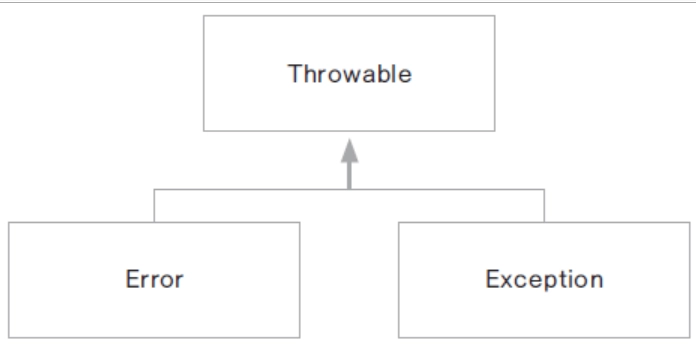
- 최상위 클래스: Throwable
- 하위 클래스: Error와 Exception
- Error: 시스템 레벨의 심각한 오류.
- Exception: 프로그램에서 처리 가능한 예외.
package com.tenco.exception;

import java.util.InputMismatchException;
import java.util.Scanner;

public class FinallyHandling {

    public static void main(String[] args) {
        Scanner scanner = new Scanner(System.in);

        try {
            System.out.println("숫자를 입력하시오");
            int result = scanner.nextInt();
        } catch (InputMismatchException e) {
            System.out.println("사용자야 정수값만 넣어주길 바래!");
        } catch (Exception e) {
            System.out.println(e.getClass() + ",  " + e.getMessage());
        } finally {
            // 반드시 수행되어야 할 코드 영역
            // 심지어 return 키워드를 만나더라도 여기는 수행이 됩니다.
            // 키보드를 통해 들어오는 값을 받는 자원 해제
            scanner.close();
        }

        System.out.println("비정상 종료 되지 않았습니다");

    } // end of main
}
배열을 벗어났을때 상황을 대비하여 예외처리를 하고 있다.
그리고 finally 로 무조건 실행하게 될 코드를 작성하여 스캐너를 닫아주고 있다.
입력에 사용한 자원을 정리하기 위해서이다.
3.3. throws: 예외 던지기
throws를 사용하면 메서드 호출자가 예외를 처리하도록 책임을 위임합니다.
package com.tenco.exception;

public class ThrowsHandling {

    public static void main(String[] args) {

        Calc calc = new Calc();
        try {
            calc.divide(100, 0);
        } catch (ArithmeticException e) {
            System.out.println("0으로 나눌 수 없습니다");
        }
    } // end of main

} // end of class

class Calc {

    public int divide(int n1, int n2) throws ArithmeticException {
        System.out.println("정수 나눗셈 동작");
        return n1 / n2; // 어떤 수를 0으로 나누면 ArithmeticException 발생 됨
    }

}
package com.tenco.exception;

public class ThrowsHandling {

    public static void main(String[] args) {

        Calc calc = new Calc();
        try {
            calc.divide(100, 0);
        } catch (ArithmeticException e) {
            System.out.println("0으로 나눌 수 없습니다");
        }
    } // end of main

} // end of class

class Calc {

    public int divide(int n1, int n2) throws ArithmeticException {
        if (n2 == 0) {
            System.out.println("0을 입력할 수 없습니다");
            throw new ArithmeticException();
        }
        return n1 / n2; // 어떤 수를 0으로 나누면 ArithmeticException 발생 됨
    }
}
이렇게 이코드에 해당하는 예외처리를 이걸 실행하는 호출자가 예외를 처리하게끔 던져버릴 수 있다.
4. 사용자 정의 예외 클래스 만들기
사용자 정의 예외 클래스를 만들어 특정 상황에 맞는 예외를 처리할 수 있습니다. 이를 위해 Exception 또는 RuntimeException을 상속받습니다.
4.1. 사용자 정의 예외: 0으로 나누기 오류
package com.tenco.exception;

// 사용자 정의 예외 클래스 만들기
public class DivideByZeroError extends RuntimeException {

    // 자바개발자들이 미리 만들어 둔 예외 클래스는 default(기본) 메세지가 미리 만들어져 있다.
    public DivideByZeroError(String message) {
        super(message);
    }

    public static void main(String[] args) {
        Calc2 calc2 = new Calc2();
        try {
            calc2.divide(10, 0);
        } catch (ArithmeticException e) {
            System.out.println("여기는 ArithmeticException 만 발생되면 호출 됨. ");
        } catch (DivideByZeroError e2) {
            System.out.println("어 내가 만든 예외 클래스가 발생 했네");
        }

    } // end of main

} // end of class

class Calc2 {

    public int divide(int n1, int n2) {
        System.out.println("사용자 정의 예외 클래스 사용해보기");
        if(n2 == 0) {
            throw new DivideByZeroError("0은 안됨.");
        }
        return n1 / n2;
    }

}
n2가 0일때 내가 만들어둔 메서드 divideByzeroError이 발생한다.
package com.tenco.exception;

public class Password {

    private String password;

    public String getPassword() {
        return password;
    }

    public void setPassword(String password) throws PasswordException {
        if(password == null) {
            throw new PasswordException("비밀번호는 null 일 수 없습니다");
        } else if(password.length() < 4) {
            throw new PasswordException("비밀번호는 4글자 이상이어야 합니다");
        }
        this.password = password;
    }
}
package com.tenco.exception;
public class SignUpMain {
public static void main(String[] args) {
// 테스트 코드
// String password; --> 대신 클래스의 이점을 활용
Password password = new Password();
// 원래는 setPassword 에 throws 가 걸려 있기 때문에 호출하는 입장에서 강제적으로
// try catch 구문을 작성할 수 있도록 툴이 알져 주게 된다.
try {
password.setPassword(null);
} catch (PasswordException e) {
System.err.println(e.getMessage());
} catch (Exception e2) {
System.err.println(e2.getClass() + ", " + e2.getMessage());
}
} // end of main
} // end of classthrows를 던져서 main에서 호출할때 main 메서드가 예외를 처리하는 모습이다.
그리고 예외는 checked exception과 unckecked exception이 있다.
첫번째는 컴파일러가 미리 검사하여 try catch문이나 throws를 써줘야 한다.
두번째는 throw만 쓰면 된다.
