JDBC 란?
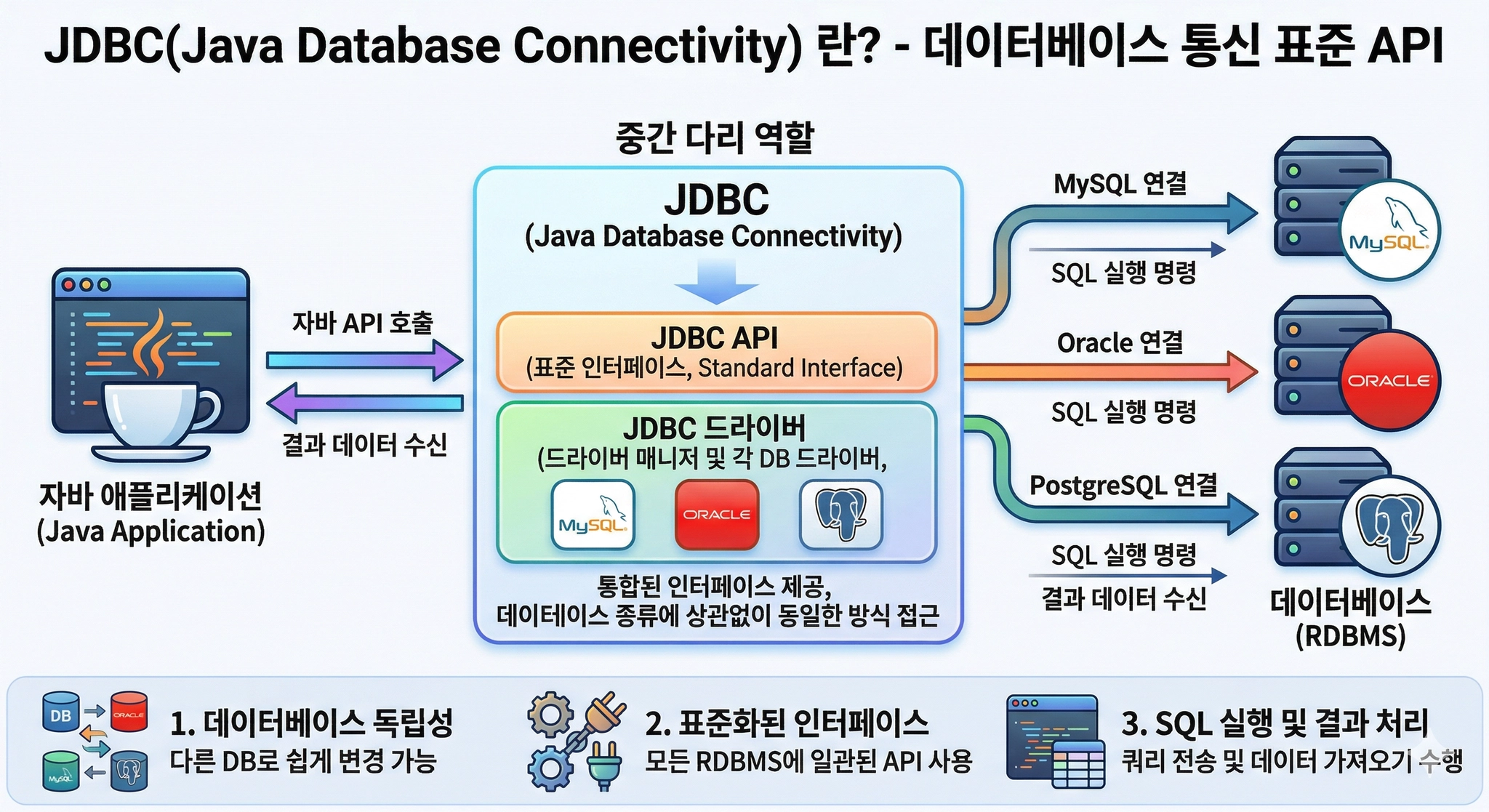
JDBC(Java Database Connectivity) 는 자바 애플리케이션이 데이터베이스와 통신할 수 있도록 만든 표준 API 입니다.
package ch01;

import java.sql.Connection;
import java.sql.DriverManager;
import java.sql.SQLException;

public class JdbcHello {

    public static void main(String[] args) {
        // 연결 정보
        String url = "jdbc:mysql://localhost:3306/shop?serverTimezone=Asia/Seoul";
        String user = "xxxxxxxx";
        String password = "xxxxxxxxx";
        // 실무에서 비밀번를 코드를 직접 작성 쓰지 않습니다.
        // 환경변수나 설정파일 사용할 수 있음 (.env, application.properties, application.ymal)

        try (Connection connection = DriverManager
                .getConnection(url, user, password)) {
            System.out.println("연결 성공 됨.");
            System.out.println("DB 제품명 : " + connection.getMetaData().getDatabaseProductName());
            System.out.println("DB 버전 : " + connection.getMetaData().getDatabaseProductVersion());

        } catch (SQLException e) {
            System.out.println("DB랑 연결 오류 발생 함");
            e.printStackTrace();
        }
    }

}
기본 연결 코드이다.
package ch01;

import java.sql.Connection;
import java.sql.DriverManager;
import java.sql.SQLException;

public class JdbcHello2 {

    public static void main(String[] args) {
        // 연결 정보
        String url = "jdbc:mysql://localhost:3306/shop?serverTimezone=Asia/Seoul";
        String user = System.getenv("DB_USER");
        String password = System.getenv("DB_PASSWORD");

        System.out.println("로컬 컴퓨터에 저장한 환경 변수 이름으로 값을 확인해 보자");
        System.out.println("user : " + user);
        System.out.println("password : " + password);

        try (Connection connection = DriverManager
                .getConnection(url, user, password)) {
            System.out.println("연결 성공 됨.");
            System.out.println("DB 제품명 : " + connection.getMetaData().getDatabaseProductName());
            System.out.println("DB 버전 : " + connection.getMetaData().getDatabaseProductVersion());

        } catch (SQLException e) {
            System.out.println("DB랑 연결 오류 발생 함");
            e.printStackTrace();
        }
    }

}
환경 변수를 활용하여 비밀번호와 유저를 넣어보았다.
코드 핵심 포인트
DriverManager.getConnection(url, user, password)
  → JDBC URL, DB 계정, 비밀번호로 데이터베이스에 연결

try (Connection connection = ...) { }
  → try-with-resources 패턴
  → 블록이 끝나면 connection.close() 가 자동 호출됨
  → 연결을 안 닫으면 DB 연결이 쌓여서 서버가 터집니다

SQLException
  → DB 연결 실패, 잘못된 SQL, 권한 없음 등
  → JDBC 작업의 모든 에러는 SQLException 으로 처리
JDBC URL 형식 이해하기
jdbc:mysql://localhost:3306/shop?serverTimezone=Asia/Seoul
  │    │         │        │   │   └─ 옵션 파라미터
  │    │         │        │   └─ 데이터베이스 이름
  │    │         │        └─ 포트 번호 (MySQL 기본: 3306)
  │    │         └─ 서버 주소 (내 컴퓨터: localhost)
  │    └─ 데이터베이스 종류
  └─ JDBC 프로토콜
다른 데이터베이스의 URL 형식:
MySQL      : jdbc:mysql://localhost:3306/dbname
Oracle     : jdbc:oracle:thin:@localhost:1521:dbname
PostgreSQL : jdbc:postgresql://localhost:5432/dbname
H2(인메모리) : jdbc:h2:mem:testdb