아늬 나는 할 줄 아는게 아무것도 업는데 왜 벌써 숙련주차...?오늘 해 본 것
01. 소셜(카카오)로그인 -초반-
👉 OAuth는 인터넷 사용자들이 비밀번호를 제공하지 않고 다른 웹사이트 상의 자신들의 정보에 대해 웹사이트나 애플리케이션의 접근 권한을 부여할 수 있는 공통적인 수단으로서 사용되는, 접근 위임을 위한 개방형 표준입니다.
-
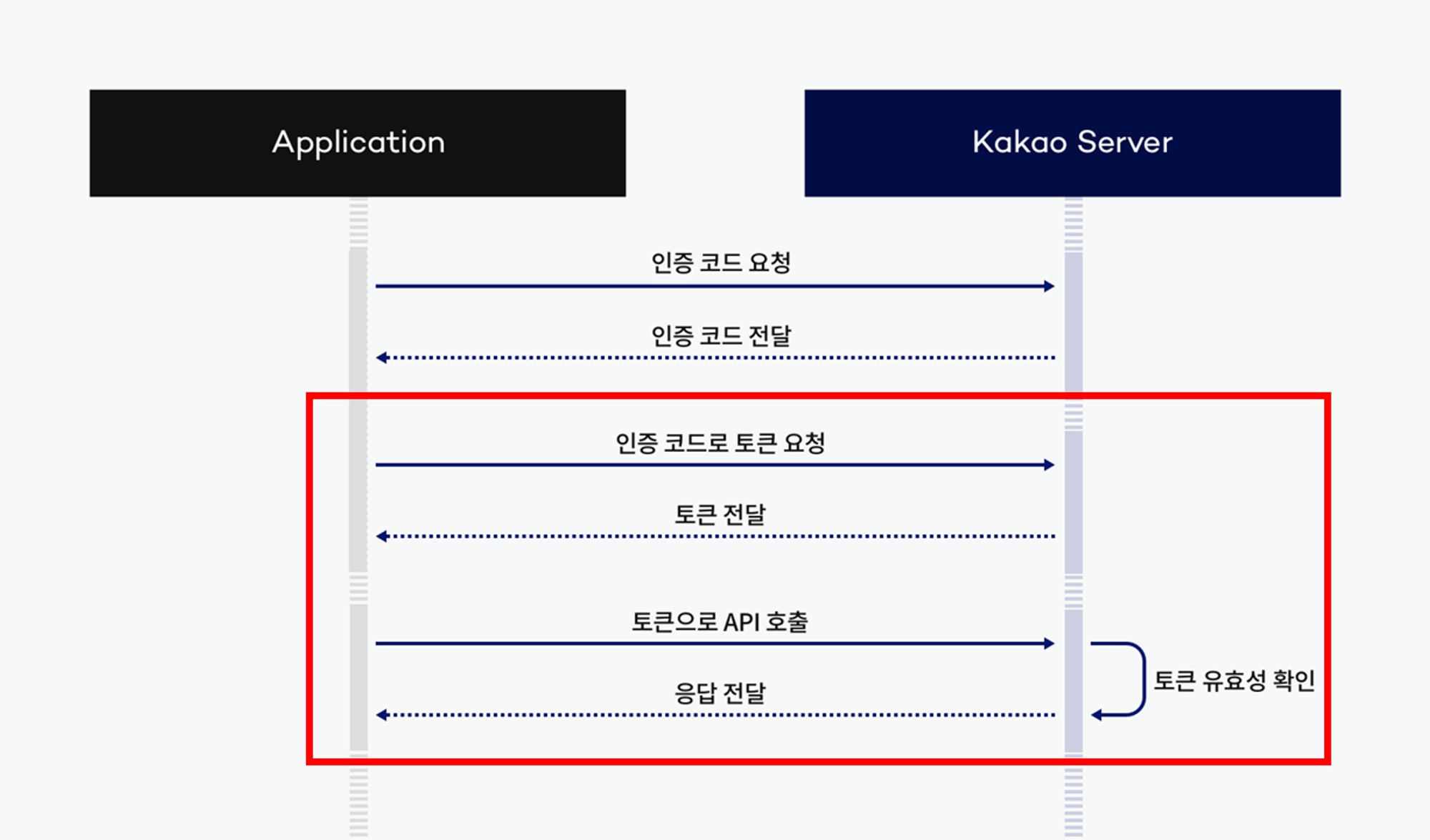
카카오 로그인 흐름
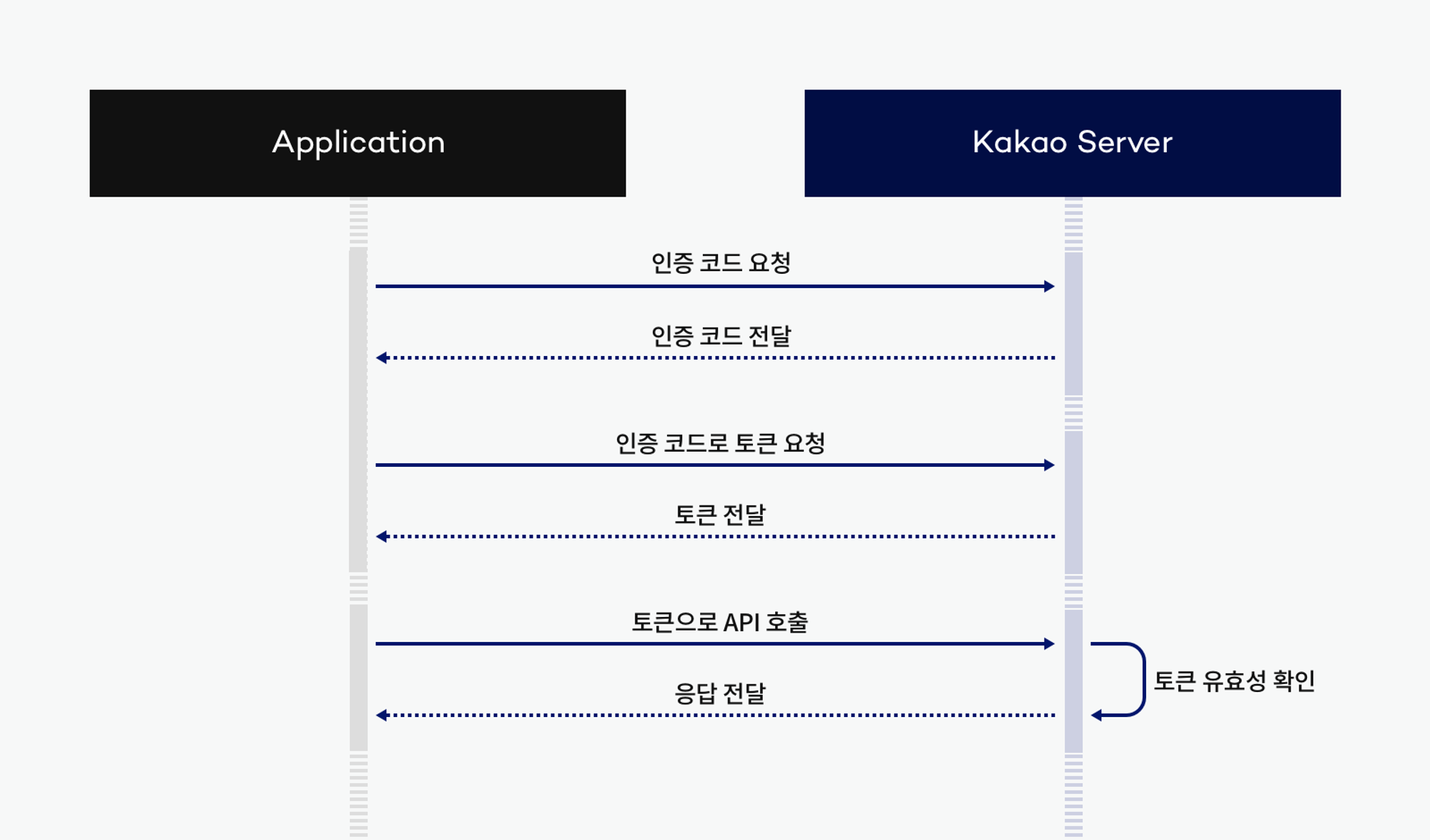
-
필요한 거
- 카카오 개발 사이트에서 '애플리케이션 등록'이 필요
- 사이트 도메인 등록하기(사이트 도메인에는 개발중인 로컬환경의 서버 주소를 입력)
- 카카오로 로그인 했을 때 인가토큰을 받게 될 Redirect URI (callback) 를 설정하기
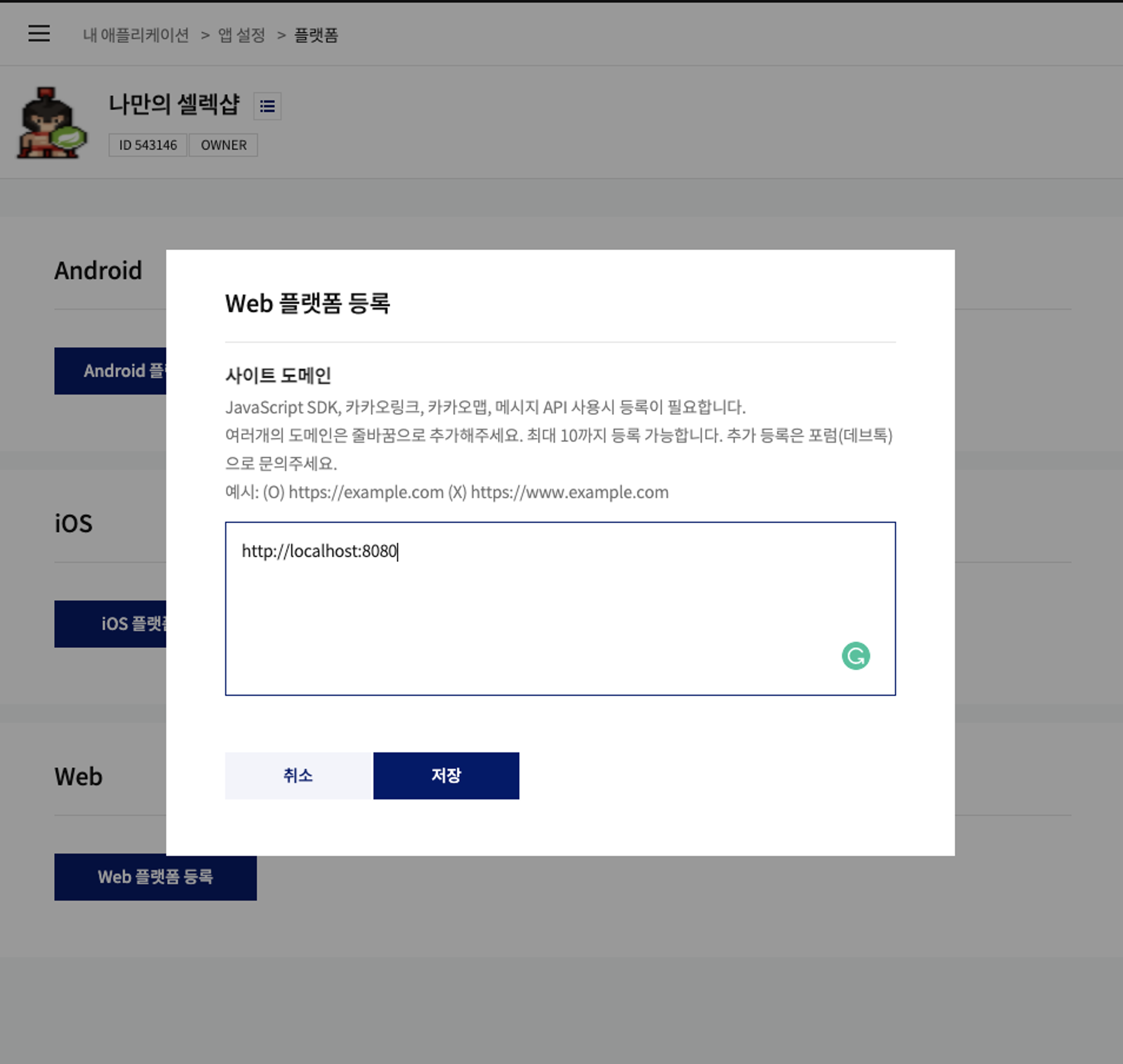

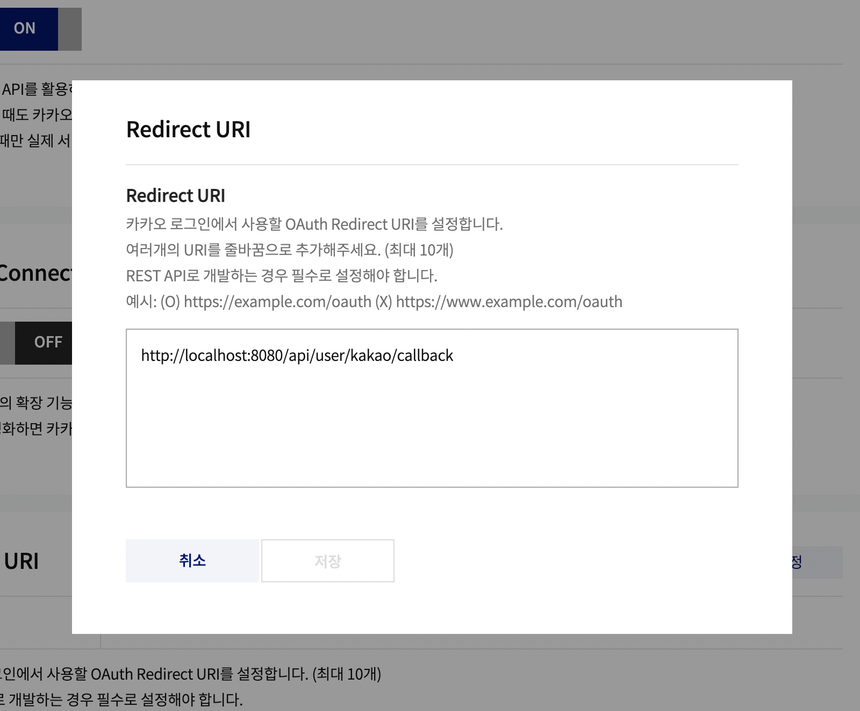
필요한게 얼추 준비되었다면 바로 다음 공부
02. 카카오 사용자 정보 가져오기
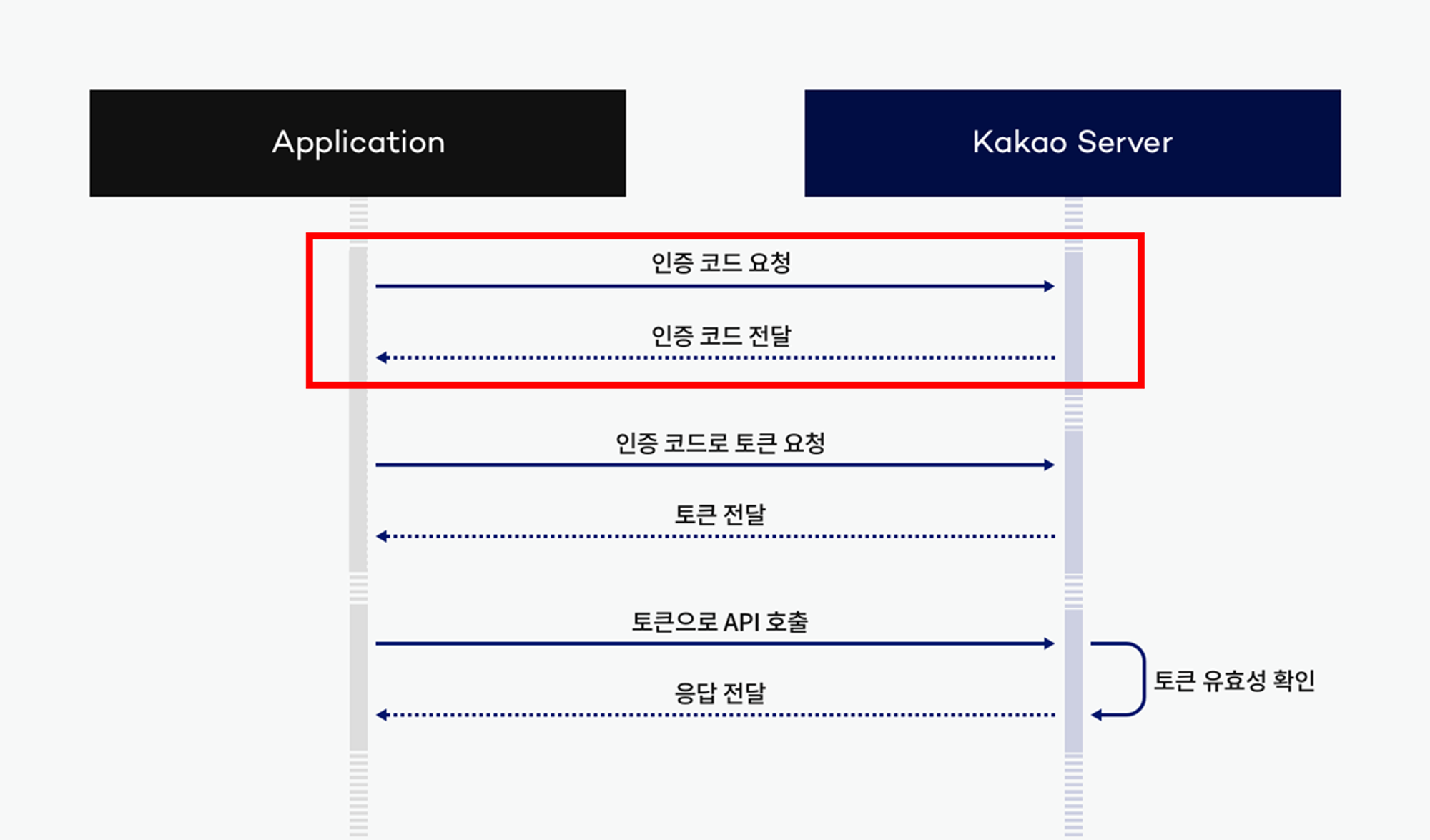
흐름에서는 저 빨간 박스 부분
1. 인가코드 요청 방법
https://kauth.kakao.com/oauth/authorize?client_id={REST_API_KEY}&redirect_uri={REDIRECT_URI}&response_type=code2. 카카오에서 보내주는 '인가코드' 처리
- UserController
@GetMapping("/user/kakao/callback")
public String kakaoLogin(@RequestParam String code, HttpServletResponse response) throws JsonProcessingException {
    // code: 카카오 서버로부터 받은 인가 코드 Service 전달 후 인증 처리 및 JWT 반환
    String token = kakaoService.kakaoLogin(code);

    // Cookie 생성 및 직접 브라우저에 Set
    Cookie cookie = new Cookie(JwtUtil.AUTHORIZATION_HEADER, token.substring(7));
    cookie.setPath("/");
    response.addCookie(cookie);

    return "redirect:/";
}- 카카오에서 보내주는 인가코드를 받음(여기서는 Controller)
- 인가코드를 가지고 카카오 로그인을 처리함 ( 여기서는 Service)
- 로그인 성공 시 "/" redirect(여기서는 Controller)
3. 카카오 사용자 정보 가져오기
@Slf4j(topic = "KAKAO Login")
@Service
@RequiredArgsConstructor
public class KakaoService {

    private final PasswordEncoder passwordEncoder;
    private final UserRepository userRepository;
    private final RestTemplate restTemplate;
    private final JwtUtil jwtUtil;

    public String kakaoLogin(String code) throws JsonProcessingException {
        // 1. "인가 코드"로 "액세스 토큰" 요청
        String accessToken = getToken(code);

        // 2. 토큰으로 카카오 API 호출 : "액세스 토큰"으로 "카카오 사용자 정보" 가져오기
        KakaoUserInfoDto kakaoUserInfo = getKakaoUserInfo(accessToken);

        return null;
    }
"인가 코드"로 "액세스 토큰" 요청
private String getToken(String code) throws JsonProcessingException {
    // 요청 URL 만들기
    URI uri = UriComponentsBuilder
            .fromUriString("https://kauth.kakao.com")
            .path("/oauth/token")
            .encode()
            .build()
            .toUri();

    // HTTP Header 생성
    HttpHeaders headers = new HttpHeaders();
    headers.add("Content-type", "application/x-www-form-urlencoded;charset=utf-8");

    // HTTP Body 생성
    MultiValueMap<String, String> body = new LinkedMultiValueMap<>();
    body.add("grant_type", "authorization_code");
    body.add("client_id", **"본인의 REST API키"**);
    body.add("redirect_uri", "http://localhost:8080/api/user/kakao/callback");
    body.add("code", code);

    RequestEntity<MultiValueMap<String, String>> requestEntity = RequestEntity
            .post(uri)
            .headers(headers)
            .body(body);

    // HTTP 요청 보내기
    ResponseEntity<String> response = restTemplate.exchange(
            requestEntity,
            String.class
    );

    // HTTP 응답 (JSON) -> 액세스 토큰 파싱
    JsonNode jsonNode = new ObjectMapper().readTree(response.getBody());
    return jsonNode.get("access_token").asText();
}
"액세스 토큰"으로 "카카오 사용자 정보" 가져오기
private KakaoUserInfoDto getKakaoUserInfo(String accessToken) throws JsonProcessingException {
    // 요청 URL 만들기
    URI uri = UriComponentsBuilder
            .fromUriString("https://kapi.kakao.com")
            .path("/v2/user/me")
            .encode()
            .build()
            .toUri();

    // HTTP Header 생성
    HttpHeaders headers = new HttpHeaders();
    headers.add("Authorization", "Bearer " + accessToken);
    headers.add("Content-type", "application/x-www-form-urlencoded;charset=utf-8");

    RequestEntity<MultiValueMap<String, String>> requestEntity = RequestEntity
            .post(uri)
            .headers(headers)
            .body(new LinkedMultiValueMap<>());

    // HTTP 요청 보내기
    ResponseEntity<String> response = restTemplate.exchange(
            requestEntity,
            String.class
    );

    JsonNode jsonNode = new ObjectMapper().readTree(response.getBody());
    Long id = jsonNode.get("id").asLong();
    String nickname = jsonNode.get("properties")
            .get("nickname").asText();
    String email = jsonNode.get("kakao_account")
            .get("email").asText();

    log.info("카카오 사용자 정보: " + id + ", " + nickname + ", " + email);
    return new KakaoUserInfoDto(id, nickname, email);
}
** RestTemplateConfig를 @Bean으로 수동처리했다
@Configuration
public class RestTemplateConfig  {
    @Bean
    public RestTemplate restTemplate(RestTemplateBuilder restTemplateBuilder) {
        return restTemplateBuilder
                // RestTemplate 으로 외부 API 호출 시 일정 시간이 지나도 응답이 없을 때
                // 무한 대기 상태 방지를 위해 강제 종료 설정
                .setConnectTimeout(Duration.ofSeconds(5)) // 5초
                .setReadTimeout(Duration.ofSeconds(5)) // 5초
                .build();
    }
}- 카카오에서 가져올 유저 정보는 아이디 이름 이메일
package com.sparta.myselectshop.dto;

import lombok.Getter;
import lombok.NoArgsConstructor;

@Getter
@NoArgsConstructor
public class KakaoUserInfoDto {
    private Long id;
    private String nickname;
    private String email;

    public KakaoUserInfoDto(Long id, String nickname, String email) {
        this.id = id;
        this.nickname = nickname;
        this.email = email;
    }
}
후기
뭔가 교환교환해서 결국 정보 얻어내는 느낌스ㅓ...

뉴비 개발 공부중