Object
변수선언
let과 const를 사용한다.
const는 변수를 선언하면 상수화를 시키기 때문에, 다시 대입하는게 불가능하다.
let a = 10
typeof(a)

>>> 'number'
객체선언
- 상수화가 되어있지만, 새로운 필드를 입력할 수 있다.
const c = {name:'park', age: '22'}
c.adress = 'songdo'
//const여도 c와 객체는 다른 메모리에 존재하기 때문에 값을 변경할 수 있다.

let person = {name: "lee", age: 20}
person = {...person, age:21, addr: "songdo"} // 가능.

const person = {name: "lee", age: 20}
person = {...person, age:21, addr: "songdo"} // 불가능.
//다만 다른 변수를 선언해서 const로 선언한 변수를 가져와 선언하는건 가능하다.
-Spread Operator를 사용하면 새로운 객체를 참조하게끔 할 수 있다. 다만 원래const로 상수화가 되어있는 경우, 그 변수 값 자체는 수정이 불가능하기 때문에 후자는 불가능하다.
즉 Spread Operator를 사용하면 리액트 코드에서 객체를 업데이트하면서 리랜더링을 가능하게끔 만든다.
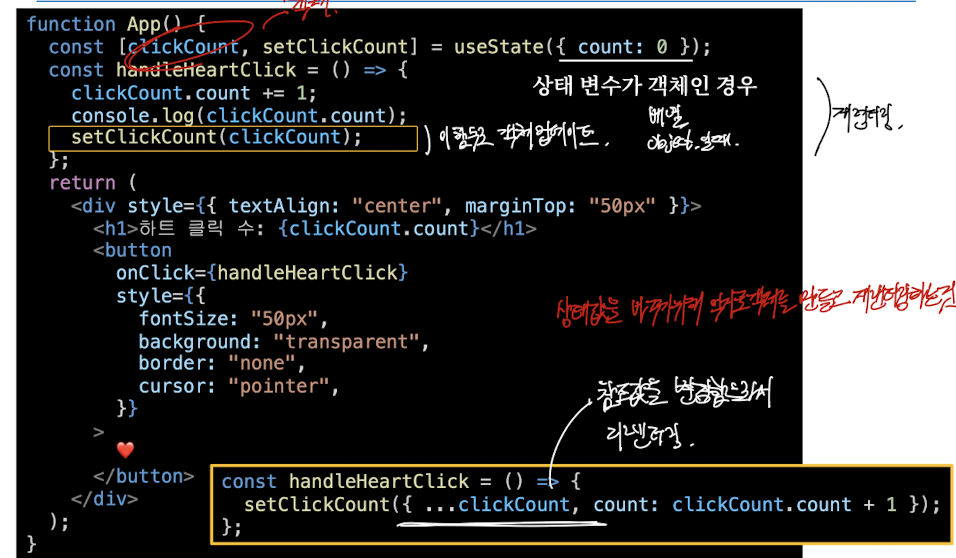
- Object 선언
- Object 선언
- Object 선언
- 객체사용법
느슨한 모드
"use strict"
// 느슨하게 문법을 사용하면 에러를 발생시킨다.
객체는 상속받는 영역이 따로 존재한다.
객체명.__proto__.변수값 != 객체명.변수값
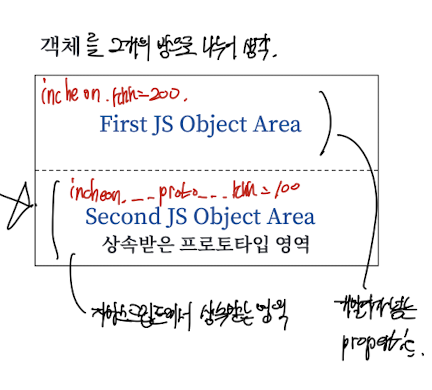
객체 생성방법
// 1. 객체 리터럴을 사용한다.
const obj = {};
let point = { x: 0, y: 0 };
// 2. new 키워드를 사용한다.
let o = new Object();
// 3. Object.create() 메서드를 사용한다.
let o1 = Object.create({ x: 1, y: 2 }); // 3개의 영역, 상속된 프로퍼티 포함
let o2 = Object.create(null); // 2번째 영역이 생기지 않는다.
let o3 = Object.create(Object.prototype); // 기본 프로토타입 상속
- Object.create을 통해서 만들게 될 경우, 상속 영역에 값을 가지고 있으므로 값을 안전하게 전달할 수 있다는 장점이 있다.
- 상속받은 프로퍼티는 삭제가 불가능하다.
- 또 객체는 배열과 달리 length 성질이 없는 특징이 있다.
백틱
`"백틱 사이에 있는 모든것을 저장한다 따옴표도 저장한다"`
delete
let obj = Object.create({ x: 1 });
delete obj.x;
상속받은 프로퍼티는 삭제가 불가능하다.
hasOwnProperty, propertyIsEnumerable
o.hasOwnProperty("x")
//객체의 첫번째 영역에 이러한 성질을 가지고 있니?
o.propertyIsEnumerable("x");
//enumerabel한 property이냐. true면 for문으로 출력가능
//이렇게 반복문도 가능하다.
for (let p in o) {
  if (!o.hasOwnProperty(p)) continue; // Own 프로퍼티가 아니면 스킵
  else console.log("🔥", p);
}
객체에 함수를 넣을 수 있다
o.ff = function(){}; //변수에 함수를 저장할 수 있다. 함수를 변수 다루듯.
객체 복사 방법
let o = { x: 1, z: 3 };
let defaults = { x: 2, y: 2 };
// 덮어씌우는 방법
Object.assign(o, defaults); // overwrites everything in o with defaults
o = Object.assign({}, defaults, o); // 같은 결과
o = { ...defaults, ...o }; // 아주 중요하다
스프레드 오퍼레이터를 사용해서 객체를 복사할 수 있다.
직렬화, stringify(), parse()
let o = { x: 1, y: { z: [false, null, ""] } };
JSON.stringify(o); //스트링화
JSON.stringify(o, null, 2);//객체마다 2칸을 띄워서 null로 채운 상태로 스트링화.
let p = JSON.parse(s); //오브젝트화
-
console.log(typeof o); //object
console.log(typeof s); //string
console.log(typeof p); //object
수신과 전송을 위한 일이다. stringify()에 argument들을 통해 조절 가능.
toString(), String 메소드
let point = {
  x: 1,
  y: 2,
  toString: function () {
    return `🌟 ${this.x}, ${this.y}`;
  },
};
-
let ex1 = {
  xxx: function () {
    return true;
  },
  toString: function () {
    return `${this.xxx}`;
  },
};
String(point); // => "🌟 1, 2"
String(ex1); // => 'function () {\n    return true;\n  }'
String 메소드는 보통 오버라이드해서 입맛대로 사용한다.
toLocalString은 일종의 템플릿 같은.
valueOf(), Number 메소드
let point = {
  x: 3,
  y: 4,
  valueOf: function () {
    return Math.hypot(this.x, this.y);
  },
};
Number(point); //5, 같다.
point.valueof(); //5, 같다
이것 역시 정의내려서 사용할 수 있다.
JSON.stringify는 toJSON을 찾는다
let o = { x: 1, y: { x: "2" } };
JSON.stringify(o); //'{"x":1,"y":{"x":"hi"}}'
-
let point = {
  x: 1,
  y: 2,
  toString: function () {
    return `(${this.x}, ${this.y})`;
  },
  toJSON: function () {
    console.log("🏅");
    return this.toString();
  },
};
JSON.stringify([point]); //'["(1, 2)"]'
- JSON.stringify()는 기본적으로 문자열로 바꿔주는 함수지만,
toJSON()이 정의되어있는 경우에는 그 메소드를 실행시킨다.
ES6 문법
let x = 1;
let y = 2;
let o2 = { x, y }; //이렇게 쓸 수 있다고 함.
-
const PROPERTY_NAME = "p";
function computePropertyName() {
  return "p" + 2;
}
let o = {};
o[PROPERTY_NAME+1] = 1;
o[computePropertyName()] = 2;
//o{p1: 1, p2: 2}가 생겨난다
-
const a = Symbol("a"); //로컬 심볼, 매번 고유한 값
const a1 = Symbol.for("a"); //전역 심볼
const b = Symbol.for("b"); //전역 심볼 같은 값을 공유한다.
const b1 = Symbol.for("b"); // b == b1
Spread operater
let position = { x: 0, y: 0 };
let dimensions = { width: 100, height: 75 };
let rect = { ...position, ...dimensions };
//{x: 0, y: 0, width: 100, height: 75}
-
let o = { x: 1 };
let p = { x: 0, ...o }; //o로 오버라이딩, {x:1}
-
let o1 = Object.create({ x: 1 });
let p1 = { ...o1 }; //o1의 상속부분은 복사되지 않는다.
p1.x; // => undefined
- 중요하다. 스프레드 오퍼레이터를 사용하면 배열을 합치거나 오버라이딩 할 수 있다. 다만 상속부분까지 복사되지는 않는다.
프로퍼티로 함수?
let square = {
  area: function () {
    //하나의 프로퍼티지만 함수가 가능하다.
    return this.side * this.side;
  },
  side: 10,
};
square.area(); // => 100
-
let square1 = {
  area() {
   //콜론 표시가 없어도 함수 모양대로 만들면 알아서 객체로 만들어진다.
  return this.side * this.side;
  },
  side: 10,
};
square1.area(); // => 100
- 객체의 프로퍼티로 함수를 사용할 수 있다. 그리도 두번째와 같이 function()키워드를 사용하지 않아도 함수명() {}을 통해서 함수를 선언할 수 있다.
accessor properties, get() set()
const value = 20;
let o = {
  dataProp: value,
  get accessorProp() {
    return this.dataProp;
  },
  set accessorProp(value) {
    console.log("값을 변경하셨네요");
    this.dataProp = value;
  },
};
console.log(o.accessorProp); //get 메소드 호출
o.accessorProp = "0"; //set 메소드 호출
- get() set() 메소드를 가질 수 있다. 이를 통해 호출과 삽입을 할 수 있다.