오늘의 코드카타
- 양과 늑대
- 이진 트리를 순회하면서 가능한 노드 검사하기 : 백트래킹 알고리즘
- 보통의 문제는 하나의 길로만 가는 반면, 다른 길로도 가는 경우도 검사를 해야 함
- https://school.programmers.co.kr/learn/courses/30/lessons/92343
오늘의 공부
팀 프로젝트 진행 내용
1. 파쿠르 기능 구현
- Capsule Trace 실행 및 디버깅을 위해 캡슐 및 선 그려주는 함수
bool UAO_TraversalComponent::RunCapsuleTrace(const FVector& StartLocation, const FVector& EndLocation, float Radius,
	float HalfHeight, FHitResult& OutHit, FColor DebugHitColor, FColor DebugTraceColor)
{
	UWorld* World = GetWorld();
	if (!World)
	{
		return false;
	}

	FCollisionShape TraceShape = FCollisionShape::MakeCapsule(Radius, HalfHeight);
	FCollisionQueryParams CollisionResponseParams(FName(TEXT("TraversalTrace")), false, GetOwner());
	bool bHit = World->SweepSingleByChannel(
		OutHit,
		StartLocation,
		EndLocation,
		FQuat::Identity,
		ECC_Visibility,
		TraceShape,
		CollisionResponseParams
	);

	if (DrawDebugLevel >= 2)
	{
		FQuat CapsuleRot = FQuat::Identity;

		if (bHit)
		{
			// 충돌 지점까지의 스윕 캡슐
			DrawDebugCapsule(World, OutHit.Location, HalfHeight, Radius, CapsuleRot, DebugHitColor, false, DrawDebugDuration);

			// 충돌이 시작된 곳에서 충돌 지점까지의 선
			DrawDebugLine(World, StartLocation, OutHit.Location, DebugHitColor, false, DrawDebugDuration);
		}
		else
		{
			// 전체 스윕 경로의 끝 지점 캡슐
			DrawDebugCapsule(World, EndLocation, HalfHeight, Radius, CapsuleRot, DebugTraceColor, false, DrawDebugDuration);

			// 전체 트레이스 선 (Start -> End)
			DrawDebugLine(World, StartLocation, EndLocation, DebugTraceColor, false, DrawDebugDuration);
		}
	}

	return bHit;
}
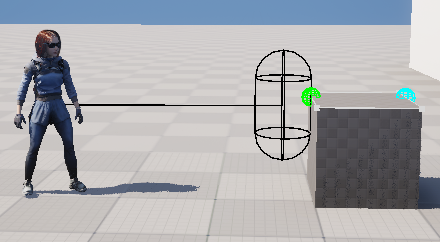
(1) 파쿠르 가능한 오브젝트 찾고, 앞뒤 ledge 정보를 받아오기
// Perform a trace in the actor's forward direction to find a traversable object
FHitResult HitResult;
FVector TraceStart = ActorLocation + TraversalInput.TraceOriginOffset;
FVector TraceEnd = TraceStart + TraversalInput.TraceForwardDirection * TraversalInput.TraceForwardDistance + TraversalInput.TraceEndOffset;

RunCapsuleTrace(
	TraceStart,
	TraceEnd,
	TraversalInput.TraceRadius,
	TraversalInput.TraceHalfHeight,
	HitResult,
	FColor::Black,
	FColor::Green);

// Get the front and back ledge transforms from the traversable component
UAO_TraversableComponent* TraversableComponent = Cast<UAO_TraversableComponent>(
	HitResult.GetActor()->GetComponentByClass(UAO_TraversableComponent::StaticClass()));

TraversalResult.HitComponent = HitResult.GetComponent();
TraversableComponent->GetLedgeTransforms(HitResult.ImpactPoint, ActorLocation, TraversalResult);
(2) 앞 ledge 위에 파쿠르를 실행할 수 있는 공간이 있는지 확인하기
// Perform a trace from the actors location up to the front ledge location to determine if there is room for the actor to move up to it
FVector RoomCheckFrontLedgeLocation = TraversalResult.FrontLedgeLocation + TraversalResult.FrontLedgeNormal * (CapsuleRadius + 2.0f);
RoomCheckFrontLedgeLocation.Z += CapsuleHalfHeight + 2.0f;

FHitResult RoomCheckFrontHitResult;
RunCapsuleTrace(
	ActorLocation,
    RoomCheckFrontLedgeLocation,
    CapsuleRadius,
    CapsuleHalfHeight,
    RoomCheckFrontHitResult,
    FColor::Red,
    FColor::Green);

// Save the height of the obstacle
TraversalResult.ObstacleHeight = abs((ActorLocation.Z - CapsuleHalfHeight) - TraversalResult.FrontLedgeLocation.Z);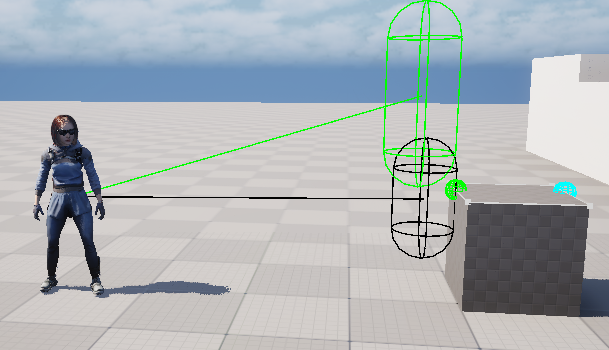
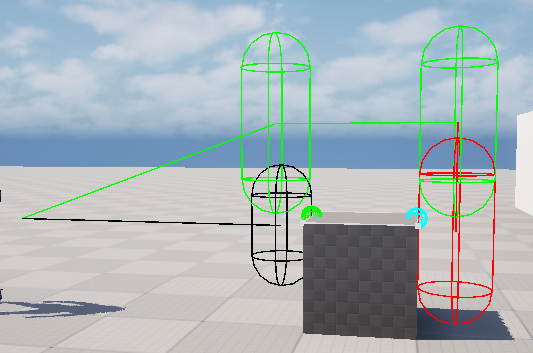
(3) 앞 ledge 위부터 뒤 ledge 위까지 공간이 있는지 확인하고 그에 따라 장애물 너비 저장
-> 공간이 있다면 뒤 바닥 위치까지 저장
// Perform a trace across the top of the obstacle from the front ledge to the back ledge to see if theres room for the actor to move across it.
FVector RoomCheckBackLedgeLocation = TraversalResult.BackLedgeLocation + TraversalResult.BackLedgeNormal * (CapsuleRadius + 2.0f);
RoomCheckBackLedgeLocation.Z += CapsuleHalfHeight + 2.0f;

FHitResult RoomCheckBackHitResult;
bool bRoomCheckBackHit = RunCapsuleTrace(
	RoomCheckFrontLedgeLocation,
    RoomCheckBackLedgeLocation,
    CapsuleRadius,
    CapsuleHalfHeight,
    RoomCheckBackHitResult,
    FColor::Red,
    FColor::Green);

if (bRoomCheckBackHit)
{
	TraversalResult.ObstacleDepth = (RoomCheckBackHitResult.ImpactPoint - TraversalResult.FrontLedgeLocation).Size2D();
	TraversalResult.bHasBackLedge = false;
}
else
{
	TraversalResult.ObstacleDepth = (TraversalResult.FrontLedgeLocation - TraversalResult.BackLedgeLocation).Size2D();

	// Trace downward from the back ledge location to find the floor
	FVector BackFloorTrace = TraversalResult.BackLedgeLocation + TraversalResult.BackLedgeNormal * (CapsuleRadius + 2.0f);
	BackFloorTrace.Z -= 50.f;
	FHitResult BackFloorHitResult;
	RunCapsuleTrace(
    	RoomCheckBackLedgeLocation,
        BackFloorTrace,
        CapsuleRadius,
        CapsuleHalfHeight,
        BackFloorHitResult,
        FColor::Red,
        FColor::Green);

	if (BackFloorHitResult.bBlockingHit)
	{
		TraversalResult.bHasBackFloor = true;
		TraversalResult.BackFloorLocation = BackFloorHitResult.ImpactPoint;
		TraversalResult.BackLedgeHeight = abs(BackFloorHitResult.ImpactPoint.Z - TraversalResult.BackLedgeLocation.Z);
	}
	else
	{
		TraversalResult.bHasBackFloor = false;
	}
}
(4) 계산한 데이터를 기반으로 Chooser Table을 통해 가장 알맞은 몽타주를 선택하는 과정 구현
- Custom 구조체를 input과 output을 사용하기 위해서는 아래와 같은 복잡한 코드가 필요함
// Evaluate a chooser to select all montages that match the conditions of the traversal check.
const FInstancedStruct ResultInstances = UChooserFunctionLibrary::MakeEvaluateChooser(AnimChooserTable);
FChooserEvaluationContext EvaluationContext;

FInstancedStruct InputStruct;
InputStruct.InitializeAs<FTraversalChooserInput>();
FTraversalChooserInput& InputData = InputStruct.GetMutable<FTraversalChooserInput>();
FTraversalChooserInput ChooserInput = FTraversalChooserInput(
	TraversalResult.ActionType,
	TraversalResult.bHasFrontLedge,
	TraversalResult.bHasBackLedge,
	TraversalResult.bHasBackFloor,
	TraversalResult.ObstacleHeight,
	TraversalResult.ObstacleDepth,
	TraversalResult.BackLedgeHeight,
	CharacterMovement->MovementMode,
	PlayerCharacter->Gait,
	CharacterMovement->Velocity.Size2D());
InputData = ChooserInput;
EvaluationContext.Params.Add(InputStruct);

FInstancedStruct OutputStruct;
OutputStruct.InitializeAs<FTraversalChooserOutput>();
FTraversalChooserOutput& OutputData = OutputStruct.GetMutable<FTraversalChooserOutput>();
EvaluationContext.Params.Add(OutputStruct);

TArray<UObject*> EvaluateObjects = UChooserFunctionLibrary::EvaluateObjectChooserBaseMulti(
	EvaluationContext, ResultInstances, UAnimMontage::StaticClass());
(5) Chooser Table을 통해 선택한 몽타주들 중에서 가장 현재 포즈와 연결되는 몽타주를 선택하는 과정
UPoseSearchLibrary::MotionMatch()를 통해 AnimMontage 선택 및 해당 몽타주에 대한 정보 저장
// Perform a Motion Match on all the montages that were chosen by the chooser to find the best result.
// This match will elect the best montage AND the best entry frame (start time) based on the distance to the ledge, and the current characters pose.
FPoseSearchContinuingProperties ContinuingProperties;
FPoseSearchFutureProperties FutureProperties;
FPoseSearchBlueprintResult MotionMatchResult;
UPoseSearchLibrary::MotionMatch(
	Character->GetMesh()->GetAnimInstance(),
	EvaluateObjects,
	FName(TEXT("PoseHistory")),
	ContinuingProperties,
	FutureProperties,
	MotionMatchResult);

UAnimMontage* SelectedAnim = Cast<UAnimMontage>(MotionMatchResult.SelectedAnim);

TraversalResult.ChosenMontage = SelectedAnim;
TraversalResult.StartTime = MotionMatchResult.SelectedTime;
TraversalResult.PlayRate = MotionMatchResult.WantedPlayRate;
2. 알게 된 점
FPoseSearchContinuingProperties ContinuingProperties;
FPoseSearchFutureProperties FutureProperties;
FPoseSearchBlueprintResult MotionMatchResult;
UPoseSearchLibrary::MotionMatch(
	Character->GetMesh()->GetAnimInstance(),
	EvaluateObjects,
	FName(TEXT("PoseHistory")),
	ContinuingProperties,
	FutureProperties,
	MotionMatchResult);

UObject* ResultObject = MotionMatchResult.SelectedAnim;UPoseSearchLibrary::MotionMatch()를 통해서 알맞은 애님 몽타주를 골라내는 과정에서MotionMatchResult.SelectedAnim값이 정상적으로 반환되지 않고, 항상 nullptr이 나오게 됨
// PoseSearchLibrary.cpp

// this function is looking for UPoseSearchDatabase(s) to search for the input AssetToSearch
static bool AddToSearch(FAssetsToSearchPerDatabaseMap& AssetsToSearchPerDatabaseMap, const UObject* AssetToSearch)
{
	bool bAsyncBuildIndexInProgress = false;
	if (const UAnimSequenceBase* SequenceBase = Cast<const UAnimSequenceBase>(AssetToSearch))
	{
		for (const FAnimNotifyEvent& NotifyEvent : SequenceBase->Notifies)
		{
			if (const UAnimNotifyState_PoseSearchBranchIn* PoseSearchBranchIn = Cast<UAnimNotifyState_PoseSearchBranchIn>(NotifyEvent.NotifyStateClass))
			{
				if (!PoseSearchBranchIn->Database)
				{
					UE_LOG(LogPoseSearch, Error, TEXT("improperly setup UAnimNotifyState_PoseSearchBranchIn with null Database in %s"), *SequenceBase->GetName());
					continue;
				}

				// we just skip indexing databases to keep the experience as smooth as possible
				if (AddToSearchForDatabase(AssetsToSearchPerDatabaseMap, SequenceBase, PoseSearchBranchIn->Database, true))
				{
					bAsyncBuildIndexInProgress = true;
				}
			}
		}
	}

    ...
}- 해당 AnimMontage 내부에
UAnimNotifyState_PoseSearchBranchIn노티파이 스테이트가 필수적으로 필요한 것을 알 수 있다. - 이를 통해 PSD를 통해 검색을 해서 모션 매칭을 적용하는 것을 알 수 있다.
오늘의 CS
템플릿
- 컴파일러가 사용자가 제공한 타입이나 값에 따라 실제 코드를 생성하도록 지시하는 도구
- 특징
- 동작 시점 : 컴파일 타임
- 타입 안정성 : 컴파일 시점에 타입을 확인하고 오류를 잡아내기 때문에 잘못된 타입 사용을 방지할 수 있기 때문에 안정성이 매우 높음
- 용도 : 자료형에 독립적인 일반적인 함수나 컨테이너를 만들 때 사용됨
매크로
- 전처리기에 의해 처리되는 기능으로, 소스 코드를 스캔하며 정의된 텍스트로 치환하는 도구
- 특징
- 동작 시점 : 전처리 단계
- 타입 안정성 : 매크로는 타입을 인식하지 못하기 때문에, 예상치 못한 문법 오류를 발생시키기 쉬움
- 용도 : 상수를 정의하거나, 작은 코드 조각을 반복해서 사용해야 할 때 사용됨
데드락
- 둘 이상의 프로세스(또는 스레드)가 자원을 차지하고 서로가 가진 자원을 요청하며 무한정 대기하는 상태
- 이로 인해 시스템이 더 이상 작업을 진행하지 못하고 멈추게 됨
4가지 필요조건
- 상호 배제 : 자원은 한 번에 한 프로세스만이 사용할 수 있음
- 점유와 대기 : 자원을 최소한 하나 이상 보유하고 있는 프로세스가, 다른 프로세스가 보유하고 있는 자원을 추가로 얻기 위해 대기해야 함
- 비선점 : 이미 할당된 자원은 해당 자원을 점유하고 있는 프로세스가 스스로 해제하기 전까지 강제로 빼앗을 수 없음
- 순환 대기 : 는 이 가진 자원을 대기하고, 은 가 가진 자원을 대기하는 식으로 결국 이 가 가진 자원을 대기하는 사이클이 형성됨
데드락 해결 방법
- 예방 : 필요 조건 4가지 중 하나라도 깨뜨려서 차단함
- 상호 배제 : 자원의 공유 허용
- 점유와 대기 : 필요한 모든 자원을 한 번에 요청하거나, 보유한 자원을 모두 해제하고 다시 요청
- 비선점 : 자원을 대기하는 프로세스가 있다면, 점유된 자원을 강제로 빼앗음
- 순환 대기 : 모든 자원에 고유한 순서를 부여하고, 프로세스는 오름차순으로만 자원을 요청하도록 강제
- 회피 : 자원 할당 요청을 수락하기 전에 시스템이 안전한 상태를 유지하는지 확인
- 은행가 알고리즘 : 시스템은 프로세스의 최대 필요 자원량을 미리 파악하고, 현재 자원을 할당해도 모든 프로세스가 종료될 수 있는 안전한 순서가 존재할 때만 자원을 할당함
- 발견 및 복구 : 주기적으로 데드락 발생 여부를 검사하고, 데드락이 발견되면 시스템을 복구함
- 발견 : 자원 할당 그래프를 사용하여 시스템에 순환 대기가 있는지 확인함
- 복구 : 프로세스 강제 종료, 자원 선점(데드락에 관련된 프로세스가 가진 자원을 강제로 빼앗아 다른 프로세스에게 할당)

게임 개발자를 향해..