오늘의 코드카타
- 모두 0으로 만들기
- 루트 노드를 설정하고 트리 구조를 파악해서 구조화하기
- 리프 노드부터 루트 노드까지 올라가면서 가중치 변경하기
- 주의할 점 : 주어지는 벡터의 범위는 int이기 때문에 이를 사용할 경우 overflow를 조심해야 함
- https://school.programmers.co.kr/learn/courses/30/lessons/76503
오늘의 공부
팀 프로젝트 진행 내용
- 오늘은 5.6 버전의 GAS를 처음 해봐서 간단한 Sprint 기능을 GAS로 구현해보고자 했다.
1. 플레이어 Attribute Set 구현
- 다른 분이 먼저 플레이어 캐릭터에 ASC 부여를 해서 Attribute Set 구현부터 시작을 하게 되었다.
- 다른 분이 Attribute Set의 함수 생성 매크로가
ATTRIBUTE_ACCESSORS에서ATTRIBUTE_ACCESSORS_BASIC로 변경되었다고 알려주셔서 해당 매크로로 구현을 했다. - 먼저 체력과 스태미나를 기본적으로 구현했고, 멀티플레이를 위해 그에 따른 함수들을 구현했다.
// AO_PlayerCharacter_AttributeSet.h

UCLASS()
class AO_API UAO_PlayerCharacter_AttributeSet : public UAttributeSet
{
	GENERATED_BODY()

public:
	UAO_PlayerCharacter_AttributeSet();

protected:
	virtual void GetLifetimeReplicatedProps(TArray<FLifetimeProperty>& OutLifetimeProps) const override;
	virtual void PreAttributeChange(const FGameplayAttribute& Attribute, float& NewValue) override;
	virtual void PostGameplayEffectExecute(const struct FGameplayEffectModCallbackData& Data) override;

public:
	// 체력
	UPROPERTY(BlueprintReadOnly, ReplicatedUsing = OnRep_Health, Category = "Health")
	FGameplayAttributeData Health;
	ATTRIBUTE_ACCESSORS_BASIC(UAO_PlayerCharacter_AttributeSet, Health)

	UPROPERTY(BlueprintReadOnly, ReplicatedUsing = OnRep_MaxHealth, Category = "Health")
	FGameplayAttributeData MaxHealth;
	ATTRIBUTE_ACCESSORS_BASIC(UAO_PlayerCharacter_AttributeSet, MaxHealth)

	// 스태미나
	UPROPERTY(BlueprintReadOnly, ReplicatedUsing = OnRep_Stamina, Category = "Stamina")
	FGameplayAttributeData Stamina;
	ATTRIBUTE_ACCESSORS_BASIC(UAO_PlayerCharacter_AttributeSet, Stamina)

	UPROPERTY(BlueprintReadOnly, ReplicatedUsing = OnRep_MaxStamina, Category = "Health")
	FGameplayAttributeData MaxStamina;
	ATTRIBUTE_ACCESSORS_BASIC(UAO_PlayerCharacter_AttributeSet, MaxStamina)

protected:
	UFUNCTION()
	void OnRep_Health(const FGameplayAttributeData& OldValue);
	UFUNCTION()
	void OnRep_MaxHealth(const FGameplayAttributeData& OldValue);
	UFUNCTION()
	void OnRep_Stamina(const FGameplayAttributeData& OldValue);
	UFUNCTION()
	void OnRep_MaxStamina(const FGameplayAttributeData& OldValue);
};- 생성자에서 체력, 최대 체력, 스태미나, 최대 스태미나를 100으로 기본 설정해줬다.
- 각 Attribute가 범위를 넘어서지 않게끔
PreAttributeChange(),PostGameplayEffectExecute()에서 Clamp를 통해 제한을 걸었다.
// AO_PlayerCharacter_AttributeSet.cpp

UAO_PlayerCharacter_AttributeSet::UAO_PlayerCharacter_AttributeSet()
{
	InitHealth(100.f);
	InitMaxHealth(100.f);
	InitStamina(100.f);
	InitMaxStamina(100.f);
}

void UAO_PlayerCharacter_AttributeSet::GetLifetimeReplicatedProps(TArray<FLifetimeProperty>& OutLifetimeProps) const
{
	Super::GetLifetimeReplicatedProps(OutLifetimeProps);

	DOREPLIFETIME_CONDITION_NOTIFY(UAO_PlayerCharacter_AttributeSet, Health, COND_None, REPNOTIFY_Always);
	DOREPLIFETIME_CONDITION_NOTIFY(UAO_PlayerCharacter_AttributeSet, MaxHealth, COND_None, REPNOTIFY_Always);
	DOREPLIFETIME_CONDITION_NOTIFY(UAO_PlayerCharacter_AttributeSet, Stamina, COND_None, REPNOTIFY_Always);
	DOREPLIFETIME_CONDITION_NOTIFY(UAO_PlayerCharacter_AttributeSet, MaxStamina, COND_None, REPNOTIFY_Always);
}

void UAO_PlayerCharacter_AttributeSet::PreAttributeChange(const FGameplayAttribute& Attribute, float& NewValue)
{
	Super::PreAttributeChange(Attribute, NewValue);

	if (Attribute == GetHealthAttribute())
	{
		NewValue = FMath::Clamp(NewValue, 0.f, GetMaxHealth());
	}
	else if (Attribute == GetStaminaAttribute())
	{
		NewValue = FMath::Clamp(NewValue, 0.f, GetMaxStamina());
	}
}

void UAO_PlayerCharacter_AttributeSet::PostGameplayEffectExecute(const struct FGameplayEffectModCallbackData& Data)
{
	Super::PostGameplayEffectExecute(Data);

	if (Data.EvaluatedData.Attribute == GetHealthAttribute())
	{
		SetHealth(FMath::Clamp(GetHealth(), 0.f, GetMaxHealth()));
	}
	else if (Data.EvaluatedData.Attribute == GetStaminaAttribute())
	{
		SetStamina(FMath::Clamp(GetStamina(), 0.f, GetMaxStamina()));
	}
}

void UAO_PlayerCharacter_AttributeSet::OnRep_Health(const FGameplayAttributeData& OldValue)
{
	GAMEPLAYATTRIBUTE_REPNOTIFY(UAO_PlayerCharacter_AttributeSet, Health, OldValue);
}

void UAO_PlayerCharacter_AttributeSet::OnRep_MaxHealth(const FGameplayAttributeData& OldValue)
{
	GAMEPLAYATTRIBUTE_REPNOTIFY(UAO_PlayerCharacter_AttributeSet, MaxHealth, OldValue);
}

void UAO_PlayerCharacter_AttributeSet::OnRep_Stamina(const FGameplayAttributeData& OldValue)
{
	GAMEPLAYATTRIBUTE_REPNOTIFY(UAO_PlayerCharacter_AttributeSet, Stamina, OldValue);
}

void UAO_PlayerCharacter_AttributeSet::OnRep_MaxStamina(const FGameplayAttributeData& OldValue)
{
	GAMEPLAYATTRIBUTE_REPNOTIFY(UAO_PlayerCharacter_AttributeSet, MaxStamina, OldValue);
}- 위의 Attribute Set을 PlayerCharacter에서 생성자로 생성해줬다.
- 해당 Attribute Set은 별도의 등록과정이 없어도
Initialize()단계를 진행하게 되면, 액터에서 찾아서 등록이 되는 것으로 알고 있다.
UCLASS()
class AO_API AAO_PlayerCharacter : public ACharacter, public IAbilitySystemInterface, public IAO_FoleyAudioBankInterface
{
	GENERATED_BODY()

    ...

	UPROPERTY(EditDefaultsOnly, BlueprintReadOnly, Category = "PlayerCharacter|GAS")
	TObjectPtr<UAO_PlayerCharacter_AttributeSet> AttributeSet;

    ...
}

AAO_PlayerCharacter::AAO_PlayerCharacter()
{
	...

	AttributeSet = CreateDefaultSubobject<UAO_PlayerCharacter_AttributeSet>(TEXT("AttributeSet"));
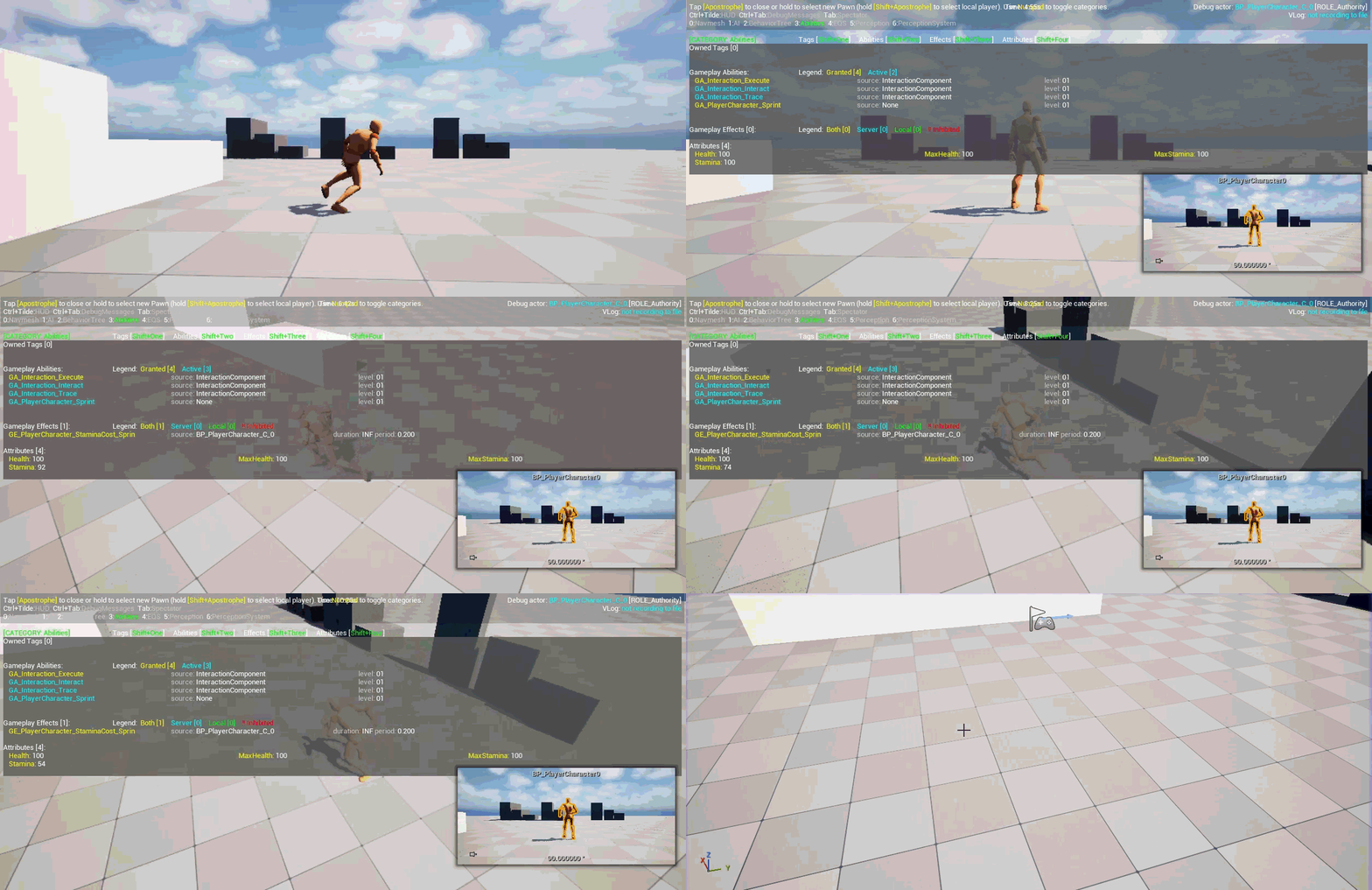
}'키를 통해 GAS 디버깅이 가능한데, 이를 통해 AttributeSet이 정상적으로 작동하는 것을 볼 수 있다. (Stamina는 Sprint 기능을 구현한 후에 찍어서 감소했다.)

2. 플레이어 EnhancedInput 기반으로 GameplayAbility 동작되게 구현
- GameplayAbility를 실행함에 있어서 기본적으로는 특정 상황에서
TryActivateAbility()를 통해 실행하게 된다. - 여기서 Player의 EnhancedInput을 통해 효과적으로 Ability를 관리하는 기능을 제공한다.
- GameplayAbility의 InputID를 통해 각각의 동작을 구분해서 눌렀을 때는
AbilitySpecInputPressed()를 통해 GameplayAbility의InputPressed()가 발동되고, 해제했을 때는AbilitySpecInputReleased()를 통해 GameplayAbility의InputReleased()가 발동되게 된다.
void AAO_PlayerCharacter::HandleGameplayAbilityInputPressed(int32 InInputID)
{
	FGameplayAbilitySpec* Spec = AbilitySystemComponent->FindAbilitySpecFromInputID(InInputID);
	if (Spec)
	{
		Spec->InputPressed = true;
		if (Spec->IsActive())
		{
			AbilitySystemComponent->AbilitySpecInputPressed(*Spec);
		}
		else
		{
			AbilitySystemComponent->TryActivateAbility(Spec->Handle);
		}
	}
}

void AAO_PlayerCharacter::HandleGameplayAbilityInputReleased(int32 InInputID)
{
	FGameplayAbilitySpec* Spec = AbilitySystemComponent->FindAbilitySpecFromInputID(InInputID);
	if (Spec)
	{
		Spec->InputPressed = false;
		if (Spec->IsActive())
		{
			AbilitySystemComponent->AbilitySpecInputReleased(*Spec);
		}
	}
}- IA_Sprint에 Ability를 할당하기 위해서 헤더에
TMap을 통해 ID와 GameplayAbility를 저장하고, 이를 기반으로 바인딩을 했다.
UPROPERTY(EditDefaultsOnly, BlueprintReadOnly, Category = "PlayerCharacter|GAS")
TMap<int32, TSubclassOf<UGameplayAbility>> InputAbilities;

void AAO_PlayerCharacter::SetupPlayerInputComponent(UInputComponent* PlayerInputComponent)
{
	Super::SetupPlayerInputComponent(PlayerInputComponent);

	if (UEnhancedInputComponent* EIC = Cast<UEnhancedInputComponent>(PlayerInputComponent))
	{
		// EIC->BindAction(IA_Sprint, ETriggerEvent::Started, this, &AAO_PlayerCharacter::StartSprint);
		// EIC->BindAction(IA_Sprint, ETriggerEvent::Completed, this, &AAO_PlayerCharacter::StopSprint);

		if (IsValid(AbilitySystemComponent))
		{
			EIC->BindAction(IA_Sprint, ETriggerEvent::Triggered, this, &AAO_PlayerCharacter::HandleGameplayAbilityInputPressed, 1);
			EIC->BindAction(IA_Sprint, ETriggerEvent::Completed, this, &AAO_PlayerCharacter::HandleGameplayAbilityInputReleased, 1);
		}
} - 그리고 추후에 추가할 캐릭터가 가지고 있어야 할 DefaultAbilities를 선언했다.
- 해당 부분을
BeginPlay()에서 ASC에 등록해줬다.
UPROPERTY(EditDefaultsOnly, BlueprintReadOnly, Category = "PlayerCharacter|GAS")
TArray<TSubclassOf<UGameplayAbility>> DefaultAbilities;

void AAO_PlayerCharacter::BeginPlay()
{
	Super::BeginPlay();

	if (AbilitySystemComponent)
	{
		AbilitySystemComponent->InitAbilityActorInfo(this, this);

		if (HasAuthority())
		{
			for (const auto& DefaultAbility : DefaultAbilities)
			{
				FGameplayAbilitySpec AbilitySpec(DefaultAbility);
				AbilitySystemComponent->GiveAbility(AbilitySpec);
			}

			for (const auto& InputAbility : InputAbilities)
			{
				FGameplayAbilitySpec AbilitySpec(InputAbility.Value);
				AbilitySpec.InputID = InputAbility.Key;
				AbilitySystemComponent->GiveAbility(AbilitySpec);
			}
		}
	}
}
3. 플레이어 Sprint 기능 GAS로 적용
- Sprint를 실행시켜주는 GameplayAbility를 구현했다.
- 생성자에서는
Ability.Movement.Sprint태그를 부착해서 현재 캐릭터의 상태를 알려주고자 했다. - Ability를 활성화해주는 함수와 끝나는 함수에서 Character의 기존의 Sprint 동작 과정을 실행시켜주었다.
- 기존의 함수는 제거했고,
StartSprint_GAS()를 만들어서 bool 값으로 상태 관리를 했다.
UAO_GameplayAbility_Sprint::UAO_GameplayAbility_Sprint()
{
	const FGameplayTagContainer SprintTag(FGameplayTag::RequestGameplayTag(FName("Ability.Movement.Sprint")));
	SetAssetTags(SprintTag);

	InstancingPolicy = EGameplayAbilityInstancingPolicy::InstancedPerActor;
}

void UAO_GameplayAbility_Sprint::ActivateAbility(const FGameplayAbilitySpecHandle Handle,
                                                 const FGameplayAbilityActorInfo* ActorInfo, const FGameplayAbilityActivationInfo ActivationInfo,
                                                 const FGameplayEventData* TriggerEventData)
{
	TObjectPtr<AAO_PlayerCharacter> Character = Cast<AAO_PlayerCharacter>(ActorInfo->AvatarActor.Get());
	if (!Character)
	{
		EndAbility(Handle, ActorInfo, ActivationInfo, true, true);
		return;
	}

	Character->StartSprint_GAS(true);
}

void UAO_GameplayAbility_Sprint::InputReleased(const FGameplayAbilitySpecHandle Handle,
	const FGameplayAbilityActorInfo* ActorInfo, const FGameplayAbilityActivationInfo ActivationInfo)
{
	EndAbility(Handle, ActorInfo, ActivationInfo, true, false);
}

void UAO_GameplayAbility_Sprint::EndAbility(const FGameplayAbilitySpecHandle Handle,
                                            const FGameplayAbilityActorInfo* ActorInfo, const FGameplayAbilityActivationInfo ActivationInfo,
                                            bool bReplicateEndAbility, bool bWasCancelled)
{
	if (!IsActive())
	{
		return;
	}

	if (TObjectPtr<AAO_PlayerCharacter> Character = Cast<AAO_PlayerCharacter>(ActorInfo->AvatarActor.Get()))
	{
		Character->StartSprint_GAS(false);
	}

	Super::EndAbility(Handle, ActorInfo, ActivationInfo, bReplicateEndAbility, bWasCancelled);
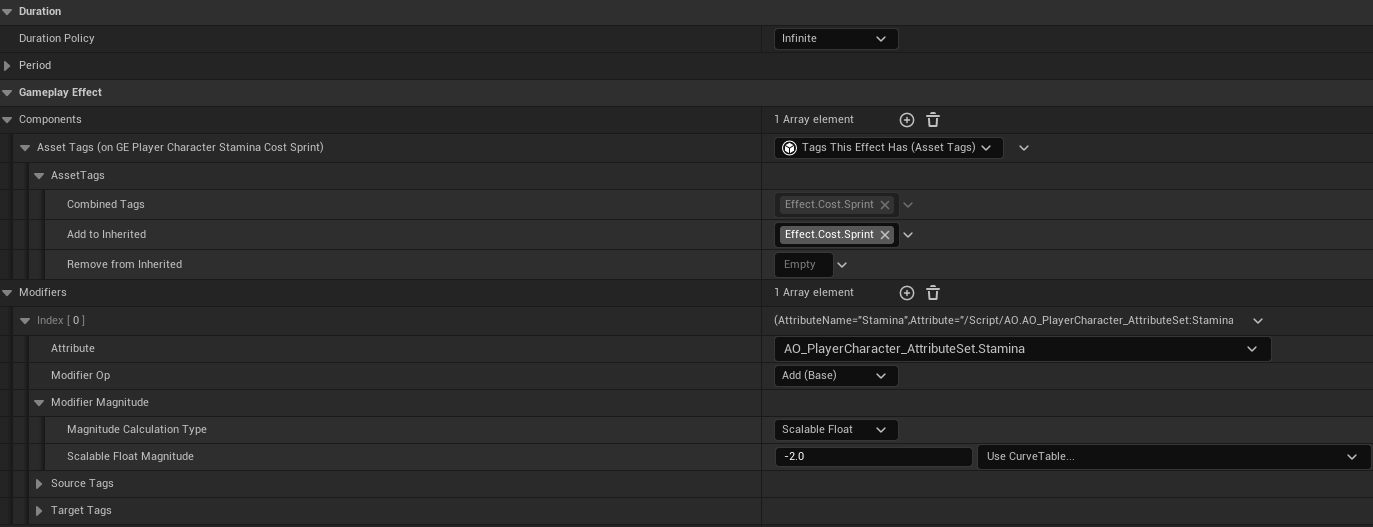
}- 이후에 해당 Ability가 실행되면 스태미나가 0.2초당 2씩 줄어들어야 하기 때문에 GameplayEffect를 생성해서 스태미나 감소 효과를 추가하고자 했다.
- 키 입력을 그만둘 시에 스태미나 감소 효과가 없어져야 되기 때문에 Duration은
Infinite로 주고, 이후에 제거하고자 했다. - 해당 Effect를 제거할 때, Tag를 활용하기 위해
Effect.Cost.Sprint태그를 Effect에 부여했다. - Period를 0.2초로, Modifier를 -2로 해서 초당 -10의 스태미나를 감소시키게끔 했다.
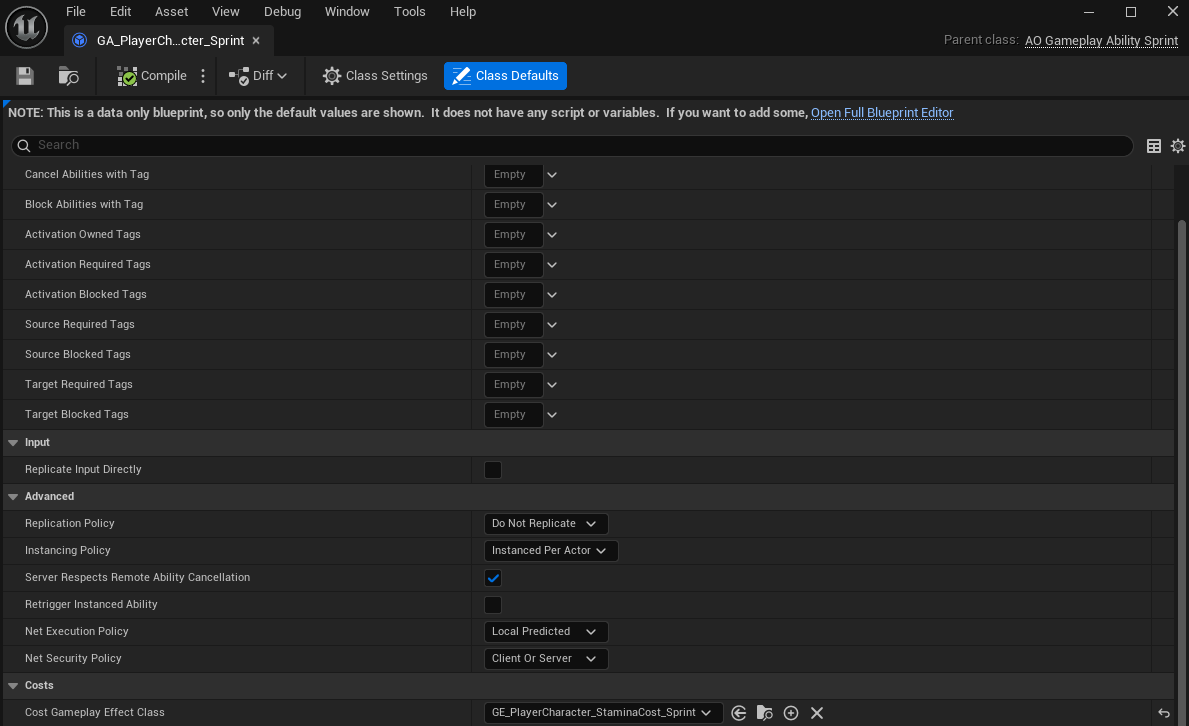
- GameplayAbility는 기본적으로
Cost Gameplay Effect Class를 가지고 있고, 할당을 하면 Ability를 실행할 시에 CostEffect를 자동으로 실행시켜주게 된다. - 이를 모르고, 추가로 할당했다가 2개가 부여되는 상황도 있었다.
- Effect를 Infinite로 할당해서
EndAbility()시에 자동으로 해제되지는 않는다. - 따라서
EndAbility()에서 태그를 찾아서RemoveActiveEffectsWithTags()를 통해 Effect를 직접 제거해줬다. Cost Gameplay Effect Class를 제거해주는 함수가 있으면 편할 것으로 보이긴 한다.
void UAO_GameplayAbility_Sprint::EndAbility(const FGameplayAbilitySpecHandle Handle,
                                            const FGameplayAbilityActorInfo* ActorInfo, const FGameplayAbilityActivationInfo ActivationInfo,
                                            bool bReplicateEndAbility, bool bWasCancelled)
{
	...

	FGameplayTagContainer SprintCostTag(FGameplayTag::RequestGameplayTag(FName("Effect.Cost.Sprint")));
	ActorInfo->AbilitySystemComponent->RemoveActiveEffectsWithTags(SprintCostTag);

    Super::EndAbility(Handle, ActorInfo, ActivationInfo, bReplicateEndAbility, bWasCancelled);
}- 추가적으로 스태미나가 0이어도 계속 Sprint를 할 수 있는 오류가 있었다.
- 따라서 Attribute Set을 구독해서 변경하는 것을 확인하고 스태미나가 0이 되면 Ability가 종료되게끔 추가적으로 구현했다.
void UAO_GameplayAbility_Sprint::ActivateAbility(const FGameplayAbilitySpecHandle Handle,
                                                 const FGameplayAbilityActorInfo* ActorInfo, const FGameplayAbilityActivationInfo ActivationInfo,
                                                 const FGameplayEventData* TriggerEventData)
{
	...

	if (const UAO_PlayerCharacter_AttributeSet* AttributeSet = Character->GetAbilitySystemComponent()->GetSet<UAO_PlayerCharacter_AttributeSet>())
	{
    	// AttributeSet 값 변경 델리게이트에 바인딩
        // 바인딩할 함수는 매개변수로 FOnAttributeChangeData 변수를 가지고 있어야 함
		Character->GetAbilitySystemComponent()->GetGameplayAttributeValueChangeDelegate(AttributeSet->GetStaminaAttribute())
			.AddUObject(this, &UAO_GameplayAbility_Sprint::OnStaminaChanged);
	}
}

void UAO_GameplayAbility_Sprint::EndAbility(const FGameplayAbilitySpecHandle Handle,
                                            const FGameplayAbilityActorInfo* ActorInfo, const FGameplayAbilityActivationInfo ActivationInfo,
                                            bool bReplicateEndAbility, bool bWasCancelled)
{
	...

    if (TObjectPtr<AAO_PlayerCharacter> Character = Cast<AAO_PlayerCharacter>(ActorInfo->AvatarActor.Get()))
	{
		if (const UAO_PlayerCharacter_AttributeSet* AttributeSet = Character->GetAbilitySystemComponent()->GetSet<UAO_PlayerCharacter_AttributeSet>())
		{
        	// Ability 종료 시에는 델리게이트 바인딩 제거
			Character->GetAbilitySystemComponent()->GetGameplayAttributeValueChangeDelegate(AttributeSet->GetStaminaAttribute())
				.RemoveAll(this);
		}
	}

    ...
}
4. 결과
오늘의 CS
IP 주소 vs MAC 주소
- IP(Internet Protocl) 주소
- 네트워크 계층(3계층)에서 사용되는 논리적 주소
- 특징
- 논리적 주소 : 소프트웨어적으로 할당되며, 네트워크 구성에 따라 변경될 수 있음
- 역할 : 네트워크 간의 통신을 가능하게 함. 패킷이 출발지 네트워크에서 목적지 네트워크까지 라우팅되는 경로를 결정하는 데 사용됨
- 할당 : 운영체제에 의해 할당되거나, DHCP 서버를 통해 동적으로 할당됨
- 구조 : IPv4(32비트 주소), IPv6(128비트 주소)
- MAC(Media Access Control) 주소
- 데이터 링크 계층(2계층)에서 사용되는 물리적 주소
- 특징
- 물리적 주소 : 하드웨어에 영구적으로 새겨진 고유 식별자
- 역할 : 같은 네트워크 내의 통신을 가능하게 함. 데이터 패킷이 다음 라우터나 최종 목적지 호스트까지 도달하는 가장 가까운 경로를 식별함
- 구조 : 48비트 또는 64비트 주소
- 불변성 : 원칙적으로 하드웨어가 변경되지 않는 한 변하지 않음

게임 개발자를 향해..