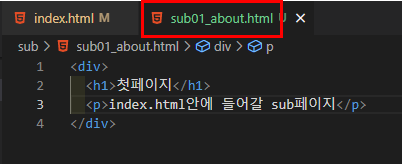
1. include 할 html 문서 만들기
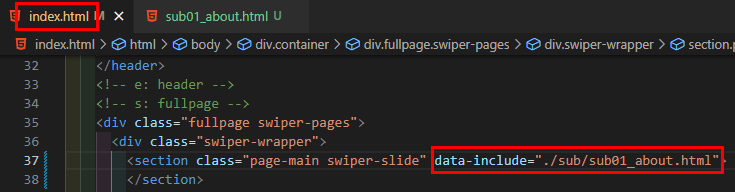
2. 불러올 html 태그에 속성값 표시하기
Attribute 명은 알아볼 수 있게 이름을 만들면 된다.
그런 후 현재 파일 위치로부터의 경로 작성
3. javaScript 코드
// Sub페이지 불러오기
function includeHTML(){
  let z, elmnt, file, xhttp;
  z = document.getElementsByTagName("*");
  for (let i = 0; i < z.length; i++) {
    elmnt = z[i];
    file = elmnt.getAttribute("html-include");
    // if문을 통해 file이 null값이 아니면 다음의 내용을 실행함
    if (file) {
      xhttp = new XMLHttpRequest();
      xhttp.onreadystatechange = function() {
        if (this.readyState == 4) {
          if (this.status == 200) {elmnt.innerHTML = this.responseText;}
          if (this.status == 404) {elmnt.innerHTML = "Page not found.";}
          /* Remove the attribute, and call this function once more: */
          elmnt.removeAttribute("html-include");
          includeHTML();
        }//if
      }//onreadystatechange

      xhttp.open("GET", file, true);
      xhttp.send();
      return;
    }//if - file
  }//for
}//includeHTML


/* 실행 */
window.addEventListener('DOMContentLoaded',()=>{
  includeHTML();
});
Element.getAttribute() / 요소의 속성 값을 가져오는 메서드
참고
https://www.codingfactory.net/10283
XMLHttpRequest() 사용자의 작업을 방해하지 않고 페이지의 일부를 업데이트
참고
https://developer.mozilla.org/ko/docs/Web/API/XMLHttpRequest
open()
참고
https://developer.mozilla.org/en-US/docs/Web/API/Window/open
https://offbyone.tistory.com/312
https://7942yongdae.tistory.com/67
참고
https://aosceno.tistory.com/556
https://www.w3schools.com/howto/howto_html_include.asp
https://kyung-a.tistory.com/18
