이점
- 우려 사항의 분리: MVVM은 UI와 데이터를 분리하므로 복잡한 애플리케이션을 더 쉽게 개발하고 유지 관리할 수 있다.
- 테스트 가능성: MVVM을 사용하면 UI와 데이터를 별도로 테스트하기가 더 쉽다.
- 재사용성: ViewModel은 다양한 뷰에서 재사용이 가능하다. 코드의 양을 줄이는 데 도움이 될 수 있다.
- 성능: MVVM은 ViewModel에 데이터를 캐싱하여 애플리케이션 성능을 향상시키는 데 도움이 돼서 데이터베이스에 액세스해야 하는 횟수를 줄일 수 있다.
MVVM 패턴 구조도
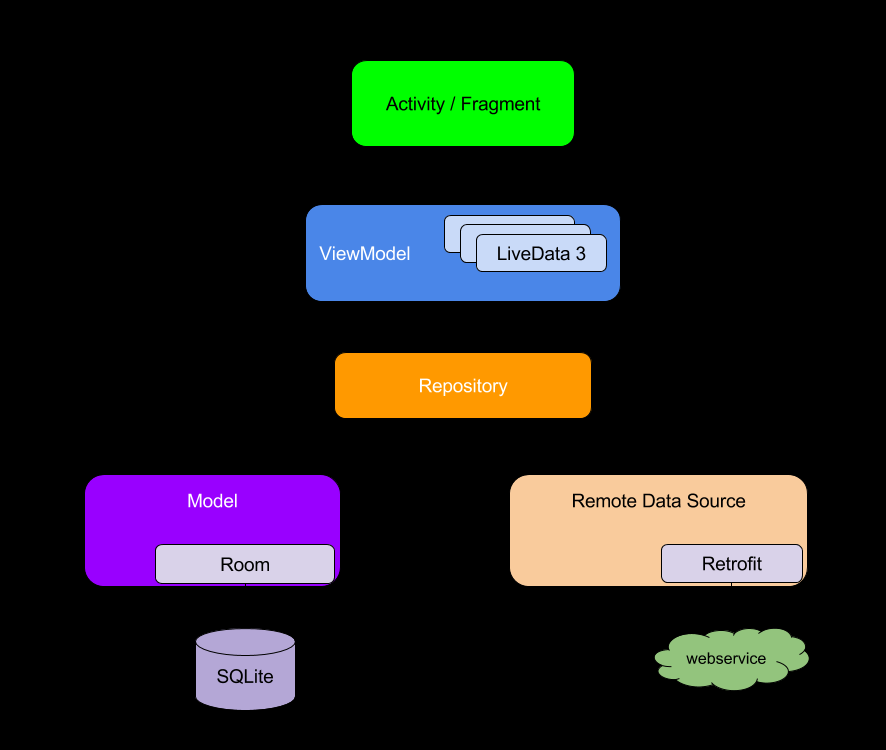
1. Model :
모델은 애플리케이션의 데이터와 비즈니스 로직.
데이터 검색 및 조작을 처리하는 데이터 클래스, 저장소 또는 네트워크 서비스 계층.
모델은 데이터 소스와 상호 작용하고 데이터에 액세스하고 업데이트함.
2. View :
view는 활동, 프래그먼트 또는 사용자 정의 보기와 같은 애플리케이션의 사용자 인터페이스(UI) 구성요소 xml정도로 생각중이다.
UI 렌더링과 사용자 상호 작용 캡처를 함.
MVVM에서 View는 ViewModel의 변경 사항을 관찰하고 그에 따라 상태를 업데이트함.
뷰는 가능한 한 가볍게 유지되어야 하며 주로 UI 렌더링 및 이벤트 처리에 중점을 두어야 한다고 한다..
3. ViewModel :
ViewModel은 View와 Model 사이의 중개자 역할.
뷰에 필요한 데이터와 상태를 노출하고 사용자 상호 작용을 처리함.
Model에서 데이터를 검색하고 관찰 가능한 속성 또는 LiveData 개체를 통해 View에 노출하고 모델과 통신하여 사용자 작업에 따라 데이터를 업데이트한다.
ViewModel은 UI 구성 요소에 대한 직접적인 참조가 없도록 View에서 분리되어야 한다.
Flow의 이해
- async + reactive
- flow - 기본, 베이스(상태를 가지고 있지 않다)
- stateFlow - .value로 마지막 값을 알 수 있음(상태를 가지고 있다.)
- sharedFlow - 연결되어 있으면서 데이터를 계속 보낼 수 있음(상태를 가지고 있지 않다)
- callbackFlow - 람다 콜백 - > flow로 만들어 줌
예제를 통해 공부해보자..
Xml파일
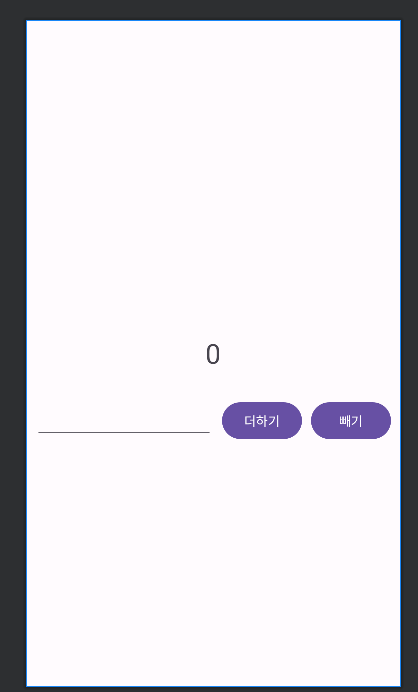
<?xml version="1.0" encoding="utf-8"?>
<androidx.constraintlayout.widget.ConstraintLayout xmlns:android="http://schemas.android.com/apk/res/android"
    xmlns:app="http://schemas.android.com/apk/res-auto"
    xmlns:tools="http://schemas.android.com/tools"
    android:layout_width="match_parent"
    android:layout_height="match_parent"
    tools:context=".MainActivity"
    android:paddingHorizontal="10dp"
    >

    <TextView
        android:id="@+id/number_textview"
        android:layout_width="wrap_content"
        android:layout_height="wrap_content"
        android:text="0"
        android:textSize="30dp"
        app:layout_constraintBottom_toBottomOf="parent"
        app:layout_constraintLeft_toLeftOf="parent"
        app:layout_constraintRight_toRightOf="parent"
        app:layout_constraintTop_toTopOf="parent" />

    <EditText
        android:id="@+id/number_input_edittext"
        android:layout_width="0dp"
        android:layout_height="wrap_content"
        android:inputType="number"
        app:layout_constraintHorizontal_weight="1"
        app:layout_constraintEnd_toStartOf="@+id/plus_btn"
        app:layout_constraintStart_toStartOf="parent"
        app:layout_constraintTop_toBottomOf="@+id/number_textview"
        android:layout_marginTop="30dp"
        />

    <Button
        android:id="@+id/plus_btn"
        android:layout_width="wrap_content"
        android:layout_height="wrap_content"
        android:text="더하기"
        app:layout_constraintEnd_toStartOf="@+id/minus_btn"
        app:layout_constraintStart_toEndOf="@+id/number_input_edittext"
        app:layout_constraintTop_toTopOf="@+id/number_input_edittext"
        android:layout_marginHorizontal="10dp"
        />

    <Button
        android:id="@+id/minus_btn"
        android:layout_width="wrap_content"
        android:layout_height="wrap_content"
        android:text="빼기"
        app:layout_constraintEnd_toEndOf="parent"
        app:layout_constraintStart_toEndOf="@+id/plus_btn"
        app:layout_constraintTop_toTopOf="@+id/number_input_edittext" />


</androidx.constraintlayout.widget.ConstraintLayout>- RecyclerView 의 아이템으로 들어갈 data class.
ViewModel
livedata -> StateFlow로 변경
.value -> .emit으로 변경
enum class ActionType {
  PLUS, MINUS
}

//데이터의 변경
// 뷰모델은 데이터의 변경사항을 아렬주는 라이브 데이터를 가지고있다.

class MyNumberViewModel(
  private val coroutineScope: CoroutineScope =
      //SupervisorJob(): SupervisorJob은 부모-자식 관계의 코루틴 설정
      // 만약 자식 코루틴 중 하나가 실패시, 다른 자식 코루틴은 영향을 받지 않고 계속 실행.
      CoroutineScope((SupervisorJob() + Dispatchers.Main.immediate))
) : ViewModel() {

  //mutablelivedata - 수정 가능
  //livedata - 값 변경X

  //내부에서 설정하는 변경가능한 자료형은 Mutable로
  private val _currentValue = MutableStateFlow<Int>(0)

  //변경되지 않는 데이터를 가져올 때 이름을 _ 언더스코어 없이 설정
  // 공개적으로 가져오는 변수는 private가 아닌 퍼블릭으로 외부에서도 접근 가능하도록 설정
  // 하지만 값을 직접 라이브 데ㅣㅇ터에 접근하지 않고 뷰모델을 통해 가져올 수 있도록 설정
  val currentValue: StateFlow<Int> = _currentValue

  //사용자의 입력값
  private val _currentUserInput = MutableStateFlow<String>("")

  val currentUserData : StateFlow<String> = _currentUserInput

  //ViewModel이 시작될 때 초기값 설정
  init {
      Log.d("ViewModel", "nyh 생성자 호출")
      _currentValue.value = 0
  }

  suspend fun updateValue(actionType: ActionType, input: Int) {
      when (actionType) {
          ActionType.PLUS -> {
              _currentValue.emit(_currentValue.value + input)
          }
          ActionType.MINUS -> {
              _currentValue.emit(_currentValue.value - input)
          }
      }
      _currentUserInput.value = ""
      Log.d("updateVal", "nyh 초기화")
  }

  override fun onCleared() {
      coroutineScope.cancel()
  }
}
Activity
lifecycleScope.launch 추가
class MainActivity : AppCompatActivity() {

    lateinit var myNumberViewModel: MyNumberViewModel
    private val binding by lazy { ActivityMainBinding.inflate(layoutInflater) }
    override fun onCreate(savedInstanceState: Bundle?) {
        super.onCreate(savedInstanceState)
        setContentView(binding.root)

        myNumberViewModel = ViewModelProvider(this).get(MyNumberViewModel::class.java)

        lifecycleScope.launch {
            binding.plusBtn.setOnClickListener { view ->
                handleButtonClick(view)
            }

            binding.minusBtn.setOnClickListener { view ->
                handleButtonClick(view)
            }
        }
        lifecycleScope.launch {
            lifecycle.repeatOnLifecycle(Lifecycle.State.STARTED) {
                launch {
                    try {
                        myNumberViewModel.currentValue.collect {
                            Log.d("lifeScope", "nyh suc $it")
                            binding.numberTextview.text = it.toString()
                        }
                    } catch (e: Throwable) {
                        Log.d("lifeScope", "nyh fail")
                    }

                }
                launch {
                    myNumberViewModel.currentUserData.collect {
                        Log.d("lifeScope", "nyh suc $it")
                        binding.numberInputEdittext.setText(it)
                    }
                }
                launch { }
            }
        }
    }

    //클릭
    private fun handleButtonClick(view: View?) {
        val userInputString = binding.numberInputEdittext.text.toString()
        if (userInputString.isEmpty()) {
            // 무효한 입력 처리
            return
        }
        val userInputNumber = userInputString.toInt()

        lifecycleScope.launch {
            when (view) {
                binding.plusBtn -> {
                    myNumberViewModel.updateValue(actionType = ActionType.PLUS, userInputNumber)
                }
                binding.minusBtn -> {
                    myNumberViewModel.updateValue(actionType = ActionType.MINUS, userInputNumber)
                }
            }
        }
    }
}
안드로이드 주니어 개발자