1. DOM
• 웹브라우저는 HTML문서를 해석하고, 화면을 통해 해석된 결과를 보여준다.
• 해석한 HTML코드를 화면을 통해 보여주는 과정을 '렌더링'이라 한다.
• 브라우저는 HTML코드를 해석해서 요소들이 트리 형태로 구조화해 표현하는 문서(객체)를 생성한다.
  이를 DOM이라 하며, 브라우저는 DOM을 통해 화면에 웹 콘텐츠를 렌더링한다.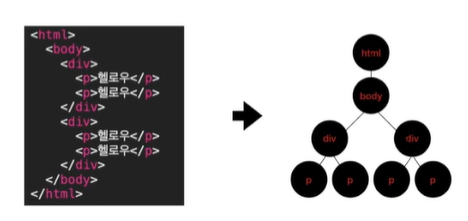
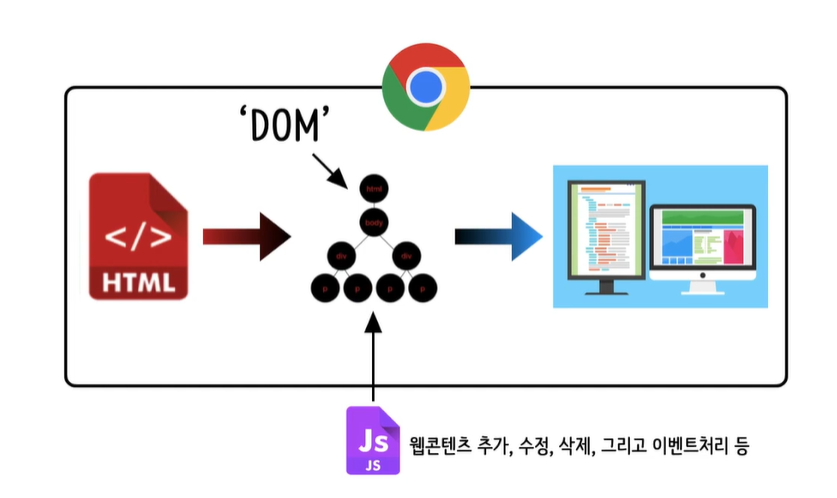
• DOM은 자바스크립트를 사용해서 웹 콘텐츠를 추가, 수정, 삭제하거나 마우스 클릭, 키보드 타이핑 등
  이벤트에 대한 처리를 정의할 수 있도록 제공되는 프로그래밍 인터페이스이다.
2. window.document
• 브라우저 객체 window의 document 속성은 창이 포함한 문서를 참조한다.
  즉, window.document은 현재 브라우저에 렌더링되고 있는 문서를 의미하며, 이 속성을 이용하면
  해당 문서에 접근할 수 있다.

• 페이지 콘텐츠, 즉 DOM에 대한 진입점 역할을 하는 프로그래밍 인터페이스이다.
  이를 이용하면 페이지의 정보를 얻거나 웹 요소를 생성 및 조작할 수 있다.
3. window.document의 대표 메소드
1) document.querySelector

	• document의 querySelector메소드는 선택자를 인자로 전달받아, 전달받은 선택자와 일치하는
      문서 내 첫 번째 요소(Element)를 반환한다. 일치하는 요소가 없으면 '없다'라는 의미의
      null데이터를 반환한다.

    * 인자로 전달되는 선택자는 문자열 타입의 '유효한 CSS선택자'를 의미한다.

    ex) doucument.querySelector("p");
    	doucument.querySelector("#text");
        doucument.querySelector(".text");


2) document.getElementById

	• document의 getElementById메소드는 id를 인자로 전달받아, 전달받은 선택자와 일치하는 문서
      내 요소(Element)를 반환한다. 일치하는 요소가 없으면 '없다'라는 의미의 null데이터를 반환한다.

    * 인자로 전달되는 선택자는 문자열 타입의 'id'를 의미한다.

    ex) document.getElementById("text");
    	document.getElementById("image");

* 메소드 둘 다 결과를 반환해준다.
4. textContent
• textContent속성은 해당 노드가 포함하고 있는 텍스트 콘텐츠를 표현하는 속성이다.
• textContent를 통해 요소가 포함한 텍스트를 읽을 수도, 변경할 수도 있다.

  ex) const p = document.querySeletor("p");
      // p 요소를 반환받아 상수로 이름을 붙인다
      console.log(p.textContent)
      // p 요소의 textContent 속성을 콘솔에 출력해보자
      p.textContext = "텍스트를 이걸로 바꿔"
      // p 요소의 textContent 값을 변경해보자
5. 실습
1) html 코드
<!DOCTYPE html>
<html lang="en">
    <head>
        <meta charset="UTF-8">
        <meta http-equiv="X-UA-Compatible" content="IE-edge">
        <meta name="viewport" content="width=device-width, inital-scale=1">
        <title>자바스크립트 실습해보자</title>
    </head>
    <body>
        <h1>큰 제목입니다</h1>
        <p>헬로우 이건 문단입니다</p>
        <p id="text">아이디가 있는 문단입니다</p>
        <p class="paragraph">클래스가 있는 문단입니다</p>

        <script src="script.js"></script>
    </body>
</html>
2) js 코드
console.log(document.querySelector("h1"));
console.log(document.querySelector("p"));
console.log(document.querySelector("#text"));
console.log(document.querySelector(".paragraph"));
console.log(document.querySelector(".para"));

console.log(document.getElementById("text"));
console.log(document.getElementById("p"));

const a = document.querySelector("h1");
const b = document.getElementById("text");
a.textContent = "헬로우 여러분"
console.log(a.textContent);
b.textContent = "헬로우 여러분2"
console.log(b.textContent);
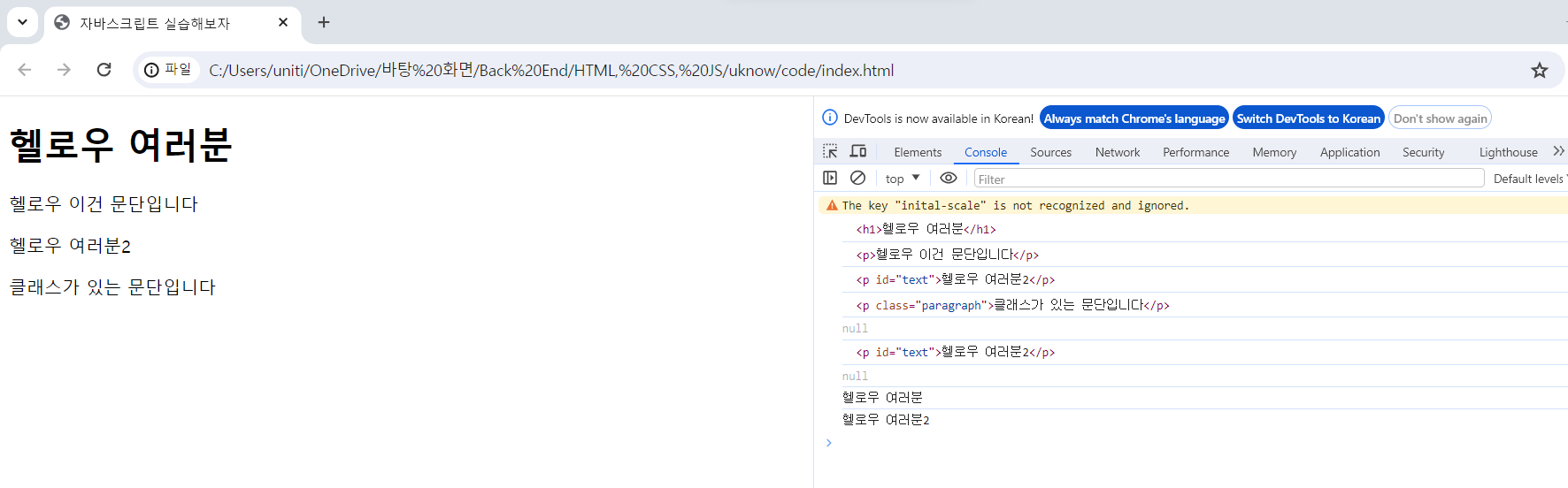
3) 결과

블로그 이전했습니다 -> https://young-code.tistory.com