
DOM 이란?
DOM : Document Object Model (문서 객체 모델)
브라우저는 HTML 문서를 파싱하는 과정에서 DOM이라는 트리구조의 객체를 생성
프로그래밍 언어가 DOM 구조에 접근하여 문서 구조, 스타일, 내용 등을 변경할 수 있다
트리구조
- 자료구조의 일종으로 여러 개의 노드(
node)로 구성됨- 하나의 부모가 여러 개의 자식 노드를 가지는 형태
DOM 트리
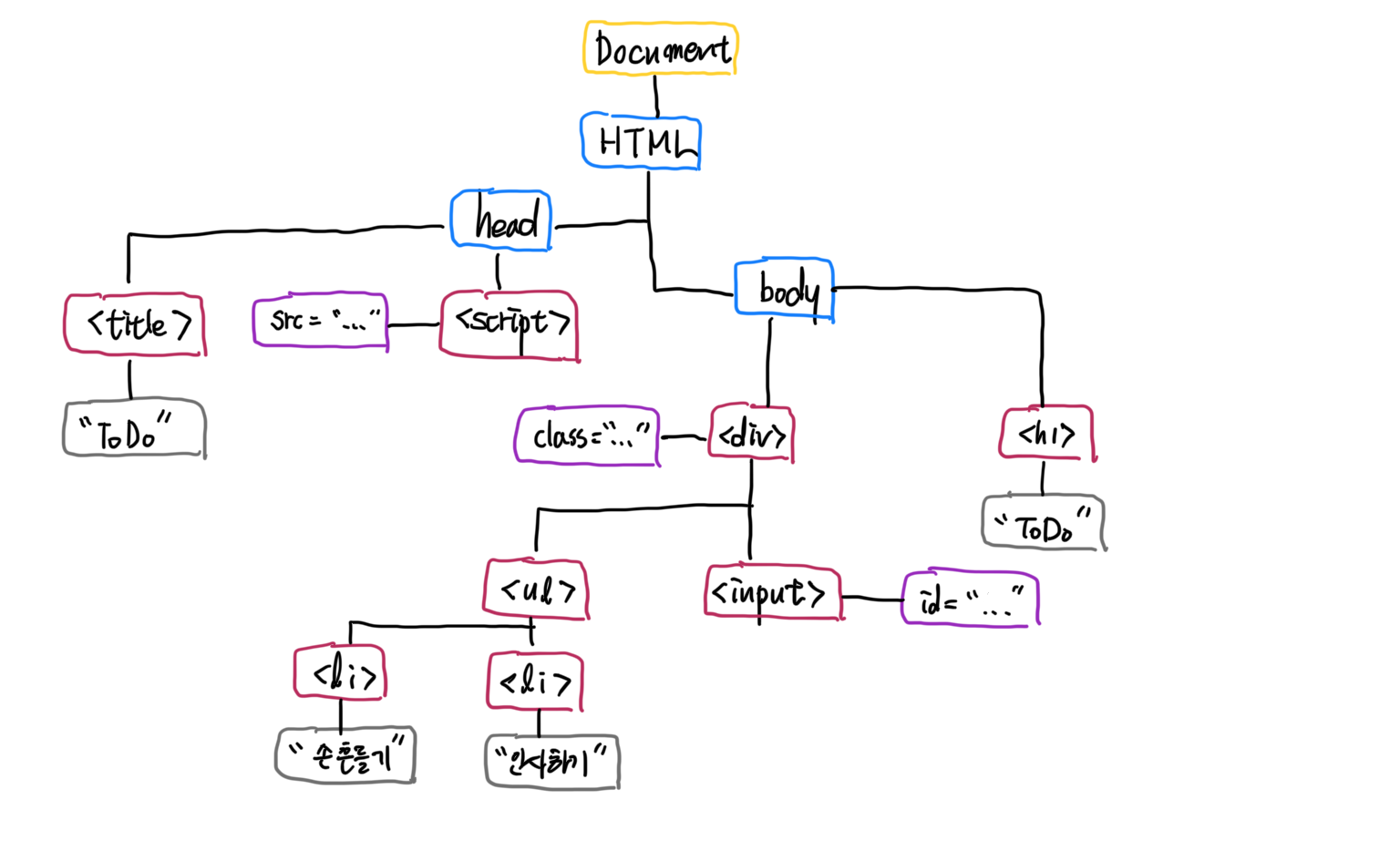
Document
문서(document) 노드. DOM 진입점 역할HTML
Document를 제외하고 최상위. 이러한 노드를 루트(root) 노드라고 하며,
루트 노드는 항상 하나만 존재함head,body,title,div...
요소(element) 노드라고 하며, 속성 노드를 가질 수 있는 유일한 노드src = "...", `id = "..."``
속성(attribute) 노드라고 하며, 요소 노드에 관한 정보를 담고 있음.
해당 요소 노드의 자식 노드는 아님"ToDo","인사하기"..
텍스트(text) 노드라고 하며, 자식 노드를 가질 수 없기 때문에 항상 Leaf Node가 됨
Parent Node (부모 노드) : 각 노드의 바로 위에 위치한 노드
Child Node (자식 노드) : 각 노드의 바로 아래에 위치한 노드
Leaf Node : 트리 구조에서 가장 끝단에 위치하여 Child Node가 없는 노드
DOM 메서드
-
document.getElemetnById( )
Element Node의 id 속성을 체크해서 해당하는 Element를 참조 -
document.getElemetnByClass( )
Element Node의 class 속성을 체크해서 해당하는 Element를 참조 -
document.querySelector( )
소괄호에 입력한 값에 해당하는 Element를 참조
"#id"를 입력하면 id를 기반으로,".class"를 입력하면 class를 기반 -
document.querySelectorAll( )
소괄호에 입력한 값에 해당하는 Element를 배열 형태로 모두 참조 -
document.createElement( )
새로운 노드를 생성 -
document.appendChilds( )
Element Node를 현재 DOM에 추가
const node = document.createElement("li");
const textnode = document.createTextNode("Water");

node.appendChild(textnode);
document.getElementById("myList").appendChild(node);

// Before
* Coffee
* Tea

// After
* Coffee
* Tea
* Water
window.event
window 객체 : 현재의 DOM 문서를 담고 있는 창, 그 자체
window 객체 내부에는 기본적으로 내장된 함수, 변수, 객체, 속성 등이 존재하고, 그 중 event 속성이 존재함
Event: DOM 내에서 발생하는 사용자의 액션
키보트 버튼을 누르거나 마우스를 클릭하는 등이 해당됨
event 속성을 활용해 사용자의 행동에 따른 결과값을 만들 수 있음
<!DOCTYPE html>
<html lang="en">
  <head>
    <title>Document</title>
    <script>
    	const printName = function () {
      		const inputValue = document.querySelector("#name-box")
      		if(window.event.keyCode === 13){
      			console.log(inputValue.value)
      		}
      	};
    </script>
  </head>
  <body>
  	<input id="name-box" onKeydown = "printName()" />
  </body>
</html>

<!-- 키보드의 Enter 버튼은 13이라는 keyCode 숫자를 가짐  -->
<!-- input 태그 내에서 버튼이 눌릴 때마다 함수를 실행하고,
     eneter가 눌리면 조건문을 통과해 로그가 찍힘 -->