
구조분해할당 (destructuring assignment)
구조화 되어 있는 배열, 객체와 같은 데이터를 분해하여 각각의 변수에 다시 할당하는 것
배열 구조분해할당
const arr = [1, 2, 3, 4, 5];
let [one, two] = arr;

console.log(one)  // 결과: 1
console.log(two)  // 결과: 2
- 선언 키워드 작성
- 대괄호 안에 변수명 입력 (여러 개를 작성할 경우 문자들을 쉼표( , )로 구분)
- 할당 연산자( = )와 구조분해할당 하고 싶은 배열 입력
- 배열의 앞에서부터 차례대로 각각의 변수에 담김
객체 구조분해할당
const obj = {
  name : "otter",
  gender : "male"
}

let {name, gender} = obj;

console.log(name)    // 결과: otter
console.log(gender)  // 결과: male

let { name: a, gender: b} = obj;

console.log(a)    // 결과: otter
console.log(b)    // 결과: male
- 선언 키워드 작성
- 중괄호 안에 사용하려는 property의 key값 입력
(여러 개를 작성할 경우 문자들을 쉼표( , )로 구분) - 할당 연산자( = )와 구조분해할당 하고 싶은 객체 입력
- 객체의 앞에서부터 차례대로 각각의 key에 값이 담김
- 이미 존재하는 key가 아닌 별도의 변수명으로 관리하고 싶다면 콜론(:)을 사용
Spread 연산자
배열 등으로 보관된 값들의 집합을 전개해주는 연산자
const arr = [1, 2, 3, 4, 5];

console.log(...arr)  // 결과 : 1, 2, 3, 4, 5
깊은 복사, 얕은 복사
얕은 복사 (shallow copy)
const arr = [1, 2, 3, 4, 5];

const newArr1 = arr  // arr과 같은 주소값을 공유하게 됨
const newArr2 = [...arr];  // 기존에 arr과 별개의 새로운 배열의 주소가 담김
const obj = {
  name: "otter",
  gender: "male"
}

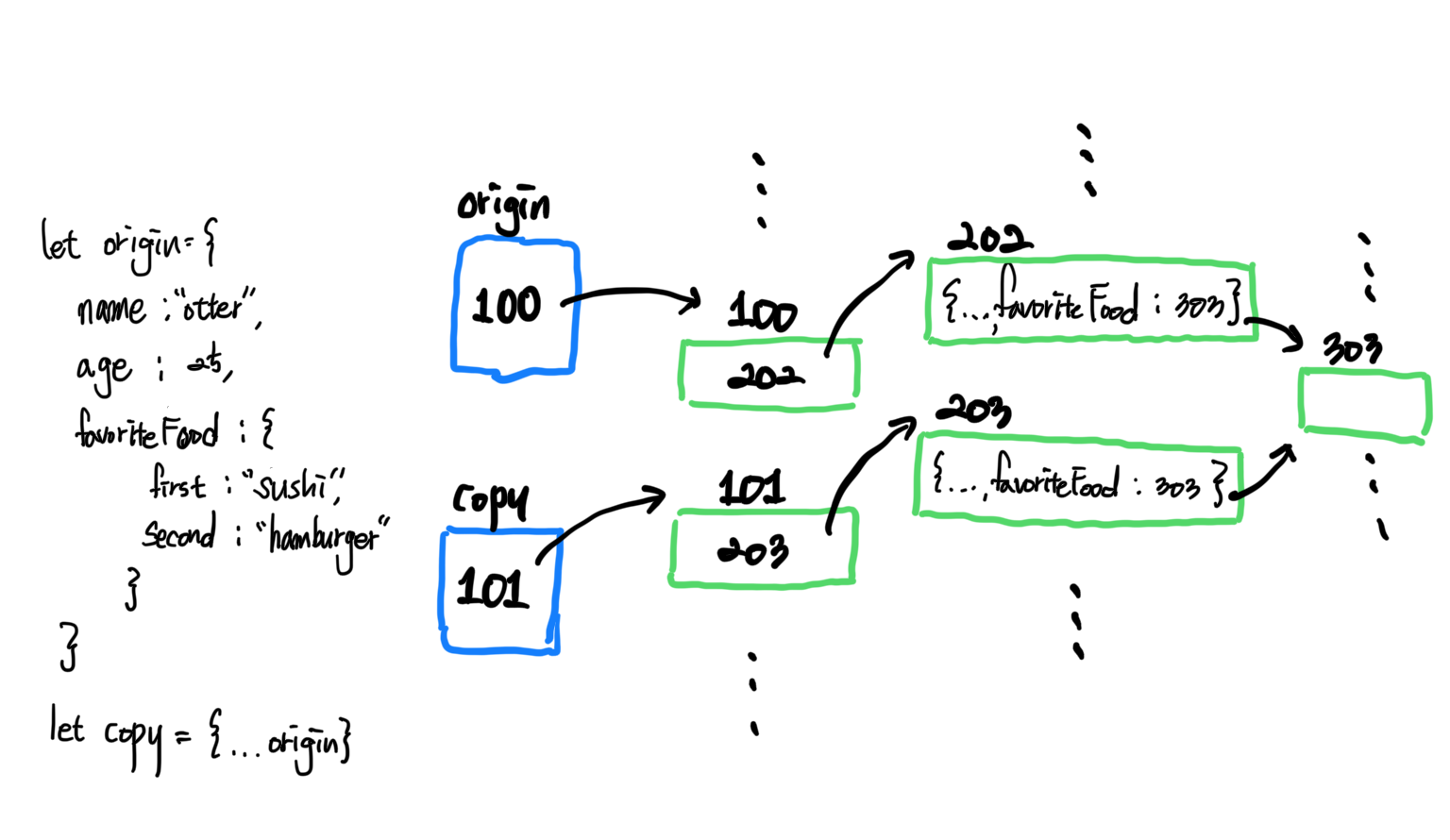
const newObj = {...obj};  // 객체를 펼쳐준 뒤 새로운 중괄호로 감싸서 새로운 객체 생성
다만 객체 안에 또다른 객체가 포함되어 있을 경우, spread 연산자를 사용해도 내부의 객체는 기존의 주소값에 연결되어 있기 때문에 문제가 발생할 수 있음
깊은 복사
얕은 복사의 문제를 해결하기 위해 JSON.stringify( ) 와 JSON.parse( )를 사용
JSON.stringify( ): 객체를 JSON 데이터 포맷, 즉 문자열로 변환JSON.parse( ): 문자열을 객체 형태로 변환
JSON ( JavaScript Object Notation) : 자바스크립트 객체 표기법
데이터를 쉽게 교환하고 저장하기 위한 텍스트 기반의 데이터 교환 표준
기본적으로 키(key)와 값(value)가 쌍을 이루는 구조{ key : value }
const obj = {
  name: "otter",
  gender: "male",
  favoriteFood: {
    first: "sushi",
    seconde: "hamburger"
  }
}

const copy = JSON.stringify(obj)
console.log(copy)
// {"name":"otter", "gender":"male", "favoriteFood":{"first":"sushi", "second":"hamburger"}}
// copy에 담긴 값은 더이상 객체가 아니며, 완전히 새로운 문자열 -> 새로운 주소값
const deepCopy = JSON.parse(copy)
console.log(deepCopy)

/*
{
  name: "otter",
  gender: "male",
  favoriteFood: {
    first: "sushi",
    seconde: "hamburger"
  }
}
*/

// JSON 데이터 포맷을 다시 객체 형태로 변환 -> 새로운 객체 생성
// deepCopy에 담기는 주소는 원본 객체의 주소와는 다름
📌 JSON.parse( ) 와 response.json( )의 차이
JSON.parse( ): 응답 바디(response body)만을 넣어야 함. 바디와 헤더가 함께 들어가면 데이터를 읽지 못함response.json(): 응답 헤더(response header)가 들어가도 바디만 읽어 옴
rest 파라미터
함수의 매개변수(parameter)를 배열로 전달받는 방식
const foo = function(one, two, ...rest){
  console.log(rest)
}

foo(1, 2, 3, 4, 5)
// 출력: [3, 4, 5]

const foo = function(one, two, ...arr){
  console.log(arr)
}
// rest parameter도 매개변수이기 때문에 원하는 변수명 지정 가능


const foo = function(...rest){
  console.log(rest)
}

foo(1, 2, 3, 4, 5)
// 출력: [1, 2, 3, 4, 5]
📌 rest parameter를 사용할 땐 반드시 매개변수 중 마지막에 위치해야 함
// 잘못된 예시
const foo = function(one, ...rest, two){
  console.log(rest)
}
Keep going