
우연한 계기로 남는 시간 짬을 내어 파이썬 기초 문법과 자료 구조 이해 여부를 확인하는 시간을 가지게 되었습니다.
goal
- 파이썬 기초 학습 여부 확인
- 개념, 활용, 예제
- 개선점 도출
참고
반복문
개념
- 참고
- 반복문 : 단순 반복 실행 자동화를 위한 제어 흐름 도구
- 파이썬은 리스트 요소가 나열된 순서대로 반복을 실행
if, for, while
활용
- range() : 범위 지정
or i in range(5):
    print(i)

0
1
2
3
4- break, continue : 종료 및 탈출
for n in range(2, 10):
    for x in range(2, n):
        if n % x == 0:
            print(f"{n} equals {x} * {n//x}")
            break

4 equals 2 * 2
6 equals 2 * 3
8 equals 2 * 4
9 equals 3 * 3
for num in range(2, 10):
if num % 2 == 0:
print(f"짝수 찾기 : {num}")
continue
print(f"홀수 찾기 : {num}")
짝수 찾기 : 2
- else : break를 건너 뛰면 실행되는 조건문
for n in range(2, 10):
    for x in range(2, n):
        if n % x == 0:
            print(n, 'equals', x, '*', n//x)
            break
    else:
        # loop fell through without finding a factor
        print(n, 'is a prime number')

2 is a prime number
3 is a prime number- pass() : 아무런 동작도 필요하지 않은 경우
class MyEmptyClass:
    pass
일반적으로 최소 클래스 (기본 생성자) 만드는데 사용
- match() : switch case와 같은 조건문
예시
초간단 예시
 for i in range(2,10):        # 1번 for문
        for j in range(1, 10):   # 2번 for문
            print(i*j, end=" ")
        print('')

2 4 6 8 10 12 14 16 18
3 6 9 12 15 18 21 24 27
4 8 12 16 20 24 28 32 36
5 10 15 20 25 30 35 40 45
6 12 18 24 30 36 42 48 54
7 14 21 28 35 42 49 56 63
8 16 24 32 40 48 56 64 72
9 18 27 36 45 54 63 72 81- 리스트 조작
result = [x*y for x in range(2,10)
                  for y in range(1,10)]
>>> print(result)
[2, 4, 6, 8, 10, 12, 14, 16, 18, 3, 6, 9, 12, 15, 18, 21, 24, 27, 4, 8, 12, 16,
20, 24, 28, 32, 36, 5, 10, 15, 20, 25, 30, 35, 40, 45, 6, 12, 18, 24, 30, 36, 42
, 48, 54, 7, 14, 21, 28, 35, 42, 49, 56, 63, 8, 16, 24, 32, 40, 48, 56, 64, 72,
9, 18, 27, 36, 45, 54, 63, 72, 81]
리스트
개념
- 하나의 항목에 여러 변수 저장하는데 사용
참고
- 자료구조 : 컴퓨터를 통해 데이터를 저장, 표현하는 기법
- 추후 알고리즘 구현과 데이터베이스 설계 및 운영체제 활용을 통한 상업용 서비스 네트워킹으로 활용됨
- 현대 슈퍼앱 (배달, 물류, 금융, 포털..) 들은 클라우드와 보안 등을 통해 정보기술을 활용한 플랫폼 - 고객 - 소비자 중개 서비스가 활성화되어 상업적 효과를 누리는 중
- 이를 위해 보편적으로 모놀리식 아키텍처 - MSA 전환, 비동기 처리와 동시성 제어, 디자인 패턴, 가상 시스템 디자인 등 정보화 시대에 활용되는 핵심 기술들의 기초적인 내용 중 한가지가 자료구조
- 알고리즘 구현으로 점진적 발전이 이루어지지만 거기에 매몰되기보단 기본적인 감각을 익히는 단계
- 그 자료구조를 조작하는 방법 중 한가지가 리스트
- 스택, 큐, 힙, 트리, 그래프 - 파이썬에서 리스트를 활용하는 방법은?
활용
요약
append(): 리스트의 끝에 값을 추가
insert(): 지정한 위치에 값을 삽입
remove(): 리스트에서 첫 번째로 일치하는 값을 삭제
sort(): 리스트를 정렬
reverse(): 리스트의 순서를 반대로 뒤집기
count(대상): 리스트 내에서 대상의 개수 세기
- append() : 리스트 끝에 더하기
fruits = ['apple', 'banana', 'cherry']

points = (1, 4, 5, 9)

fruits.append(points)

print(fruits)
['apple', 'banana', 'cherry', (1, 4, 5, 9)]
- extend() : 리스트 끝에 모든 항목 붙여 덯기
...
fruits.expends(points)
print(fruits)
['apple', 'banana', 'cherry', 1, 4, 5, 9]
- len()
get_list_len = ["apple", "banana", "cherry"]
print(len(get_list_len))
3
-
list.insert(i, x) : 주어진 변수를 리스트에 삽입
-
remove(x) : 값이 x와 동일한 첫번째 항목 삭제
-
pop([i]) :
- 리스트에서 주어진 위치에 있는 항목을 삭제하고, 그 항목을 반환
- 인덱스를 지정하지 않는 경우 리스트의 마지막 항목을 삭제하고 반환
- 리스트가 비어 있거나 인덱스가 리스트 범위를 벗어나면 IndexError를 발생시킴
-
clear
- 모든 항목 삭제
fruits = ["apple", "banana", "cherry"]

fruits.clear()

print(fruits)
[] -
index(x[start[ end]])
- x와 일치하는 항목 탐색을 start부터 end까지. 없으면 valueError
a = [10, 20, 30, 40, 50, 40, 60, 40, 70]
res = a.index(40, 4, 8)
print(res)
`5`
- count(x) : 리스트에서 x 등장 횟수 조회
- sort(*, key=None, reverse=False) : 리스트 요소 제자리 정렬
- reverse() : 리스트 요소 뒤집기. 역정렬
- copy() : 얕은 사본 돌려주기
```python
fruits = ['orange', 'apple', 'pear', 'banana', 'kiwi', 'apple', 'banana']
fruits.count('apple')

fruits.count('tangerine')

fruits.index('banana')

fruits.index('banana', 4)  # 위치 4에서부터 다음 banana 를 찾습니다

fruits.reverse()
fruits

fruits.append('grape')
fruits

fruits.sort()
fruits

fruits.pop()
예시
리스트를 스택, 큐로도 사용 가능
stack = [3, 4, 5]
stack.append(6)
stack.append(7)
stack

stack.pop()

stack

stack.pop()

stack.pop()

stack
from collections import deque
queue = deque(["배달이", "네이버", "커피빈"])
queue.append("애플") # 애플 도착
queue.append("아마존") # 아마존 도착
queue.popleft() # 처음 도착한 사람이 이제 떠납니다
queue.popleft() # 두번째 도착한 사람이 이제 떠납니다
queue # 도착한 순서대로 남아있는 큐- 리스트 예쁘게 정렬하기
a = [3, 1, 2, 4]
print(sorted(a)) # [1, 2, 3, 4]- 리스트 예쁘게 정렬하기2
a = [3, 1, 2, 4]
a.sort()
print(a) # [1, 2, 3, 4]- 리스트 예쁘게 정렬하기3
a = ["cd", "ab", "bc"]
print(sorted(a)) # ["ab", "bc", "cd"]- 리스트 예쁘게 정렬하기4
a = ["cd", "ab", "bc"]
a.sort()
print(a) # ["ab", "bc", "cd"]- 리스트 예쁘게 출력하기
a = [1, 2, 3, 4]
print(*a) # 1 2 3 4- 리스트 예쁘게 출력하기2
a = ["ab", "bc", "cd"]
print(*a) # ab bc cd
리스트 값 모두 합치기
a = [3, 1, 2, 4]
print(sum(a)) # 10- 리스트 길이 구하기
a = [3, 1, 2, 4]
print(len(a)) # 4- 리스트 값 평균 구하기
a = [3, 1, 2, 4]
print(sum(a)/len(a)) # 2.5
리스트의 최댓값
a = [3, 1, 2, 4]
print(max(a)) # 4- 리스트의 최솟값
a = [3, 1, 2, 4]
print(min(a)) # 1- 리스트에서 위치 찾기
a = [3, 1, 2, 4]
print(a.index(2)) # 2- 리스트 한줄에 하나씩 출력하기
a = [1, 2, 3, 4]
for i in a:
print(i)- 리스트 한줄에 하나씩 출력하기2
a = ["ab", "bc", "cd"]
for i in a:
  print(i)
튜플
개념
- 데이터 저장을 위한 파이썬 컬렉션(자료구조 조작 모음) 중 한가지
- 하나의 변수에 여러 항목 저장하는데 사용
- 순서가 있고 변경할 수 없는 컬렉션. 불변이 특징이고 가변 객체 포함은 가능
- 생성과 검색은 자유롭지만 수정, 삭제, 삽입 불가로 리스트만큼 활용되진 않아 상황에 따라 장단을 고려한 선택
- 인덱싱이 필요한 경우 사용됨
활용
- 인덱싱
>>> t1 = (1, 2, 'a', 'b')
>>> t1[0]
1
>>> t1[3]
'b'- 슬라이싱 : 인덱스 1부터 조회
>>> t1 = (1, 2, 'a', 'b')
>>> t1[1:]
(2, 'a', 'b')- 덧셈
>>> t1 = (1, 2, 'a', 'b')
>>> t2 = (3, 4)
>>> t3 = t1 + t2
>>> t3
(1, 2, 'a', 'b', 3, 4)- 곱셈
>>> t2 = (3, 4)
>>> t3 = t2 * 3
>>> t3
(3, 4, 3, 4, 3, 4)- 길이 구하기
>>> t1 = (1, 2, 'a', 'b')
>>> len(t1)
4
예제
- 튜플로 반복문 사용해보기
directions = ("North", "South", "East", "West")
for direction in directions:
  print(direction)

# North
# South
# East
# West- 데이터 개수 세기
menu = ('짜장면', '짬뽕', '탕수육', '라조기', '팔보채', '깐풍기', '라조기')
menu.count('라조기')- 튜플 더하기
tuple1 = (1, 2, 3)
tuple2 = ('짜장면', '짬뽕', '탕수육')

tuple3 = tuple1 + tuple2
print(tuple3)     # 1, 2, 3, 짜장면, 짬뽕, 탕수육
딕셔너리
개념
- 지금까지 순차 조회했던 리스트, 튜플에 비해 key : value 형태로 데이터를 저장하는 컬렉션
- key에 대응하는 값을 인덱싱 할 수 있는게 특징
- value에 list 추가도 가능
- 예시
| key | value |
|---|---|
| name | pey |
| phone | 010-9999-1234 |
| birth | 1118 |
| date | [0612, 0613, 0613] |
활용
- 딕셔너리 만들기
vd1 = {1: 'Geeks', 2: 'For', 3: 'Geeks'}
print(d1)- 요소 접근
d = { "name": "장남이", 1: "Python", (1, 2): [1,2,4] }

# Access using key
print(d["name"])

# Access using get()
print(d.get("장남이"))- 쌍 추가, 삭제
d = {1: '장남이', 2: '반복', 3: '당근', '나이':30}

del d["나이"]
print(d)

# Using pop() to remove an item and return the value
val = d.pop(1)
print(val)

# Using popitem to removes and returns
# the last key-value pair.
key, val = d.popitem()
print(f"Key: {key}, Value: {val}")

# Clear all items from the dictionary
d.clear()
print(d)- key 사용으로 value 얻기
>>> a = {'name': '장남이', 'phone': '010-9999-1234', 'birth': '0614'}
>>> a.get('name')
'장남이'
>>> a.get('phone')
'010-9999-1234'- 주의 사항
- 관련 함수
- 더 자세한 내용
예제
- 과목별 성적 조회 프로그램
grades = {"수학": 90, "과학": 85, "영어": 95}
for subject, score in grades.items():
    print(subject, ":", score)
장단점
장점
- 키-값 쌍을 저장하여 데이터를 효율적으로 관리할 수 있음
- 데이터를 검색할 때 키를 사용하여 빠르게 값을 찾을 수 있음
- 키는 중복될 수 없으므로, 유일한 식별자로 사용할 수 있음
단점
- 순서가 없으므로 인덱스로 접근할 수 없음
- 키-값 쌍의 개수가 많아질수록 검색 속도가 느려질 수 있습니다.
문자열
개념
- 연속된 문자 나열. 따옴표로 구분
- 단일 문자 char과 구분되는 데이터 유형
"Life is too short, You need Python"
"a"
"123"
활용
- 문자열 연산
- 문자열 길이 구하기
- 인덱싱, 슬라이싱
>>> a = "Life is too short"
>>> a.split()
['Life', 'is', 'too', 'short']
>>> b = "a:b:c:d"
>>> b.split(':')
['a', 'b', 'c', 'd']- 포매팅
>>> d = {'name':'장남이', 'age':30}
>>> f'나의 이름은 {d["name"]}입니다. 나이는 {d["age"]}입니다.'
'나의 이름은 장남이입니다. 나이는 30입니다.>>> y = 3.42134234
>>> "{0:0.4f}".format(y)
'3.4213'- 소/대문자 치환
>>> a = "hi"
>>> a.upper()
'HI'>>> a = "HI"
>>> a.lower()
'hi'- 교체
>>> a = "Life is too short"
>>> a.replace("Life", "Your leg")
'Your leg is too short'- 정규식
- 구성요소 확인 - 알파벳 / 숫자 / 특수문자 여부 - 비밀번호 검사에 사용
>>> s = "12345"
>>> s.isdigit()
True
>>> s = "1234a"
>>> s.isdigit()
False
>>> s = "12 34"
>>> s.isdigit()
False>>> s = "12345"
>>> s.isdigit()
True
>>> s = "1234a"
>>> s.isdigit()
False
>>> s = "12 34"
>>> s.isdigit()
False>>> s = "Life is too short"
>>> s.startswith("Life")
True
>>> s.startswith("short")
False>>> s = "Life is too short"
>>> s.endswith("short")
True
>>> s.endswith("too")
False- 개수 세기
>>> a = "hobby"
>>> a.count('b')
2- 위치 조회
>>> a = "Python is the best choice"
>>> a.find('b')
14
>>> a.find('k')
-1>>> a = "Life is too short"
>>> a.index('t')
8
>>> a.index('k')
Traceback (most recent call last):
File "<stdin>", line 1, in <module>
ValueError: substring not found예제
- 온라인 캘린더 날짜 알림 문구 포매팅
>>> a = "20250614"
>>> year = a[:4]
>>> month = a[4:6]
>>> date = a[6:]
>>> date_format = "현재 날짜는 {}년 {}월 {}일 입니다."

>>> print(date_format.format(year, month, date))
현재 날짜는 2025년 06월 14일 입니다.
파일
개념
- 직접 값을 입력하지 않고도 파일 입출력이 가능
- 정리
|분류|종류|의미|설명|파일이 없을 때|파일이 있을 때|
|:--:|:--:|:--:|:--:|:--:|:--:|
|출력|r|read||읽기|오류 발생|읽기|
|-|w|write||쓰기|새로 생성|새로 생성|
| - |a|append|추가|새로 생성|추가|
| - |x||exclusive|배타적 추가|새로 생성|오류 발생|
활용
- 파일을 열었다면 write()으로 내용 작성. 문자열 형태 데이터를 인자로. 숫자를 쓰려면 데이터 변환 필요
- 파일 작업 끝나면 항상 close()로 닫아줘야 함
- 닫지 않으면 리소스 낭비 또는 접근 불가 발생 가능
예시 - 메모장 구현
# 파일을 쓰기 모드('w')로 열어서 'Hello.txt' 파일을 생성
file = open('Hello.txt','w')

# 파일에 문자열 'Hello, world!'를 작성
file.write('Hello, world!')

# 파일 닫기
file.close()
# for문을 사용하여 파일에 문자열을 쓰기 위해 파일을 쓰기 모드('w')로 열기
file = open('Hello.txt', 'w')
# for문을 사용하여 1부터 10까지의 숫자를 각 줄에 쓰기 위해 반복
for i in range(1, 11):
data = f'{i}번째 줄입니다.\n' # 문자열에 개행 문자를 추가하여 줄바꿈합
file.write(data) # 파일에 문자열 작성
write 함수는 엔터 기능이 없으므로 개행 문자를 직접 추가해야 함
# 파일 닫기
file.close()모듈
개념
- 클래스. 객체로 이해하면 편함
- 한 가지 파일 내에 자료와 함수를 선언하고 .py확장자로 선언하여 관리하면 하나의 객체로 분류
- 내가 프로그램을 구현하기 위해 필요한 객체들을 독립적으로 생성하기 위해 필요
- 각 객체들을 조립해서 원활하게 실행되도록 만들면 그게 프로그램 구현
- 그 프로그램을 로컬에서 서버로 클라우드로 배포하고 배포된 프로그램을 스마트폰 또는 pc에 공급하는 것이 인터넷 서비스
- 그걸 구현하는 아주 기초 단계
참고 예시 - 출처
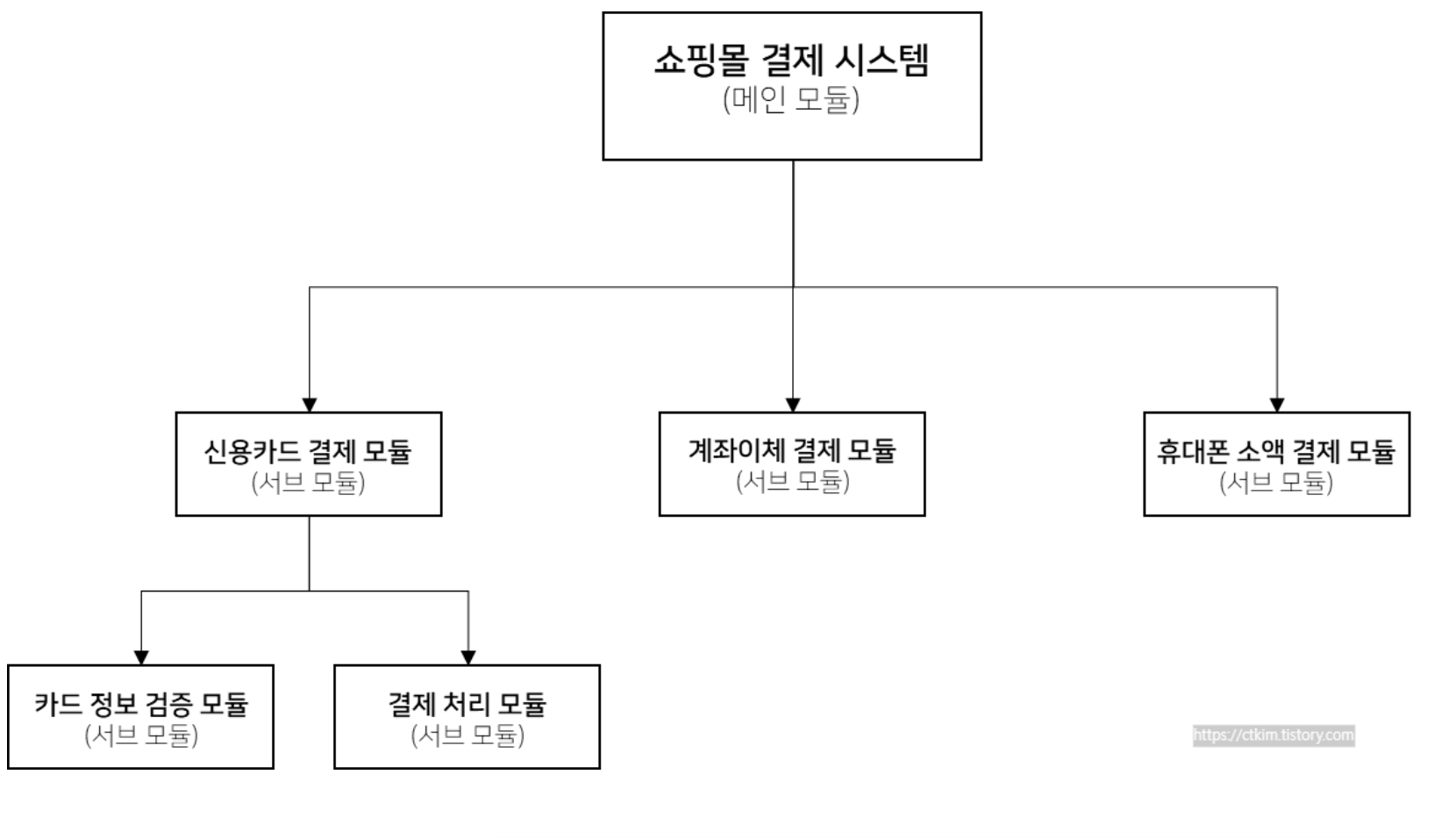
- 이름은 짧고 간결하게 파이썬 문법 규칙에 맞게(snake_case)
# mod1.py
def add(a, b):
    return a + b

def sub(a, b):
    return a-b
활용
개인화
- 원하는 함수를 저장하는 파이썬 파일 파일명/확장자 형식으로 저장(파일명.py)
"""
작성자 : 장남이
작성일 : 2025-06-14
내용 : 재사용 가능한 사칙연산 모듈 생성
"""
# object.py
def add(a, b):
    return a + b

def substraction(a, b):
    return a-b

def multiple(a, b):
    return a * b

def division(a, b):
return a / b- 재사용
import object.py

table = object.multiplue(9,9)
print(table) # 81
표준
- 동일한 기능 구현 중복을 예방하기 위해 각 언어에서 제공하는 표준 라이브러리
- 표준 모듈 활용으로 노동 효율화 가능
- 학습 / 특수 목적 등이 있는 경우 개인 모듈을 만들면 되지만 프로그래밍 보다 회사 또는 상위 목적이 우선인 경우 활용하기 좋은 선택지
- 파이썬 표준 산수 라이브러리 활용 사례
import math
sqrt = math.sqrt(9) # 3.0
factorial = math.factorial(5) # 120
외부 모듈
- 개인 / 기업용 프로그램 구현 과정에서 외부 프로그램 연동이 필요한 경우가 있음
- 예를 들어 쇼핑몰 로그인 기능을 구현하더라도 자체적 기능과 문법 모듈을 쓰는 걸 넘어 카카오톡 / 네이버 소셜 로그인 연동이 필요한 경우
- 이를 통해 사용감 개선 및 고객 이탈 예방으로 광고 서비스의 상업적 효과를 기대할 수 있음
활용 예시
- 웹사이트 통신 검증
import requests
response = requests.get("www.naver.com")
valid_access = response.status_code
implement = response.text

print(valid_access) # 웹사이트 통신 상태 검증
print(implement) : 웹사이트 조회 내용
패키지화
- 모듈의 수가 늘어날 경우 구조적으로 관리하기 위해 패키지화가 가능합니다.
- 패키지 디렉토리 생성 - 대상 디렉토리 내부 모듈 파일 생성
directory/
	_init_.py
    my_app.py
import my_app- 추후 특정 모듈 조회 시 경로를 지정하여 호출 가능
from directory import my_app.py회고
- 기초적인 자료구조와 문법 활용을 통해 웹 서비스의 상업성과 어떻게 연결되는지 고민해보는 시간 3시간을 가질 수 있었습니다.
- 몰라도 계속 하다보면 이해도가 촘촘해지겠지만 배움에는 끝이 없다고 느낍니다.
- 중요한건 어려운 지식을 허영심있게 과시하고 자랑하는 것보다 어떻게하면 실질적인 경제성과 연결하고 회사에 전달할 수 있을지 고민해보는 것
- 이 시간을 통해 어떻게 사회성과 경제성을 잘 키워갈 수 있을지 고민해보는 시간이 필요해보입니다.
- 척에서 진짜가 되려면 같이 잘하는게
- 개선점 :
- 기초 이해 학습 시간을 수익성 있는 경제활동과 연결해보고 제약 안에서 현실적으로 구현할 수 있는 방법 고민해보기

우리스러움