이제 못생긴 alert 은 그만!
지금부터 나의 프로젝트는 MZ 하게 toastr 를 사용해보겠다.
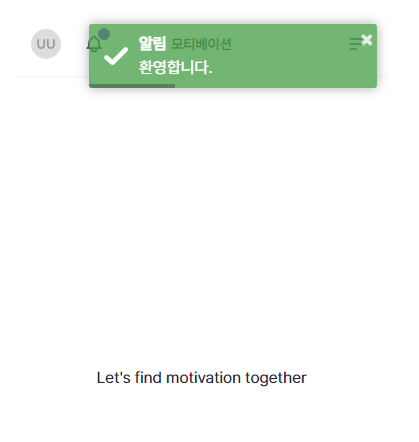
로그인 성공시 알림이다.
못생긴 alert 과 달리 상당히 귀여운 모습이다.
toastr.options = {   // toastr 라이브러리 설정
    closeButton: true,
    debug: false,
    newestOnTop: true,
    progressBar: true,
    positionClass: "toast-top-right",
    preventDuplicates: false,
    onclick: null,
    showDuration: "300",
    hideDuration: "1000",
    timeOut: "5000",
    extendedTimeOut: "1000",
    showEasing: "swing",
    hideEasing: "linear",
    showMethod: "fadeIn",
    hideMethod: "fadeOut",
    zIndex: 9999999

};
common.js 에서 toastr 라이브러리 설정을 해줬다.
앞으로 프로젝트 내에서 대부분 동작의 결과를 toastr 알람을 통해 클라이언트에게 전달해 줄 것이다.
RsData 패턴을 이용해 동작의 성공 유무와 그에따른 메시지를 인자로 rq 의 함수를 호출하여
성공시 redirect 를 실패시 historyback 을 실행하는 패턴을 썼다.
    public String redirect(String url, String msg) { // msg 가 있다면, url 에 parameter 로 ?msg= 형태로 redirect
        if (Ut.str.isBlank(msg)) return "redirect:" + url;

        return "redirect:" + Ut.url.modifyQueryParam(url, "msg", Ut.url.encodeWithTtl(msg));
    }


    public String historyBack(String msg) { // historyBack 시에 toastr 를 위해 내용을 발라서 historyback 시킴

        String referer = req.getHeader("referer"); // referer 정보 가져옴
        String key = "historyBackFailMsg___" + referer; // value 제단
        req.setAttribute("localStorageKeyAboutHistoryBackFailMsg", key);
        req.setAttribute("historyBackFailMsg", Ut.url.withTtl(msg)); // timeout 을 위한 ttl 을 발라서 msg 저장

        // 200 이 아니라 400 으로 응답코드가 지정되도록
        resp.setStatus(HttpServletResponse.SC_BAD_REQUEST);

        return "common/js"; //  history back
    }
historyback 은 어디서 얻어터지고 돌아온 경우 ( 즉, 서버에서 실행한 어떤 동작의 결과가 실패인 경우 RsData 의 resultCode 가 F 로 시작하는 경우 ) 에만 toastr 알림이 떠야한다.
때문에 서버에서 '이 request 는 어디서 얻어터지고 온 request야' 라고 알려주기 위해 toastr 로 띄울 메시지와 구분을 위한 키를 객체로 바인딩 해주어 historyback 했다.
    // 일반 메세지
    const msg = /*[[${msg}]]*/ null;

    // 에러 메세지
    const localStorageKeyAboutHistoryBackFailMsg = /*[[${localStorageKeyAboutHistoryBackFailMsg}]]*/ null;
    const historyBackFailMsg = /*[[${historyBackFailMsg}]]*/ null;

    if (localStorageKeyAboutHistoryBackFailMsg && localStorageKeyAboutHistoryBackFailMsg.trim().length > 0) {
        localStorage.setItem(localStorageKeyAboutHistoryBackFailMsg, historyBackFailMsg);
    }

    history.back();
historyback 전담 처리반도 있다. common 에 사는 js 씨다.
function parseMsg(msg) {
    const [pureMsg, ttl] = msg.split(";ttl=");

    const currentJsUnixTimestamp = new Date().getTime();

    if (ttl && parseInt(ttl) + 5000 < currentJsUnixTimestamp) {
        return [pureMsg, false];
    }

    return [pureMsg, true];
}

function toastMsg(isNotice, msg) {
    if (isNotice) toastNotice(msg);
    else toastWarning(msg);
}

function toastNotice(msg) {
    const [pureMsg, needToShow] = parseMsg(msg);

    if (needToShow) {
        toastr["success"](pureMsg, "알림");
    }
}

function toastWarning(msg) {
    const [pureMsg, needToShow] = parseMsg(msg);

    if (needToShow) {
        toastr["warning"](pureMsg, "경고");
    }
}
에러 메시지와 일반 메시지를 적절한 toastr 로 띄우게 했고
ttl 을 통해 메시지의 수명도 만들었다. (새로고침 무한으로 한다고 toastr 알림을 무한으로 띄우는건 너무 슬픈일이니까)
이제 나의 프로젝트는 redirect 와 historyback 시에 특정 메시지를 toastr 를 통해 클라이언트에게 전해줄 수 있게 되었다.
나는 정말 친절한 사람인 것 같다.

한 줄 소개