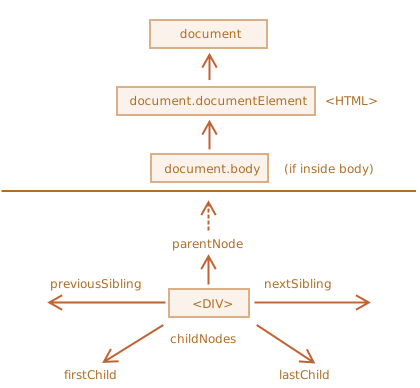
DOM [Document Object Model]
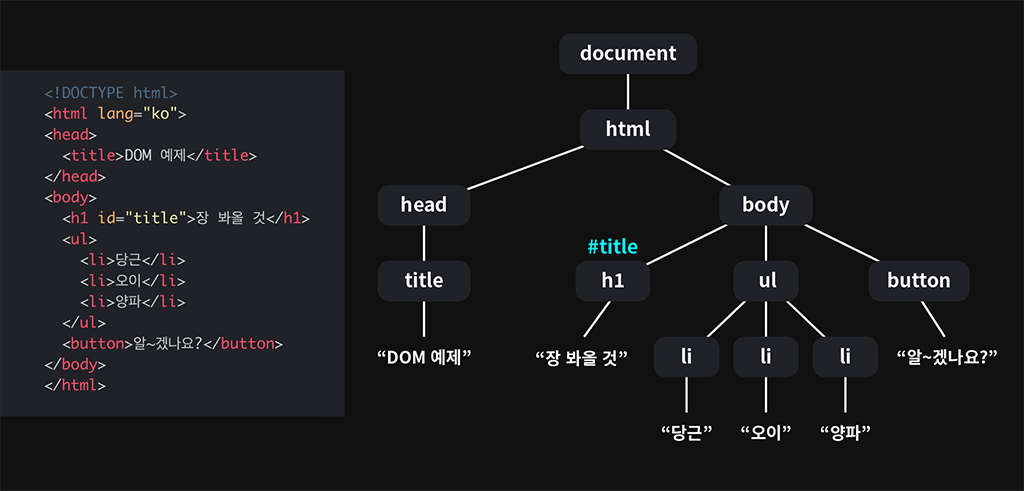
👉 문서 객체 모델은 메모리에 웹 페이지 문서 구조를
트리구조로 표현해서 웹 브라우저가 HTML 페이지를 인식하게 해줌
웹 페이지를 이루는 요소들을 JS가 이용할 수 있게
브라우저가 트리 구조로 만든 객체 모델을 의미🔥
노드 탐색
1 2 3 4 5 6 7 8 9 | <div id="body-container" class="container mt-5"> <ul class="list-group mt-5 mb-5"> <li class="list-group-item 1">An item</li> <li class="list-group-item 2">A second item</li> <li class="list-group-item 3">A third item</li> <li class="list-group-item 4">A fourth itme</li> <li class="list-group-item 5">And a fifth one</li> </ul> </div> | cs |
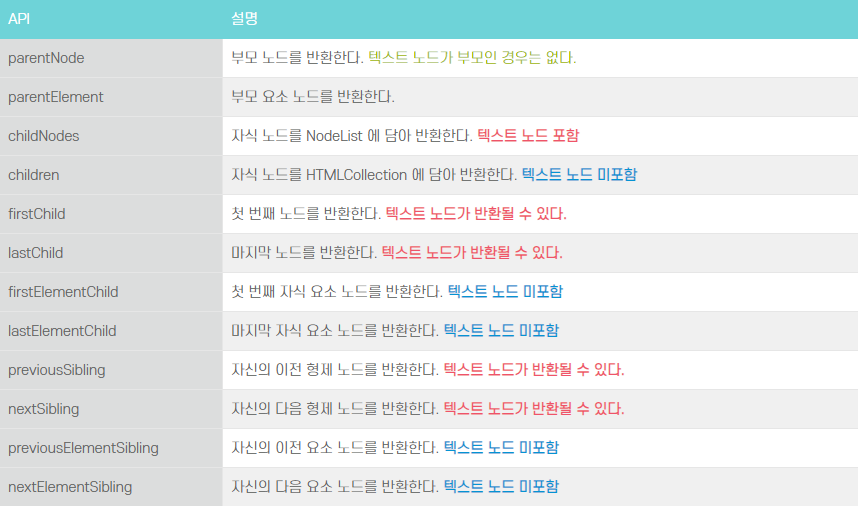
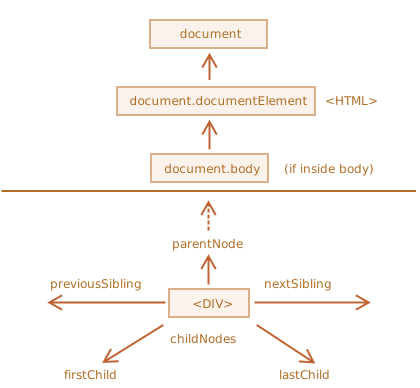
👩🦰 부모[parent] 노드 탐색 : parentNode ( 부모 노드를 리턴🔁 )
🧑 자식[child] 노드 탐색 🔍
- childNodes 👉 자식 노드 목록을 NodeList 형태로 리턴
- firstChild 👉 자식 노드 중 첫 번째 자식 노드를 리턴
- lastChild 👉 자식 노드 중 마지막 자식 노드를 리턴
🧑👦 형제[sibling] 노드 탐색 🔍
- previousSibling 👉 같은 레벨의 노드 중 이전 노드를 리턴
- nextSibling 👉 같은 레벨의 노드 중 다음 노드를 리턴
document.querySelector( )
1 2 3 4 5 6 7 | let val; const list = document.querySelector('ul.list-group'); const listItem = document.querySelector('li.list-group-item:first-child'); console.log('list', list); console.log('listItem', listItem); | cs |
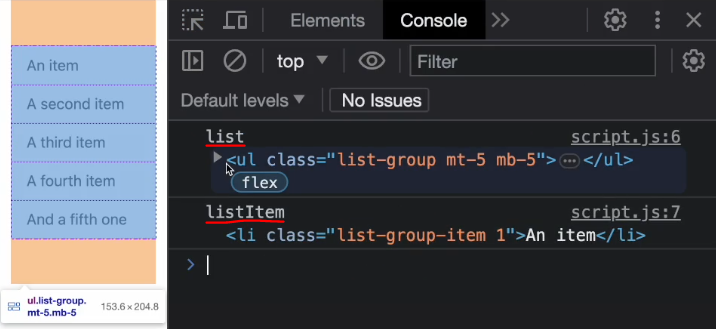
📌자식 노드 탐색하기
🔍childNodes, firstChild, lastChild 로 자식 노드 탐색 가능
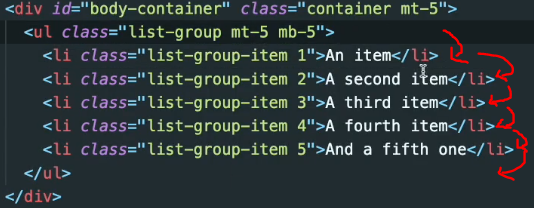
1 2 | val = list.childNodes; // NodeList 반환, line break도 포함O console.log('val', val); // text->line break | cs |
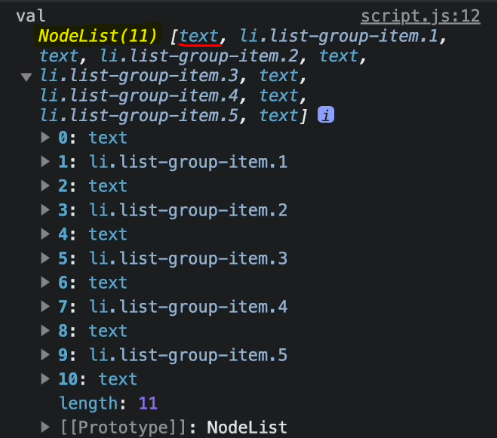
👉 라인 브레이크 까지 포함해서 길이 11개
1 2 3 4 5 6 7 8 9 10 11 12 13 14 | val = list.childNodes[0]; // 0번째가 text(line break)가 반환 val = list.childNodes[0].nodeName; // 출력: val #text val = list.childNodes[3]; // 출력: val 1, 노드의 타입은 1(요소) val = list.childNodes[3].nodeType; // 출력: val 8(주석 처리된 것) // NodeType // 1 - Element Node // 2 - Attribute (deprecated) // 3 - Text node // 8 - Comment node // 9 - Document itself // 10 - Doctype console.log('val' val); | cs |
✨Node Type(노드의 타입 상수로 리턴) 프로퍼티
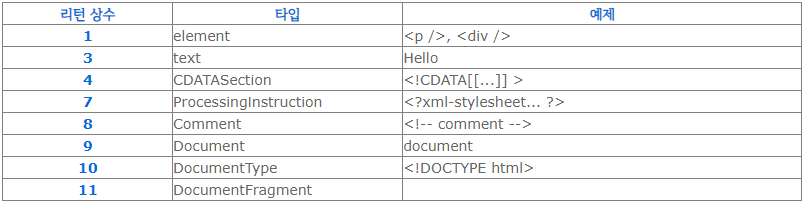
childNodes는 마치 배열 같아 보임
하지만 childNodes는 배열이 아닌 반복 가능한(이터러블) 유사 배열 객체인 컬렉션 🔥
👉 childNodes가 컬렉션이기에 갖는 특징✨
- for..of 사용 가능 ( for..in은 사용❌ ) 배열 아니지만 forEach( ), for..of도 사용 가능⭕
출력 : #text li.list-group-item.1 #text li.list-group-item.2 #text li.list-group-item.3
cs
💡 for..of : 배열 순환할 때 사용
💡 for..in : 객체 순환할 때 사용- 배열 아니기에 배열 메서드 사용❌
cs - Array.from 사용하면 진짜 배열 만들 수 있음🙆♀️
출력 : f filter() { [native code] }
cs
💡 Array.from( )
유사 배열 객체나 반복 가능한 객체(이터러블)를 얕게 복사해 새로운 Array 객체 만듦
🧑 children & first/last Child & firstElement/lastElement Child
1 2 3 4 5 6 7 8 9 10 11 12 13 14 15 16 17 18 19 20 | // children element nodes 반환 val = list.children; // HTML Collection 반환(line break X) val = list.children[1]; list.children[1].textContent = 'Hi'; // 기존 텍스트->Hi로 변경 // First child val = list.firstChild; // 출력: val #text // list.firstChild === list.childNodes[0]; val = list.firstElementChild; // 출력: val li.list-group-item.1 // Last child val = list.lastChild; // list.lastChild === list.childNodes[list.childNodes.length -1]; // text 노드 포함, 출력: val #text val = list.lastElementChild; // 출력: val li.list-group-item.5 // child 요소 count val = list.childElementCount; // 출력: val 5 | cs |
🔸.children vs .childNodes
➡ .children : 요소 노드만 포함 ( 반환 값- HTMLCollection )
➡ .childNodes : 요소 노드 + 텍스트, 주석 노드 모두 포함 ( NodeList )
📌부모 노드 탐색하기
👩🦰 parentNode & parentElement
1 2 3 4 5 | // parent node 반환 val = listItem.parentNode; // 출력: val ul.list-group.mt-5.mb-5 val = listItem.parentElement; // 출력: val div#body-container.container.mt-5 val = listItem.perentElement.parentElement; | cs |
📌형제 노드 탐색하기
🧑👦 nextSibling/nextElementSibling & previousSibling/previousElementSibling
1 2 3 4 5 6 7 8 9 10 11 | // next sibling 반환 val = listItem.nextSibling; // 출력: val #text val = listItem.nextElementSibling; // 출력: val li.list-group-item.2 // 출력: val li.list-group-item.3 val = listItem.nextElementSibling.nextElementSibling; // 출력: val li.list-group-item.2 val = listItem.nextElementSibling.nextElementSibling.previousElementSibling; // previous sibling 반환 val = listItem.previousSibling; // val #text val = list.previousElementSibling; // val null | cs |

안녕하세요! 퍼블리싱 & 프론트엔드 개발 공부 블로그 입니다!