Instana 설치 및 구성
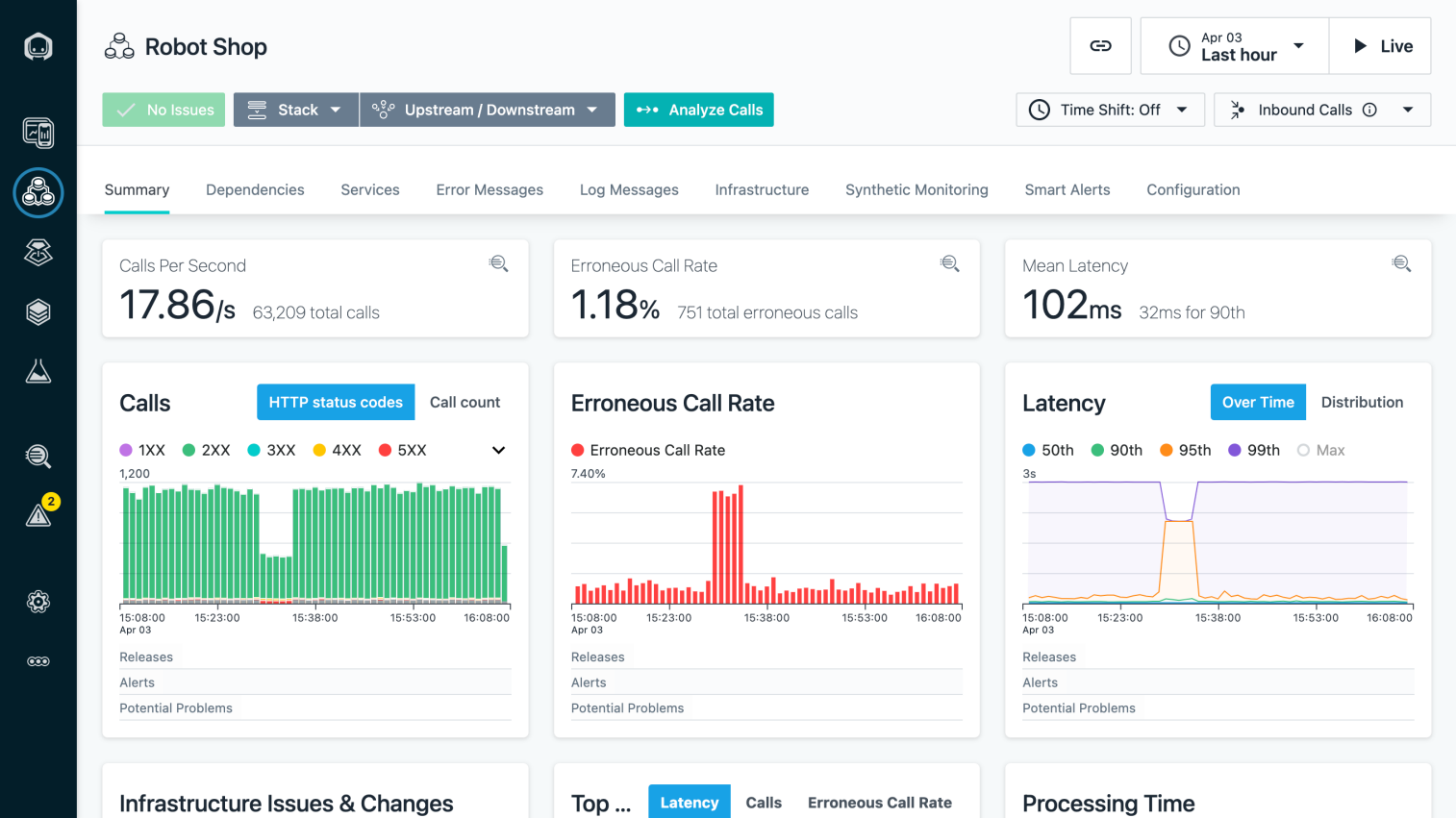
https://www.ibm.com/docs/en/instana-observability/current 참고
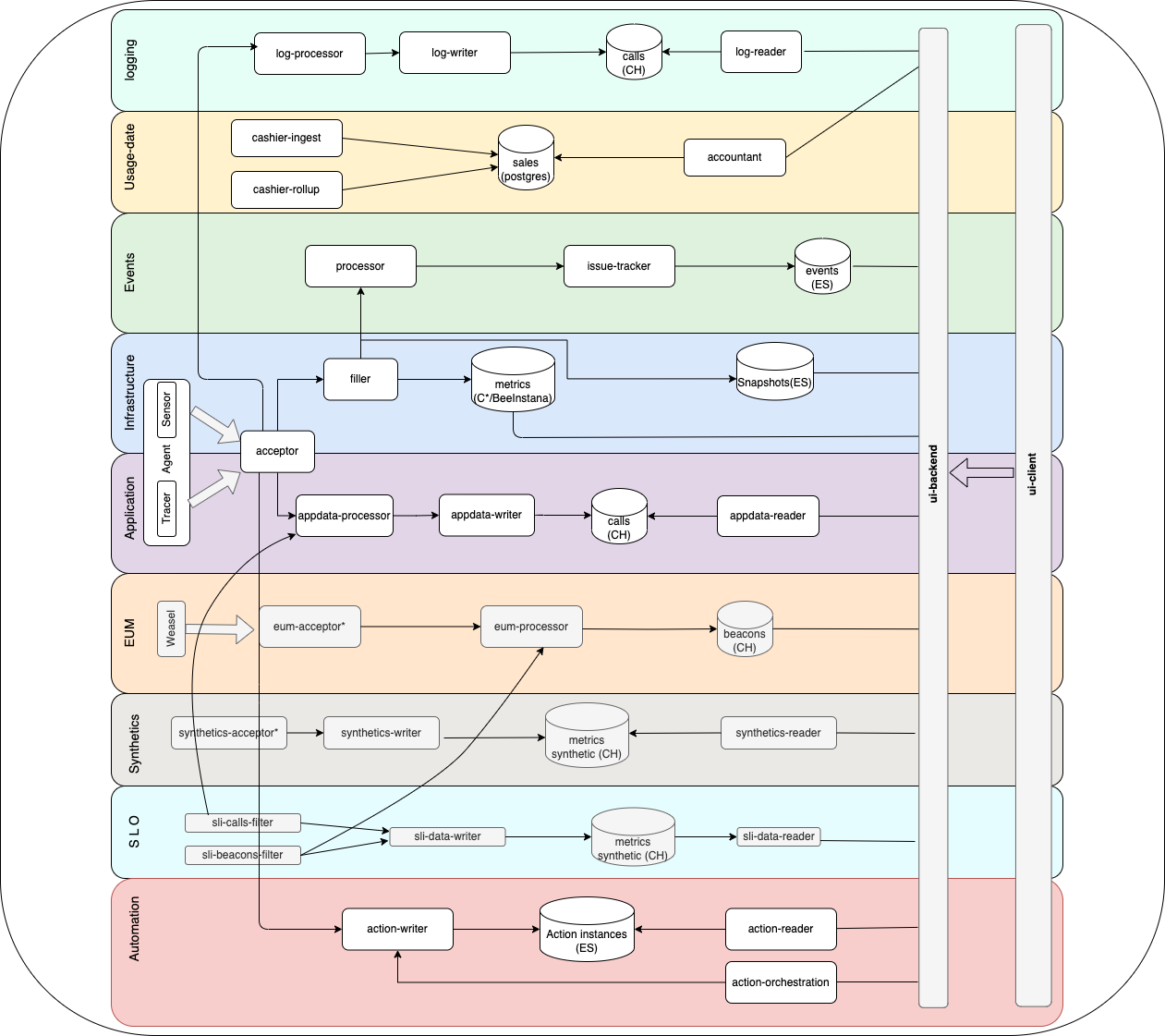
Architecture
0. 사전 준비
- Instana trial version으로 가입하면 이메일로 수신되는 내용중에 "Agent key:" 값이 있음. 이를 환경변수로 설정
export AGENT_KEY="xxxxxxxxxxxxxxxx" kXR7gH6gQ46BA9hqUw0yPw- 사설 repository 주소
export PRIVATE_REPO="192.168.0.52"- Instana namespace
kubectl create ns instana-zookeeper
kubectl create ns instana-kafka
kubectl create ns instana-clickhouse
kubectl create ns instana-postgres
kubectl create ns instana-cassandra
kubectl create ns instana-elastic
kubectl create ns instana-core
kubectl create ns instana-units
kubectl create ns instana-operator
kubectl create ns cert-manager (optional)- skopeo나 docker로 private repo에 이미지 복사
Air-gapped 환경에서 instana 공식 image repo에서 사설 repo로 사용되는 docker image를 복사하는 방법은 참고 1을 확인한다. 우분투 20.10 이상에서는 skopeo로 간단하게 repo 사이에서 image를 복사할 수도 있으니 아래 명령을 참고한다.
// skopeo로 로그인시
// skopeo는 ubuntu 20.10+에서 apt-get install skopeo로 설치가능
$ skopeo login -u _ -p $AGENT_KEY artifact-public.instana.io

// skopeo로 image 복사 명령 예.
$ skopeo copy --dest-tls-verify=false \
docker://artifact-public.instana.io/self-hosted-images/3rd-party/zookeeper-operator:0.2.15_v0.2.0 \
docker://$PRIVATE_REPO/instana-zookeeper/zookeeper-operator:0.2.15_v0.2.0


// docker로 로그인시
$ docker login -u _ -p $AGENT_KEY artifact-public.instana.io
// 이후 docker pull, tag, push 명령으로 사설 repo에 복사함.- 절차
- Install the kubectl plug-in.
- Install and configure the Instana Operator
- Install the components of the Instana backend.
- Set up load balancers and DNS for the Acceptor and Gateway services
1. Kubectl plug-in 설치
- Ubuntu
// gpg key download
$ wget -nv -O- --user=_ --password="$DOWNLOAD_KEY" https://artifact-public.instana.io/artifactory/api/security/keypair/public/repositories/rel-debian-public-virtual | gpg --dearmor > /usr/share/keyrings/instana-archive-keyring.gpg

// repository 설정 파일 생성
$ echo 'deb [signed-by=/usr/share/keyrings/instana-archieve-keyring.gpg] https://artifact-public.instana.io/artifactory/rel-debian-public-virtual generic main' > /etc/apt/sources.list.d/instana-public.list

$ cat << EOF > /etc/apt/auth.conf
machine artifact-public.instana.io
	login _
    password $AGENT_KEY
EOF

$ apt -y update
$ apt install -y instana-kubectl

$ kubectl instana --version
kubectl-instana version 269-0 (commit=fc63211a3fd1c1cba6d34de5d39af184dd1774ab, date=2024-04-01T22:07:54Z)

Minimum required database versions:

kafka               :	Major: 3 	min. Minor: 2
elasticsearch       :	Major: 7 	min. Minor: 16
cassandra           :	Major: 4 	min. Minor: 0
clickhouse          :	Major: 23.8 	min. Minor: 8
beeinstana          :	Major: 1 	min. Minor: 160
postgres            :	Major: 15 	min. Minor: 0
수동으로 kubectl plugin 파일을 다운로드 받아서 $PATH 환경변수에 포함되는 디렉토리에 복사해 넣어도 된다.
$ curl -L -o ./ https://artifact-public.instana.io/artifactory/rel-generic-instana-virtual/infrastructure/kubectl/release-269/kubectl-instana-linux_amd64-release-269-0.tar.gz

$ tar -zxvf kubectl-instana-linux_amd64-release-269-0.tar.gz
$ cp kubectl-instana /usr/local/bin
2. Data store operator 설치
- Namespace 및 image pulll secret 생성
kubectl create ns instana-operator
kubectl create secret docker-registry instana-pull-secret \
--namespace=instana-operator \
--docker-username=_ \
--docker-password=$AGENT_KEY \
--docker-server=artifact-public.instana.io- Admission webhook TLS 생성
ca.crt
tls.crt
tls.key

kubectl create secret generic instana-operator-webhook \
--type=kubernetes.io/tls \
--from-file=tls.key=./tls.key
--from-file=tls.crt=./tls.crt
--from-file=ca.crt=./ca.crt- helm chart
Air-gapped 환경에서 operator를 설치할 경우에는 아래와 같이 online 환경에서 helm repository를 추가하고 각 버전에 맞는 operator helm chart 압축파일을 다운로드 받아서 사용한다.
helm repo add pravega https://charts.pravega.io
helm repo add strimzi https://strimzi.io/charts/
helm repo add elastic https://helm.elastic.co
helm repo add postgres https://opensource.zalando.com/postgres-operator/charts/postgres-operator
helm repo add k8ssandra https://helm.k8ssandra.io/stable
helm repo add cnpg https://cloudnative-pg.github.io/charts
helm repo add instana https://artifact-public.instana.io/artifactory/rel-helm-customer-virtual --username=_ --password=$AGENT_KEY
helm repo add jetstack https://charts.jetstack.io

helm repo update

helm pull instana/ibm-clickhouse-operator --version=v0.1.2
helm pull pravega/zookeeper-operator --version=0.2.15
helm pull strimzi/strimzi-kafka-operator --version 0.38.0
helm pull elastic/eck-operator --version=2.9.0
helm pull cnpg/cloudnative-pg --version 0.20.0
helm pull k8ssandra/cass-operator --version=0.45.2
helm pull jetstack/cert-manager --version v1.13.2- zookeeper operator 설치
cd /root/ws/instana/helm
$ helm install instana -n instana-zookeeper \
--create-namespace \
--version=0.2.15 \
--set image.repository=$PRIVATE_REPO/instana-zookeeper/zookeeper-operator \
--set image.tag=0.2.15_v0.2.0 \
--set hooks.image.repository=$PRIVATE_REPO/instana-zookeeper/k8s-kubectl \
--set hooks.image.tag=v1.23.2 \
helm/zookeeper-operator-0.2.15.tgz- kafka operator 설치
cd /root/ws/instana/helm
helm install strimzi ./$(ls | grep 'strimzi*' | head -1) --version 0.38.0 -n instana-kafka \
--create-namespace \
--set image.registry=192.168.0.52 \
--set image.repository=instana-kafka \
--set image.name=operator \
--set image.tag=0.38.0_v0.3.0 \
--set kafka.image.registry=192.168.0.52 \
--set kafka.image.repository=instana-kafka \
--set kafka.image.name=kafka \
--set kafka.image.tag=3.6.0_v0.3.0 \
--set topicOperator.image.registry=192.168.0.52 \
--set topicOperator.image.repository=instana-kafka \
--set topicOperator.image.tag=0.38.0_v0.3.0 \
--set userOperator.image.registry=192.168.0.52 \
--set userOperator.image.repository=instana-kafka \
--set userOperator.image.tag=0.38.0_v0.3.0 \
--set tlsSidecarEntityOperator.image.registry=192.168.0.52 \
--set tlsSidecarEntityOperator.image.repository=instana-kafka \
--set tlsSidecarEntityOperator.image.tag=3.6.0_v0.3.0- elasticsearch operator 설치
helm install elastic-operator ./$(ls | grep 'eck*' | head -1) -n instana-elastic \
--create-namespace \
--version=2.9.0 \
--set image.repository=192.168.0.52/instana-elastic/elasticsearch-operator \
--set image.tag=2.9.0_v0.3.0- cloud-native postgres operator 설치
helm install cnpg cloudnative-pg-0.20.0.tgz -n instana-postgres \
--create-namespace \
--version=0.20.0 \
--set image.repository=192.168.0.52/instana-postgres/cloudnative-pg-operator \
--set image.tag=1.21.1_v0.1.0
--set containerSecurityContext.runAsUser=<UID from namespace>
--set containerSecurityContext.runAsGroup=<UID from namespace> - cassandra operator 설치
helm install cass-operator cass-operator-0.45.2.tgz -n instana-cassandra \
--create-namespace \
--version=0.45.2 \
--set image.registry=192.168.0.52 \
--set image.repository=instana-cassandra/cass-operator \
--set image.tag=1.18.2_v0.1.0

Error: INSTALLATION FAILED: execution error at (cass-operator/templates/webhook-service.yaml:5:6): cass-operator webhooks require cert-manager to be installed in the cluster- clickhouse operator 설치
helm install clickhouse-operator ibm-clickhouse-operator-v0.1.2.tgz -n instana-clickhouse \
--create-namespace \
--version=v0.1.2 \
--set operator.image.repository=192.168.0.52/instana-clickhouse/clickhouse-operator \
--set operator.image.tag=v0.1.2
3. Instana core 설치
A Core represents shared components and is responsible for configuring data store access. As a result, most configurations are going to happen here.
A Core custom resource must have version instana.io/v1beta2 and kind Core. Configurations for Core go into the spec section.
- namespace 생성
instana-core, instana-units namespace를 아래 label값으로 생성한다.
apiVersion: v1
kind: Namespace
metadata:
  name: instana-core
  labels:
    app.kubernetes.io/name: instana-core
---
apiVersion: v1
kind: Namespace
metadata:
  name: instana-units
  labels:
app.kubernetes.io/name: instana-units- image pull secret 생성
Instana 공식 repository인 artifact-public.instana.io에서 사용되는 image를 가져오기 위해 namespace에 image pull secret를 생성한다.
$ kubectl create secret docker-registry instana-pullsecret \
--namespace=instana-core \
--docker-username=_ \
--docker-password=$AGENT_KEY \
--docker-server=artifact-public.instana.io

$ kubectl create secret docker-registry instana-pullsecret \
--namespace=instana-units \
--docker-username=_ \
--docker-password=$AGENT_KEY \
--docker-server=artifact-public.instana.io
참고로 dry-run 옵션으로 file로 저장한 후 kubectl apply할 수도 있음.
kubectl create secret docker-registry instana-pullsecret \
--namespace=instana-core \
--docker-username=_ \
--docker-password=$AGENT_KEY \
--docker-server=artifact-public.instana.io \
--dry-run=client \
--output=yaml > instana-pullsecret.yaml- download license key
license file은 Units의 config.yaml파일에서 사용된다.
$ kubectl instana license download --sales-key $AGENT_KEY
Downloaded license to: /root/license.json
root@node-63:~# cat /root/license.json
["9470303aeed1d56d5afcd14ec107007788bab99a228ba9592a4a94adf316a22e1c6426bd8db8273579fdc58fe62117657017ad42b2cf3d133485c0e73b604f84724a16fe308edb1d7fba102633729fc41738e9f518f5305768f056f493a6fc15aa20d737bec9a1a138b199ff2f63a4c04c6efaaa633a65fa097d25b26690565ea498a6aeebbef9363766d94a266cadd2aba92a0dac5a78fd96b3339c793df49c51be640e4b832019d7756bfa0ec92116"]
curl을 이용한 다운로드 방법은 아래와 같다.
curl https://instana.io/onprem/license/download/v2/allValid?salesId=$AGENT_KEY -o license.json- core namespace에서 사용되는 instana-tls ingress 인증서 생성
kubectl create secret tls instana-tls --namespace instana-core \
--cert=path/to/tls.crt \
--key=path/to/tls.key- Core Secret
선택적으로 DH(Diffe-Hellman) 파라미터를 설정할 수 있다.
openssl dhparam -out dhparams.pem 2048

openssl genrsa -aes128 -out key.pem 2048
openssl req -new -x509 -key key.pem -out cert.pem -days 365
cat key.pem cert.pem > sp.pem
# Diffie-Hellman parameters to use (optional)
dhParams: |
-----BEGIN DH PARAMETERS-----
<snip/>
-----END DH PARAMETERS-----
# The repository password for accessing the Instana agent repository.
# Use the download key that you received from us
repositoryPassword: mydownloadkey
# The sales key you received from us
salesKey: mysaleskey
# Seed for creating crypto tokens. Pick a random 12 char string
tokenSecret: mytokensecret
# Configuration for raw spans storage
storageConfigs:
rawSpans:
# Required if using S3 or compatible storage bucket.
# Credentials should be configured.
# Not required if IRSA on EKS is used.
s3Config:
accessKeyId: ...
secretAccessKey: ...
# Required if using Google Cloud Storage.
# Credentials should be configured.
# Not required if GKE with workload identity is used.
gcloudConfig:
serviceAccountKey: ...
# SAML/OIDC configuration
serviceProviderConfig:
# Password for the key/cert file
keyPassword: mykeypass
# The combined key/cert file
pem: |
-----BEGIN RSA PRIVATE KEY-----
<snip/>
-----END RSA PRIVATE KEY-----
-----BEGIN CERTIFICATE-----
<snip/>
-----END CERTIFICATE-----
# Required if a proxy is configured that needs authentication
proxyConfig:
# Proxy user
user: myproxyuser
# Proxy password
password: my proxypassword
emailConfig:
# Required if SMTP is used for sending e-mails and authentication is required
smtpConfig:
user: mysmtpuser
password: mysmtppassword
# Required if using for sending e-mail.
# Credentials should be configured.
# Not required if using IRSA on EKS.
sesConfig:
accessKeyId: ...
secretAccessKey: ...
# Optional: You can add one or more custom CA certificates to the component trust stores
# in case internal systems (such as LDAP or alert receivers) which Instana talks to use a custom CA.
customCACert: |
-----BEGIN CERTIFICATE-----
<snip/>
-----END CERTIFICATE-----
# Add more certificates if you need
# -----BEGIN CERTIFICATE-----
# <snip/>
# -----END CERTIFICATE-----
datastoreConfigs:
kafkaConfig:
adminUser: strimzi-kafka-user
adminPassword: <RETRIEVED_FROM_SECRET>
consumerUser: strimzi-kafka-user
consumerPassword: <RETRIEVED_FROM_SECRET>
producerUser: strimzi-kafka-user
producerPassword: <RETRIEVED_FROM_SECRET>
elasticsearchConfig:
adminUser: elastic
adminPassword: <RETRIEVED_FROM_SECRET>
user: elastic
password: <RETRIEVED_FROM_SECRET>
postgresConfigs:
- user: postgres
password: <RETRIEVED_FROM_SECRET>
adminUser: postgres
adminPassword: <RETRIEVED_FROM_SECRET>
cassandraConfigs:
- user: instana-superuser
password: <RETRIEVED_FROM_SECRET>
adminUser: instana-superuser
adminPassword: <RETRIEVED_FROM_SECRET>
clickhouseConfigs:
- user: clickhouse-user
password: <USER_GENERATED_PASSWORD>
adminUser: clickhouse-user
adminPassword: <USER_GENERATED_PASSWORD>- create core secret
kubectl -n instana-core create secret generic instana-core --from-file=path/to/config.yaml - create unit config.yaml
# The initial user of this tenant unit with admin role, default admin@instana.local.
# Must be a valid e-mail address.
# NOTE:
# This only applies when setting up the tenant unit.
# Changes to this value won't have any effect.
initialAdminUser: myuser@example.com
# The initial admin password.
# NOTE:
# This is only used for the initial tenant unit setup.
# Changes to this value won't have any effect.
initialAdminPassword: mypass
# A list of Instana licenses. Multiple licenses may be specified.
licenses: [ "license1", "license2" ]
# A list of agent keys. Specifying multiple agent keys enables gradually rotating agent keys.
agentKeys:
  - myagentkey
# The download key that you received from us (in the license e-mail, this is called initial agent key).
downloadKey: mydownloadkey- create unit secret
kubectl -n instana-units create secret generic tenant0-unit0 --from-file=path/to/config-unit.yaml - core.yaml
apiVersion: instana.io/v1beta2
kind: Core
metadata:
  namespace: instana-core
  name: instana-core
spec:
  # The domain under which Instana is reachable
  baseDomain: instana.utcloud.io

  # Depending on your cluster setup, you may need to specify an image pull secret.
  imagePullSecrets:
    - name: instana-pullsecret

  # This configures an SMTP server for sending e-mails.
  # Alternatively, Amazon SES is supported. Please see API reference for details.
  emailConfig:
    smtpConfig:
      from: admin@utcloud.io
      host: smtp.utcloud.io
      port: 465
      useSSL: true

  # The Operator can install network policies for restricting network traffic
  # to what's required only. By default, network policies are disabled.
  # Set this to true if you want to enable them. We suggest you leave this turned off
  # initially until you've made sure everything works.
enableNetworkPolicies: true- unit.yaml
apiVersion: instana.io/v1beta2
kind: Unit
metadata:
  namespace: instana-units
  name: tenant0-unit0
spec:
  coreName: instana-core
  coreNamespace: instana-core
  tenantName: tenant0
unitName: unit0- core, unit 생성
kubectl apply -f core.yaml
kubectl apply -f unit.yaml
4. Instana agent 설치
참고
1. artifact-public.instana.io 에서 사설 harbor로 image 복사하기
// zookeeper
docker pull artifact-public.instana.io/self-hosted-images/3rd-party/zookeeper-operator:0.2.15_v0.2.0
docker pull artifact-public.instana.io/self-hosted-images/3rd-party/zookeeper:3.8.3_v0.2.0
docker pull lachlanevenson/k8s-kubectl:v1.23.2
docker tag artifact-public.instana.io/self-hosted-images/3rd-party/zookeeper-operator:0.2.15_v0.2.0 192.168.0.52/instana-zookeeper/zookeeper-operator:0.2.15_v0.2.0
docker tag artifact-public.instana.io/self-hosted-images/3rd-party/zookeeper:3.8.3_v0.2.0 192.168.0.52/instana-zookeeper/zookeeper:3.8.3_v0.2.0
docker tag lachlanevenson/k8s-kubectl:v1.23.2 192.168.0.52/instana-zookeeper/k8s-kubectl:v1.23.2
docker push 192.168.0.52/instana-zookeeper/zookeeper-operator:0.2.15_v0.2.0
docker push 192.168.0.52/instana-zookeeper/zookeeper:3.8.3_v0.2.0
docker push 192.168.0.52/instana-zookeeper/k8s-kubectl:v1.23.2

// kafka
docker pull artifact-public.instana.io/self-hosted-images/3rd-party/strimzi/operator:0.38.0_v0.3.0
docker pull artifact-public.instana.io/self-hosted-images/3rd-party/strimzi/kafka:3.6.0_v0.3.0
docker tag artifact-public.instana.io/self-hosted-images/3rd-party/strimzi/operator:0.38.0_v0.3.0 192.168.0.52/instana-kafka/operator:0.38.0_v0.3.0
docker tag artifact-public.instana.io/self-hosted-images/3rd-party/strimzi/kafka:3.6.0_v0.3.0 192.168.0.52/instana-kafka/kafka:3.6.0_v0.3.0
docker push 192.168.0.52/instana-kafka/operator:0.38.0_v0.3.0
docker push 192.168.0.52/instana-kafka/kafka:3.6.0_v0.3.0

// elasticsearch
docker pull artifact-public.instana.io/self-hosted-images/3rd-party/elasticsearch-operator:2.9.0_v0.3.0
docker pull artifact-public.instana.io/self-hosted-images/3rd-party/elasticsearch:7.17.14_v0.2.0
docker tag artifact-public.instana.io/self-hosted-images/3rd-party/elasticsearch-operator:2.9.0_v0.3.0 192.168.0.52/iinstana-elastic/elasticsearch-operator:2.9.0_v0.3.0
docker tag artifact-public.instana.io/self-hosted-images/3rd-party/elasticsearch:7.17.14_v0.2.0 192.168.0.52/iinstana-elastic/elasticsearch:7.17.14_v0.2.0
docker push 192.168.0.52/iinstana-elastic/elasticsearch-operator:2.9.0_v0.3.0
docker push 192.168.0.52/iinstana-elastic/elasticsearch:7.17.14_v0.2.0

// cloud native pg
docker pull artifact-public.instana.io/self-hosted-images/3rd-party/cloudnative-pg-operator:1.21.1_v0.1.0
docker pull artifact-public.instana.io/self-hosted-images/3rd-party/cnpg-containers:15_v0.1.0
docker tag artifact-public.instana.io/self-hosted-images/3rd-party/cloudnative-pg-operator:1.21.1_v0.1.0 192.168.0.52/instana-postgres/cloudnative-pg-operator:1.21.1_v0.1.0
docker tag artifact-public.instana.io/self-hosted-images/3rd-party/cnpg-containers:15_v0.1.0 192.168.0.52/instana-postgres/cnpg-containers:15_v0.1.0
docker push 192.168.0.52/instana-postgres/cloudnative-pg-operator:1.21.1_v0.1.0
docker push 192.168.0.52/instana-postgres/cnpg-containers:15_v0.1.0

// cassandra
docker pull artifact-public.instana.io/self-hosted-images/3rd-party/cass-operator:1.18.2_v0.1.0
docker pull artifact-public.instana.io/self-hosted-images/3rd-party/k8ssandra-management-api-for-apache-cassandra:4.1.2_v0.2.0
docker pull artifact-public.instana.io/self-hosted-images/3rd-party/system-logger:1.18.2_v0.1.0
docker pull artifact-public.instana.io/self-hosted-images/3rd-party/k8ssandra-k8ssandra-client:0.2.2_v0.1.0
docker tag artifact-public.instana.io/self-hosted-images/3rd-party/cass-operator:1.18.2_v0.1.0 192.168.0.52/instana-cassandra/cass-operator:1.18.2_v0.1.0
docker tag artifact-public.instana.io/self-hosted-images/3rd-party/k8ssandra-management-api-for-apache-cassandra:4.1.2_v0.2.0 192.168.0.52/instana-cassandra/k8ssandra-management-api-for-apache-cassandra:4.1.2_v0.2.0
docker tag artifact-public.instana.io/self-hosted-images/3rd-party/system-logger:1.18.2_v0.1.0 192.168.0.52/instana-cassandra/ystem-logger:1.18.2_v0.1.0
docker tag artifact-public.instana.io/self-hosted-images/3rd-party/k8ssandra-k8ssandra-client:0.2.2_v0.1.0 192.168.0.52/instana-cassandra/k8ssandra-k8ssandra-client:0.2.2_v0.1.0
docker push 192.168.0.52/instana-cassandra/cass-operator:1.18.2_v0.1.0
docker push 192.168.0.52/instana-cassandra/k8ssandra-management-api-for-apache-cassandra:4.1.2_v0.2.0
docker push 192.168.0.52/instana-cassandra/ystem-logger:1.18.2_v0.1.0
docker push 192.168.0.52/instana-cassandra/k8ssandra-k8ssandra-client:0.2.2_v0.1.0

// clickhouse
docker pull artifact-public.instana.io/clickhouse-operator:v0.1.2
docker pull artifact-public.instana.io/clickhouse-openssl:23.8.9.54-1-lts-ibm
docker pull registry.access.redhat.com/ubi9/ubi-minimal:latest
docker tag artifact-public.instana.io/clickhouse-operator:v0.1.2 192.168.0.52/instana-clickhouse/clickhouse-operator:v0.1.2
docker tag artifact-public.instana.io/clickhouse-openssl:23.8.9.54-1-lts-ibm 192.168.0.52/instana-clickhouse/clickhouse-openssl:23.8.9.54-1-lts-ibm
docker tag registry.access.redhat.com/ubi9/ubi-minimal:latest 192.168.0.52/instana-clickhouse/ubi-minimal:latest
docker push 192.168.0.52/instana-clickhouse/clickhouse-operator:v0.1.2
docker push 192.168.0.52/instana-clickhouse/clickhouse-openssl:23.8.9.54-1-lts-ibm
docker push 192.168.0.52/instana-clickhouse/ubi-minimal:latest

// cert-manager(optional)
docker pull quay.io/jetstack/cert-manager-controller:v1.13.2
docker pull quay.io/jetstack/cert-manager-webhook:v1.13.2
docker pull quay.io/jetstack/cert-manager-cainjector:v1.13.2
docker pull quay.io/jetstack/cert-manager-acmesolver:v1.13.2
docker pull quay.io/jetstack/cert-manager-ctl:v1.13.2
docker tag quay.io/jetstack/cert-manager-controller:v1.13.2 192.168.0.52/cert-manager/cert-manager-controller:v1.13.2
docker tag quay.io/jetstack/cert-manager-webhook:v1.13.2 192.168.0.52/cert-manager/cert-manager-webhook:v1.13.2
docker tag quay.io/jetstack/cert-manager-cainjector:v1.13.2 192.168.0.52/cert-manager/cert-manager-cainjector:v1.13.2
docker tag quay.io/jetstack/cert-manager-acmesolver:v1.13.2 192.168.0.52/cert-manager/cert-manager-acmesolver:v1.13.2
docker tag quay.io/jetstack/cert-manager-ctl:v1.13.2 192.168.0.52/cert-manager/cert-manager-ctl:v1.13.2
docker push 192.168.0.52/cert-manager/cert-manager-controller:v1.13.2
docker push 192.168.0.52/cert-manager/cert-manager-webhook:v1.13.2
docker push 192.168.0.52/cert-manager/cert-manager-cainjector:v1.13.2
docker push 192.168.0.52/cert-manager/cert-manager-acmesolver:v1.13.2
docker push 192.168.0.52/cert-manager/cert-manager-ctl:v1.13.2- instana core image 복사를 위해 get-instana-backend-image.sh 생성 및 실행
$ kubectl instana images > images.txt
artifact-public.instana.io/backend/acceptor:3.269.342-0
artifact-public.instana.io/backend/accountant:3.269.342-0
artifact-public.instana.io/backend/action-orchestration:3.269.342-0
artifact-public.instana.io/backend/action-reader:3.269.342-0
artifact-public.instana.io/backend/action-writer:3.269.342-0
artifact-public.instana.io/backend/appdata-health-aggregator:3.269.342-0
artifact-public.instana.io/backend/appdata-health-processor:3.269.342-0
artifact-public.instana.io/backend/appdata-legacy-converter:3.269.342-0
artifact-public.instana.io/backend/appdata-live-aggregator:3.269.342-0
artifact-public.instana.io/backend/appdata-processor:3.269.342-0
artifact-public.instana.io/backend/appdata-reader:3.269.342-0
artifact-public.instana.io/backend/appdata-writer:3.269.342-0
artifact-public.instana.io/backend/bizops-reader:3.269.342-0
artifact-public.instana.io/backend/bizops-writer:3.269.342-0
artifact-public.instana.io/backend/bouncer:3.269.342-0
artifact-public.instana.io/backend/butler:3.269.342-0
artifact-public.instana.io/backend/cashier-acceptor:3.269.342-0
artifact-public.instana.io/backend/cashier-ingest:3.269.342-0
artifact-public.instana.io/backend/cashier-rollup:3.269.342-0
artifact-public.instana.io/backend/cashier-usage-transfer:3.269.342-0
artifact-public.instana.io/backend/config-templates:3.269.342-0
artifact-public.instana.io/backend/email-health-provider:3.269.342-0
artifact-public.instana.io/backend/eum-acceptor:3.269.342-0
artifact-public.instana.io/backend/eum-health-processor:3.269.342-0
artifact-public.instana.io/backend/eum-processor:3.269.342-0
artifact-public.instana.io/backend/filler:3.269.342-0
artifact-public.instana.io/backend/gateway:1.25.1_v0.36.0
artifact-public.instana.io/backend/groundskeeper:3.269.342-0
artifact-public.instana.io/backend/infra-health-processor:3.269.342-0
artifact-public.instana.io/backend/integration:3.269.342-0
artifact-public.instana.io/backend/issue-tracker:3.269.342-0
artifact-public.instana.io/backend/js-stack-trace-translator:3.269.342-0
artifact-public.instana.io/backend/log-health-processor:3.269.342-0
artifact-public.instana.io/backend/log-processor:3.269.342-0
artifact-public.instana.io/backend/log-reader:3.269.342-0
artifact-public.instana.io/backend/log-writer:3.269.342-0
artifact-public.instana.io/backend/otlp-acceptor:3.269.342-0
artifact-public.instana.io/backend/processor:3.269.342-0
artifact-public.instana.io/backend/serverless-acceptor:3.269.342-0
artifact-public.instana.io/backend/sli-beacons-filter:3.269.342-0
artifact-public.instana.io/backend/sli-calls-filter:3.269.342-0
artifact-public.instana.io/backend/sli-data-reader:3.269.342-0
artifact-public.instana.io/backend/sli-data-writer:3.269.342-0
artifact-public.instana.io/backend/sli-evaluator:3.269.342-0
artifact-public.instana.io/backend/statistic-exporter-global:3.269.342-0
artifact-public.instana.io/backend/statistic-exporter-regional:3.269.342-0
artifact-public.instana.io/backend/synthetics-acceptor:3.269.342-0
artifact-public.instana.io/backend/synthetics-health-processor:3.269.342-0
artifact-public.instana.io/backend/synthetics-reader:3.269.342-0
artifact-public.instana.io/backend/synthetics-writer:3.269.342-0
artifact-public.instana.io/backend/tag-processor:3.269.342-0
artifact-public.instana.io/backend/tag-reader:3.269.342-0
artifact-public.instana.io/backend/ui-backend:3.269.342-0
artifact-public.instana.io/backend/ui-client:3.269.342-0
artifact-public.instana.io/infrastructure/instana-operator:269-0
$ vi get-instana-backend-image.sh
#!/bin/bash
while read p; do SOURCE=`echo "$p" | tac -s'/' | head -1`; echo $SOURCE;
docker pull artifact-public.instana.io/backend/$SOURCE
docker tag artifact-public.instana.io/backend/$SOURCE 192.168.0.52/instana-core/$SOURCE;
docker push 192.168.0.52/instana-core/$SOURCE;
done<images.txt
OPERATOR_IMAGE=`echo "$(cat images.txt | tail -1)" | tac -s'/' | head -1`
docker pull artifact-public.instana.io/infrastructure/$OPERATOR_IMAGE
docker tag artifact-public.instana.io/infrastructure/$OPERATOR_IMAGE 192.168.0.52/infrastructure/$OPERATOR_IMAGE
docker push 192.168.0.52/infrastructure/$OPERATOR_IMAGE
$ chmod 755 ./get-instana-backend-image.sh
$ ./get-instana-backend-image.sh
클라우드쟁이