안드로이드 샘플 앱인 nowinandroid 앱을 참고하였다.
nowinandroid 앱의 MainActivity를 보면 다음과 같은 코드가 있다
override fun onCreate(savedInstanceState: Bundle?) {
        val splashScreen = installSplashScreen()
        super.onCreate(savedInstanceState)

        var uiState: MainActivityUiState by mutableStateOf(Loading)

        // Update the uiState
        lifecycleScope.launch {
            lifecycle.repeatOnLifecycle(Lifecycle.State.STARTED) {
                viewModel.uiState
                    .onEach {
                        uiState = it
                    }
                    .collect()
            }
        }

        // Keep the splash screen on-screen until the UI state is loaded. This condition is
        // evaluated each time the app needs to be redrawn so it should be fast to avoid blocking
        // the UI.
        splashScreen.setKeepOnScreenCondition {
            when (uiState) {
                Loading -> true
                is Success -> false
            }
        }
}
viewModel의 uiState를 collect하고 이는 splashScreen이 데이터를 가져오기 전까지 유지되도록 한다.
ViewModel 코드는 다음과 같이 되어 있다.
val uiState: StateFlow<MainActivityUiState> = userDataRepository.userData.map {
        Success(it)
    }.stateIn(
        scope = viewModelScope,
        initialValue = Loading,
        started = SharingStarted.WhileSubscribed(5_000),
    )

sealed interface MainActivityUiState {
    data object Loading : MainActivityUiState
    data class Success(val userData: UserData) : MainActivityUiState
}
userDataRepository.userData까지는 일반 Flow<> 타입이다. 이는 stateIn을 통해서 StateFlow가 된다.
StateFlow, SharedFlow
- StateFlow와 SharedFlow는 hot stream이다.
- 일반 Flow는 cold stream으로 consumer가 collect해야 값을 produce하지만 hot stream은 consumer가 있든 없든 값을 produce해야 한다.
왜 hot stream이어야 하지?
- cold stream은 consumer가 collect할 때마다 값을 새로 emit한다.
fun main() {
    val coldFlow: Flow<Int> = flow {
        emit(1)
        emit(2)
        emit(3)
    }

    coldFlow.collect { value -> println("Received: $value") }
    coldFlow.collect { value -> println("Received Again: $value") }
}

//results
Received: 1
Received: 2
Received: 3
Received Again: 1
Received Again: 2
Received Again: 3-
만약 flow로 네트워크에서 받아온 데이터나 오래 걸리는 작업을 값으로 생산한다면 collector가 생길 때마다 요청하게 될 것이다
-
하지만 hot stream으로 하면 생산한 값을 메모리에 가지고 있어서 새로운 collector가 생기면 저장해놓은 데이터를 전해줄 수 있다.
SharedFlow
- 여러 collector에게 자신의 값을 계속 전달해줄 수 있어서 'Shared'Flow
public fun <T> MutableSharedFlow(
    replay: Int = 0,
    extraBufferCapacity: Int = 0,
    onBufferOverflow: BufferOverflow = BufferOverflow.SUSPEND
):
여기서 replay값이 새로운 consumer가 생겼을 때 다시 전해줄 값의 개수이다.
StateFlow
- state를 저장하기 위한 SharedFlow이다.
- 항상 값이 하나 cache되어 있어야 한다. (그래서 초기값이 있어야 함)
- state는 항상 값이 있어야 하기 때문에 State 저장 용으로 유용
아까 ViewModel에 있던 코드를 다시 가져와보자
.stateIn(
        scope = viewModelScope,
        initialValue = Loading,
        started = SharingStarted.WhileSubscribed(5_000),
)- stateIn : StateFlow로 만들겠다.
- scope = 데이터를 sharing할 coroutinScope, collector의 coroutineContext에서 produce한다.
- initialValue = 초기값
- started = sharing이 시작되고 끝날 때의 전략
- Lazily: 첫번째 consumer가 생길 때 시작하고 scope이 cancel되면 멈추겠다.
- Eagerly: 바로 시작하고 scope이 cancel되면 멈추겠다.
- WhileSubscribed: 첫번째 consumer가 생길 때 시작하고 더 이상 consumer가 존재하지 않으면 upstream flow를 멈추겠다.
WhileSubscribed
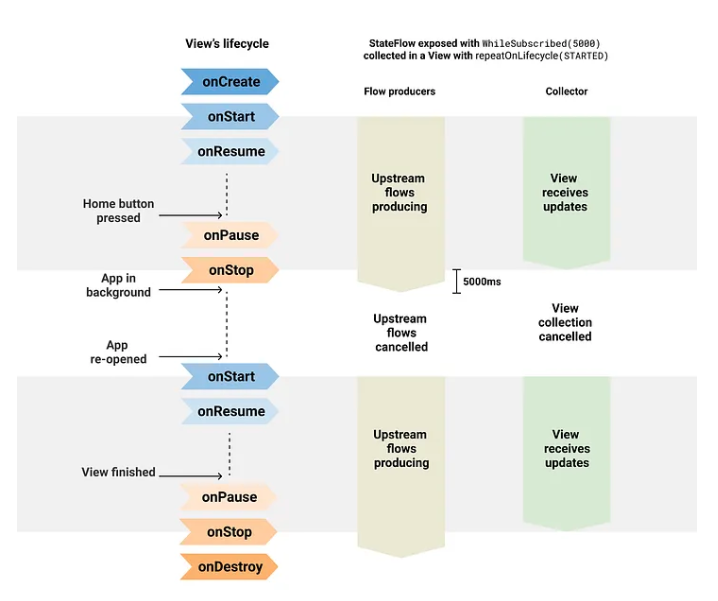
- 이 전략이 안드로이드 앱 개발할 때 앱이 background에 들어가면 더이상 consumer가 존재하지 않고 값도 produce할 필요가 없다.
- 따라서, WhileSubscribed을 사용하면 produce를 멈춤으로써 자원을 아낄 수 있다.
- WhileSubscribed에는
public fun WhileSubscribed(
    stopTimeoutMillis: Long = 0,
    replayExpirationMillis: Long = Long.MAX_VALUE
)
stopTimeoutMillis 옵션이 있는데 이는 더이상 consumer가 있을 때 바로 stop하지 않고 몇 초 이따가 멈추는 옵션이다.
위 코드에서는 WhileSubscribed(5_000)으로 설정했는데 5초 동안은 upstream이 살아있을 것이다.
- 왜 5초 동안 살아있게 하는걸까?
- configuration change처럼 잠깐 view가 없어졌다 다시 생기는 경우에는 upstream을 멈췄다 다시 생성하는 것보다는 기존 것을 그대로 사용하는게 더 이득이기 때문이다.
Flow with lifecycle
- StateFlow와 비슷하게 상태값을 가지고 있는 LiveData가 있다.
- LiveData는 관찰 가능하고 생명주기를 알고 있기 때문에 관찰하고 있던 view가 없어지면 데이터 업데이트를 멈춘다.
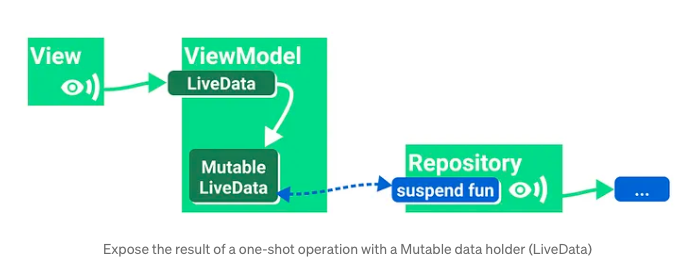
- 하지만 Flow는 view의 생명주기를 알지 못하기 때문에 view가 살아있든 말든 데이터를 방출한다.
- 이는 매우 메모리 낭비이다.- UI (Collector)가 자신이 데이터가 필요할 때 collect하고 필요하지 않으면 collect를 멈춤으로서 데이터를 관리한다.
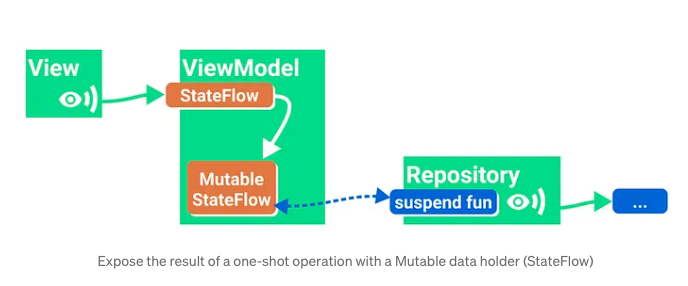
observing StateFlow
- Activity.lifecycleScope.launch:
- Activity의 onCreate ~ onDestroy 동안 살아있음 - Fragment.lifecycleScope.launch:
- Fragemtn의 onCreate ~ onDestroy 동안 살아있음
- Fragment.viewLifecycleOwner.lifecycleScope.launch:
- Fragment onCreate ~ onViewDestroyed 동안 살아있음
- UI 수정할 때는 viewLifecycleOwner을 사용해야 한다.
launch, launchWhenX
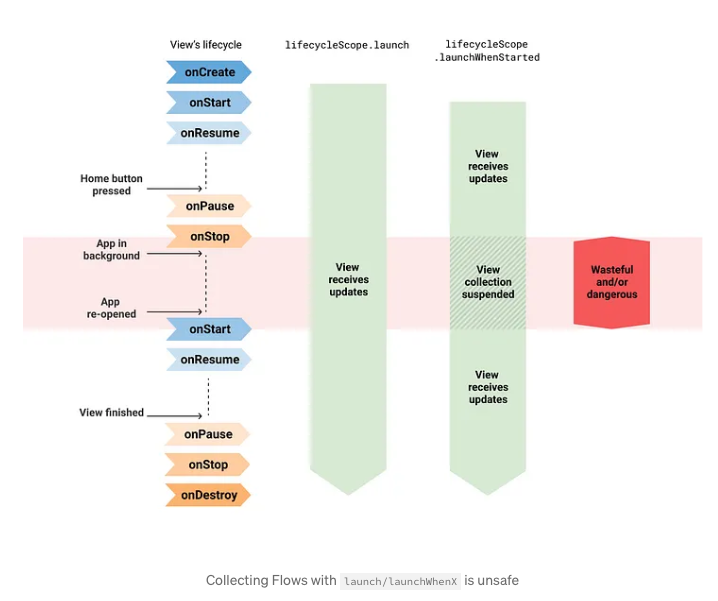
- launch, launchWhenX(State)는 위험하다.
- 일단 Destroy가 될 때까지 코루틴이 살아있기 때문에 앱이 background에 있어도 upstream이 계속 active하다.
lifecycle.repeatOnLifecycle
- repeatOnLifecycle이 특정 상태를 벗어나게 되면 upstream을 멈추어 낭비가 되지 않게 한다.
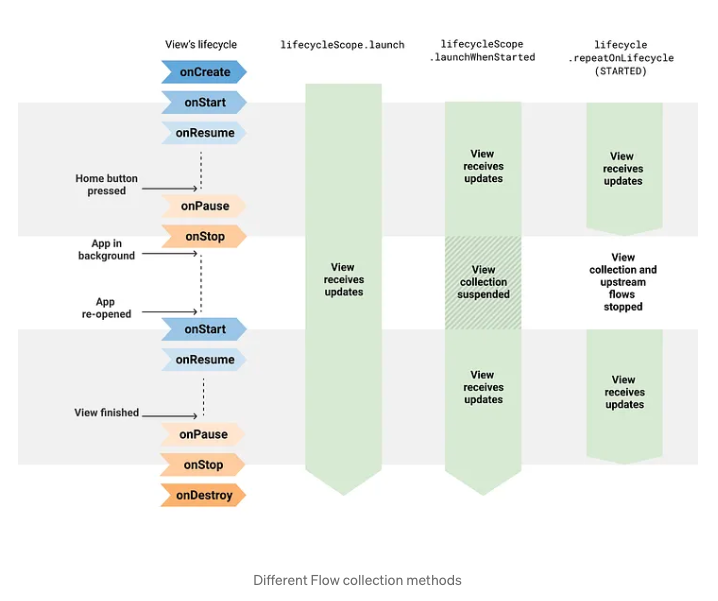
- 따라서, lifecycleScope안에서 꼭 repeatOnLifecycle을 호출해 그 안에서 collect를 해야 한다.
- repeatOnLifecycle은 UI layer에서 Flow를 안전하게 collect할 수 있게 해주는 API
repeatOnLifecycle + WhileSubscribed
Flow.flowWithLifecycle
- collect할 Flow가 하나밖에 없는 경우에는 repeatOnLifecycle대신 flowWithLifecycle로 단순하게 사용 가능
lifecycleScope.launch {
            locationProvider.locationFlow()
                .flowWithLifecycle(lifecycle, Lifecycle.State.STARTED)
                .collect {
                    // New location! Update the map
                }
        }
callbackFlow
- 콜백 기반 API를 Flow로 변환할 수 있는 빌더
- 개념상으로 Channel처럼 동작하기 때문에 send 메서드 사용
참고
https://medium.com/androiddevelopers/things-to-know-about-flows-sharein-and-statein-operators-20e6ccb2bc74
https://medium.com/androiddevelopers/migrating-from-livedata-to-kotlins-flow-379292f419fb
https://medium.com/androiddevelopers/a-safer-way-to-collect-flows-from-android-uis-23080b1f8bda