
게시판 프로젝트
글 업로드
사용자는 항상 어플리케이션을 강제종료할 수 있다는 가정을 하고 글업로드 과정에서 용량이 큰 파일데이터가 글 데이터보다 먼저 업로드되도록 순서를 정해야 한다.
글 데이터가 올라갔는데 이미지 파일이 업로드 되지 않은 경우 글을 보여줄때 같이 업로드한 이미지 파일이 서버에 없기 때문에 문제가 발생할 수 있기 때문이다.
이미지 업로드 작업과 글 작성 작업을 코루틴으로 구현할 수 있다.
Cloud Storage 셋팅
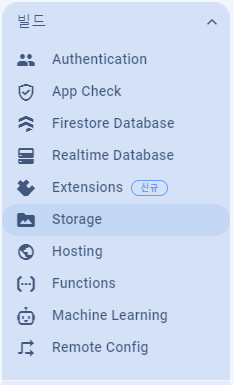
빌드 메뉴의 Storage 클릭
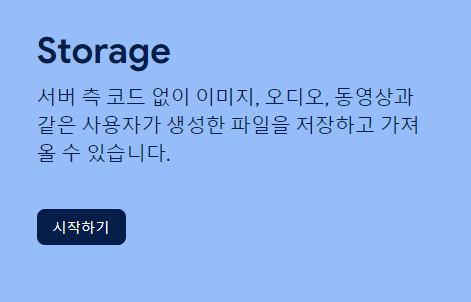
시작하기 버튼 클릭
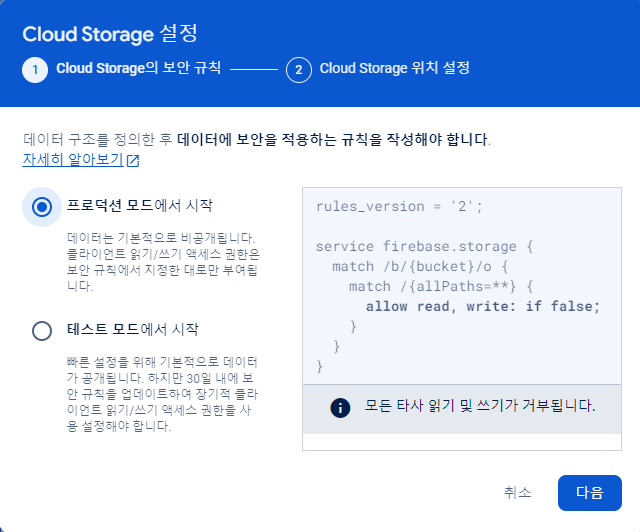
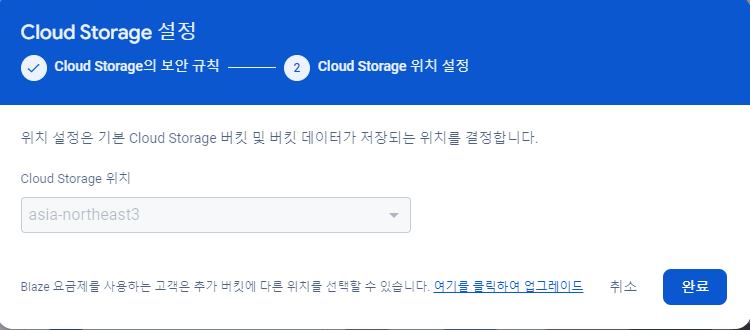
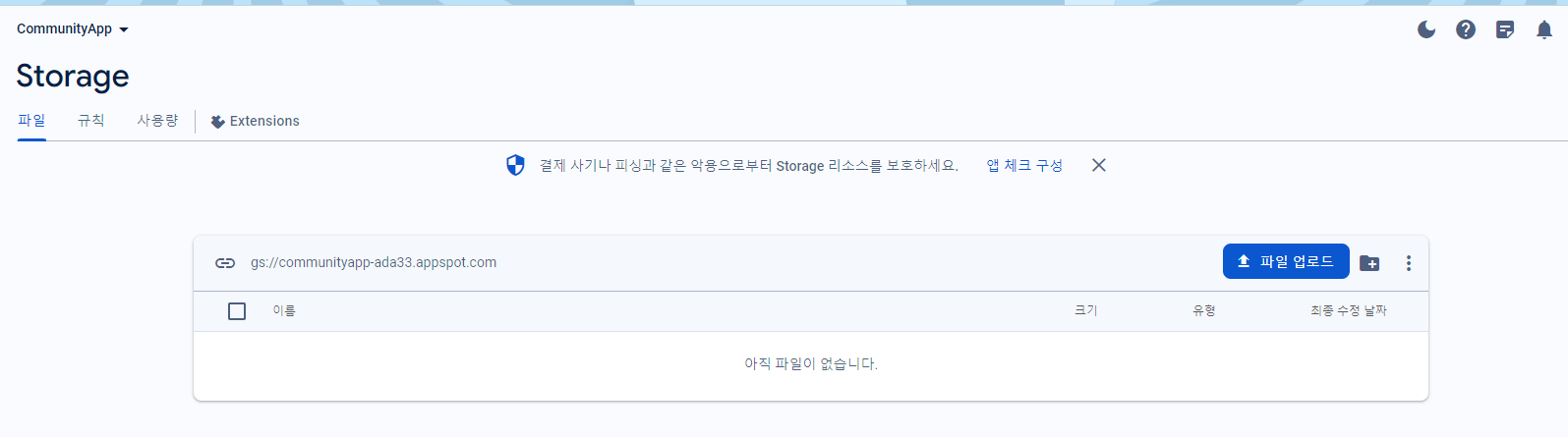
완료를 누르고 아래 화면이 뜨면 정상적으로 셋팅이 완료되었다.
사용자가 이미지를 첨부했는지 여부를 알 수 있는 변수를 추가해준다.
카메라로 찍었을 때, 앨범에서 가져왔을 때 true값으로 바꿔준다.
해당 이미지 파일은 단말기 로컬에 저장되어있어야 한다.
// AddContentFragment.kt

    // 이미지를 첨부한 적이 있는지
    var isAddPicture = false


    // 입력 요소 설정
    fun settingInputForm(){
        addContentViewModel.textFieldAddContentSubject.value = ""
        addContentViewModel.textFieldAddContentText.value = ""
        addContentViewModel.settingContentType(ContentType.TYPE_FREE)

        fragmentAddContentBinding.imageViewAddContent.setImageResource(R.drawable.panorama_24px)
        isAddPicture = false

        Tools.showSoftInput(contentActivity, fragmentAddContentBinding.textFieldAddContentSubject)
    }


    // 카메라 런처 설정
    fun settingCameraLauncher(){
        val contract1 = ActivityResultContracts.StartActivityForResult()
        cameraLauncher = registerForActivityResult(contract1){
            // 사진을 사용하겠다고 한 다음에 돌아왔을 경우
            if(it.resultCode == AppCompatActivity.RESULT_OK){
                // 사진 객체를 생성한다.
                val bitmap = BitmapFactory.decodeFile(contentUri.path)

                // 회전 각도값을 구한다.
                val degree = Tools.getDegree(contentActivity, contentUri)
                // 회전된 이미지를 구한다.
                val bitmap2 = Tools.rotateBitmap(bitmap, degree.toFloat())
                // 크기를 조정한 이미지를 구한다.
                val bitmap3 = Tools.resizeBitmap(bitmap2, 1024)

                fragmentAddContentBinding.imageViewAddContent.setImageBitmap(bitmap3)
                isAddPicture = true


    // 앨범 런처 설정
    fun settingAlbumLauncher() {
        // 앨범 실행을 위한 런처
        val contract2 = ActivityResultContracts.StartActivityForResult()
        albumLauncher = registerForActivityResult(contract2){
            // 사진 선택을 완료한 후 돌아왔다면
            if(it.resultCode == AppCompatActivity.RESULT_OK){
                // 선택한 이미지의 경로 데이터를 관리하는 Uri 객체를 추출한다.
                val uri = it.data?.data
                if(uri != null){
                    // 안드로이드 Q(10) 이상이라면
                    val bitmap = if(Build.VERSION.SDK_INT >= Build.VERSION_CODES.Q){
                        // 이미지를 생성할 수 있는 객체를 생성한다.
                        val source = ImageDecoder.createSource(contentActivity.contentResolver, uri)
                        // Bitmap을 생성한다.
                        ImageDecoder.decodeBitmap(source)
                    } else {
                        // 컨텐츠 프로바이더를 통해 이미지 데이터에 접근한다.
                        val cursor = contentActivity.contentResolver.query(uri, null, null, null, null)
                        if(cursor != null){
                            cursor.moveToNext()

                            // 이미지의 경로를 가져온다.
                            val idx = cursor.getColumnIndex(MediaStore.Images.Media.DATA)
                            val source = cursor.getString(idx)

                            // 이미지를 생성한다
                            BitmapFactory.decodeFile(source)
                        }  else {
                            null
                        }
                    }

                    // 회전 각도값을 가져온다.
                    val degree = Tools.getDegree(contentActivity, uri)
                    // 회전 이미지를 가져온다
                    val bitmap2 = Tools.rotateBitmap(bitmap!!, degree.toFloat())
                    // 크기를 줄인 이미지를 가져온다.
                    val bitmap3 = Tools.resizeBitmap(bitmap2, 1024)

                    fragmentAddContentBinding.imageViewAddContent.setImageBitmap(bitmap3)
                    isAddPicture = true
이미지뷰의 이미지를 추출해 로컬에 저장
// Tools.kt


		// 이미지뷰의 이미지를 추출해 로컬에 저장한다.
        fun saveImageViewData(context:Context, imageView:ImageView, fileName:String){
            // 외부 저장소까지의 경로를 가져온다.
            val filePath = context.getExternalFilesDir(null).toString()
            // 이미지 뷰에서 BitmapDrawable 객체를 추출한다.
            val bitmapDrawable = imageView.drawable as BitmapDrawable

            // 로컬에 저장할 경로
            val file = File("${filePath}/${fileName}")
            // 스트림 추출
            val fileOutputStream = FileOutputStream(file)
            // 이미지를 저장한다.
            // 첫 번째 : 이미지 데이터 포맷(JPEG, PNG, WEBP_LOSSLESS, WEBP_LOSSY)
            // 두 번째 : 이미지의 퀄리티
            // 세 번째 : 이미지 데이터를 저장할 파일과 연결된 스트림
            bitmapDrawable.bitmap.compress(Bitmap.CompressFormat.JPEG, 100, fileOutputStream)
            fileOutputStream.flush()
            fileOutputStream.close()
        }
ContentDao
ContentDao 클래스 추가
// ContentDao.kt


class ContentDao {

    companion object {

        // 이미지 데이터를 firebase storage에 업로드하는 메서드
        suspend fun uploadImage(context:Context, fileName:String, uploadFileName:String){
            // 외부 저장소까지의 경로를 가져온다.
            val filePath = context.getExternalFilesDir(null).toString()
            // 서버로 업로드할 파일의 경로
            val file = File("${filePath}/${fileName}")
            val uri = Uri.fromFile(file)

            val job1 = CoroutineScope(Dispatchers.IO).launch {
                // Storage에 접근할 수 있는 객체를 가져온다.(폴더의 이름과 파일이름을 지정해준다.)
                val storageRef = Firebase.storage.reference.child("image/${uploadFileName}")
                // 업로드한다.
                storageRef.putFile(uri)
            }
            job1.join()
        }

    }
}
글 작성 처리 메서드
// AddContentFragment.kt


    // 글 작성처리 메서드
    fun uploadContentData(){
        CoroutineScope(Dispatchers.Main).launch {
            // 첨부된 이미지가 있다면
            if(isAddPicture == true){
                // 이미지 뷰의 이미지 데이터를 파일로 저장한다.
                Tools.saveImageViewData(contentActivity, fragmentAddContentBinding.imageViewAddContent, "uploadTemp.jpg")
                // 서버에서의 파일 이름
                val serverFileName = "image_${System.currentTimeMillis()}.jpg"
                // 서버로 업로드한다.
                ContentDao.uploadImage(contentActivity, "uploadTemp.jpg", serverFileName)
            }
        }
    }


                        // 완료
                        R.id.menuItemAddContentDone -> {
                            // 입력 요소 유효성 검사
                            val chk = checkInputForm()
                            if(chk == true){
                                // 글 데이터를 업로드한다.
                                uploadContentData()
                                // ReadContentFragment로 이동한다.
                                // contentActivity.replaceFragment(ContentFragmentName.READ_CONTENT_FRAGMENT, true, true, null)
                            }
                        }
이미지를 첨부해서 게시글 업로드 테스트를 해보면
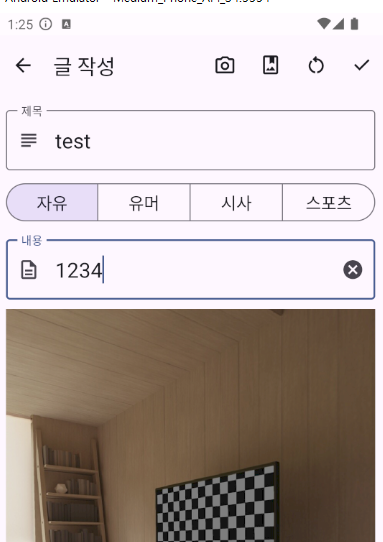


스토리지에 이미지파일이 정상적으로 업로드 된 것을 확인할 수 있다.
게시글 상태
게시글 상태를 나타내는 값을 정의한다
// Tools.kt


// 게시글 상태를 나타내는 값을 정의한다.
enum class ContentState(var str:String, var number:Int){
    CONTENT_STATE_NORMAL("정상", 1),
    CONTENT_STATE_REMOVE("삭제", 2),
}
Content Model
Content Model 클래스파일 추가
// ContentModel.kt


data class ContentModel(
    var contentIdx:Int, var contentSubject:String, var contentType:Int,
    var contentText:String, var contentImage:String?, var contentWriterIdx:Int, var contentWriteDate:String,
    var contentState:Int
) {
    // 매개 변수가 없는 생성자
    constructor():this(0, "", 0, "", "", 0, "", 0)
}
ContentSequence 문서 추가
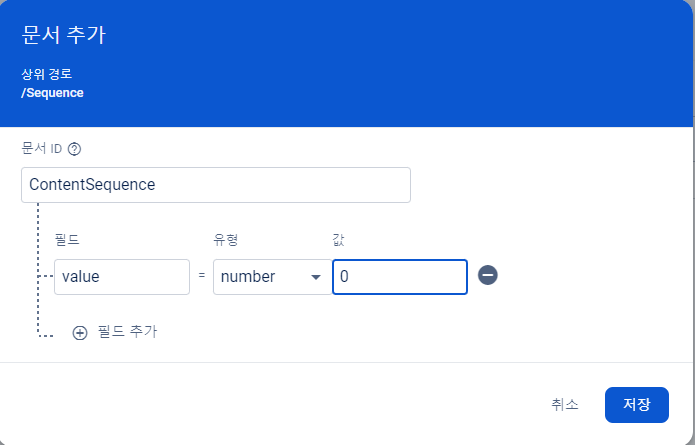

UserDao.kt에서 작성했던 메서드를 그대로 ContentDao.kt에 복붙해서 수정한다.
// ContentDao.kt


        // 게시글 번호 시퀀스값을 가져온다.
        suspend fun getContentSequence():Int{

            var contentSequence = -1

            val job1 = CoroutineScope(Dispatchers.IO).launch {
                // 컬렉션에 접근할 수 있는 객체를 가져온다.
                val collectionReference = Firebase.firestore.collection("Sequence")
                // 게시글 번호 시퀀스값을 가지고 있는 문서에 접근할 수 있는 객체를 가져온다.
                val documentReference = collectionReference.document("ContentSequence")
                // 문서내에 있는 데이터를 가져올 수 있는 객체를 가져온다.
                val documentSnapShot = documentReference.get().await()
                contentSequence = documentSnapShot.getLong("value")?.toInt()!!
            }
            job1.join()

            return contentSequence
        }


        // 게시글 시퀀스 값을 업데이트 한다.
        suspend fun updateContentSequence(contentSequence: Int){
            val job1 = CoroutineScope(Dispatchers.IO).launch {
                // 컬렉션에 접근할 수 있는 객체를 가져온다.
                val collectionReference = Firebase.firestore.collection("Sequence")
                // 게시글 번호 시퀀스값을 가지고 있는 문서에 접근할 수 있는 객체를 가져온다.
                val documentReference = collectionReference.document("ContentSequence")
                // 저장할 데이터를 담을 HashMap을 만들어준다.
                val map = mutableMapOf<String, Long>()
                // "value"라는 이름의 필드가 있다면 값이 덮어씌워지고 필드가 없다면 필드가 새로 생성된다.
                map["value"] = contentSequence.toLong()
                // 저장한다.
                documentReference.set(map)
            }
            job1.join()
        }


        // 게시글 정보를 저장한다.
        suspend fun insertContentData(contentModel: ContentModel){
            val job1 = CoroutineScope(Dispatchers.IO).launch {
                // 컬렉션에 접근할 수 있는 객체를 가져온다.
                val collectionReference = Firebase.firestore.collection("ContentData")
                // 컬렉션에 문서를 추가한다.
                // 문서를 추가할 때 객체나 맵을 지정한다.
                // 추가된 문서 내부의 필드는 객체가 가진 프로퍼티의 이름이나 맵에 있는 데이터의 이름으로 동일하게 결정된다.
                collectionReference.add(contentModel)
            }
            job1.join()
        }
AddContentViewModel 게시판 타입값을 반환하는 메서드 작성
// AddContentViewModel.kt


    // MutableLiveData에 담긴 버튼의 ID 값을 통해 게시판 타입값을 반환하는 메서드
    fun gettingContentType():ContentType = when(toggleAddContentType.value){
        R.id.buttonAddContentType1 -> ContentType.TYPE_FREE
        R.id.buttonAddContentType2 -> ContentType.TYPE_HUMOR
        R.id.buttonAddContentType3 -> ContentType.TYPE_SOCIETY
        R.id.buttonAddContentType4 -> ContentType.TYPE_SPORTS
        else -> ContentType.TYPE_ALL
    }
글 작성 처리 메서드 수정
// AddContentFragment.kt


    // 글 작성처리 메서드
    fun uploadContentData(){
        CoroutineScope(Dispatchers.Main).launch {

            // 서버에서의 첨부 이미지 파일 이름
            var serverFileName:String? = null

            // 첨부된 이미지가 있다면
            if(isAddPicture == true) {
                // 이미지의 뷰의 이미지 데이터를 파일로 저장한다.
                Tools.saveImageViewData(contentActivity, fragmentAddContentBinding.imageViewAddContent, "uploadTemp.jpg")
                // 서버에서의 파일 이름
                serverFileName = "image_${System.currentTimeMillis()}.jpg"
                // 서버로 업로드한다.
                ContentDao.uploadImage(contentActivity, "uploadTemp.jpg", serverFileName)
            }

            // 게시글 시퀀스 값을 가져온다.
            val contentSequence = ContentDao.getContentSequence() + 1
            // 게시글 시퀀스 값을 업데이트 한다.
            ContentDao.updateContentSequence(contentSequence)

            // 업로드할 정보를 담아준다.
            val contentIdx = contentSequence
            val contentSubject = addContentViewModel.textFieldAddContentSubject.value!!
            val contentType = addContentViewModel.gettingContentType().number
            val contentText = addContentViewModel.textFieldAddContentText.value!!
            val contentImage = serverFileName
            val contentWriterIdx = contentActivity.loginUserIdx

            val simpleDateFormat = SimpleDateFormat("yyyy-MM-dd")
            val contentWriteDate = simpleDateFormat.format(Date())

            val contentState = ContentState.CONTENT_STATE_NORMAL.number

            val contentModel = ContentModel(contentIdx, contentSubject, contentType, contentText, contentImage, contentWriterIdx, contentWriteDate, contentState)
            // 업로드한다.
            ContentDao.insertContentData(contentModel)

            // 키보드를 내려준다.
            Tools.hideSoftInput(contentActivity)

            // ReadContentFragment로 이동한다.
            contentActivity.replaceFragment(ContentFragmentName.READ_CONTENT_FRAGMENT, true, true, null)
        }
    }
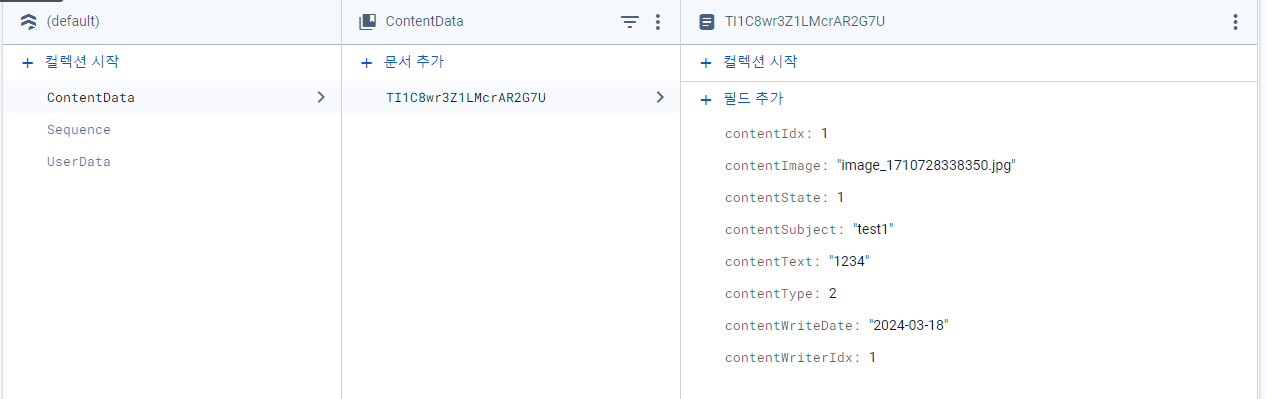
글 작성 후 데이터베이스에 결과를 확인한다.

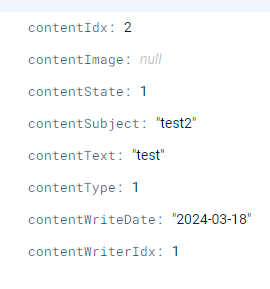
이미지를 첨부하지 않은 경우에는 contentImage에 null값이 들어간다.
안드로이드공부