
Why? 왜 배움?
- Go 로직을 짜던 도중 로직 작동 확인이 필요함
What? 뭘 배움?
-
Go Test 에는 native test, testify library 가 대표적으로 사용됨
-
BDD DSL 기반 test 구성을 한다면 testify library 사용
-
native test 가 조금 더 쓰기 편하다고 느껴짐
- 간결한 test 작성이 가능하고, 부가적인 라이브러리 활용은 golang 철학에 벗어남
- file 아래에 test 가 작성되어있어 관리가 용이 (참고 fzf)
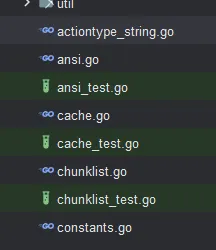
- test 패키지를 따로 쓰는 java 진영에서는 익숙치 않을 수 있음
How? 어떻게 씀?
필자는 아직 testify 를 사용해본 적이 없어 추후 활용하게 되면 업데이트하겠음
test 패키지에서 testcontainer 생성하는 모듈을 따로 구성함
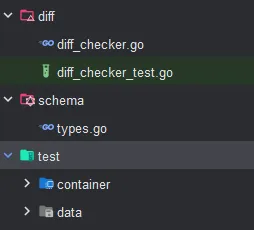
package container

import (
	"context"
	"github.com/testcontainers/testcontainers-go/modules/mysql"
)

func CreatMySQLContainer(ctx context.Context) (*mysql.MySQLContainer, error) {
	return mysql.Run(
		ctx,
		"mysql:8.0.36",
		mysql.WithDatabase("old"),
		mysql.WithUsername("root"),
		mysql.WithPassword("testdbsecret"),
		mysql.WithScripts("../test/data/schema.sql"),
	)
}
이후 아래와 같이 connection 확인하는 로직 구성함
package db

import (
	"context"
	container "db-migration/test/container"
	"fmt"
	_ "github.com/go-sql-driver/mysql"
	"github.com/testcontainers/testcontainers-go"
	"os"
	"testing"
)

func TestConnectDBWithURL(t *testing.T) {
	// GIVEN
	ctx := context.Background()
	mysqlContainer, _ := container.CreatMySQLContainer(ctx)
	testcontainers.CleanupContainer(t, mysqlContainer)
	connectionString, _ := mysqlContainer.ConnectionString(ctx)

	// WHEN
	result, err := ConnectDBWithURL(connectionString)

	// THEN
	if err != nil {
		t.Error(err)
		t.Fail()
	}
	if result == nil {
		t.Error("ConnectDBWithURL failed")
		t.Fail()
	}
	result.Close()
}

func TestOnFile(t *testing.T) {
	readFile, _ := os.ReadFile("../test/data/schema.sql")
	fmt.Print(string(readFile))
	//fmt.Println(file)
}
Reference
https://go.dev/doc/tutorial/add-a-test
https://github.com/junegunn/fzf/blob/master/src/ansi_test.go

블로그 이전했습니다 -- https://vanillacake369.github.io