Oracle Database 11g Express Edition의 Install중 생기는 Error 해결(Oracle XE service instance Checking)
Oracle DBMS가 기존에 설치되어있고 상위 버전의 DBMS를 설치하려고 할때 흔히 발생되는 문제같다.
Oracle에서 압축파일을 다운받고 setup.exe 를 실행시키는 도중 아래 창이 뜨는 경우
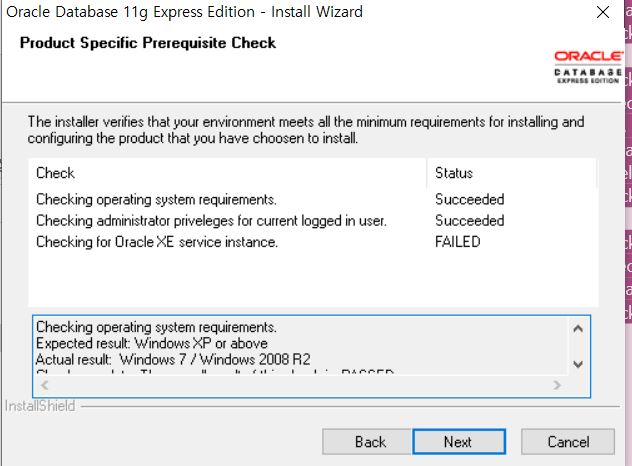
(네모 간의 세부 메세지는 :
Checking operating system requirements.
Expected result: Windows XP or above
Actual result: Windows 7 / Windows 2008 R2
Check complete. The overall result of this check is: PASSED.
Checking administrator priveleges for current logged in user.
Expected result: Administrator priveleges for current logged in user.
Actual result: Current logged in user has Administrator priveleges.
Check complete. The overall result of this check is: PASSED.
Checking for Oracle XE service instance.
Expected result: should not be installed allready.
Actual result: OracleServiceXE found on system.
Check complete. The overall result of this check is:
)
그리고 저 상태에서 Next> 버튼을 누를 경우
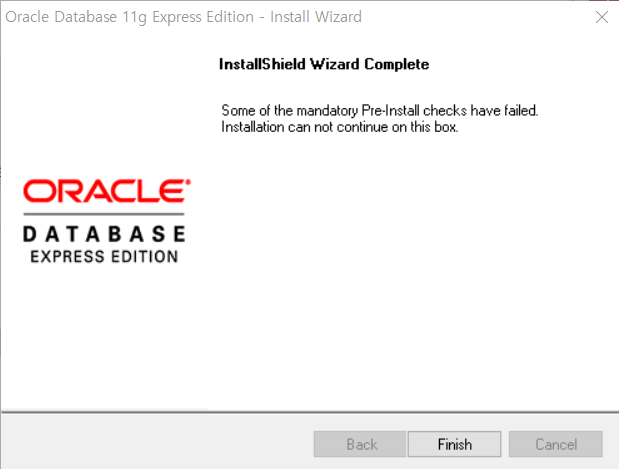
로 나온다면,
1, 일단 cmd를 열고
sc delete OracleServiceXE
의 코드를 입력하거나 이가 안된다면
2. cmd 에서
sc stop OracleServiceXE
sc delete OracleServiceXE
이렇게 해도 엑세스 거부 가 뜬다면
3. cmd를 관리자권한으로 열어서 1번과 2번을 실행해보면 해결이 된다.