1) dialogflow에 정보 보내는 법
https://www.npmjs.com/package/dialogflow
const dialogflow = require('dialogflow');
const uuid = require('uuid');

/**
 * Send a query to the dialogflow agent, and return the query result.
 * @param {string} projectId The project to be used
 */
async function runSample(projectId = 'your-project-id') {
  // A unique identifier for the given session
  const sessionId = uuid.v4();

  // Create a new session
  const sessionClient = new dialogflow.SessionsClient();
  const sessionPath = sessionClient.sessionPath(projectId, sessionId);

  // The text query request.
  const request = {
    session: sessionPath,
    queryInput: {
      text: {
        // The query to send to the dialogflow agent
        text: 'hello',
        // The language used by the client (en-US)
        languageCode: 'en-US',
      },
    },
  };

  // Send request and log result
  const responses = await sessionClient.detectIntent(request);
  console.log('Detected intent');
  const result = responses[0].queryResult;
  console.log(`  Query: ${result.queryText}`);
  console.log(`  Response: ${result.fulfillmentText}`);
  if (result.intent) {
    console.log(`  Intent: ${result.intent.displayName}`);
  } else {
    console.log(`  No intent matched.`);
  }
}
코드를 router.post 안에 넣기
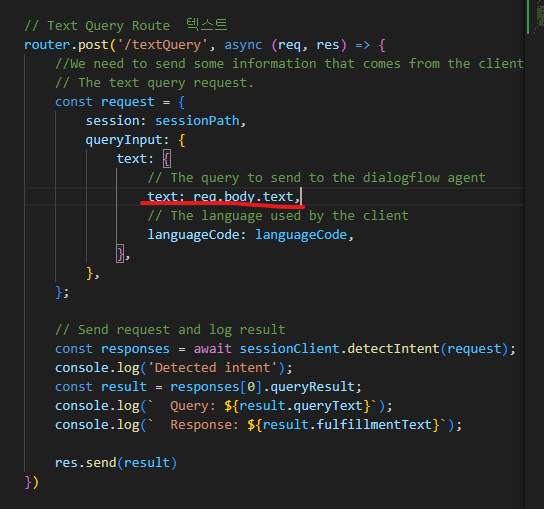
내가 채팅한 값 = req.boddy.text
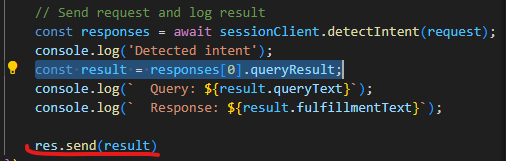
2) POSTMAN
download
textQuery route 보냄
server 킴 (npm run start)
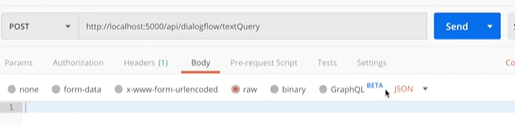
- post
- 주소씀
- raw
- json
-> json형태로 "text: Hello"
2-1)인증 문제
root 디렉토리에서 진행
set GOOGLE_APPLICATION_CREDENTIALS=/path-tokeys/keys-file.json

작성 후 private key 뒤에 올려두고 Enter
=> npm run start
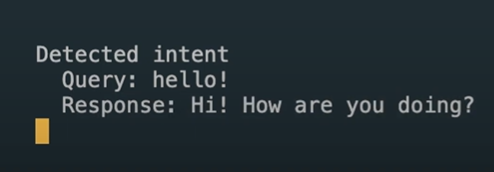
+) npm install 설치가 안되는 경우
- python 설치