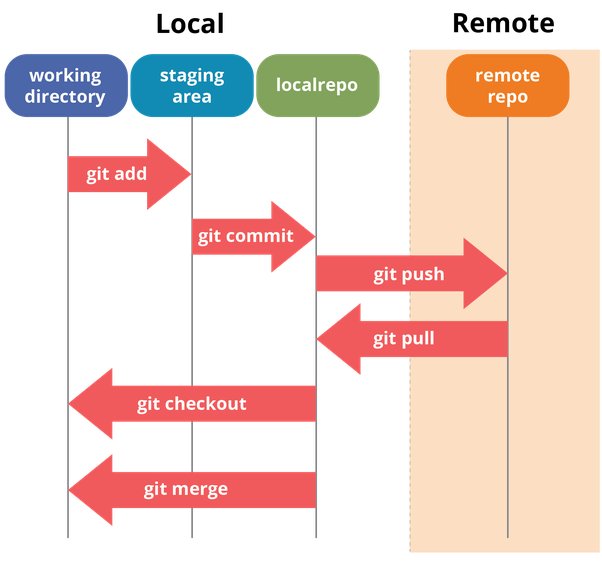
local + git 연결
- 기본 환경 설정
(.gitconfig 파일에 저장됨)
git config --global user.name "test"
git config --global user.email id001@test.kr"
git repository의 기본 브런치가 main 이면 변경이 필요함.
git config --global init.defaultBranch main기본 환경 설정 확인
cat ~/.gitconfig- 현재 디렉토리 기준 git 저장소 생성
git init- 현재 디렉토리에서 원격 저장소 연결
git remote add origin https://저장소주소- 원격 저장소에 파일들을 모두 업로드
git push -u origin --allserver => local 반영
a. 자동으로 merge
git pull origin mainb. merge 없이 변경사항 가지고 옴
=> git fetch
c. 원격저장소 내용 그대로 로컬에 복사
=> git clone
local => server 반영
- 현재 디렉토리 => staging area 반영
git add.
git add 파일명- staging area => local repo 반영
git commit -m "커밋 메세지(description)"- local repo => server 반영
git push --set-upstream origin main
git push origin +main (강제 반영)
branch 생성 및 수정사항 반영
- 브랜치 생성
git switch -c "브랜치명"- 현재 브랜치 확인
git branch- 현재 디렉토리 => staging area 반영
git add.
git add 파일명- staging area => local repo 반영
git commit -m "커밋 메세지(description)"- local repo => server 반영
git push --set-upstream origin main
git push origin +main (강제 반영)
원격 저장소에 관리대상 파일 삭제 반영
- 캐시 제거
git rm -r --cached .- 현재 상태 확인
git status- 현재 디렉토리 => staging area 반영
git add.
git add 파일명- staging area => local repo 반영
git commit -m "커밋 메세지(description)"- local repo => server 반영
git push --set-upstream origin main
git push origin +main (강제 반영)
기억저장소