개요
binacne로부터 symbol 리스트를 얻기 위해서 exchangeInfo를 받아오는 api를 활용하여 함수를 만들었다. 그러나 exchangeInfo에서는 볼륨(거래량)을 구할 수 없었다. 찾아보니 ticker라는 데이터를 가져오게 되면 volume과 symbol을 한 번에 가져올 수 있다는 것을 알았다. quoteVolume을 기준으로 내림차순으로 정렬하였다.
내용
fapi/v1/ticker/24hr
https://fapi.binance.com/fapi/v1/ticker/24hr
chrome에서 위 url로 요청을 하게되면 여러개의 데이터를 얻을 수 있다.
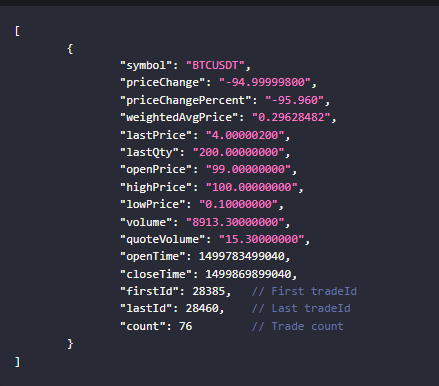
json 데이터가 어레이형태로 래핑되어 넘어오는 것을 확인할 수 있다.
    /// fapi/v1/ticker/24hr
    async fn get_symbol_with_volume(&self) -> anyhow::Result<Vec<Ticker>> {
        let common_endpoint = CommonEndpoint::Ticker;
        let binance_request = BinanceRequest::new(BaseUrl::future, common_endpoint);

        let res = adapter_utils::request("get", binance_request).await?;

        let mut parsed: Vec<Ticker> = serde_json::from_str(res.as_str()).context("fail to parse json")?;

        parsed.sort_by(|a, b| {
            let a: f64 = a.quote_volume.parse().unwrap();
            let b: f64 = b.quote_volume.parse().unwrap();
            b.partial_cmp(&a).unwrap()
        });

        // parsed.iter().for_each(|t| {
        //     println!("symbol: {}, quoteVolume: {}", t.symbol, t.quote_volume);
        // });

        Ok(parsed)
    }
volume을 기준으로 내림차순된 symbol을 순회하며
    let futures: Vec<_> = list.iter()
        .take(10)
        .map(|s| {
            // let adapter = BinanceCommon::new();
            let adapter = adapter_arc.clone();
            let symbol = s.symbol.clone();
            async move {
                adapter.get_kline(symbol, "15m", Some(1000)).await
            }
        }).collect();
각 symbol에 맞는 알고리즘을 돌릴 수 있다.
끝
다음 포스팅은 알고리즘을 어떻게 비동기 처리했는지에 대해서 작성하겠다.
끝