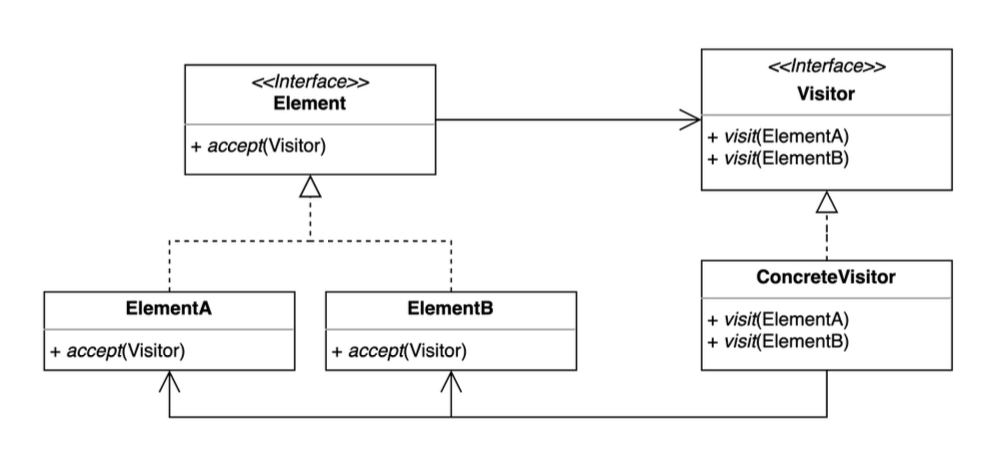
방문자(Visitor) 패턴
- 기존 코드를 변경하지 않고 새로운 기능을 추가
- 객체 구조는 그대로, 객체들에 대해 수행할 동작을 바깥으로 분리
- 더블 디스패치를 활용할 수 있다.
적용
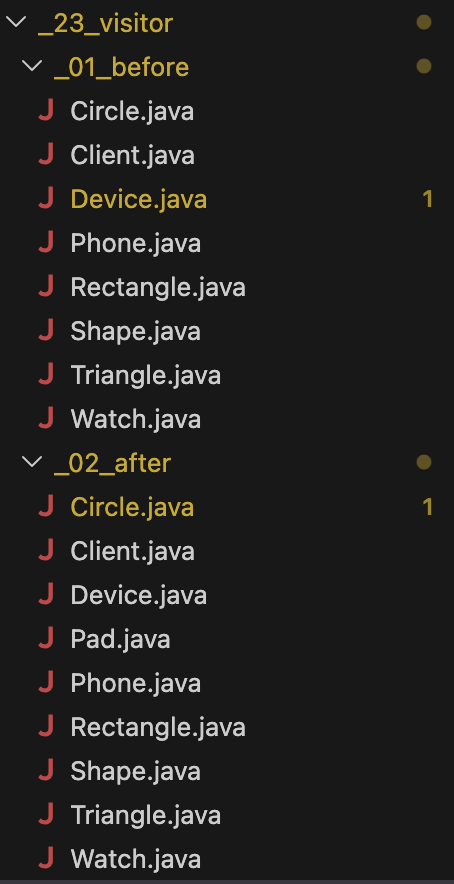
- 객체
- Circle
- Rectangle
- Triangle
- 객체들에 대한 작업
- Phone에 출력
- Watch에 출력
- Pad에 출력
도형 클래스 안에서 모든 출력 방법을 처리하지 말고, 출력하는 책임을 Device쪽에 넘길 것
역할
- Element(Circle, Rectangle, Triangle): 방문을 당하는 객체들
공통적으로 Shape 인터페이스를 구현함
public interface Shape {
    void accept(Device device);
}- Visitor(Phone, Watch, Pad): 방문해서 작업을 수행
이들은 Device 인터페이스를 구현하여 오는 도형에 맞는 작업을 함.
public interface Device {
    void print(Circle circle);
    void print(Rectangle rectangle);
    void print(Triangle triangle);
}
before
public class Rectangle implements Shape {
    @Override
    public void printTo(Device device) {
        if (device instanceof Phone) {
            System.out.println("print Rectangle to phone");
        } else if (device instanceof Watch) {
            System.out.println("print Rectangle to watch");
        }
    }
}
문제점 : 도형 안에 계속 분기문이 들어가서 새로운 Device가 추가되면 if문을 추가하는 등 기존 코드를 계속 수정해야함.
after
public class Rectangle implements Shape {
    @Override
    public void accept(Device device) {
        device.print(this);
    }
}
this(객체 자신)를 Device에 넘겨 타입에 맞는 메서드를 호출한다.
예를 들어 Phone에 호출한다면
public class Phone implements Device {
    @Override
    public void print(Circle circle) {
        System.out.println("Print Circle to Phone");
    }

    @Override
    public void print(Rectangle rectangle) {
        System.out.println("Print Rectangle to Phone");
    }

    @Override
    public void print(Triangle triangle) {
        System.out.println("Print Triangle to Phone");
    }
}
이중 디스패치(Double Dispatch)
한 번의 메서드 호출만으로 반영하기 어려운 두 객체의 타입 정보를, 두 단계의 호출을 통해 반영하여 적절한 메서드를 실행하는 기법
public class Client {
    public static void main(String[] args) {
        Shape rectangle = new Rectangle();
        Device device = new Pad();
        rectangle.accept(device);
    }
}- ractangle.accept(device) 호출
- device.print(this) => this 는 rectangle 자신
- device는 Pad객체니 Pad.printf(Rectangle rectangle) 호출
- System.out.println("Print Rectangle to Pad");
첫 번째 디스패치 shape.accept(device);
두 번째 디스패치 device.print(this);
로 메서드가 두 단계를 거치면서 두 객체의 타입 정보를 반영한다.
장단점
- 장점
- 기존 코드를 변경하지 않고 새로운 코드를 추가할 수 있다.
- 기존 Element를 크게 안 건드리고 Visitor 클래스를 추가할 수 있음
- 추가 기능을 한 곳에 모아둘 수 있다.
- Phone 출력 로직은 Phone안에, Watch 출력 로직은 Watch안에 ...
- 기존 코드를 변경하지 않고 새로운 코드를 추가할 수 있다.
- 단점
- 복잡하다
- 이중 디스패치로 인해 직관성이 떨어진다.
- 새로운 Element를 추가하거나 제거할 때 모든 Visitor 코드를 변경해야 한다.
- Hexagon이 추가 된다면, Phone, Watch, Pad 등 전부 수정해야함.
- 복잡하다
=> 객체 종류는 거의 안바뀌고 객체들에 대한 작업이 자주 늘어날때, 동작을 객체 밖으로 분리하고 싶을 때 사용하자. 객체 종류가 자주 늘고 구조가 단순하다면 굳이 필요없다.
자바와 스프링에서 찾기 FileVisitor
자바 FileVisitor
public class VisitorInJava {

    public static void main(String[] args) throws IOException {
    	// 여기서 부터 하위 폴더로 들어가 안의 파일들을 다 보겠다.
        Path startingDirectory = Path.of("/Users/keesun/workspace/design-patterns");
        // visitor 객체. Triangle.java라는 파일을 찾고싶다.
        SearchFileVisitor searchFileVisitor =
                new SearchFileVisitor("Triangle.java", startingDirectory);
        // 자바가 제공하는 기능. 파일을 트리구조로 순회해주고 그때마다 visitor 메서드 호출
        Files.walkFileTree(startingDirectory, searchFileVisitor);
    }
}

public class SearchFileVisitor implements FileVisitor<Path> {

    private String fileToSearch;
    private Path startingDirectory;

    public SearchFileVisitor(String fileToSearch, Path startingDirectory) {
        this.fileToSearch = fileToSearch;
        this.startingDirectory = startingDirectory;
    }

    @Override // 디렉터리 들어가기직전 호출 지금 코드에서 의미 x 계속 탐색
    public FileVisitResult preVisitDirectory(Path dir, BasicFileAttributes attrs) throws IOException {
        return FileVisitResult.CONTINUE;
    }

    @Override // 파일 하나 만났을 때 호출. 찾는 파일과 같은지 검사
    public FileVisitResult visitFile(Path file, BasicFileAttributes attrs) throws IOException {
        if (fileToSearch.equals(file.getFileName().toString())) {
            System.out.println("found " + file.getFileName());
            return FileVisitResult.TERMINATE;
        }
        return FileVisitResult.CONTINUE;
    }

    @Override // 파일 방문 중 실패했을 때 호출 (파일이 깨졌거나 권한이 없거나)
    public FileVisitResult visitFileFailed(Path file, IOException exc) throws IOException {
        exc.printStackTrace(System.out);
        return FileVisitResult.CONTINUE;
    }

    @Override // 디렉터리 탐색 끝내고 나올 때 호출
    public FileVisitResult postVisitDirectory(Path dir, IOException exc) throws IOException {
        if (Files.isSameFile(startingDirectory, dir)) {
            System.out.println("search end");
            return FileVisitResult.TERMINATE;
        }
        return FileVisitResult.CONTINUE;
    }
}
=> 구조를 순회하면서, 각 원소에 대해 수행할 작업을 외부 객체(visitor)로 분리하는 패턴