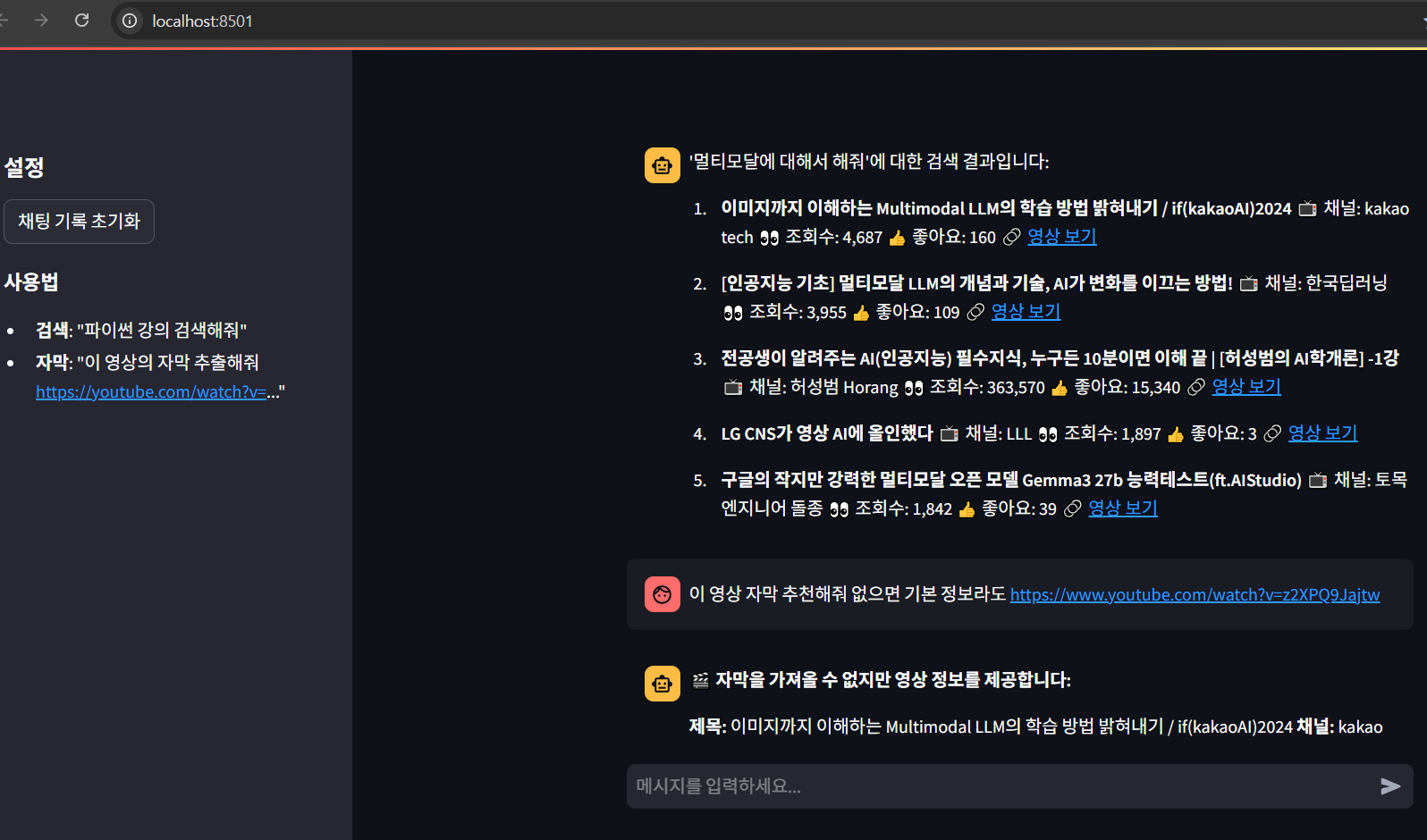
유튜브 검색 및 자막 가져오기 인데..자막 왜 못가져 오지...
- mcp_server.py
from mcp.server.fastmcp import FastMCP
from youtube_transcript_api import YouTubeTranscriptApi
from youtube_transcript_api._errors import TranscriptsDisabled, NoTranscriptFound, VideoUnavailable
import urllib.parse
import xml.etree.ElementTree as ET
from datetime import datetime
import requests
import re
from dotenv import load_dotenv
import os
load_dotenv()
YOUTUBE_API_KEY = os.getenv("YOUTUBE_API_KEY")
YOUTUBE_API_URL = 'https://www.googleapis.com/youtube/v3'
# Create an MCP server
mcp = FastMCP("youtube_agent_server")
### Tool 1 : 유튜브 영상 URL에 대한 자막을 가져옵니다 (개선된 버전)
@mcp.tool()
def get_youtube_transcript(url: str) -> str:
""" 유튜브 영상 URL에 대한 자막을 가져옵니다."""
def extract_video_id(url: str) -> str:
"""YouTube URL에서 비디오 ID 추출"""
patterns = [
r'(?:youtube\.com\/watch\?v=|youtu\.be\/|youtube\.com\/embed\/)([a-zA-Z0-9_-]{11})',
r'youtube\.com\/watch\?.*v=([a-zA-Z0-9_-]{11})',
]
for pattern in patterns:
match = re.search(pattern, url)
if match:
return match.group(1)
raise ValueError("유효하지 않은 YouTube URL입니다")
def method1_youtube_transcript_api(video_id: str) -> tuple:
"""방법 1: youtube-transcript-api 사용 (최대한 간단한 버전)"""
try:
# 모든 가능한 언어로 시도
all_languages = ['ko', 'en', 'en-US', 'en-GB', 'ja', 'zh', 'es', 'fr', 'de', 'it', 'pt', 'ru', 'ar', 'hi', 'th', 'vi', 'id', 'tr', 'pl', 'nl', 'sv', 'da', 'no', 'fi', 'cs', 'hu', 'ro', 'bg', 'hr', 'sk', 'sl', 'et', 'lv', 'lt', 'el', 'he', 'fa', 'ur', 'bn', 'ta', 'te', 'ml', 'kn', 'gu', 'pa', 'or', 'as', 'ne', 'si', 'my', 'km', 'lo', 'ka', 'am', 'sw', 'zu', 'af', 'sq', 'eu', 'be', 'bs', 'ca', 'cy', 'eo', 'gl', 'is', 'mk', 'mt', 'ms', 'tl', 'uk', 'uz', 'vi', 'yi']
# 먼저 자막 목록 확인
try:
transcript_list = YouTubeTranscriptApi.list_transcripts(video_id)
# 사용 가능한 자막들 확인
available_transcripts = []
for transcript in transcript_list:
available_transcripts.append(transcript.language_code)
print(f"사용 가능한 자막 언어: {available_transcripts}")
# 사용 가능한 자막 중에서 우선순위 언어 시도
preferred_languages = ['ko', 'en', 'en-US', 'en-GB']
for lang in preferred_languages:
if lang in available_transcripts:
try:
transcript = transcript_list.find_transcript([lang])
transcript_data = transcript.fetch()
text = " ".join([entry["text"] for entry in transcript_data])
if text.strip():
return text, f"성공 (언어: {lang})"
except Exception as e:
continue
# 첫 번째 사용 가능한 자막 시도
try:
first_transcript = next(iter(transcript_list))
transcript_data = first_transcript.fetch()
text = " ".join([entry["text"] for entry in transcript_data])
if text.strip():
return text, f"성공 (언어: {first_transcript.language_code})"
except Exception as e:
pass
except Exception as e:
print(f"자막 목록 조회 실패: {e}")
# 직접 언어별 시도
for lang in ['ko', 'en']:
try:
transcript = YouTubeTranscriptApi.get_transcript(video_id, languages=[lang])
text = " ".join([entry["text"] for entry in transcript])
if text.strip():
return text, f"성공 (직접 - {lang})"
except Exception as e:
continue
except Exception as e:
print(f"youtube-transcript-api 오류: {e}")
return None, "실패"
def method2_direct_api_call(video_id: str) -> tuple:
"""방법 2: 직접 YouTube API 호출"""
try:
# YouTube의 자막 API 직접 호출
for lang in ['ko', 'en']:
captions_url = f"https://www.youtube.com/api/timedtext?v={video_id}&lang={lang}&fmt=srv3"
response = requests.get(captions_url, headers={
'User-Agent': 'Mozilla/5.0 (Windows NT 10.0; Win64; x64) AppleWebKit/537.36'
}, timeout=10)
if response.status_code == 200 and response.text.strip():
try:
root = ET.fromstring(response.text)
texts = []
for text_elem in root.findall('.//text'):
if text_elem.text:
# HTML 엔티티 디코딩
clean_text = text_elem.text.replace('&', '&').replace('<', '<').replace('>', '>')
texts.append(clean_text)
if texts:
return " ".join(texts), f"성공 (직접 API - {lang})"
except ET.ParseError:
continue
except Exception as e:
pass
return None, "실패"
def method3_yt_dlp_extraction(video_id: str) -> tuple:
"""방법 3: yt-dlp를 사용한 자막 추출"""
try:
import subprocess
import json
# yt-dlp로 자막 정보 가져오기
cmd = [
'yt-dlp',
'--list-subs',
'--no-download',
f'https://www.youtube.com/watch?v={video_id}'
]
result = subprocess.run(cmd, capture_output=True, text=True, timeout=30)
if result.returncode == 0 and 'ko' in result.stdout:
# 한국어 자막이 있으면 다운로드
download_cmd = [
'yt-dlp',
'--write-subs',
'--write-auto-subs',
'--sub-langs', 'ko,en',
'--skip-download',
'--output', f'{video_id}.%(ext)s',
f'https://www.youtube.com/watch?v={video_id}'
]
download_result = subprocess.run(download_cmd, capture_output=True, text=True, timeout=60)
if download_result.returncode == 0:
# 다운로드된 자막 파일 찾기
import glob
srt_files = glob.glob(f'{video_id}*.srt')
if srt_files:
with open(srt_files[0], 'r', encoding='utf-8') as f:
content = f.read()
# SRT 파일 정리
lines = content.split('\n')
text_lines = []
for line in lines:
if line and not line.isdigit() and '-->' not in line:
text_lines.append(line.strip())
if text_lines:
return ' '.join(text_lines), "성공 (yt-dlp)"
except Exception as e:
pass
return None, "실패"
def method4_web_scraping(video_id: str) -> tuple:
"""방법 4: 웹 스크래핑을 통한 자막 추출 (개선된 버전)"""
try:
import re
import urllib.parse
# YouTube 페이지에서 자막 정보 추출
page_url = f"https://www.youtube.com/watch?v={video_id}"
response = requests.get(page_url, headers={
'User-Agent': 'Mozilla/5.0 (Windows NT 10.0; Win64; x64) AppleWebKit/537.36 (KHTML, like Gecko) Chrome/91.0.4472.124 Safari/537.36'
}, timeout=15)
if response.status_code == 200:
# 다양한 자막 URL 패턴 시도
patterns = [
r'"captions":\{"playerCaptionsTracklistRenderer":\{"captionTracks":\[(.*?)\]',
r'"captionTracks":\[(.*?)\]',
r'"captions":\{"playerCaptionsTracklistRenderer":\{"captionTracks":\[(.*?)\]\}',
]
for pattern in patterns:
match = re.search(pattern, response.text)
if match:
captions_data = match.group(1)
# URL 추출 패턴들
url_patterns = [
r'"baseUrl":"([^"]+)"',
r'"url":"([^"]+)"',
r'"baseUrl":"([^"]*timedtext[^"]*)"'
]
for url_pattern in url_patterns:
urls = re.findall(url_pattern, captions_data)
for url in urls:
try:
# URL 디코딩
decoded_url = urllib.parse.unquote(url)
# 자막 다운로드
caption_response = requests.get(decoded_url, headers={
'User-Agent': 'Mozilla/5.0 (Windows NT 10.0; Win64; x64) AppleWebKit/537.36'
}, timeout=10)
if caption_response.status_code == 200 and caption_response.text.strip():
try:
root = ET.fromstring(caption_response.text)
texts = []
for text_elem in root.findall('.//text'):
if text_elem.text:
clean_text = text_elem.text.replace('&', '&').replace('<', '<').replace('>', '>').replace('"', '"').replace(''', "'")
texts.append(clean_text)
if texts and len(' '.join(texts).strip()) > 10: # 최소 길이 체크
return " ".join(texts), "성공 (웹 스크래핑)"
except ET.ParseError:
continue
except Exception:
continue
except Exception:
continue
except Exception as e:
pass
return None, "실패"
# 메인 로직
try:
video_id = extract_video_id(url)
# 여러 방법 시도 (간단한 방법부터)
methods = [
method1_youtube_transcript_api,
method4_web_scraping,
method2_direct_api_call,
method3_yt_dlp_extraction
]
for method in methods:
try:
transcript, status = method(video_id)
if transcript and len(transcript.strip()) > 0:
return transcript
except Exception as e:
continue
# 모든 방법 실패 - 오류 대신 빈 결과 반환
return {
"content": [],
"isError": True,
"errorMessage": f"비디오 ID '{video_id}'의 자막을 가져올 수 없습니다. 자막이 없거나 접근이 제한되어 있을 수 있습니다."
}
except Exception as e:
# 예외 발생 시에도 오류 정보 반환
return {
"content": [],
"isError": True,
"errorMessage": f"자막 추출 중 오류 발생: {str(e)}"
}
### Tool 2 : 유튜브에서 특정 키워드로 동영상을 검색하고 세부 정보를 가져옵니다
@mcp.tool()
def search_youtube_videos(query: str) -> list:
"""유튜브에서 특정 키워드로 동영상을 검색하고 세부 정보를 가져옵니다"""
try:
if not YOUTUBE_API_KEY:
raise ValueError("YouTube API 키가 설정되지 않았습니다.")
# 1. 동영상 검색
max_results: int = 20
search_url = f"{YOUTUBE_API_URL}/search?part=snippet&q={requests.utils.quote(query)}&type=video&maxResults={max_results}&key={YOUTUBE_API_KEY}"
search_response = requests.get(search_url, timeout=10)
search_response.raise_for_status()
search_data = search_response.json()
video_ids = [item['id']['videoId'] for item in search_data.get('items', [])]
if not video_ids:
return []
video_details_url = f"{YOUTUBE_API_URL}/videos?part=snippet,statistics&id={','.join(video_ids)}&key={YOUTUBE_API_KEY}"
details_response = requests.get(video_details_url, timeout=10)
details_response.raise_for_status()
details_data = details_response.json()
videos = []
for item in details_data.get('items', []):
snippet = item.get('snippet', {})
statistics = item.get('statistics', {})
thumbnails = snippet.get('thumbnails', {})
high_thumbnail = thumbnails.get('high', {})
view_count = statistics.get('viewCount')
like_count = statistics.get('likeCount')
video_card = {
"title": snippet.get('title', 'N/A'),
"publishedDate": snippet.get('publishedAt', ''),
"channelName": snippet.get('channelTitle', 'N/A'),
"channelId": snippet.get('channelId', ''),
"thumbnailUrl": high_thumbnail.get('url', ''),
"viewCount": int(view_count) if view_count is not None and view_count.isdigit() else 0,
"likeCount": int(like_count) if like_count is not None and like_count.isdigit() else 0,
"url": f"https://www.youtube.com/watch?v={item.get('id', '')}",
}
videos.append(video_card)
return videos
except requests.exceptions.RequestException as e:
raise RuntimeError(f"YouTube API 요청 오류: {str(e)}")
except Exception as e:
raise RuntimeError(f"검색 중 오류 발생: {str(e)}")
### Tool 3 : YouTube 동영상 URL로부터 채널 정보와 최근 5개의 동영상을 가져옵니다
@mcp.tool()
def get_channel_info(video_url: str) -> dict:
"""YouTube 동영상 URL로부터 채널 정보와 최근 5개의 동영상을 가져옵니다"""
def extract_video_id(url):
patterns = [
r'(?:youtube\.com\/watch\?v=|youtu\.be\/|youtube\.com\/embed\/)([a-zA-Z0-9_-]{11})',
r'youtube\.com\/watch\?.*v=([a-zA-Z0-9_-]{11})',
]
for pattern in patterns:
match = re.search(pattern, url)
if match:
return match.group(1)
return None
def fetch_recent_videos(channel_id):
rss_url = f"https://www.youtube.com/feeds/videos.xml?channel_id={channel_id}"
try:
response = requests.get(rss_url, timeout=10)
if response.status_code != 200:
return []
root = ET.fromstring(response.text)
ns = {'atom': 'http://www.w3.org/2005/Atom'}
videos = []
for entry in root.findall('.//atom:entry', ns)[:5]:
title_elem = entry.find('./atom:title', ns)
link_elem = entry.find('./atom:link', ns)
published_elem = entry.find('./atom:published', ns)
if title_elem is not None and link_elem is not None and published_elem is not None:
videos.append({
'title': title_elem.text or '',
'link': link_elem.attrib.get('href', ''),
'published': published_elem.text or '',
'updatedDate': datetime.now().strftime("%Y-%m-%d %H:%M:%S")
})
return videos
except Exception as e:
print(f"RSS 피드 오류: {str(e)}")
return []
try:
if not YOUTUBE_API_KEY:
raise ValueError("YouTube API 키가 설정되지 않았습니다.")
video_id = extract_video_id(video_url)
if not video_id:
raise ValueError("유효하지 않은 YouTube URL입니다.")
video_api = f"{YOUTUBE_API_URL}/videos?part=snippet,statistics&id={video_id}&key={YOUTUBE_API_KEY}"
video_response = requests.get(video_api, timeout=10)
video_response.raise_for_status()
video_data = video_response.json()
if not video_data.get('items'):
raise ValueError("비디오를 찾을 수 없습니다.")
video_info = video_data['items'][0]
channel_id = video_info['snippet']['channelId']
channel_api = f"{YOUTUBE_API_URL}/channels?part=snippet,statistics&id={channel_id}&key={YOUTUBE_API_KEY}"
channel_response = requests.get(channel_api, timeout=10)
channel_response.raise_for_status()
channel_data = channel_response.json()
if not channel_data.get('items'):
raise ValueError("채널을 찾을 수 없습니다.")
channel_info = channel_data['items'][0]
return {
'channelTitle': channel_info['snippet'].get('title', 'N/A'),
'channelUrl': f"https://www.youtube.com/channel/{channel_id}",
'subscriberCount': channel_info['statistics'].get('subscriberCount', '0'),
'viewCount': channel_info['statistics'].get('viewCount', '0'),
'videoCount': channel_info['statistics'].get('videoCount', '0'),
'videos': fetch_recent_videos(channel_id)
}
except requests.exceptions.RequestException as e:
raise RuntimeError(f"YouTube API 요청 오류: {str(e)}")
except Exception as e:
raise RuntimeError(f"채널 정보 조회 중 오류 발생: {str(e)}")
if __name__ == "__main__":
print("Starting MCP server...")
mcp.run(transport="stdio")- mcp_client.py
import sys
import asyncio
import streamlit as st
import json
from openai import OpenAI
from dotenv import load_dotenv
import subprocess
import time
import re

load_dotenv()

# Windows 호환성
if sys.platform == "win32":
    asyncio.set_event_loop_policy(asyncio.WindowsProactorEventLoopPolicy())

class SimpleMCPClient:
    def __init__(self, command, args):
        self.command = command
        self.args = args
        self.process = None
        self.tools = []

    async def connect(self):
        """MCP 서버에 연결"""
        try:
            # MCP 서버 프로세스 시작
            self.process = subprocess.Popen(
                [self.command] + self.args,
                stdin=subprocess.PIPE,
                stdout=subprocess.PIPE,
                stderr=subprocess.PIPE,
                text=True,
                bufsize=0,
                encoding='utf-8',
                errors='ignore'
            )

            # 잠시 대기
            await asyncio.sleep(1)

            # 1. 초기화 메시지 전송
            init_message = {
                "jsonrpc": "2.0",
                "id": 1,
                "method": "initialize",
                "params": {
                    "protocolVersion": "2024-11-05",
                    "capabilities": {
                        "tools": {}
                    },
                    "clientInfo": {
                        "name": "streamlit-client",
                        "version": "1.0.0"
                    }
                }
            }

            await self._send_message(init_message)
            init_response = await self._read_message()

            if not init_response.get("result"):
                return False

            # 2. 초기화 완료 알림
            initialized_message = {
                "jsonrpc": "2.0",
                "method": "notifications/initialized"
            }
            await self._send_message(initialized_message)

            # 3. 도구 목록 요청
            tools_message = {
                "jsonrpc": "2.0",
                "id": 2,
                "method": "tools/list"
            }
            await self._send_message(tools_message)
            tools_response = await self._read_message()

            if tools_response.get("result") and "tools" in tools_response["result"]:
                self.tools = tools_response["result"]["tools"]
                return True

            return False

        except Exception as e:
            st.error(f"MCP 서버 연결 오류: {str(e)}")
            return False

    async def _send_message(self, message):
        """메시지 전송"""
        if self.process and self.process.stdin:
            message_str = json.dumps(message) + "\n"
            self.process.stdin.write(message_str)
            self.process.stdin.flush()

    async def _read_message(self):
        """메시지 수신"""
        if self.process and self.process.stdout:
            line = self.process.stdout.readline()
            if line:
                return json.loads(line.strip())
        return {}

    async def call_tool(self, tool_name, arguments):
        """도구 호출"""
        try:
            call_message = {
                "jsonrpc": "2.0",
                "id": 3,
                "method": "tools/call",
                "params": {
                    "name": tool_name,
                    "arguments": arguments
                }
            }

            await self._send_message(call_message)
            response = await self._read_message()

            if response.get("result"):
                return response["result"]
            else:
                return None

        except Exception as e:
            st.error(f"도구 호출 오류: {str(e)}")
            return None

    def disconnect(self):
        """연결 종료"""
        if self.process:
            self.process.terminate()
            self.process.wait()

# MCP 서버 설정 (캐시 제거)
async def setup_mcp_servers():
    try:
        mcp_client = SimpleMCPClient("python", ["mcp_server.py"])
        if await mcp_client.connect():
            return mcp_client
        else:
            st.error("MCP 서버 연결 실패")
            return None
    except Exception as e:
        st.error(f"MCP 서버 설정 오류: {str(e)}")
        return None

# 영상 대안 정보 제공 함수
async def get_video_alternative_info(url, mcp_client):
    """자막 추출 실패 시 영상의 대안 정보 제공"""
    try:
        # URL에서 비디오 ID 추출
        import re
        video_id_pattern = r'(?:youtube\.com\/watch\?v=|youtu\.be\/|youtube\.com\/embed\/)([a-zA-Z0-9_-]{11})'
        match = re.search(video_id_pattern, url)

        if not match:
            return "❌ 유효하지 않은 YouTube URL입니다."

        video_id = match.group(1)

        # 영상 정보를 검색으로 가져오기
        search_result = await mcp_client.call_tool("search_youtube_videos", {"query": f"site:youtube.com {video_id}"})

        if search_result and isinstance(search_result, dict) and 'content' in search_result:
            content = search_result['content']
            videos = []

            # 각 텍스트 항목을 JSON으로 파싱
            for item in content:
                if item.get('type') == 'text':
                    try:
                        video_data = json.loads(item['text'])
                        videos.append(video_data)
                    except json.JSONDecodeError:
                        continue

            # 해당 비디오 ID와 일치하는 영상 찾기
            target_video = None
            for video in videos:
                if video_id in video.get('url', ''):
                    target_video = video
                    break

            if target_video:
                response = "🎬 **자막을 가져올 수 없지만 영상 정보를 제공합니다:**\n\n"
                response += f"**제목:** {target_video.get('title', 'N/A')}\n"
                response += f"**채널:** {target_video.get('channelName', 'N/A')}\n"
                response += f"**조회수:** {target_video.get('viewCount', 0):,}\n"
                response += f"**좋아요:** {target_video.get('likeCount', 0):,}\n"
                response += f"**업로드 날짜:** {target_video.get('publishedDate', 'N/A')}\n"
                response += f"**URL:** {target_video.get('url', 'N/A')}\n\n"
                response += "💡 **자막이 없는 이유:**\n"
                response += "- 영상에 자막이 설정되지 않았을 수 있습니다\n"
                response += "- 자막이 비공개로 설정되어 있을 수 있습니다\n"
                response += "- 자동 생성 자막이 비활성화되어 있을 수 있습니다\n"
                response += "- 영상이 너무 짧거나 오래된 영상일 수 있습니다\n\n"
                response += "🔍 **대안:** 영상 제목과 설명을 참고하여 내용을 파악해보세요!"
                return response
            else:
                return "❌ 해당 영상의 정보를 찾을 수 없습니다. URL을 다시 확인해주세요."
        else:
            return "❌ 영상 정보를 가져올 수 없습니다. 잠시 후 다시 시도해주세요."

    except Exception as e:
        return f"❌ 오류가 발생했습니다: {str(e)}"

# 간단한 AI 응답 생성 함수
async def generate_response(user_message, mcp_client):
    """사용자 메시지에 대한 AI 응답 생성"""
    try:
        # 간단한 키워드 기반 응답 로직
        print(f"처리 중인 메시지: {user_message}")

        if "자막" in user_message or "transcript" in user_message.lower():
            # URL 추출 (더 정확한 방법)
            url_pattern = r'https?://(?:www\.)?youtube\.com/watch\?v=[A-Za-z0-9_-]{11}|https?://youtu\.be/[A-Za-z0-9_-]{11}'
            urls = re.findall(url_pattern, user_message)

            print(f"사용자 메시지: {user_message}")
            print(f"찾은 URL들: {urls}")
            print(f"자막 키워드 체크: {'자막' in user_message}")
            print(f"transcript 키워드 체크: {'transcript' in user_message.lower()}")

            if urls:
                url = urls[0]
                print(f"자막을 추출하는 중... URL: {url}")
                transcript_result = await mcp_client.call_tool("get_youtube_transcript", {"url": url})

                # 자막 추출 결과 확인
                if transcript_result and isinstance(transcript_result, dict):
                    # 오류가 포함된 경우 확인
                    if 'isError' in transcript_result and transcript_result['isError']:
                        print("자막 추출 오류 감지, 대안 정보 제공")
                        return await get_video_alternative_info(url, mcp_client)

                    # 정상적인 자막 내용이 있는 경우
                    if 'content' in transcript_result:
                        content = transcript_result['content']
                        if content and len(content) > 0 and 'text' in content[0]:
                            transcript_text = content[0]['text']
                            return f"**자막 내용 (처음 500자):**\n\n{transcript_text[:500]}..."
                        else:
                            print("자막 내용이 비어있음, 대안 정보 제공")
                            return await get_video_alternative_info(url, mcp_client)
                    else:
                        print("자막 내용 키가 없음, 대안 정보 제공")
                        return await get_video_alternative_info(url, mcp_client)
                else:
                    print("자막 추출 결과가 None이거나 잘못된 형식, 대안 정보 제공")
                    return await get_video_alternative_info(url, mcp_client)
            else:
                return "유튜브 URL을 제공해주세요. 예: https://www.youtube.com/watch?v=VIDEO_ID"

        elif "검색" in user_message or "찾아" in user_message or "영상" in user_message:
            # 검색어 추출 (간단한 방법)
            search_query = user_message.replace("검색", "").replace("찾아", "").replace("영상", "").strip()
            if not search_query:
                search_query = "유튜브"

            # 유튜브 검색 실행
            search_result = await mcp_client.call_tool("search_youtube_videos", {"query": search_query})

            if search_result and isinstance(search_result, dict) and 'content' in search_result:
                content = search_result['content']
                videos = []

                # 각 텍스트 항목을 JSON으로 파싱
                for item in content:
                    if item.get('type') == 'text':
                        try:
                            video_data = json.loads(item['text'])
                            videos.append(video_data)
                        except json.JSONDecodeError:
                            continue

                # 응답 생성
                response = f"'{search_query}'에 대한 검색 결과입니다:\n\n"
                for i, video in enumerate(videos[:5], 1):  # 상위 5개
                    response += f"{i}. **{video.get('title', 'N/A')}**\n"
                    response += f"   📺 채널: {video.get('channelName', 'N/A')}\n"
                    response += f"   👀 조회수: {video.get('viewCount', 0):,}\n"
                    response += f"   👍 좋아요: {video.get('likeCount', 0):,}\n"
                    response += f"   🔗 [영상 보기]({video.get('url', 'N/A')})\n\n"

                return response
            else:
                return "죄송합니다. 검색 결과를 가져올 수 없습니다."


        else:
            return "안녕하세요! 유튜브 검색이나 자막 추출을 도와드릴 수 있습니다. 무엇을 도와드릴까요?"

    except Exception as e:
        return f"오류가 발생했습니다: {str(e)}"

# 메시지 처리
async def process_user_message():
    # 세션 상태에서 MCP 클라이언트 가져오기 또는 새로 생성
    if "mcp_client" not in st.session_state:
        st.session_state.mcp_client = await setup_mcp_servers()

    mcp_client = st.session_state.mcp_client

    if not mcp_client:
        st.error("MCP 서버를 연결할 수 없습니다.")
        return

    # 마지막 사용자 메시지 가져오기
    if st.session_state.chat_history:
        last_message = st.session_state.chat_history[-1]
        if last_message["role"] == "user":
            user_input = last_message["content"]

            # AI 응답 생성
            response_text = await generate_response(user_input, mcp_client)

            # 응답을 채팅 기록에 추가
            st.session_state.chat_history.append({
                "role": "assistant",
                "content": response_text
            })
        else:
            st.error("사용자 메시지를 찾을 수 없습니다.")
    else:
        st.error("채팅 기록이 없습니다.")

# Streamlit UI 메인
def main():
    st.set_page_config(page_title="유튜브 에이전트", page_icon="🎥")

    if "chat_history" not in st.session_state:
        st.session_state.chat_history = []

    st.title("🎥 유튜브 컨텐츠 에이전트")
    st.caption("유튜브 검색과 자막 추출을 도와드립니다!")

    # 사이드바
    with st.sidebar:
        st.header("설정")

        if st.button("채팅 기록 초기화"):
            st.session_state.chat_history = []
            # MCP 클라이언트도 초기화
            if "mcp_client" in st.session_state:
                st.session_state.mcp_client.disconnect()
                del st.session_state.mcp_client
            st.rerun()

        st.markdown("### 사용법")
        st.markdown("""
        - **검색**: "파이썬 강의 검색해줘"
        - **자막**: "이 영상의 자막 추출해줘 https://youtube.com/watch?v=..."
        """)

    # 채팅 기록 표시
    for m in st.session_state.chat_history:
        with st.chat_message(m["role"]):
            st.markdown(m["content"])

    # 사용자 입력 처리
    user_input = st.chat_input("메시지를 입력하세요...")
    if user_input:
        # 사용자 메시지 추가
        st.session_state.chat_history.append({"role": "user", "content": user_input})
        with st.chat_message("user"):
            st.markdown(user_input)

        # AI 응답 생성
        with st.chat_message("assistant"):
            with st.spinner("처리 중..."):
                try:
                    # 동기적으로 비동기 함수 실행
                    loop = asyncio.new_event_loop()
                    asyncio.set_event_loop(loop)
                    try:
                        loop.run_until_complete(process_user_message())
                    finally:
                        loop.close()

                    # 마지막 응답 표시
                    if st.session_state.chat_history:
                        last_response = st.session_state.chat_history[-1]
                        if last_response["role"] == "assistant":
                            st.markdown(last_response["content"])
                except Exception as e:
                    st.error(f"처리 중 오류 발생: {str(e)}")
                    st.session_state.chat_history.append({
                        "role": "assistant",
                        "content": f"오류가 발생했습니다: {str(e)}"
                    })

if __name__ == "__main__":
    main()
- .env
OPENAI_API_KEY=ollama
OPENAI_BASE_URL=http://localhost:11434/v1

YOUTUBE_API_KEY=TEST
실행
서버 실행 : python mcp_server.py
클라이언트 실행 : python.exe -m streamlit run mcp_client_fixed.py
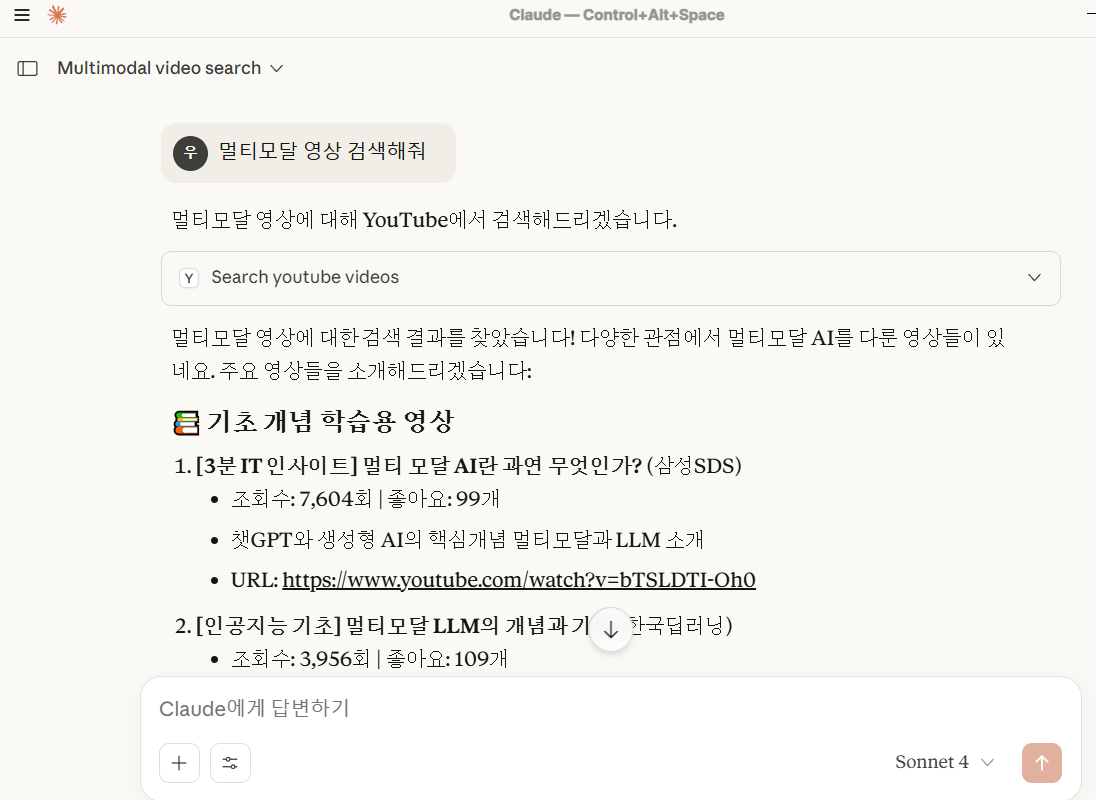
claude desktop 에 MCP붙여서 실행

개발 정리 공간 - 업무일때도 있고, 공부일때도 있고...