WORDLE
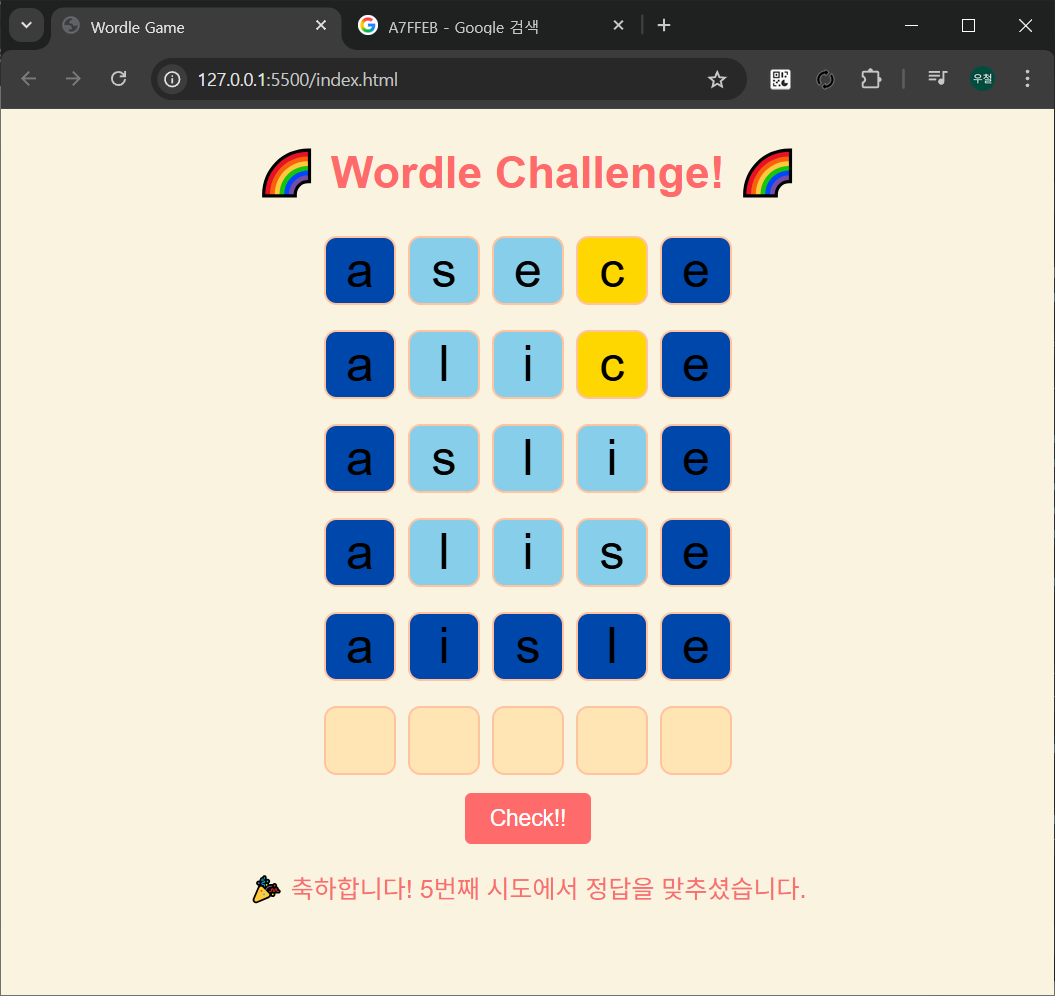
요즘 사람들이 많이 하는 단어 맞추기 게임인데
재미삼아 구성해 보았습니다.
기초 구성은 제가 하고
상세화랑 디자인은 ai의 도움을 받았습니다
이번엔 코파일럿...단일 파일의 경우 코파일럿도 훌륭히 해내니까.. :)
<!DOCTYPE html>
<html lang="en">
<head>
    <meta charset="UTF-8">
    <meta name="viewport" content="width=device-width, initial-scale=1.0">
    <title>Wordle Game</title>
    <style>
        body {
            font-family: Arial, sans-serif;
            text-align: center;
            background-color: #FAF3E0;
        }
        h1 {
            font-size: 36px;
            color: #FF6B6B;
        }
        .row {
            display: flex;
            justify-content: center;
            margin-bottom: 10px;
        }
        input {
            width: 50px;
            height: 50px;
            font-size: 40px;
            text-align: center;
            margin: 5px;
            border: 2px solid #FFC3A0;
            background-color: #FFE5B4;
            border-radius: 10px;
        }
        button {
            background-color: #FF6B6B;
            color: white;
            padding: 10px 20px;
            font-size: 18px;
            border: none;
            border-radius: 5px;
            cursor: pointer;
        }
        button:hover {
            background-color: #F86F6F;
        }
        p {
            font-size: 20px;
            color: #F86F6F;
        }

        /* 모달 스타일 */
        #modal {
            display: none;
            position: fixed;
            top: 0;
            left: 0;
            width: 100%;
            height: 100%;
            background: rgba(0, 0, 0, 0.6);
            justify-content: center;
            align-items: center;
        }
        #modal-content {
            background: white;
            padding: 20px;
            border-radius: 10px;
            width: 80%;
            max-width: 400px;
            text-align: center;
        }
        #modal button {
            margin-top: 10px;
            background-color: #FF6B6B;
            padding: 8px 15px;
            font-size: 16px;
            color: white;
            border: none;
            cursor: pointer;
        }
    </style>
</head>
<body>

    <!-- 모달 창 -->
    <div id="modal">
        <div id="modal-content">
            <h2>🎉 Welcome to Wordle Challenge! 🎉</h2>
            <p>당신의 단어 추리 능력을 시험해보세요!</p>
            <p>5글자 단어를 입력하고 정답을 맞춰보세요.</p>
            <ul style="text-align: left;">
                <li>✅ <b>정확한 글자와 위치</b> → <span style="color: #0047AB;">진한 파란색</span> (완벽한 정답!)</li>
                <li>🔵 <b>단어에 포함되었지만 위치가 틀린 경우</b> → <span style="color: #87CEEB;">하늘색</span> (힌트 제공!)</li>
                <li>🟡 <b>전혀 포함되지 않은 경우</b> → <span style="color: #FFD700;">노란색</span> (다시 도전!)</li>
            </ul>
            <p>당신에게 주어진 <b>6번의 기회!</b></p>
            <p>과연 몇 번 만에 정답을 찾을 수 있을까요? 🚀✨</p>
            <button onclick="closeModal()">게임 시작!</button>
        </div>
    </div>

    <h1>🌈 Wordle Challenge! 🌈</h1>
    <div id="game-container"></div>
    <button id="check">Check!!</button>
    <p id="result"></p>

    <script>
        let dingdongdang = "";
        let attempts = 6;
        let currentAttempt = 0;

        // 📌 랜덤 정답 불러오기
        async function getRandomWord() {
            try {
                let response = await fetch('answer.txt');
                let text = await response.text();
                let words = text.split('\n').map(word => word.trim()).filter(word => word.length === 5 && /^[a-zA-Z]+$/.test(word));
                dingdongdang = words[Math.floor(Math.random() * words.length)];
                console.log("정답:", dingdongdang); // 테스트용 (나중에 제거 가능)
            } catch (error) {
                console.error("Error loading words:", error);
            }
        }

        getRandomWord(); // 정답 초기화

        // 입력 필드 생성
        function createInputRow() {
            var row = document.createElement("div");
            row.className = "row";

            for (let i = 0; i < 5; i++) {
                var input = document.createElement("input");
                input.className = "input";
                row.appendChild(input);
            }

            document.getElementById("game-container").appendChild(row);
        }

        // 6개의 입력 라인 생성
        for (let i = 0; i < attempts; i++) {
            createInputRow();
        }

        document.getElementById("check").addEventListener("click", function () {
            if (currentAttempt >= attempts) return; // 게임 종료

            var userInputs = document.querySelectorAll(".row")[currentAttempt].querySelectorAll(".input");

            var correctCount = 0;
            for (let i = 0; i < 5; i++) {
                if (userInputs[i].value === dingdongdang[i]) {
                    userInputs[i].style.background = "#0047AB"; // 진한 파랑 (정확한 정답)
                    correctCount++;
                } else if (dingdongdang.includes(userInputs[i].value)) {
                    userInputs[i].style.background = "#87CEEB"; // 하늘색 (존재하지만 위치 다름)
                } else {
                    userInputs[i].style.background = "#FFD700"; // 노란색 (오답)
                }
            }

            if (correctCount === 5) {
                document.getElementById("result").innerText = `🎉 축하합니다! ${currentAttempt + 1}번째 시도에서 정답을 맞추셨습니다.`;
            } else {
                currentAttempt++;
            }

            if (currentAttempt >= attempts) {
                document.getElementById("result").innerText = `😢 기회를 모두 사용했습니다. 정답은 "${dingdongdang}" 입니다!`;
            }
        });

        function closeModal() {
            document.getElementById("modal").style.display = "none";
        }

        // 게임 시작 시 모달 창 표시
        window.onload = function() {
            document.getElementById("modal").style.display = "flex";
        };
    </script>
</body>
</html>

개발 정리 공간 - 업무일때도 있고, 공부일때도 있고...